Mass Delete Saved Videos from Your TikTok Favorites
Your TikTok Favorites is a junk drawer. Every tap of the Favorite button drops another post in, and a few years on it's hundreds deep in recipes, tutorials, and clips you'll never scroll back to. TikTok only takes them out one at a time, with the same button that put them there. Redact empties the drawer in one run, or just the stretch of it you choose, and it can delete every collection you've built as well. It all runs on your own computer.
Available on
Plan
Date Range
Matched on when each video was posted
Saved
Found in Favorites, ready to unsave
@weeknight.wok
garlic noodles in twelve minutes
@studio.tidy
the cable tray that fixed my desk
@runclub.lena
hip openers before a long run
Free while the video is new
Unsaving a post costs nothing when the post itself went up in the last 30 days. TikTok keeps no date for the save, so the video's age is what counts. Older posts, and any Collections run, need Premium.
Why empty the drawer
The shortlist that became an archive
It's easy to tap the Favorite button a few times a day and open the tab once a month. Keep that up for a couple of years and the list is too long to be useful and too long to clear by hand.
Past a few hundred saves, finding one is a chore
A save is only worth something if you can get back to it. Once the tab runs hundreds deep, the post you want sits under everything you saved on the way, and it's often quicker to search TikTok again than to scroll for it.
Hidden from others, still on your account
TikTok shows your Favorites to you alone unless you share a collection, so this isn't about what visitors can see. The list simply stays on your account, post after post, for as long as you leave it, and how long that is should be your call.
Every unsave is its own trip
TikTok can't unsave in bulk. Each post means opening it, tapping the Favorite button again, and heading back to the grid for the next one. Redact makes that trip for every post in the batch.
Collections work better on a clear tab
TikTok lets you sort saves into collections of up to 1,000 posts each. Building those on an empty Favorites tab is far easier than untangling years of old saves first, so a cleared list is a good moment to start sorting what you save next.
The Saved run
The bookmark comes off, and the video stays up
Choose Saved in Redact and it reads the posts in your Favorites. Leave the date range open to take the whole list, or set a start and end to clear one stretch of it. A preview shows the exact posts first, and nothing changes until you start the real run. Redact then unsaves them one after another, paced to stay inside TikTok's limits.
Unsaving only takes a post off your list. The video stays on the creator's profile, and you can save it again any time.
The range goes by upload date, because TikTok keeps no record of the moment you saved something. A video posted in 2021 still counts as a 2021 video even if you saved it last night, and the 30-day free window follows the same rule.
- Whole list or one stretch
- Dated by the upload
- Preview before unsaving
- Video stays up
Date Range
Matched on when each video was posted
Saved
Found in Favorites, ready to unsave
@weeknight.wok
garlic noodles in twelve minutes
@studio.tidy
the cable tray that fixed my desk
@runclub.lena
hip openers before a long run
Collections
Delete every collection in a run of its own
Collections are the folders TikTok lets you sort Favorites into. Choosing Collections in Redact deletes every one your account has made, all together. There's no picker and no date range, because a collection has no date attached, and that's also why this run is Premium however old your collections are.
Only the folders go. Every post that was inside them stays saved under Favorites, which is what the red note on this run in the app says and what TikTok's own confirmation tells you when you delete a collection by hand. If you want those posts gone too, run Saved once the collections are cleared.
- All collections at once
- No picker or dates
- Posts stay in Favorites
- Premium at any age
Collections to delete Premium
This deletes every collection you have made. The videos in them stay saved under Favorites.
Pick how it runs
Check the list, clear it, or let it repeat
Preview Mode
Lists every saved post the run would take off Favorites and changes nothing, so you can move the date range until the list is right.
Deletion Mode
Unsaves the batch you previewed from your own computer, working through it at a pace TikTok accepts.
Schedule Deletion
Put the Saved cleanup on a repeating timer, or let Disappearing Mode unsave posts once they pass an age you set. Both are Premium, covered on the scheduling page.
Step by step
How to remove all your saved TikTok videos with Redact
Setup takes about three minutes, and nothing leaves your Favorites until you've seen the preview.
- 1
Download Redact for free
Download for your device →Install Redact on your computer and create a free account. TikTok cleanups run in the desktop app on Windows, macOS, and Linux.
- 2
Connect your TikTok account
Open Redact, choose TikTok, and link your account securely. Your credentials are sent straight to TikTok and never touch a Redact server.
- 3
Pick Saved and a date range
Choose Saved from the TikTok categories. Leave the date range empty to take the whole list, or set a start and end for one stretch of it. The range reads each video's upload date, since TikTok never records the day of the save.
Good to know: posts uploaded in the last 30 days unsave for free. Anything older needs Premium.
- 4
Check the preview, then unsave
Run a preview to see every post Redact has lined up. Happy with it? Start Deletion Mode and it unsaves them one by one. A long list takes a while to work through, so let it run in the background.
- 5
Collections are their own run
To delete your collections as well, choose Collections and start it. Every collection on the account goes in one pass, and the posts inside them stay saved under Favorites. It's a Premium run whatever their age.
What you saved stays between you and TikTok
Redact runs on your own computer and talks to TikTok directly, so the posts you saved, and the ones you clear, never pass through a Redact server. There's no copy of your Favorites on our side, and you can unlink TikTok from Redact at any point.
Try Redact Today
We are frequently adding support to other social network services. You can receive direct updates from us in Redact's Discord Channel.

Frequently asked questions
Redact doesn't contact anyone. It unsaves each post with the same Favorite button TikTok gives you, so it's no different from tapping it yourself.
No. Only your bookmark goes. The video stays on the creator's profile for everyone else, and you can save it again whenever you want.
Yes, with a date range, as long as you think in upload dates. TikTok doesn't store the day you saved a post, so Redact matches each one by when the creator posted it. Set the range to 2022 and it takes out videos uploaded in 2022, no matter when you saved them. Our guide on how to delete all your saved videos on TikTok covers what a date range picks up and how to unsave a few by hand instead.
Nothing happens to them unless you run Collections, which deletes every collection at once on Premium. Even then the videos don't disappear. A collection is only a folder, so deleting it leaves each post inside saved under Favorites.
No. The Saved run only covers posts. TikTok keeps saved sounds, effects, hashtags, and products in their own tabs under Favorites, and Redact doesn't touch them. Deleting collections removes the folders, but anything that was in them stays saved.
Yes for posts uploaded in the last 30 days, since that window follows the video's upload date rather than your save. Older posts and any Collections run need Premium, which also unlocks Scheduled Deletion.
More TikTok features
Delete All TikTok Videos at Once
Wipe every video in one pass, or filter by date, view count, and privacy first. Pinned videos stay protected and a preview shows the batch before it runs.
Turn Off Duet and Stitch on TikTok
Switch off Duets, Stitches and stickers across a whole batch of videos in one run, while every clip stays up on your profile.
Delete All Liked Videos on TikTok
Clear every liked video in a single run or scope it by date range, with a preview pass before anything is permanent.
Delete All Private Videos on TikTok
Clear every private video in one sweep while your public uploads stay untouched, or flip the filter and do the reverse.
Delete All TikTok Reposts at Once
Bulk-remove the videos you've reposted, by date range or all at once, without touching the original creators' posts.
Mass Unfollow Everyone on TikTok
Clear your whole TikTok following list, or keep your mutuals and drop only the accounts that don't follow you back.
Mass Remove Your TikTok Followers
Work through your whole TikTok followers list, bots and spam included, after previewing exactly who is on it, without touching anyone's videos.
Schedule TikTok Deletion or Make Videos Disappear Automatically
Recurring cleanups on your schedule, or a rolling age limit that keeps stale videos and likes off your profile.
Clear saved items on other platforms
TikTok guides
See all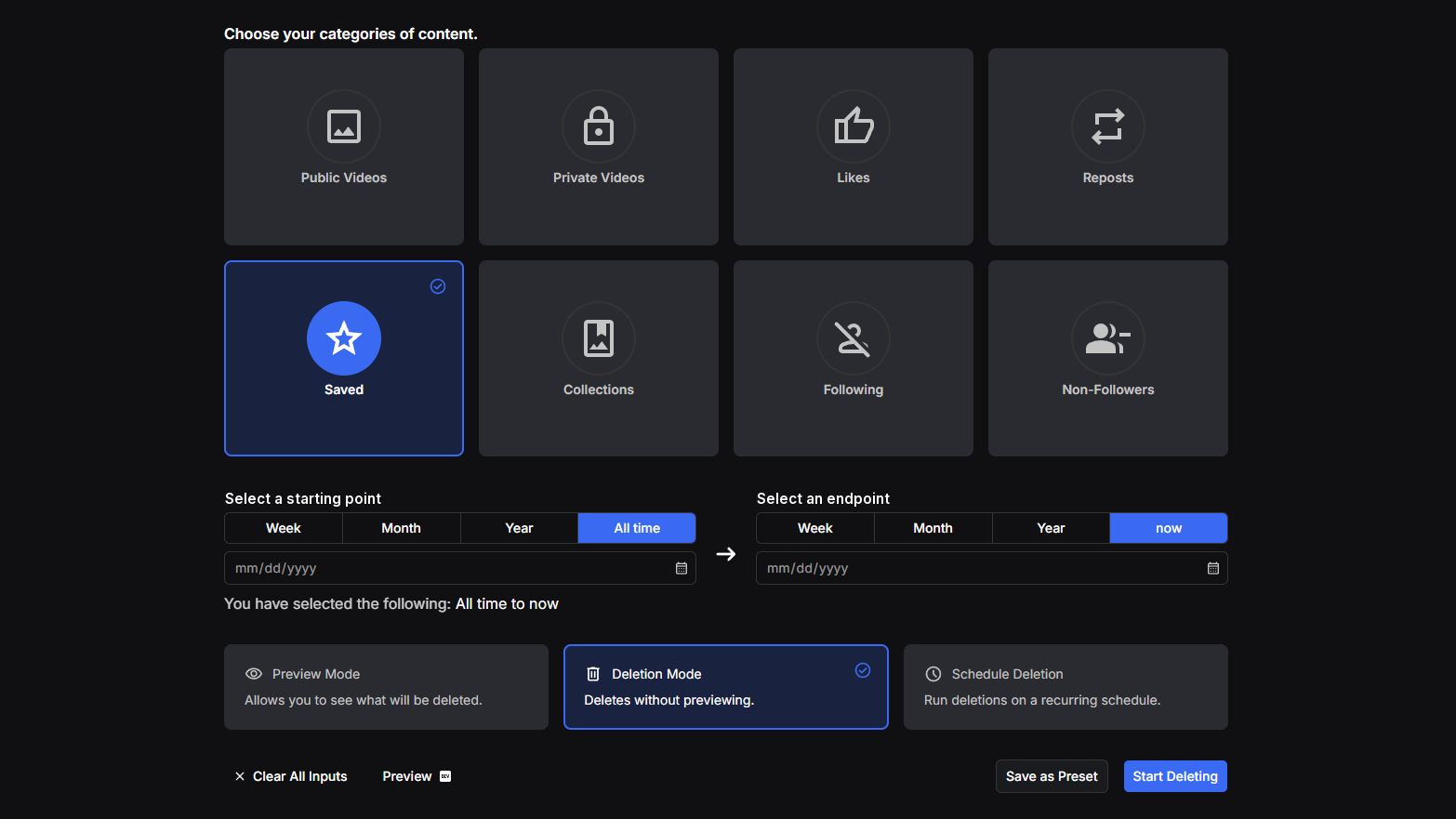
How to Delete All Your Saved Videos on TikTok at Once
TikTok has no bulk unsave. See what Favorites holds, unsave a post or delete a collection by hand, and clear every saved video at once with Redact.

How to Delete All Liked Videos on TikTok at Once
TikTok won't clear your liked videos for you. Unlike by hand, hide them, or clear every like at once with Redact, and see what the free plan covers.
How to Delete All TikTok Videos at Once (3 options)
TikTok won't delete your videos in bulk. Delete one in the app, hide it instead, or clear every upload at once with Redact, and see what's free.
Related services
See allVimeo
Delete your videos
- videos
YouTube
Delete your YouTube comments, history, playlists, likes, and uploads
- Comments
- watch & search history
- playlists
- Watch Later
- +3 more
SoundCloud
Mass delete your SoundCloud tracks, likes, comments, and reposts, with filters for date range and keywords, plus a preserve list for the uploads you keep.
- Tracks
- likes
- comments
- reposts
DeviantArt
Remove comments, favorites, or even your own old art posts.
- Comments
- Favorites
- Posts
Mass unpin images and delete boards.
- Pins
- Boards
Gyazo
Delete your images
- images