Mass Delete all Discord Messages & DMs
Quickly mass delete your Discord messages and DMs on desktop or mobile, plus reactions in the desktop app. With Redact, you can remove all your Discord messages at once, one-by-one, or with filters for keywords, content types and more. Download Redact.dev free.
Available on
messages deleted with Redact
As of June 2026, Redact users have deleted more than 316 million messages, based on anonymous desktop telemetry.
Discord Deletion Features
Discord Plugin
Redact adds one button to Discord's channel header, right next to Discord's own buttons. Click it to delete messages, preview what matches, connect another account, or use Premium disappearing mode, all without leaving the conversation. You pick what to clear and confirm in your Redact desktop app, with no Redact server in between.
RedactoToday at 1:10 AM
gg everyone, good games tonight 🎮
youToday at 1:11 AMRedact deleted
ez. i hard carried that whole lobby 😎
youToday at 1:11 AMRedact deleted
ranked is free, hitting Diamond this weekend 📈
user2Today at 1:12 AM
lmao gg, rematch tomorrow?
Redact
Mass Delete Discord Messages
Redact mass deletes your Discord messages with an intuitive set of tools. Target specific messages you've sent, or clear your entire Discord history back to the beginning of time.
We won't force you to wipe everything: safeguard the messages that still matter by archiving them locally on your device first. You can also fine-tune the batch, targeting messages as specific as those containing a particular keyword sent between March 2020 and September 2021.
And there's no need to worry about an overeager filter. Run your settings dry in Preview mode to see exactly what will be removed before you confirm, and exclude individual messages from the batch for the kind of control and precision you can't get anywhere else.
Import Data Package
Upload your Discord data for faster deletion
Delete Chat & Private Messages by Date Range
Redact software gives you complete control over what timeframe to include or ignore when you bulk delete discord messages.
Our mass Discord message deletion tool allows you to:
- Delete everything within specific dates
- Delete everything after a specific date
- Delete everything before a specific date
Or, you can specify individual months, weeks, or years - whatever you feel most comfortable with and whatever works best for your circumstances. If you'd prefer to use relative dates (e.g. 3 days ago), we've applied all the same functionality. Whether you want to delete everything older than 6 weeks, all your messages between 2 and 3 years old, or everything from the last month - Redact has you covered.
Date Range
These dates are set to specific dates. The Scheduler feature will delete only between these dates.
Delete Specific Message Types
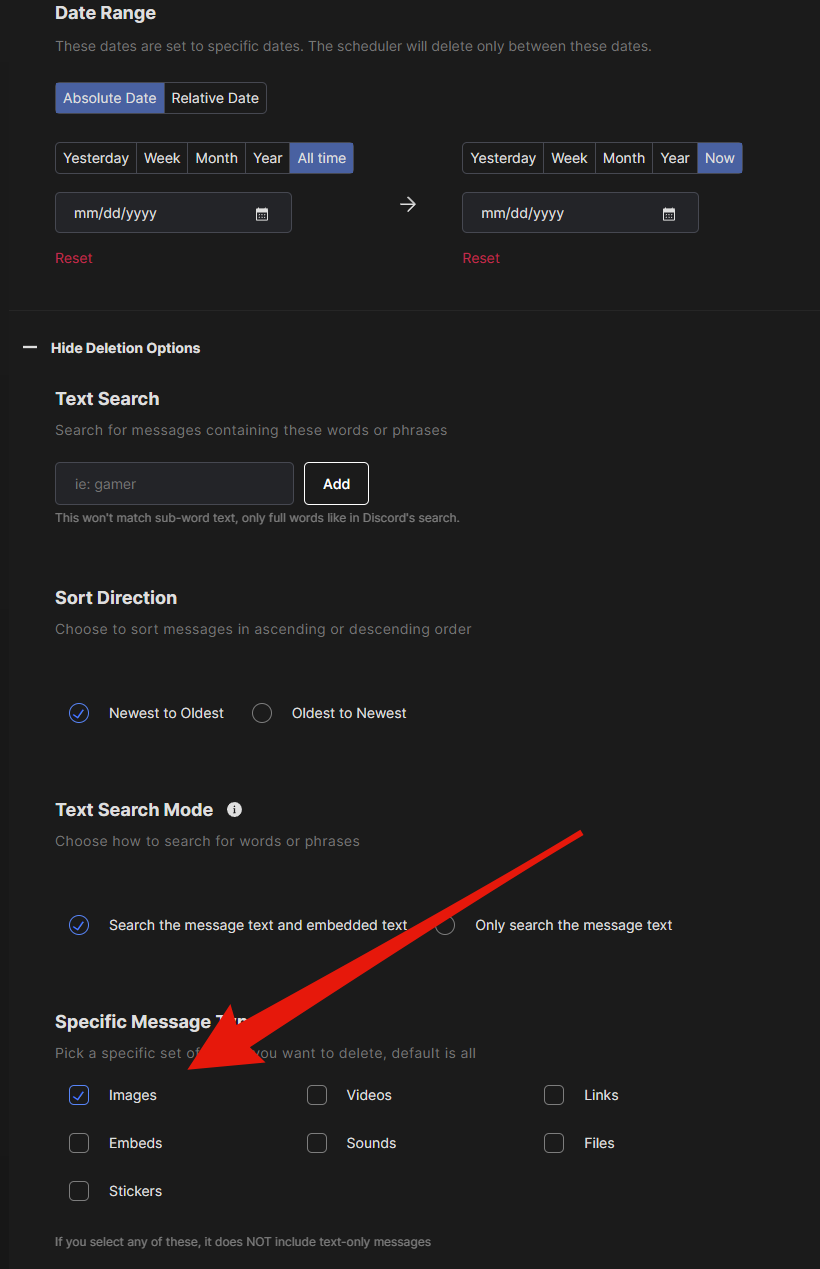
With Redact, you do not have to purge your entire Discord history to clean up the parts that matter. Beyond limiting the scope to a date range, you can focus on a single type of content. For example, you can delete every image you have ever sent, mass delete every video, or clear all your messages except the ones with files.
Uncheck every box except the type you want and the run only looks for matching messages. Combine several content types to clear them together, or select just one for pinpoint precision, so you get the job done without removing things you would rather keep. Everything runs locally, and you can archive a copy before anything is removed.
Message Types
Select which message types to delete
Delete by Keyword
When you clean up your Discord messages with Redact, you can target only the ones that contain specific words. Maybe you joined a server and had some political arguments back in 2020, or you shared a personal detail you would rather not leave in the chat. Set your keywords and Redact deletes only the messages that contain them, across every server, channel, and DM.
Just like with message types, you can feed as few or as many keywords to Redact as you need: pinpoint precision, total cleanup, or something in between. Stack keywords with a date range and content type, and preview every match before anything is removed.
Text Search
Search for messages containing these words or phrases
Matches full words only, like Discord's built-in search.
Delete Discord Direct Messages in Bulk
Your Discord footprint includes your DMs as well as server messages. Redact is a full Discord DM deleter: clear every message with one specific person, or wipe your direct messages with everyone at once. Filter by date range, keyword, or content type first, preview the batch, and Redact works through it in bulk while respecting Discord's rate limits.
Because Discord removes a deleted DM for everyone in the chat, what you clear is gone from the other person's side too, so make sure there's nothing in there you still need.
Remove Discord Reactions
Emoji you tapped under messages that remain can still be sitting there with your name on them. Redact clears up to one year of them in bulk. Pick the servers, channels, or DMs to sweep, choose whether to take back only your own reactions or clear every emoji from every user on every message in scope, and Redact walks the history and removes each match.
Deleting a message removes the reactions attached to it, but reactions on other messages stay behind. A separate reaction run takes those back at scale without deleting the messages themselves.
Reactions to Remove *
Whose reactions to remove from the selected channels
Moderator Mode
Redact gives server admins the same deletion power we give individual users, applied to the communities they moderate. Open the Mod Servers tab and clear other members' messages across the servers and channels you run, filtered by user, keyword, date, or content type. If your community changes a moderation policy, you can apply it retroactively across the server's history, with the same preview-first control you get over your own posts. Moderator deletion is a Redact Premium feature and runs locally on your device.
Quickly Delete Discord Chat & DM History
Experience the power of Redact, your all-in-one Discord content deletion solution. Mass delete messages using specific keywords, date ranges, and content types, or ignore all the filters to start completely fresh. To hang on to all those years of memories, archive everything locally before saying goodbye. Clean up more than just your chat posts, but your DMs as well.
With Redact, you can tailor your online presence exactly the way you want. Our software is free to download and try, what are you waiting for?
Deletion Mode
Discord cleanup support by plan
This table lists each cleanup action, settings, and filters for preservation or deletion, and the subscription required to access the feature.
22 actions, filters, and settings
| Cleanup action, filter, or setting | Free1 acct | Premium2 accts | Ultimate5 accts |
|---|---|---|---|
| What you can delete | |||
| Delete your Discord server messages | 30 days Delete your Discord server messages is available on Free for content from the last 30 days. | Delete your Discord server messages is available on Premium. | Delete your Discord server messages is available on Ultimate. |
| Delete your Discord direct messages | 30 days Delete your Discord direct messages is available on Free for content from the last 30 days. | Delete your Discord direct messages is available on Premium. | Delete your Discord direct messages is available on Ultimate. |
| Delete Discord forum topics and every message in them | Delete Discord forum topics and every message in them is not available on Free. | Delete Discord forum topics and every message in them is available on Premium. | Delete Discord forum topics and every message in them is available on Ultimate. |
| Delete Discord messages or forum topics as a moderator | Delete Discord messages or forum topics as a moderator is not available on Free. | Delete Discord messages or forum topics as a moderator is available on Premium. | Delete Discord messages or forum topics as a moderator is available on Ultimate. |
| Delete your Discord messages from a data export | Delete your Discord messages from a data export is not available on Free. | Delete your Discord messages from a data export is available on Premium. | Delete your Discord messages from a data export is available on Ultimate. |
| Delete your Discord messages in DMs by user ID | Delete your Discord messages in DMs by user ID is not available on Free. | Delete your Discord messages in DMs by user ID is available on Premium. | Delete your Discord messages in DMs by user ID is available on Ultimate. |
| Remove your Discord reactions | 30 days Remove your Discord reactions is available on Free for content from the last 30 days. | Remove your Discord reactions is available on Premium. | Remove your Discord reactions is available on Ultimate. |
| Remove everyone's reactions as a moderator | 30 days Remove everyone's reactions as a moderator is available on Free for content from the last 30 days. | Remove everyone's reactions as a moderator is available on Premium. | Remove everyone's reactions as a moderator is available on Ultimate. |
| Filters and rules | |||
| Filter by server, channel, or DM | 30 days Filter by server, channel, or DM is available on Free for content from the last 30 days. | Filter by server, channel, or DM is available on Premium. | Filter by server, channel, or DM is available on Ultimate. |
| Filter by date range | Filter by date range has limited availability on Free. Includes Your messages and reactions for the last 30 days. | Filter by date range is available on Premium. | Filter by date range is available on Ultimate. |
| Filter messages by image, video, link, embed, sound, file, sticker, or text | 30 days Filter messages by image, video, link, embed, sound, file, sticker, or text is available on Free for content from the last 30 days. | Filter messages by image, video, link, embed, sound, file, sticker, or text is available on Premium. | Filter messages by image, video, link, embed, sound, file, sticker, or text is available on Ultimate. |
| Filter messages by keywords or embedded text | 30 days Filter messages by keywords or embedded text is available on Free for content from the last 30 days. | Filter messages by keywords or embedded text is available on Premium. | Filter messages by keywords or embedded text is available on Ultimate. |
| Filter messages by mentioned user IDs | Filter messages by mentioned user IDs is not available on Free. | Filter messages by mentioned user IDs is available on Premium. | Filter messages by mentioned user IDs is available on Ultimate. |
| Set deletion order, oldest or newest first | Set deletion order, oldest or newest first is not available on Free. | Set deletion order, oldest or newest first is available on Premium. | Set deletion order, oldest or newest first is available on Ultimate. |
| Preserve pinned messages | 30 days Preserve pinned messages is available on Free for content from the last 30 days. | Preserve pinned messages is available on Premium. | Preserve pinned messages is available on Ultimate. |
| Limit deletion to offensive messages, detected on your device | 30 days Limit deletion to offensive messages, detected on your device is available on Free for content from the last 30 days. | Limit deletion to offensive messages, detected on your device is available on Premium. | Limit deletion to offensive messages, detected on your device is available on Ultimate. |
| Filter moderator cleanup by author, message type, keyword, or mention | Filter moderator cleanup by author, message type, keyword, or mention is not available on Free. | Filter moderator cleanup by author, message type, keyword, or mention is available on Premium. | Filter moderator cleanup by author, message type, keyword, or mention is available on Ultimate. |
| Preserve messages by author ID or pinned status when moderating | Preserve messages by author ID or pinned status when moderating is not available on Free. | Preserve messages by author ID or pinned status when moderating is available on Premium. | Preserve messages by author ID or pinned status when moderating is available on Ultimate. |
| Filter data export cleanup by channel, keyword, or mention | Filter data export cleanup by channel, keyword, or mention is not available on Free. | Filter data export cleanup by channel, keyword, or mention is available on Premium. | Filter data export cleanup by channel, keyword, or mention is available on Ultimate. |
| Filter DM cleanup by message type, keyword, or embedded text | Filter DM cleanup by message type, keyword, or embedded text is not available on Free. | Filter DM cleanup by message type, keyword, or embedded text is available on Premium. | Filter DM cleanup by message type, keyword, or embedded text is available on Ultimate. |
| Filter reaction cleanup by channel or DM | 30 days Filter reaction cleanup by channel or DM is available on Free for content from the last 30 days. | Filter reaction cleanup by channel or DM is available on Premium. | Filter reaction cleanup by channel or DM is available on Ultimate. |
| Schedule recurring Discord cleanup | Schedule recurring Discord cleanup is not available on Free. | Schedule recurring Discord cleanup is available on Premium. | Schedule recurring Discord cleanup is available on Ultimate. |
Start deleting your Discord messages easily.
Connect Your Account

Log in to Discord
Connect Discord to start deleting your content
Your password is safe: We never see or store your credentials. They're sent directly to Discord.
Your content, your device: Your content and logins stay on your device and never touch our servers.
Proven & trusted: Trusted by thousands of users. See what they have to say.
Home
Deleting items...
Had a great time at the meetup yesterday! Here are some photos...
Check out this new recipe I tried. Turned out way better than expected!
Anyone else having issues with the latest update?
Just finished setting up my new desk. Productivity boost incoming.
GG's everyone, that was a fun match. Same time next week?
Coffee shop on 4th street has the best lattes, highly recommend
Anyone got tips for fixing this build error? Stuck for hours.
- 1
Sign in to Redact's Discord service
Redact runs locally on PC, Mac, Linux, iOS, and Android. Install once, sign in to Discord, and you're ready. Your account stays yours, and no third parties touch it.
- 2
Choose the method of deletion
Pick the mode that fits the job: Preview to test your filters, Deletion for a one-shot wipe, Review and Delete for batch-by-batch control, or Schedule for hands-off recurring runs.
- 3
Watch your content deletion in real time
Every item shows up as it's removed, with full visibility into what's being deleted and when. Pause, stop, or check progress at any point. Your queue, your control.
Frequently asked questions
Select that one channel in Redact's Channel Selector and leave everything else unselected.
- Download Redact, choose Discord and connect your Discord account.
- In the Channel Selector, open the Servers tab and click the server. Its channels load in the list beside it.
- Select only the channel you want cleared. Leave the other channels, servers and DMs unselected.
- Narrow it further if you like with a date range, Message Types or Text Search.
- Run Preview Mode to see what matches, then Deletion Mode to remove it.
Deleting your last 30 days of messages in that channel is free. Older messages need Premium. There's also a video walkthrough of channel deletion if you'd rather watch it done.
No, by default, discord moderators cannot see deleted messages in their server. There is no native option to view or restore deleted messages in Discord servers. Some servers have logging bots that may save copies before deletion.
You cannot natively find deleted messages on Discord. If you are using a logging bot for your server, it may have records of deleted messages that you can access. If you are looking for a specific message that may have been deleted, use Discord's built-in search feature. With Redact.dev, you can enable the local archive feature to save a local copy of all messages that have been previewed or deleted by Redact.dev. If you want to save a one-time snapshot of a channel or server, Redact is a great way to do this without needing to use a logging bot.
Yes. Reactions have their own tab in the Discord tools, separate from message deletion and available in Advanced mode, because Discord's search cannot find them and Redact has to read channel history directly. Pick the servers, channels, or DMs to sweep and Redact takes back every emoji you added, reaching up to a year back. Moderators can instead clear every emoji, from every user, off every message in the channels and date range they picked. See the Discord reaction remover for the full walkthrough.
No, blocking a user does not delete their DMs. Blocking someone on Discord prevents them from sending you messages, and hides their messages in servers from your view. Blocking users also removes them from your friend's list. Even if you block someone, you can choose to read their messages in mutual servers by clicking the "show message" button. If you're concerned about your message history with a blocked user, the safest option is to delete your messages with them. Redact.dev allows you to automate this process by deleting all direct messages with a specific user, or deleting server messages in specific channels or communities.
Discord limits the speed of deletions (and other actions) with rate limits and rules, that Redact is built to respect so your account stays in good standing. We recommend using our Discord data import, a Premium feature, with your Discord data package, however rate limiting rules must still be respected.
Connect your Discord account to Redact, choose where to delete from, preview the matches and start the run.
- Download Redact and create a free account. It runs on Windows, macOS, Linux, iOS and Android.
- Choose Discord and connect your Discord account. Your login goes straight to Discord and never touches a Redact server.
- In the Channel Selector, click a server under Servers and select its channels, then select conversations under DMs.
- Leave the filters as they are to clear everything in those places, or set a date range, Message Types or Text Search.
- Run Preview Mode to check what matches, then Deletion Mode to remove it. Keep Redact open until it finishes.
Deleting your last 30 days of messages is free. Reaching further back needs a Premium subscription. You can also follow along with this YouTube video.
Use Redact's filters to describe the group of messages, then delete the whole group in one run.
- Download Redact, set up a free account and connect Discord.
- Select the channels or DMs the messages are in.
- Set the filters that fit them. A date range covers a period, Message Types covers things like images, links or files, and Text Search finds a word or phrase.
- Run Preview Mode to see the list. To hand-pick from it, run Review & Delete instead, which needs Local Archive turned on in Settings.
- Start the deletion and leave Redact running while it works.
Messages from your last 30 days are free to delete, in as many servers and DMs as you like. Older ones need Premium. This YouTube tutorial shows the same steps.
The fastest way to delete discord messages is by using Redact. Our app lets you automate this process and let it run in the background without you needing to do any manual deletions.
Discord limits the number of actions you can take directly, or with Redact using rate limits. Redact handles deletions as quickly as possible while respecting these rules.
Yes, you can delete direct messages on Discord one at a time or in bulk with Redact. You can use filtering options to narrow down messages based on DMs with specific people, date ranges, keywords, content type and more. We've written a blog that details the entire process here, or you can follow along with this YouTube video. To bulk delete DMs on Discord with Redact, all you have to do is download Redact and set up an account. You can delete the last 30 days of messages for free, or all Discord messages with a premium account.
Yes. We have a specific set of tools for Discord Moderators to use. These tools are similar to the tools we offer for individual users. The difference being that the Moderator tools allow for deleting of both personal content but also content and messages from other users on the server you're a moderator of. We've created a simple video walkthrough for you showing the features of the moderator tool set and how to use it.
Yes. Once inside the Discord tools screen, you will have the option to pick and choose specific servers and/or DMs where you want the app to delete messages from. The messages can be deleted in bulk, or one by one. The tighter you set your filters, the narrower your message search results will be.
Yes. Unlike many social media sites, when you remove DMs on Discord, your message is removed from both ends of the direct message conversation.
Yes - with Redact, you can bulk delete messages with a single user on Discord. Simply download Redact, create an account and select Discord. After you connect your Discord account, you can select any users (one or more) that you have messaged. You can also set up keyword, date, or content type filters to delete only specific messages with one or more users you've messaged.
Select every channel and DM in Redact, leave the filters empty and run the deletion.
- Download Redact, choose Discord and connect your account.
- Under Servers, click each server and use Select All for its channels. Under DMs, use Select All for your open conversations.
- Leave the date range, Message Types and Text Search as they are, so nothing gets filtered out.
- Turn on Local Archive first if you want a copy of your messages saved on your device.
- Run Preview Mode to check the list, then Deletion Mode to clear it.
On the free plan this clears your last 30 days. Your full history needs Premium, which also lets you import your Discord data package so Redact finds old messages faster. The DMs tab lists only the conversations you still have open. For DMs you've closed, Premium adds Delete DMs by User ID, which clears your messages with the user IDs you enter. Discord limits how fast messages can be deleted, so keep Redact open until a long history finishes. There's a video walkthrough and a written guide too.
Yes. You can mass delete Discord messages & DMs on iPhone and Android. Get Redact on the Apple App Store or Google Play. Free for your last 30 days of messages & DMs.
Discord guides
See all
How to Mass Delete Messages on Discord
Mass delete Discord messages fast with Redact. Use filters, preview, and schedules to safely clean servers and DMs - private, local, and beginner-friendly.
How to Delete All Discord Messages with Videos
Learn to mass delete all video messages from Discord servers, DMs, and channels using the Redact.dev app. Free and premium options available!
How to Bulk Delete Discord Messages in Servers and DMs
How to bulk delete Discord messages in servers and DMs using Redact.dev. Protect your privacy, clean up past conversations, and reduce clutter for free.

How to automatically delete all your Discord messages at once using the Redact App
Mass delete Discord messages with Redact in a single click, or target them by keyword, date, where they were posted or the person you sent them to.
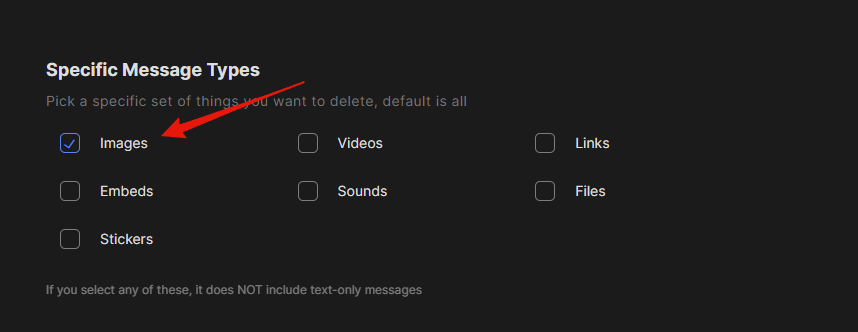
How to quickly remove all images from Discord [Redact App]
Old Discord images from chats and DMs pile up over the years. The Redact App searches your whole message history and marks every image for removal.
How to delete all of the images you’ve ever posted on Discord
Wipe every image you've posted on Discord, or just those in servers and channels you pick. Redact's filters find old memes and uploads for you.
Related services
See allTelegram
Delete your messages from Telegram.
- Messages
Purge your E-mail inbox.
- Emails
Snapchat
Delete your chat messages, photos, videos and saved snaps from Snapchat.
- Messages
- Photos
- Videos
- Saved snaps
Slack
Rapidly comb through your history and remove your Slack messages.
- Messages
Facebook Messenger
Delete messages you sent in selected Messenger conversations, with filters for date, keyword, and attachment type.
- Sent messages
- images
- videos
- link embeds
Try Redact for Free
We are frequently adding support to other social network services. You can receive direct updates from us in Redact's Discord Channel.
