How to Delete All Your Saved Videos on TikTok at Once
 Dan Saltman7 min read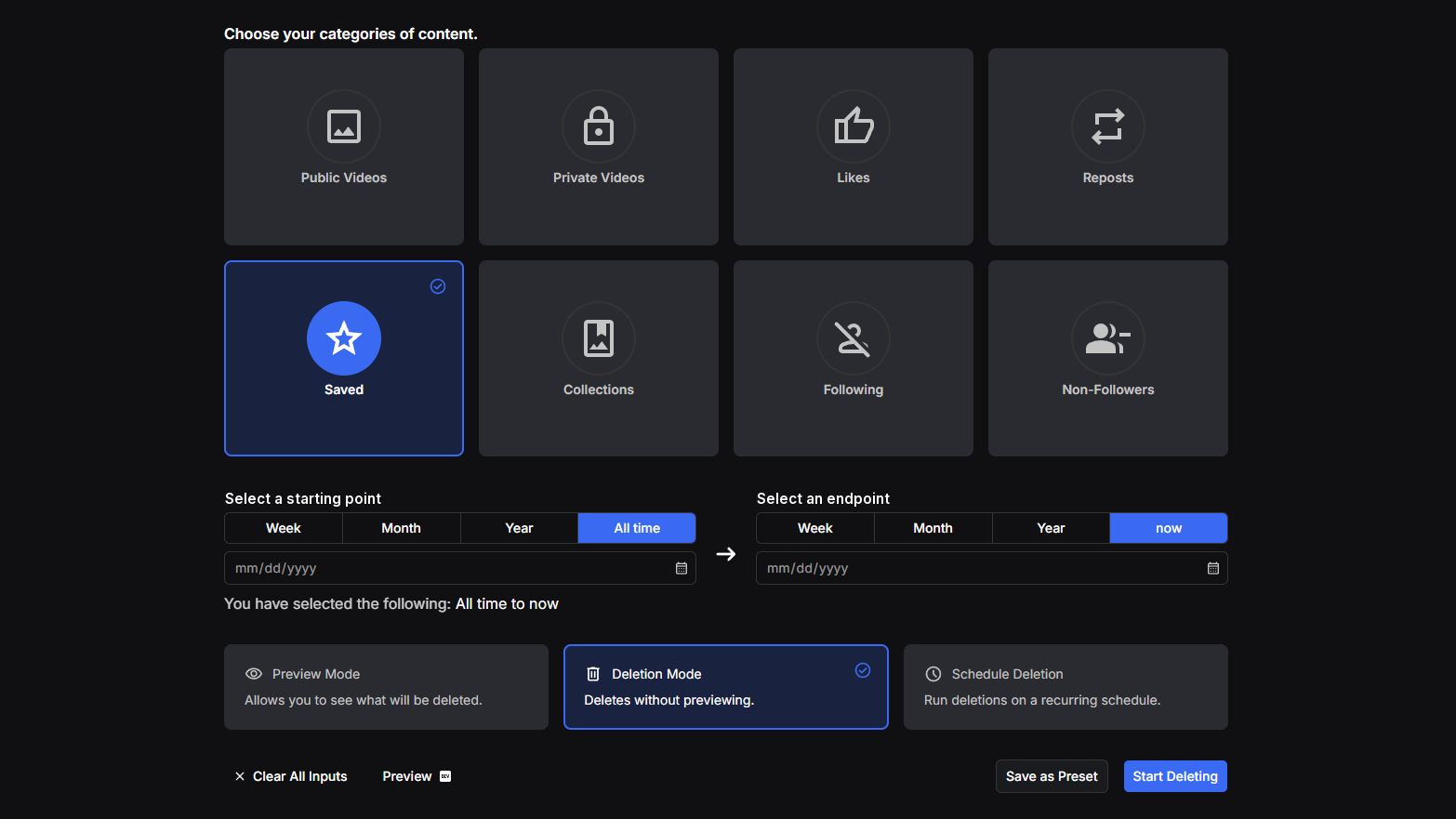
On this page
Saving a TikTok takes one tap, and a few years of tapping leaves hundreds of posts in your Favorites. TikTok only unsaves them one at a time, and no button empties the tab.
I'll cover what Favorites holds, the two jobs you can do by hand, and how Redact unsaves them all in one pass.
What TikTok keeps in your Favorites
Your saves sit on your profile in the Favorites tab, which TikTok also calls the Saved tab. Only you can see what you've favorited, unless you share a collection, and then the people you share it with can open that one.
The tab holds three kinds of saved thing.
- Posts. The videos and other posts you saved with the Favorite button. This is the list people mean by saved videos.
- Collections. Folders you sort those saves into, each holding up to 1,000. A folder only groups saves, so deleting one never unsaves what's inside.
- Everything else. Sounds, effects, hashtags, products and the books you save each get their own tab. This guide and Redact leave them alone.
Option #1 - How to unsave a post on TikTok (manual & slow)
Tap Profile, then Favorites, and open the post. Tap the Favorite button on the side of the post, just below the comment button. It's the button that saved it, and tapping it again takes the save off.
TikTok has no bulk unsave, so a long list means opening post after post. On a tablet, Favorite sits in the Share menu. On tiktok.com, your profile has the same Favorites tab, and the bookmark beside an open post does the job.
If an unsaved post still shows on another phone or computer, give it a few minutes. TikTok's help center says Favorites and collections take up to 15 minutes to sync.
Option #2 - How to delete a collection on TikTok (manual but faster)
Tap Profile, then Favorites and Collections, pick the collection, tap Manage and choose Delete collection.
Only the folder goes. Every post in it stays in your Favorites, so you'll still need to unsave those posts. TikTok's help doesn't describe taking one post out of a collection while keeping it saved, so if you don't want the post at all, open it from inside the collection and unsave it with the Favorite button.
On tiktok.com, open the collection from your Favorites tab and delete it from its three-dot menu. TikTok's confirmation says your posts stay saved.
Option #3 - How to unsave all your TikTok videos at once with Redact (automated & fast)
To clear the whole tab, install Redact on a Windows, macOS or Linux computer and sign in with the code it sends to your email. Connecting TikTok means logging in to it in a window Redact opens, and the run happens on your own machine, not on Redact's servers.
From there it takes four choices.
- Pick Saved from the TikTok categories.
- Choose a date range, or leave the dates blank for every saved post your plan covers.
- Run Preview Mode and read the list. Nothing is unsaved yet.
- Switch to Deletion Mode and start the run.
The dates trip people up. TikTok doesn't record when you saved a post, so Redact dates each one by when its creator uploaded it. A recipe clip from 2019 you bookmarked an hour ago counts as a 2019 post, so a range covering this year skips it. The free plan follows the same rule. It unsaves posts uploaded in the last 30 days, and older ones need Premium however recently you saved them.
Unsaving deletes nothing. The post leaves your Favorites, stays up wherever its creator posted it, and you can save it again. Redact paces the run to stay inside TikTok's limits, so a long list takes time and the app has to stay open until it finishes.
Delete every collection in a second run
Collections get a run of their own. Choose Collections and Redact deletes every collection on the account, with no picker and no dates, since TikTok doesn't date a collection. That's why this run needs Premium whatever age your folders are. As the red note in the app says, the posts inside stay saved under Favorites.
Other TikTok tabs you can clear
- Clear your liked videos out of the heart tab, which emptying Favorites leaves alone.
- Undo your reposts, the videos you've pushed out to your followers.
- Delete your own TikTok videos, a few by hand or every upload at once.
FAQ
What's the difference between liked and saved videos on TikTok?
A like is the heart on a post, and your likes go in a heart tab you can let other people see. A save uses the Favorite button and goes into Favorites, which only you see. The two lists are separate, so a video you liked and saved has to come off each one. The liked videos guide covers the heart tab.
Can I save a TikTok video again after unsaving it?
Yes, as long as the post is still up. Unsaving doesn't change the post, so find it again and tap Favorite. TikTok points out that a saved post can vanish from your list if the creator deletes it or makes it private, if TikTok removes it for breaking its rules, or if the creator's account is deleted or disabled, and a post in any of those states isn't there to save again. Before you clear a big list, scroll the preview and note anything you'll want later.
Does unsaving a TikTok video change anything for the creator?
No. It changes your list and nothing else. The post stays on the creator's profile with the same likes and comments, and anyone else who saved it still has it.
Can I delete one TikTok collection and keep the rest?
Yes, in the TikTok app, where every collection has its own Manage menu with Delete collection in it. Redact's Collections run can't pick and choose, so use the app when some of your folders should stay.
Is it free to unsave TikTok videos with Redact?
Partly. The free plan covers anything uploaded in the last 30 days, since TikTok never records the day you saved something. Older posts, the Collections run, Schedule Deletion and Disappearing Mode all need Premium. Unsaving by hand in TikTok is free, one post at a time.
How do I keep my TikTok Favorites from filling up again?
Put it on a timer. Schedule Deletion repeats your Saved run as often as you tell it to, and Disappearing Mode keeps unsaving posts once they've been up longer than you choose. Both need Premium, and the scheduling page for TikTok explains how they differ.
Redact for TikTok
Banish your cringe TikTok videos to the shadow realm.