Delete Your Facebook Photos and Videos in Bulk
Ten years of uploads, albums, and group shots sit on your timeline in full resolution for anyone who scrolls. On Facebook your pictures and videos live inside your posts, not in a separate library. So Redact clears them by deleting the posts that carry them. Check the Album, Images, and Videos attachment types and every photo and video post you've ever made queues up for one supervised sweep. Point it at your whole history or just the era you'd rather forget, preview the batch, and run it.
Free for your last 30 days of posts & comments.
Available on
Plan
Filter by attachments *
Delete content containing any of the following
Why photos first
Old photos don't age, but your audience does
The pictures on your timeline were posted for one crowd at one moment. That crowd scattered years ago, but the photos kept the door open for whoever came next.
New people, old archive
New coworkers, partners, and in-laws can wander your entire photo history, including the jokes, the exes, and the phases you've long since outgrown. Clearing the posts closes that door.
A photo reveals more than any caption
A face can be recognized, saved, reposted, or reverse-image-searched. Nothing else on your profile hands a stranger that much, which is why clearing pictures is the cleanup most people come looking for.
Facebook makes posting easy and un-posting hard
A long-running account carries thousands of uploads, and the interface was built for adding them one at a time, not removing them. That gap is the part Redact automates.
How it works
Two checkboxes cover every photo you've ever posted
Facebook keeps your pictures behind two post attachment types. Redact checks both and the entire photo record queues for one run.
Your photos and videos are attachments on posts, so Redact targets them with the same post filters that work on everything else on your wall. Check Album to catch posts that added photos to an album, and Images for standalone photo posts. Together they cover every photo post on your timeline. Add Videos to include your video posts, or run videos alone and leave the photos in place. Everything happens on your own device, and you can preview the whole haul before a single post is removed.
- Album posts
- Image posts
- Video posts
- Preview before deleting
Try Redact for Facebook. Free for your last 30 days of posts & comments.
Filter by attachments *
Delete content containing any of the following
Narrow the sweep
All of them, or just the ones that make you wince
Leave the filters open and checking Album, Images, and Videos queues every photo and video post you have. Or stack these to carve out an exact slice before anything is removed.
Attachment type
The core control: Album, Images, and Videos each get their own checkbox, so you can wipe photos, videos, or both. Link embeds and check-ins have boxes of their own too.
Date range
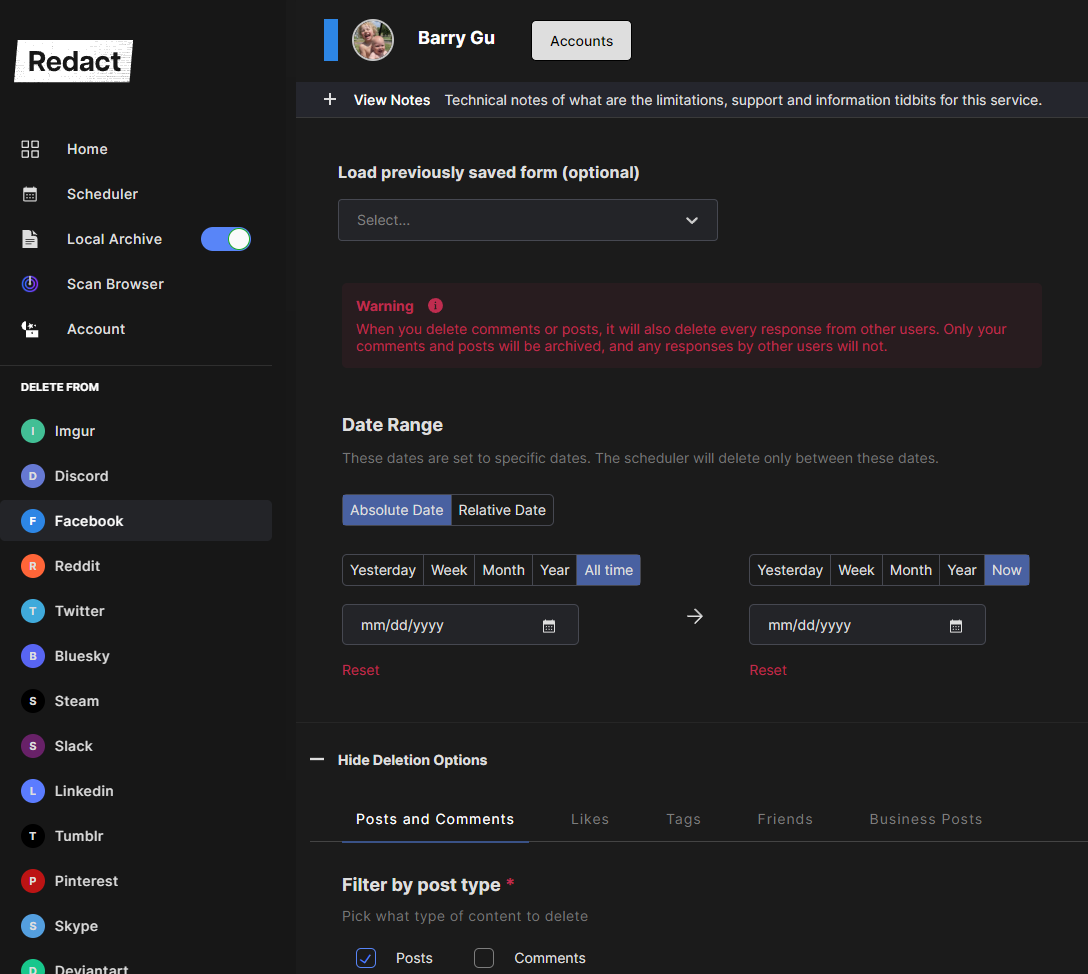
Wrap a window around one era. College stays deleted, the wedding stays up, and anything from 2010 through 2014 is a perfectly normal run.
Caption keywords
Only touch photo posts whose captions mention a person, a place, or a nickname you name.
Post type
Your own posts, posts other people dropped onto your timeline, hidden ones, or posts in groups. Pick which shelves the sweep reaches.
Preserve keywords
Add words or names you never want touched and Redact skips any matching post, no matter what other filters you set.
Ways to run it
Look first, or just get to deleting
Preview Mode
The full match list, with nothing removed. Best for a first pass.
Deletion Mode
Everything the filters caught, erased in one pass once you trust the criteria.
Review & Delete
Flip through the matches and approve each post yourself, or batch-select them.
Schedule Deletion
The same sweep on a recurring calendar, so the wall stays this clean. Scheduling is a Premium feature.
Start to finish
How to clear your Facebook photos and videos with Redact
Connect your account, pick the attachment types, and Redact deletes every matching post for you.
- 1
Download Redact for free
Download for your device →Install Redact on your device. It runs on Windows, macOS, and Linux, plus iOS and Android.
- 2
Connect your Facebook account
Open Redact, choose Facebook, and link your account securely. Your credentials are sent straight to Facebook and never touch a Redact server.
- 3
Select Posts, then check Album, Images, and Videos
Choose the Posts category, then open its attachment filter. Album plus Images is the full photo wipe; add Videos to include your video posts too. Narrow it if the whole archive is more than you meant.
- Album plus Images collects every photo post on your timeline.
- Videos adds your video posts, or run it on its own to leave photos standing.
- Date range limits the sweep to the years you choose.
- Caption keywords single out posts by what their captions say.
Going back more than 30 days? Deleting posts from the last 30 days is free. Clearing your older archive and turning on the scheduler need Premium.
- 4
Preview the haul
Run a Preview to see every matched post listed before anything happens. Prune the filters until the list is exactly the damage you intended, then start the deletion.
- 5
Run it, then automate it if you like
Redact works through your history and removes each matching post, showing progress as it goes. Keep the app running until it finishes, then hand the same setup to the scheduler if the wall should stay clean.
Your photos don't take a detour through us
The entire operation runs on your machine. Redact never uploads, mirrors, or so much as glimpses your media on any server of ours, and the Facebook login stays between your device and Facebook. Sign in passwordlessly with a secure email code, and disconnect the connection the second you're done.
Try Redact for Free
We are frequently adding support to other social network services. You can receive direct updates from us in Redact's Discord Channel.

Frequently asked questions
Select the Posts category, open its attachment filter, and check Album and Images. That pair covers every photo post on your wall, however many years deep it goes. Add Videos to include your video posts in the same run, leave the other filters open, and start the deletion.
Yes, and that's the point. On Facebook a photo is an attachment on a post, not a standalone file you delete on its own. Redact removes the post that carries it, so the picture goes with it. An album post comes down together with its album.
Yes. Album, Images, and Videos are separate attachment boxes, so you can check one without the others. Check Videos on its own to clear your video posts, or check Album and Images to sweep the photos and leave your video-only posts standing. One note: a single post that carries both a photo and a video matches either box, so it comes down whichever one you check.
Not from their account: their uploads belong to them. What you can clear is your side of things, meaning your own posts, plus posts other people dropped onto your timeline once you enable that post type in the Facebook post filters. A photo living only on their profile isn't yours to delete.
No. Likes and comments live on the post, so they leave with it. Run a Preview first if some comment thread on an old photo still matters to you, and archive the batch locally if you want a private copy before it goes.
Photos and videos posted in the last 30 days delete free, because they follow the same tier as your Facebook posts. Clearing your older archive, and turning on the recurring scheduler, need a Premium plan. You can download Redact and set everything up at no cost first.
More Facebook features
Mass Delete Facebook Posts
Bulk delete your Facebook timeline posts: status updates, photos, videos, links, and check-ins. Wipe it all or filter by date, keyword, media type, or location first.
Clear Facebook Search History
Wipe the private log of everything you've searched on Facebook, in bulk and on your device.
Delete Facebook Content by Date Range
Clear a whole era of old Facebook activity at once. Set exact dates or a relative window like older than two years, across posts, comments, likes, and search history.
Delete all Comments on Facebook
Bulk delete the comments you have left across Facebook posts, Pages, and groups, by date, keyword, or public visibility. The posts you replied to stay put.
Delete all Facebook Likes at Once
Clear the Pages you've liked and the reactions you've left on posts and comments, in bulk, with date, keyword, and keep-list controls.
Remove Facebook Tags in Bulk
Take your name off the photos, posts, and comments other people tagged you in. Clear post and comment tags, photo tags, or both in one run.
Remove all Friends on Facebook Fast
Bulk unfriend on Facebook: clear your entire friends list in one pass, or target specific people by name, with a keep list to protect anyone you want to stay connected to.
Delete All of Your Facebook History
Wipe your whole Facebook account, posts through searches, category by category, or scope it to a single category or era. Preview the hit list and keep a local archive first.
Delete photos and videos on other platforms
Facebook guides
See all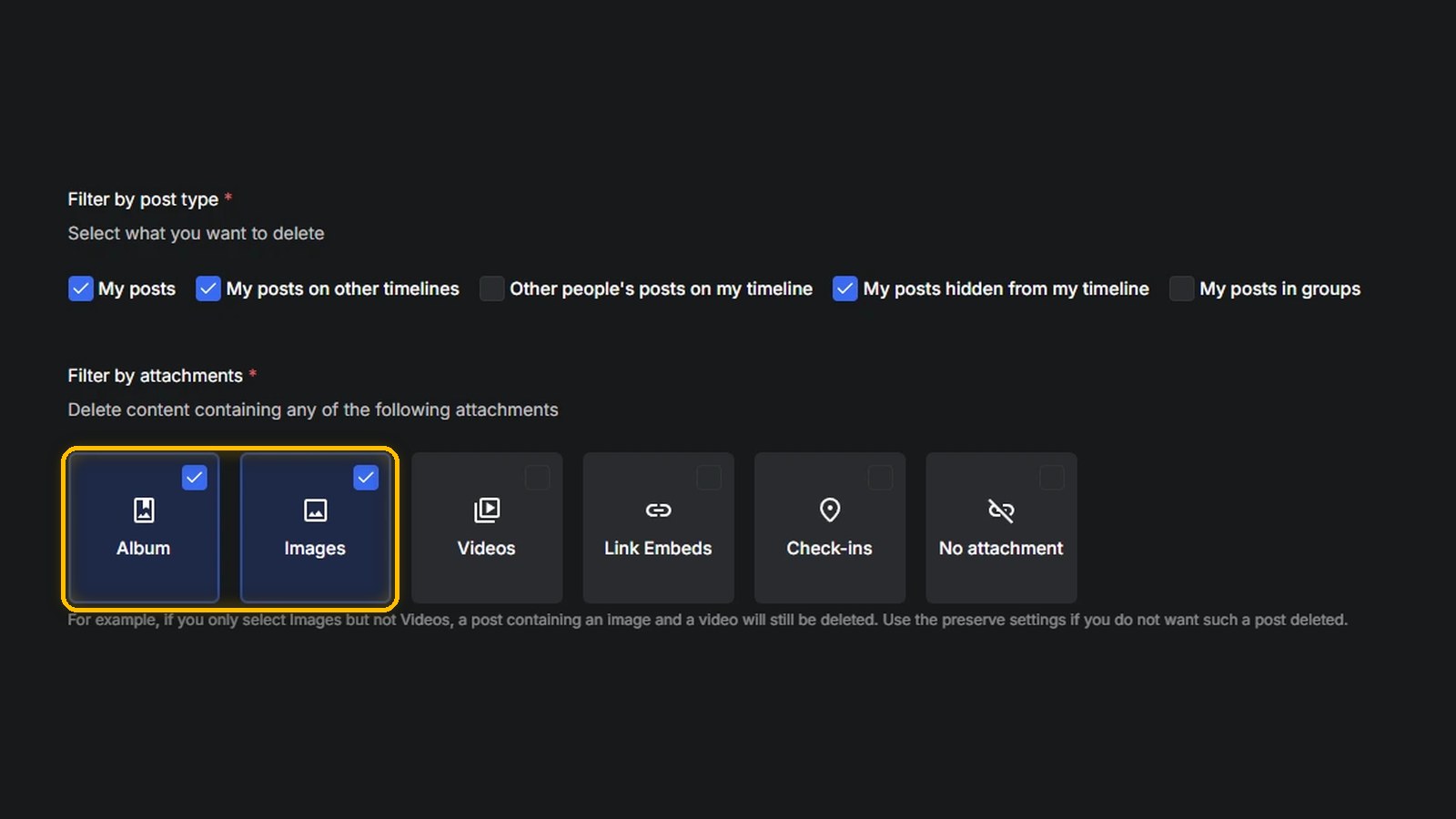
How to Delete All Your Facebook Photos at Once Using Redact
Facebook has no delete-all button for photos. Compare albums, Manage Posts and the activity log, or delete every photo post in one run with Redact.
How to automatically delete everything from Facebook in bulk
Deleting your Facebook account may not erase your data. Bulk delete everything on Facebook first with Redact, then close the account itself.

The Most Common Scams on Facebook (2025)
Stop Facebook social engineering: spot profile cloning and quiz bait, lock down privacy, and bulk-delete risky posts fast with Redact.
Related services
See allDelete your content, messages and unfollow accounts on Instagram
- Images
- reels
- carousels
- direct messages
- followers
Mastodon
Delete your posts, reposts, favorites and replies
- posts
- reposts
- favorites
- replies
Remove old Reddit posts and comments to get rid of any old skeletons in your post history losing you karma.
- Reddit Posts
- Direct Messages
- Reddit Comments
Threads
Delete your posts, reposts, replies, quotes and likes
- posts
- reposts
- likes
- replies
- quotes
Tumblr
Remove unwanted content from your Tumblr page, from published and queued posts to likes, replies, and follows.
- Posts
- Queued Posts
- Likes
- Comments
- Follows
Bluesky
Delete your posts, reposts, replies and likes
- posts
- reposts
- likes
- replies