Delete the Photos, Videos and Saved Snaps You Sent on Snapchat
A snap is gone once it's opened, unless somebody saves it in chat. Then it sits in the thread next to every photo and video you sent from your camera roll. Redact goes through the conversations you choose and deletes those for you, so you don't have to press and hold each one.
Free for your last 30 days of messages, photos, videos & saved snaps.
Available on
Plan
MIA
send me the ones from saturday
ME
best weekend in ages
What gets deleted
Two tick boxes decide what a run deletes
In Advanced mode, the Snapchat form has a Things to delete box with two options, Messages and Photos, videos and saved snaps. Both start ticked. Leave them that way to clear text and media together, or untick Messages for a run that only deletes media. Easy mode has no such box and deletes text messages only.
- Photos and videos you sent in chat. The ones you sent into a conversation from your camera roll or from Snapchat on the web.
- Snaps saved in chat. A snap you sent that you or your friend saved, so it stayed in the thread after it was opened.
- Only yours. Photos, videos and snaps your friends sent you are left where they are.
- Photos you sent
- Videos you sent
- Snaps saved in chat
- Only yours
Try Redact for Snapchat. Free for your last 30 days of messages, photos, videos & saved snaps.
Things to delete *
Delete the chat messages and media you have sent
Where it stops
What a media run doesn't touch
Redact works inside your chat threads on Snapchat Web. A few things that look close to chat media are out of its reach or left alone on purpose.
Snaps that were never saved
A snap that only shows as Delivered or Opened has nothing left in the thread to delete, so Redact skips it. Deleting an unopened one would unsend it, and Redact doesn't do that.
Memories and Stories
Memories and Stories aren't part of your chats. Redact's Snapchat tool only deletes what you sent inside conversations.
The caption under a photo
Text you typed with a photo counts as a message. It goes when Messages is ticked and stays when you run media on its own.
Copies already on someone's phone
Deleting takes a photo out of the chat. It can't reach a screenshot or a copy a friend already saved to their camera roll.
Three ways to run it
Look first, delete, or put it on a timetable
Preview Mode
Lists what the run would delete and deletes nothing. Media has no text to show, so every one is listed as "Photo, video or saved snap" with the date it was sent.
Deletion Mode
Deletes every match in the conversations and date range you set, one after another.
Schedule Deletion
Runs the same cleanup again on a timetable, so new media doesn't build up. Scheduling needs Premium.
How to do it
How to delete Snapchat photos, videos and saved snaps with Redact
You'll need a computer. Redact's Snapchat tool runs in the desktop app.
- 1
- 2
Sign in to Snapchat
Choose Snapchat in Redact and log in to Snapchat Web in the browser window that opens. The login goes straight to Snapchat.
- 3
Choose your conversations
Tick the conversations to clean, or hit Select All for every chat on your list.
- 4
Tick what to delete
Choose Advanced at the top of the Snapchat form to see Things to delete. Keep Photos, videos and saved snaps ticked. Untick Messages if you want your text left alone.
- 5
Set a date range if you want one
Leave the dates open to cover everything, or set a start date, an end date, or both.
What's free: photos, videos and saved snaps you sent in the last 30 days. Older ones need Premium.
- 6
Preview, then delete
Run Preview Mode and check the list. When it looks right, run the same settings in Deletion Mode and leave Redact open until it's done.
Your photos stay between you and Snapchat
Redact does the deleting in a browser on your own computer. It doesn't upload, copy or store the photos, videos or snaps it finds, and your login never reaches a Redact server.
Try Redact for Free
We are frequently adding support to other social network services. You can receive direct updates from us in Redact's Discord Channel.

Frequently asked questions
Yes. A snap you sent that was saved in chat is deleted along with the photos and videos you sent there. Run it from Advanced mode and keep Photos, videos and saved snaps ticked in the Things to delete box.
Yes. In Advanced mode, untick Messages in the Things to delete box and leave Photos, videos and saved snaps ticked. The run deletes your media and leaves every text message, captions included, where it is.
No. An Easy mode run deletes your text messages only. To delete photos, videos and saved snaps, choose Advanced at the top of the Snapchat form.
No. It only deletes what you sent. Photos, videos and snaps from the other person stay in the thread.
No. Memories and Stories sit outside your chats, and Redact's Snapchat tool only works inside conversations.
Not while you leave it alone. A schedule or preset saved before this option existed keeps deleting text messages only. Open it, though, and Photos, videos and saved snaps shows as ticked, so saving or running it from there deletes media too. Untick that box first if you want it to stay text only.
It's free for anything you sent in the last 30 days. Deleting older photos, videos and saved snaps needs a paid plan, and so does scheduling.
More Snapchat features
Delete photos and videos on other platforms
Snapchat guides
See all
How to Delete Your Snapchat Account (easy step by step guide)
Delete your Snapchat account on its accounts portal, from a computer or phone. It's deactivated for 30 days first. What to save and what stays after.
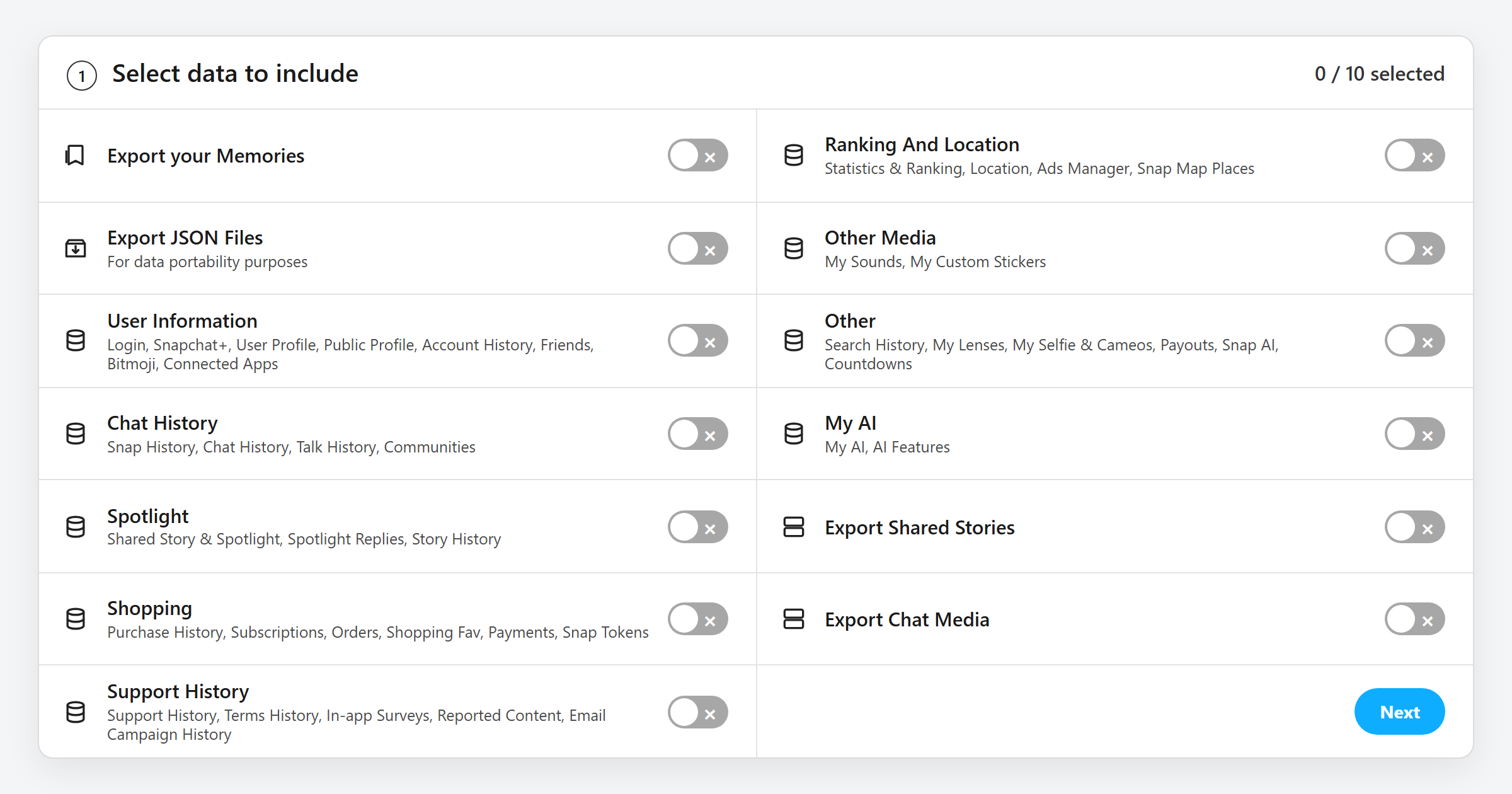
How to Download Your Snapchat Data (and What's in the File)
How to request your Snapchat data download from My Data, which switches to turn on, what every file in the ZIP holds, and how to open it.
Related services
See allDelete messages you sent in selected Messenger conversations, with filters for date, keyword, and attachment type.
- Sent messages
- images
- videos
- link embeds
Cleanse your cringe Discord history by either nuking it all, or choosing a specific server or direct message, then specifying keywords and date ranges.
- Messages in Servers
- Direct Messages
- Reactions
- Images
- Videos