Delete Your Entire Facebook History
Under your profile sits every status update, comment, like, and tag going back to the day you signed up, plus the friends you barely remember and a log of everything you have ever searched. Deleting all of that by hand, one item at a time, is a genuine slog, and Facebook's own tools were never built to finish it. Redact clears every category for you, one focused pass at a time, whether you want a clean slate or you are closing the account for good. Wipe all of it, or scope it to one category and one regrettable year, then preview the whole batch, keep a local archive, and run it from your own device.
Free for your last 30 days of posts & comments.
Available on
Why wipe the whole thing
A clean slate means clearing all six categories, not just posts
Most people delete a few old posts and call it done. But your comments sit on other people's pages, your likes and tags trail back to you from years ago, and your search log records what you looked up. A real reset takes down every one of them.
Half measures leave a trail
Delete your posts but leave the comments, likes, and tags that point back at them, and you have handed anyone a map with most of the pieces still on the table. A full wipe clears them all.
Your history is scattered across Facebook
The comments you left live on old photos and friends' walls, not your own timeline. Tags attach your name to scenes you never posted. Facebook keeps no single feed for any of it, so it stays put until you go get it.
It is more than you can clear by hand
A decade of posts, comments, likes, and tags adds up to thousands of items, and Facebook only lets you remove them one at a time. Its own tools will never get through the pile. Redact works through the whole account for you.
A fresh start without a new account
You do not have to delete your profile to start over. Wipe the content, keep the login and the handle you have had for years, and decide for yourself what still deserves to be public.
What gets wiped
Every Facebook category, or just the parts that make you wince
Facebook has no single delete-all button, so Redact reaches each category for you and clears it in its own focused pass. Leave the filters blank for a true wipe, or narrow any one category down first.
Redact covers all six Facebook categories: posts, comments, likes, tags, friends, and searches. Pick categories in the simple form and they queue together in a single run; unfriending, and any category you filter in the Advanced form, runs as its own pass. A wipe touches your content and connections only, so your login, your Messenger threads, and the profile itself stay exactly as they are.
- Posts and comments clear free for the last 30 days; reaching further back needs a paid plan. See posts, comments, and the photos and videos they carry.
- Likes, tags, friends, and searches are on a paid plan. Clear your likes, remove the tags others added, unfriend in bulk, or wipe your search history (desktop app only).
- Scope by date with the shared date range control, which covers posts, comments, likes, and searches. In the desktop app's simple form it narrows tags too. It doesn't reach friends.
Everything runs on your own device, and you can save a local archive before a single item is removed.
- Posts
- Comments
- Likes (paid plan)
- Tags (paid plan)
- Friends (paid plan)
- Searches (paid plan, desktop)
Try Redact for Facebook. Free for your last 30 days of posts & comments.
Scope the wipe
Indiscriminate is an option, not a requirement
Leave everything blank and Redact takes the account back to zero. Or dial the scope down to one category, one date window, or one regrettable year, and history loses only the chapter you picked.
Pick your categories
Choose any of the six, posts, comments, likes, tags, friends, and searches. Each category runs its own pass, so a true wipe just means working down the list.
Date window
Confine posts, comments, likes, or searches to an absolute or rolling range. Tags follow the range in the desktop app's simple form only, and friends are not filtered by date.
Keep list
Add posts, comments, likes, searches, or specific friends by name or keyword and Redact skips them, no matter how wide the wipe. Tags have no keep list.
Keyword targeting
Delete only content that mentions the words or names you specify, across posts, comments, likes, searches, and friend names.
Run it your way
Preview it, clear it, or keep it clear automatically
Preview Mode
A preview pass that drafts the full hit list across every category you selected, without removing anything. The right first pass whenever you are dialing in scope.
Deletion Mode
Clear everything that matches your setup, category by category, once you trust what is queued.
Review & Delete
Pull up the matches and remove them one decision at a time, or batch-select the ones you want gone.
Schedule Deletion
Set a recurring run so new activity clears itself as it ages past your cutoff. Scheduling, like all-time cleanups, is a Premium feature.
Step-by-step guide
From years of timeline to a clean slate
The setup takes a couple of minutes. For a very large account, lean on the date filter and let a scheduled run finish the job over several passes.
- 1
Download Redact for free
Download for your device →Install Redact on your device. It runs on Windows, macOS, and Linux, plus iOS and Android.
- 2
Connect your Facebook account
Open Redact, choose Facebook, and link your account securely. Your credentials are sent straight to Facebook and never touch a Redact server.
- 3
Choose your categories and scope
Work through the six categories: posts, comments, likes, tags, friends, and searches. The simple form queues most of them together in one run; unfriending, and any category you want to filter, runs from its own tab in the Advanced form. Search history clears from the desktop app only. Leave the filters blank for a full wipe, or narrow each pass first. On the Posts pass, tick My posts in groups too; that type is off by default.
- Date window: scope posts, comments, likes, and searches to a range. Friends are not filtered by date, and tags follow the range in the desktop app's simple form only.
- Keywords: target only content that mentions certain words or names.
- Keep list: add posts, comments, or people you never want removed.
What's free: clearing your posts and comments from the last 30 days is free. Going further back, and clearing likes, tags, friends, and searches, need Premium.
- 4
Archive, then preview
Deleting is permanent, so save a local archive first if any of it is worth keeping. Then run a Preview to see the exact hit list across every category you selected, and exclude anything you want to keep before you commit.
- 5
Run it, then keep it clear
Start the deletion and keep the app open while Redact works through each category in batches. To keep your account clear as new activity ages past your cutoff, turn on a recurring Schedule, a Premium feature.
A wipe this personal shouldn't have witnesses
Redact does the whole job on your own device. Your posts, your password, and your entire back catalogue never route through a Redact server, so none of it can leak from one. It archives your own content locally before anything is removed, signs you in passwordlessly with a secure email code, takes only the access it needs, and lets you disconnect Facebook the moment you're done.
Try Redact for Free
We are frequently adding support to other social network services. You can receive direct updates from us in Redact's Discord Channel.

Frequently asked questions
No. Removing your content and connections doesn't close your profile, and it leaves your Messenger conversations, your groups, and the account itself untouched. You are deleting what you have done on Facebook, not who you are on there. If you do plan to leave, run the wipe first so nothing is left behind, then close the account through Facebook.
Six categories: posts, comments, likes, tags, friends, and searches. Clearing your posts and comments from the last 30 days is free. Reaching further back into posts and comments, and clearing your likes, tags, friends, and searches, all need a paid plan. One platform note: search history clears from the desktop app only, while the other five categories also run on iPhone and Android.
Yes. Add a keep list of words or names and Redact skips anything that matches, across your posts, comments, likes, searches, and even specific friends, no matter how wide the run. Friends aren't filtered by date, so you scope those by name rather than by a time window. Tags have no keep list.
A run in progress can be paused or stopped, but whatever has already been removed stays gone. Facebook doesn't hand it back, which is exactly why the Preview and the local archive exist. Check the hit list and save a copy before you commit, so a change of heart never costs you anything you wanted.
Yes. Turn on a recurring Schedule and Redact reapplies your setup on the interval you choose, so new posts and comments clear themselves as they age past your cutoff and you never have to redo the sweep by hand. Scheduling is a Premium feature.
More Facebook features
Mass Delete Facebook Posts
Bulk delete your Facebook timeline posts: status updates, photos, videos, links, and check-ins. Wipe it all or filter by date, keyword, media type, or location first.
Clear Facebook Search History
Wipe the private log of everything you've searched on Facebook, in bulk and on your device.
Delete Facebook Content by Date Range
Clear a whole era of old Facebook activity at once. Set exact dates or a relative window like older than two years, across posts, comments, likes, and search history.
Delete all Comments on Facebook
Bulk delete the comments you have left across Facebook posts, Pages, and groups, by date, keyword, or public visibility. The posts you replied to stay put.
Delete all Photos & Videos on your Facebook Timeline
Bulk delete the posts that carry your photos and videos, by attachment type, date, or caption keyword. Videos are one extra checkbox.
Delete all Facebook Likes at Once
Clear the Pages you've liked and the reactions you've left on posts and comments, in bulk, with date, keyword, and keep-list controls.
Remove Facebook Tags in Bulk
Take your name off the photos, posts, and comments other people tagged you in. Clear post and comment tags, photo tags, or both in one run.
Remove all Friends on Facebook Fast
Bulk unfriend on Facebook: clear your entire friends list in one pass, or target specific people by name, with a keep list to protect anyone you want to stay connected to.
Delete your entire history on other platforms
Facebook guides
See all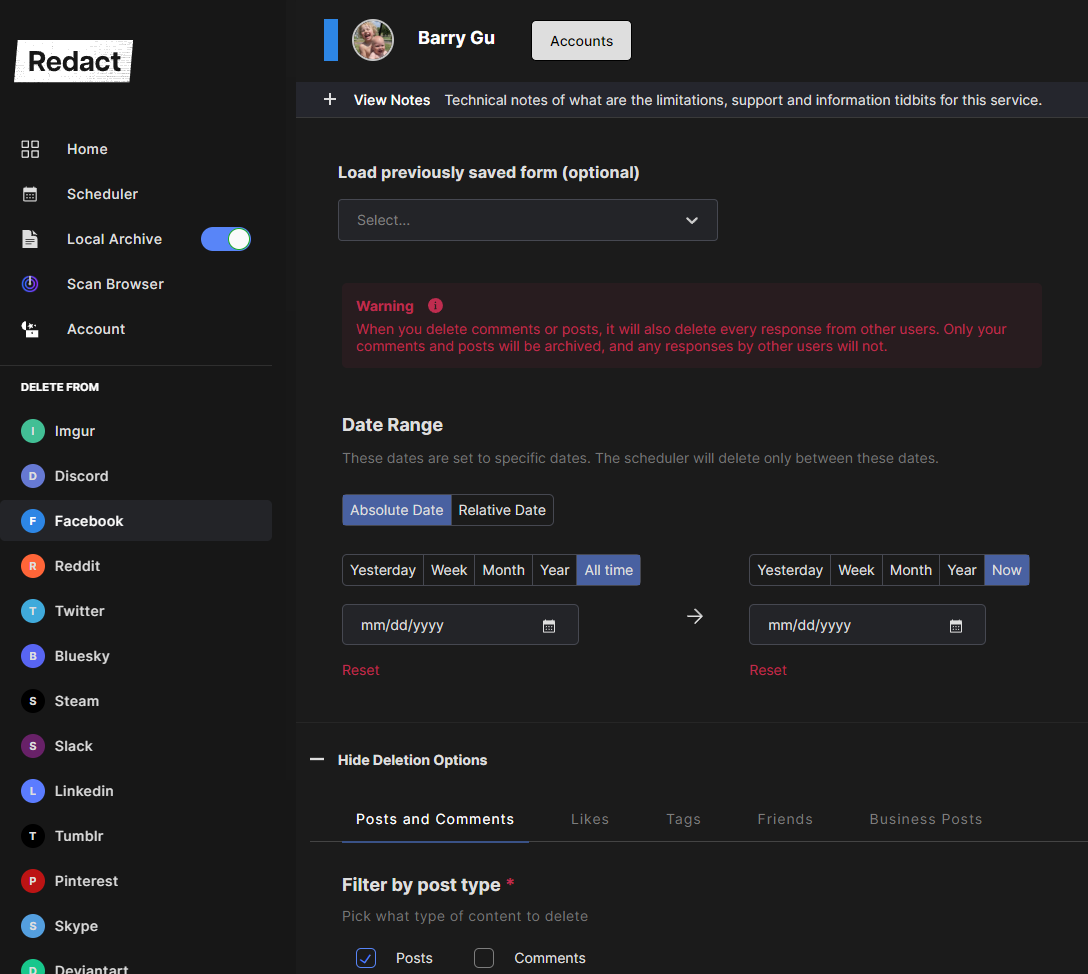
How to automatically delete everything from Facebook in bulk
Deleting your Facebook account may not erase your data. Bulk delete everything on Facebook first with Redact, then close the account itself.

Auto-Delete Content on Facebook, Twitter, Reddit, Discord and Bluesky
Automatically delete your old posts, messages, and comments on Twitter, Reddit, Discord, Facebook, Bluesky, and more.

We’re Making Mass Deletion Even Easier on Twitter, Facebook and Reddit
Mass deletion on Twitter, Facebook and Reddit got simpler in Redact, with content type and date range selectors, data package import and a preview mode.
Related services
See allDelete your content, messages and unfollow accounts on Instagram
- Images
- reels
- carousels
- direct messages
- followers
Mastodon
Delete your posts, reposts, favorites and replies
- posts
- reposts
- favorites
- replies
Remove old Reddit posts and comments to get rid of any old skeletons in your post history losing you karma.
- Reddit Posts
- Direct Messages
- Reddit Comments
Threads
Delete your posts, reposts, replies, quotes and likes
- posts
- reposts
- likes
- replies
- quotes
Tumblr
Remove unwanted content from your Tumblr page, from published and queued posts to likes, replies, and follows.
- Posts
- Queued Posts
- Likes
- Comments
- Follows
Bluesky
Delete your posts, reposts, replies and likes
- posts
- reposts
- likes
- replies