How to Delete Your Instagram Account (easy step by step guide)
Deleting now runs through Meta's Accounts Center. Here are the steps for the web and the app, the 30-day window, and what's left after.
 Dan Saltman12 min read
On this page
To delete your Instagram account, open Settings > Accounts Center, then Manage accounts, click Manage next to Instagram and choose Deactivation or deletion > Delete account. Instagram deletes the account for good 30 days after your request, as long as you don't log back in.
Deleting won't reach everything. Instagram says it can take up to 90 days to finish, copies can stay in Meta's backups after that, and anything other people saved, screenshotted or posted about you stays with them.
It's one of our guides to deleting your social media accounts.

4 things to do before you delete
A Download your Instagram data. Do it first. Instagram says you lose access to its Export your information tool once the account is deleted. Request it in Accounts Center > Your information and permissions, and wait for the file before you delete. Our Instagram data download guide walks through it.
B Decide about Threads. Meta's Threads privacy policy says your Threads profile may be deleted when you delete the account you signed up for Threads with. If that's this Instagram account and you want to keep Threads, keep the account and use the alternative below instead. Meta says deleting Threads on its own won't delete Instagram.
C Cancel subscriptions and disconnect apps. Check Subscriptions in Accounts Center for Meta Verified or subscriptions to creators, and cancel anything you bought through the App Store or Google Play where you bought it. Then remove any third-party apps you've connected to Instagram, since a connected app can log in for you.
D Decide about your username. Once the account is deleted, Instagram says you can sign up again with the same username only if nobody else has taken it. If you'd rather keep it, see the alternative below.
You'll need to be able to log in. Instagram says it can't delete an account for you, so recover your password first if you've lost it.
Delete or deactivate?
Both live on the same Deactivation or deletion screen.
- Deactivating is a break. Instagram says your photos, comments and likes are hidden until you log back in. Nothing is deleted, and you can only deactivate once a week.
- Deleting is permanent. Instagram says your profile, photos, videos, comments, likes and followers are permanently removed.
How to delete your Instagram account
These steps follow Instagram's help article on deleting your account as of October 2026. Meta is moving people to a new account layout, so the help center calls the second screen Profiles and personal details while ours showed Manage accounts. If you see the first one, click Manage next to Instagram there.
Option 1: Delete your account on instagram.com (computer or mobile browser)
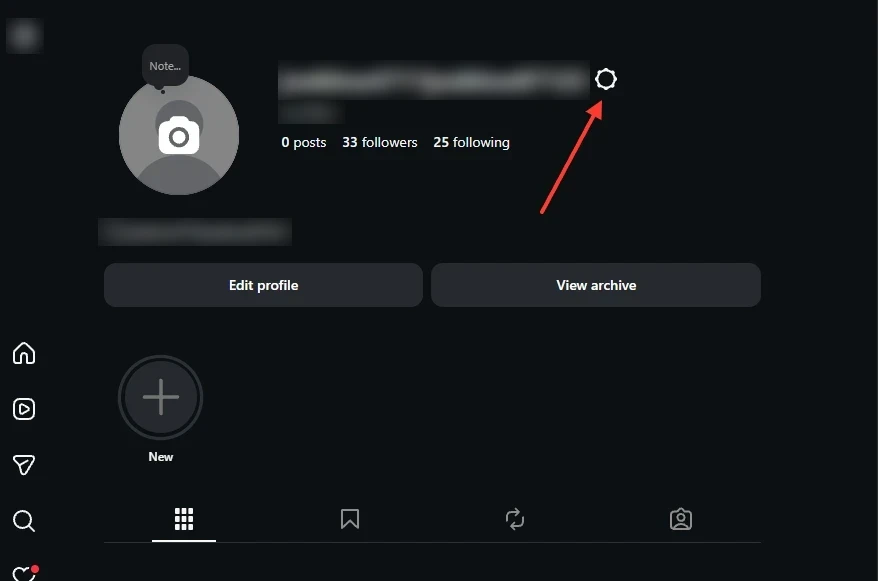
Step 1 Open Settings
Go to your profile and click the gear next to your username, then Settings and privacy. You can also click More at the bottom left, then Settings.
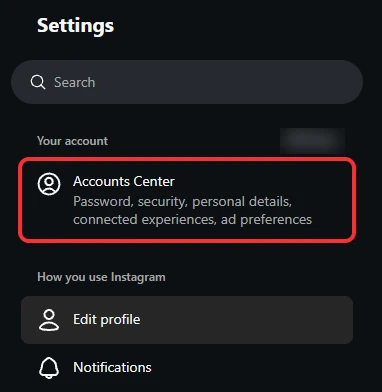
Step 2 Click Accounts Center
Accounts Center is the first item in the Settings menu, under Your account.
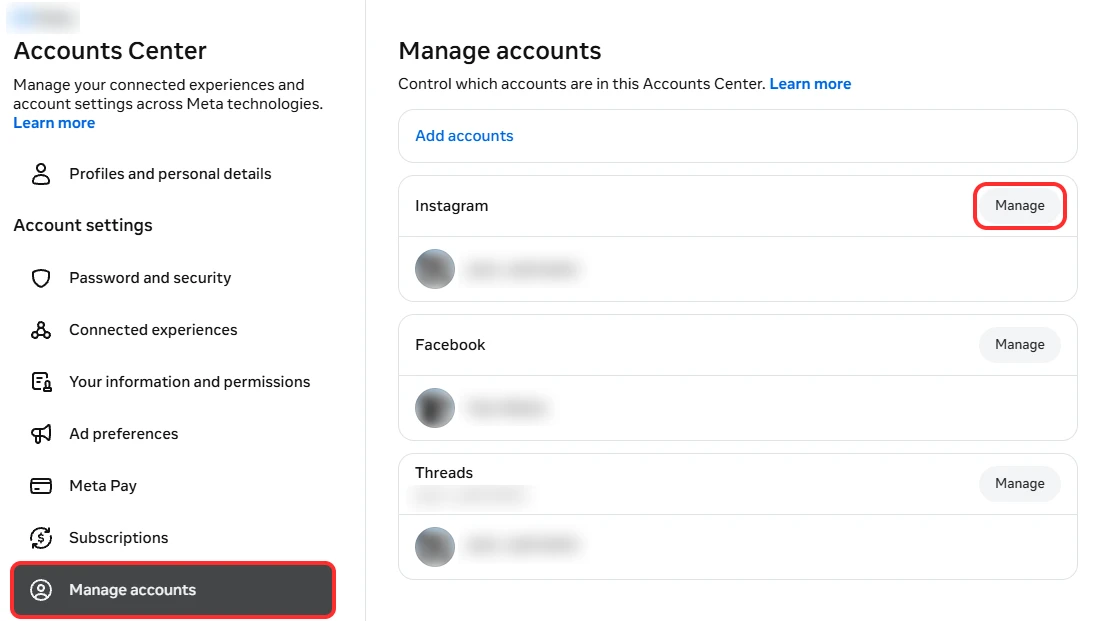
Step 3 Open Manage accounts and click Manage next to Instagram
Click Manage accounts in the left menu, then Manage next to your Instagram account.
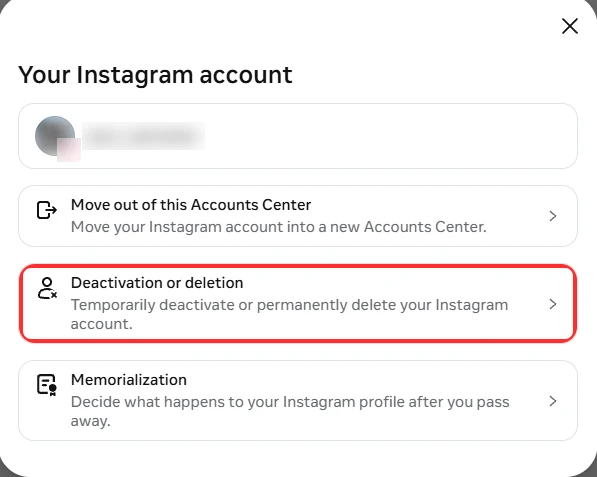
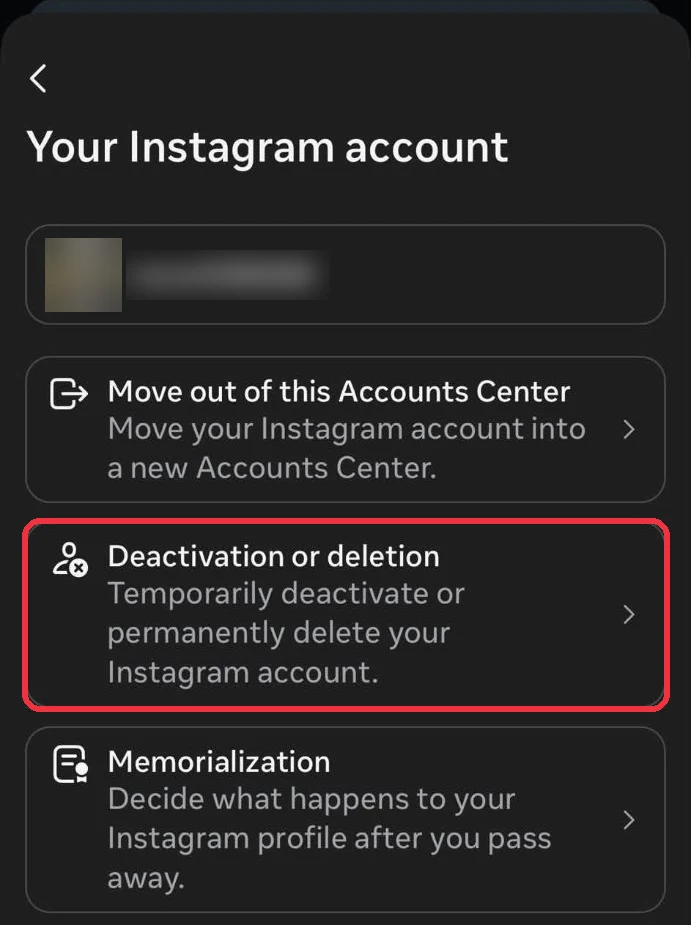
Step 4 Click Deactivation or deletion
It's the second option on the Your Instagram account screen, between Move out of this Accounts Center and Memorialization.
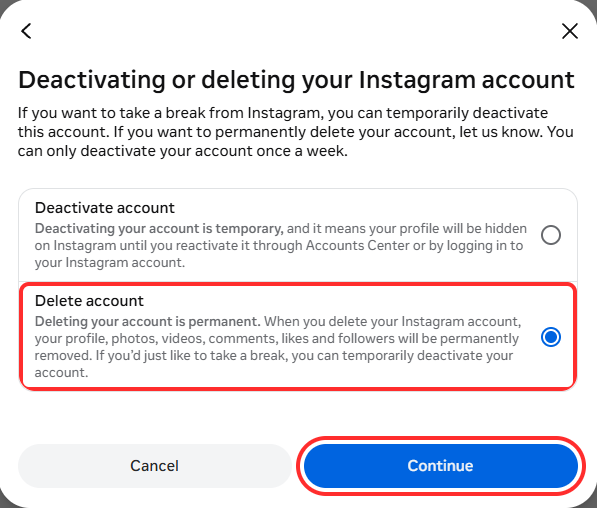
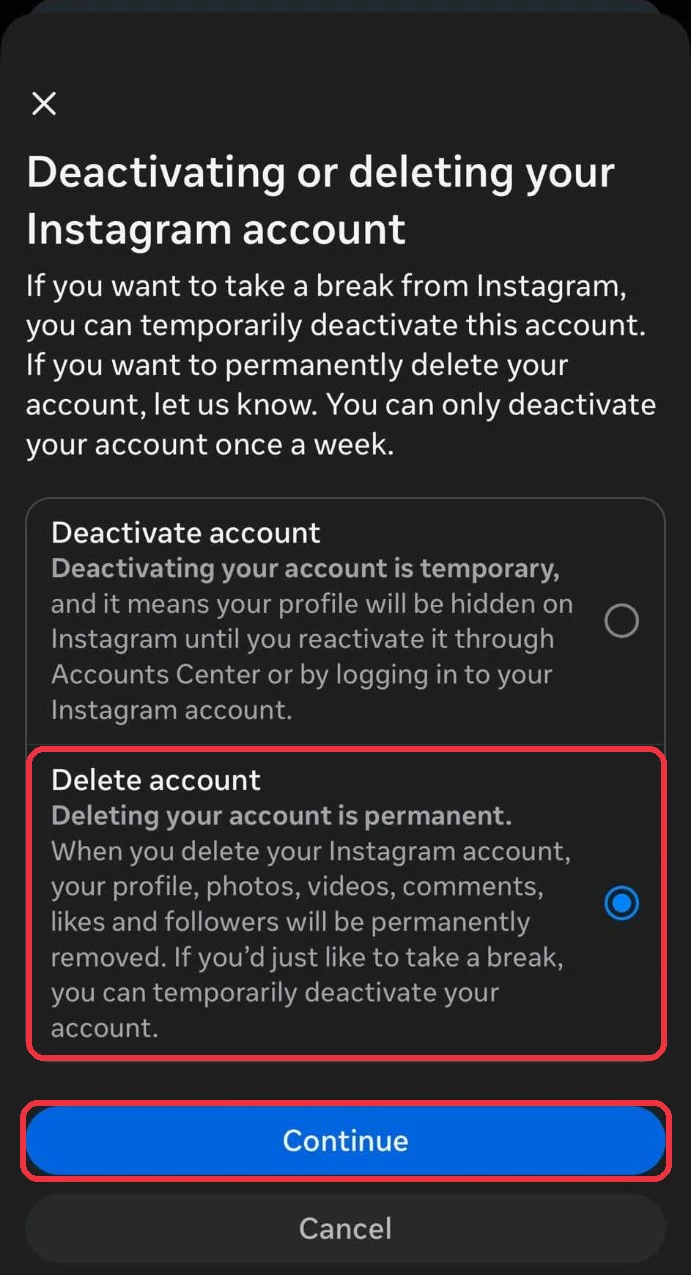
Step 5 Choose Delete account and click Continue
Pick Delete account, not Deactivate account, then click Continue.
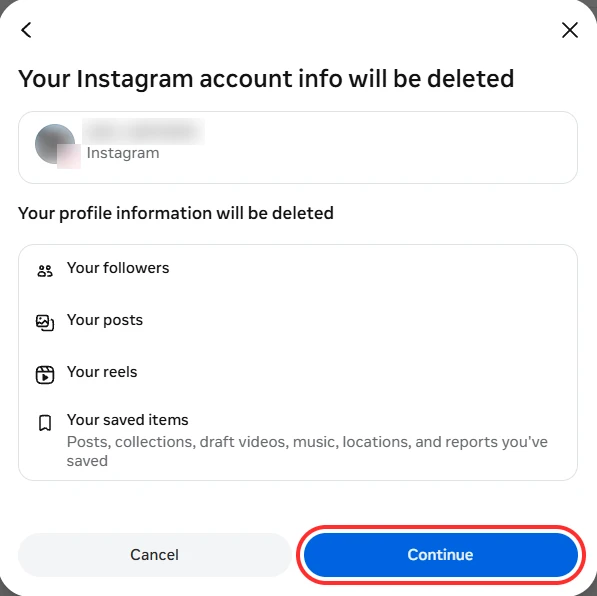
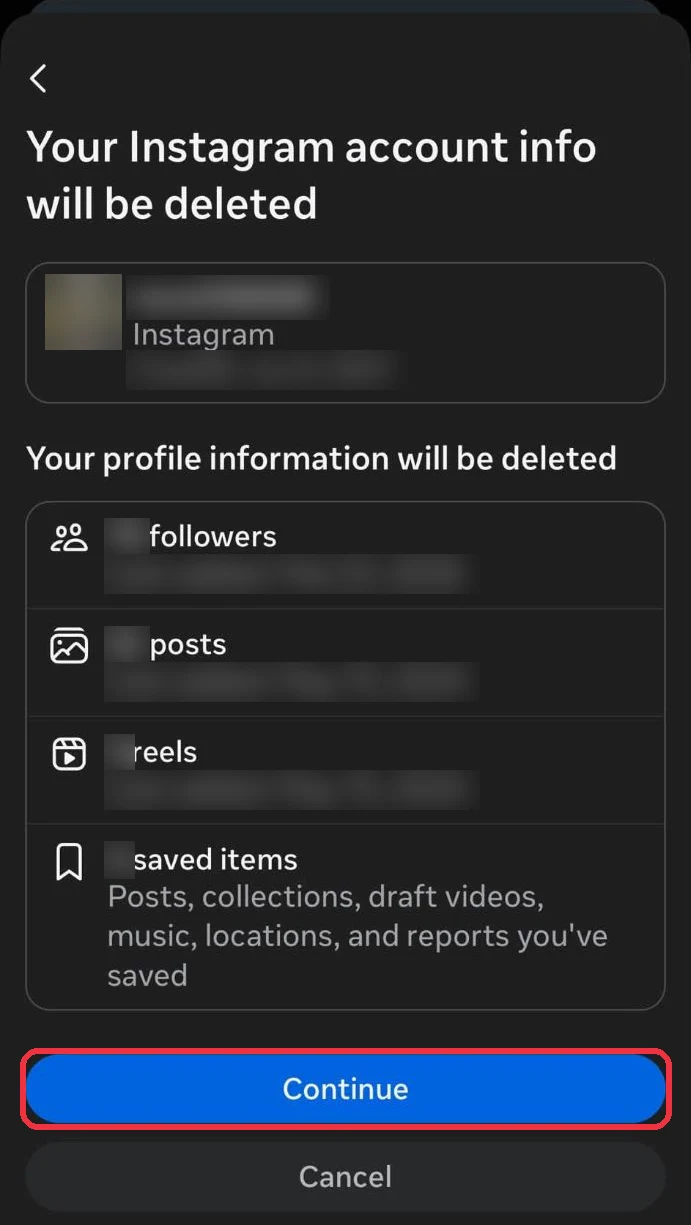
Step 6 Check what will be deleted
Instagram lists the followers, posts, reels and saved items that go with the account, so look them over and click Continue.
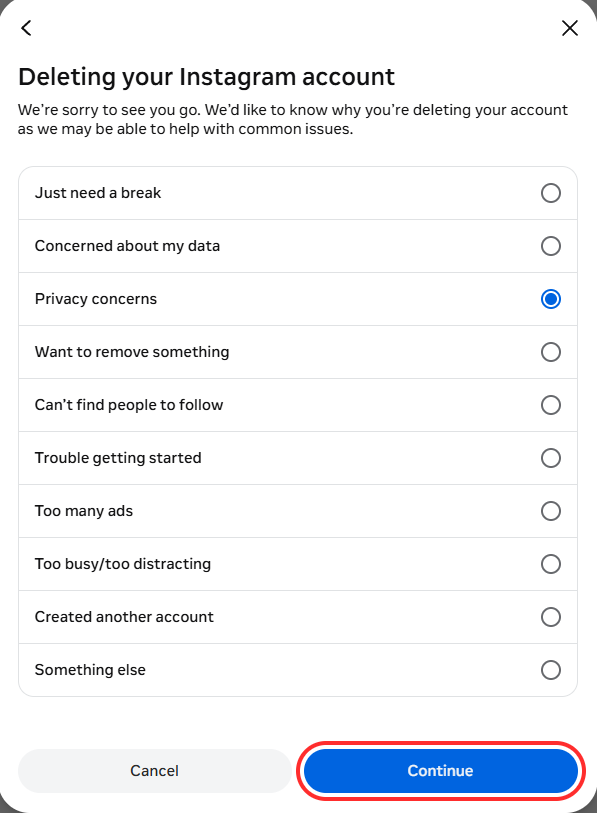
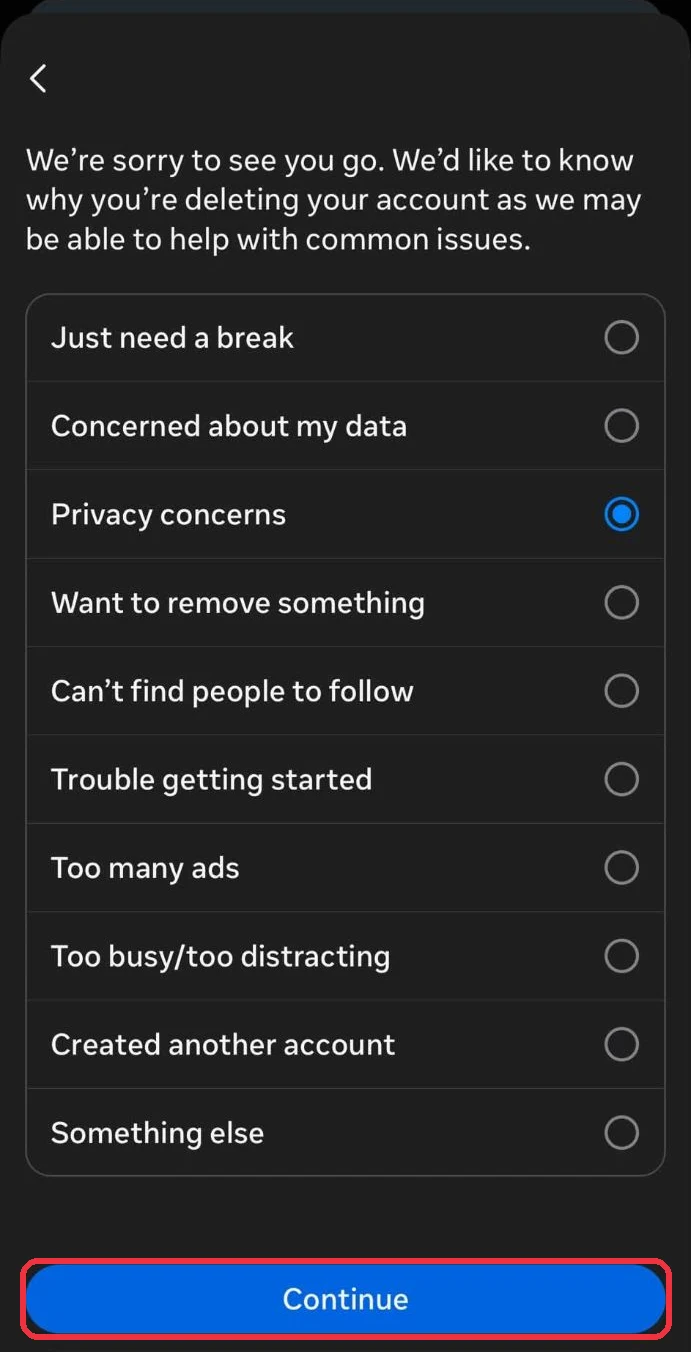
Step 7 Pick a reason and click Continue
Choose any reason and click Continue. Depending on the reason, Instagram may show a page of help articles and ask for your password, so click Continue again to get past them.
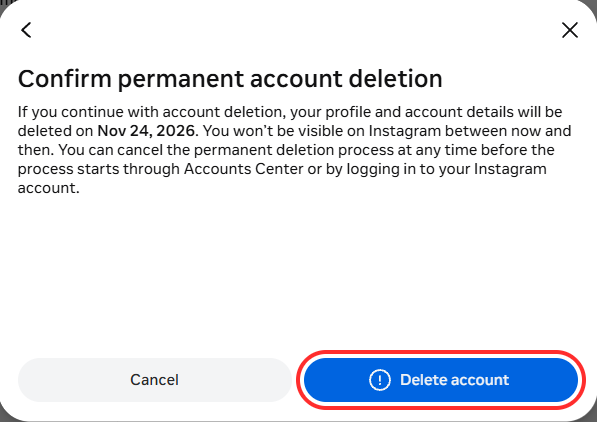
Step 8 Click Delete account
The last screen shows the date your account will be deleted, and clicking Delete account starts the 30 days.
Option 2: Delete your account in the Instagram app (iPhone)
The iPhone app opens the same Accounts Center screens as the web. On Android, Instagram says you need to delete your account at instagram.com in a browser, so follow Option 1 instead.
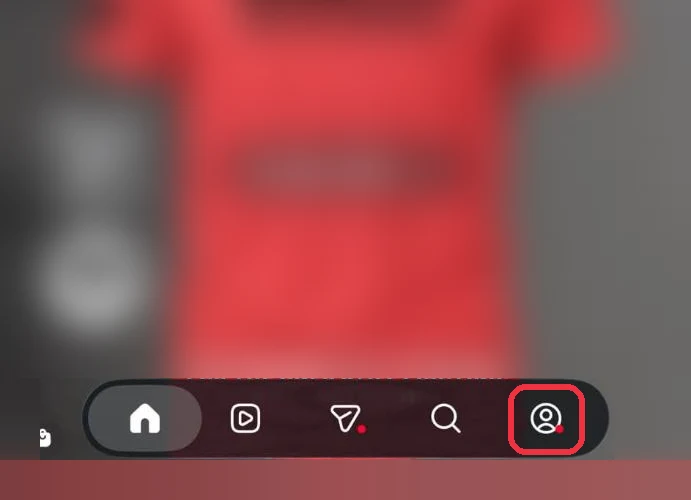
Step 1 Tap your profile
Tap the profile button at the bottom right.
Step 2 Open the menu
Tap the menu icon (three lines) at the top right of your profile.
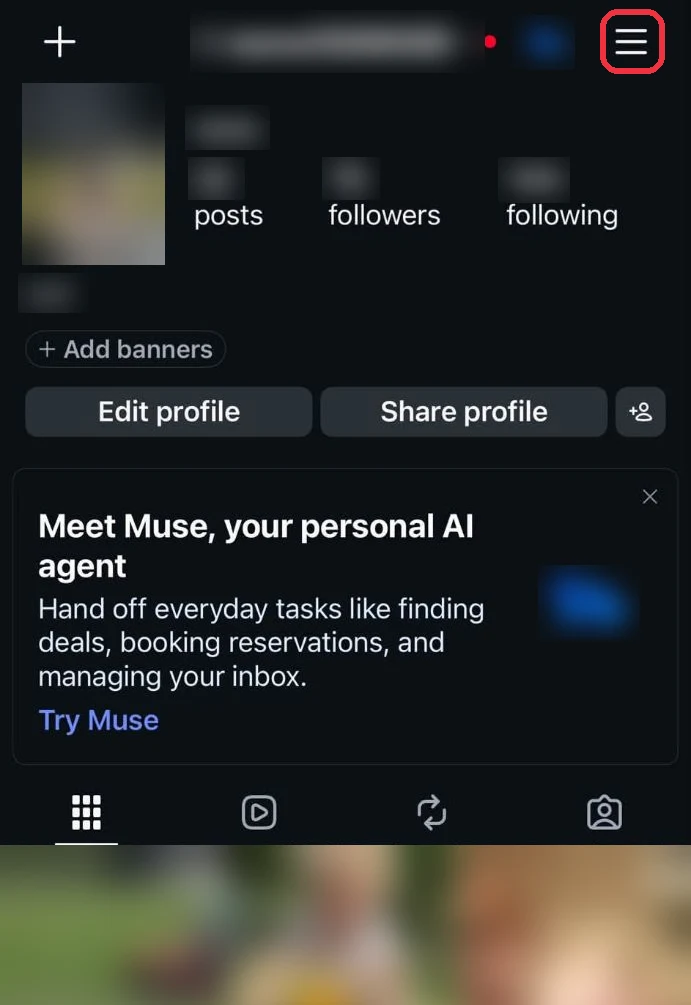
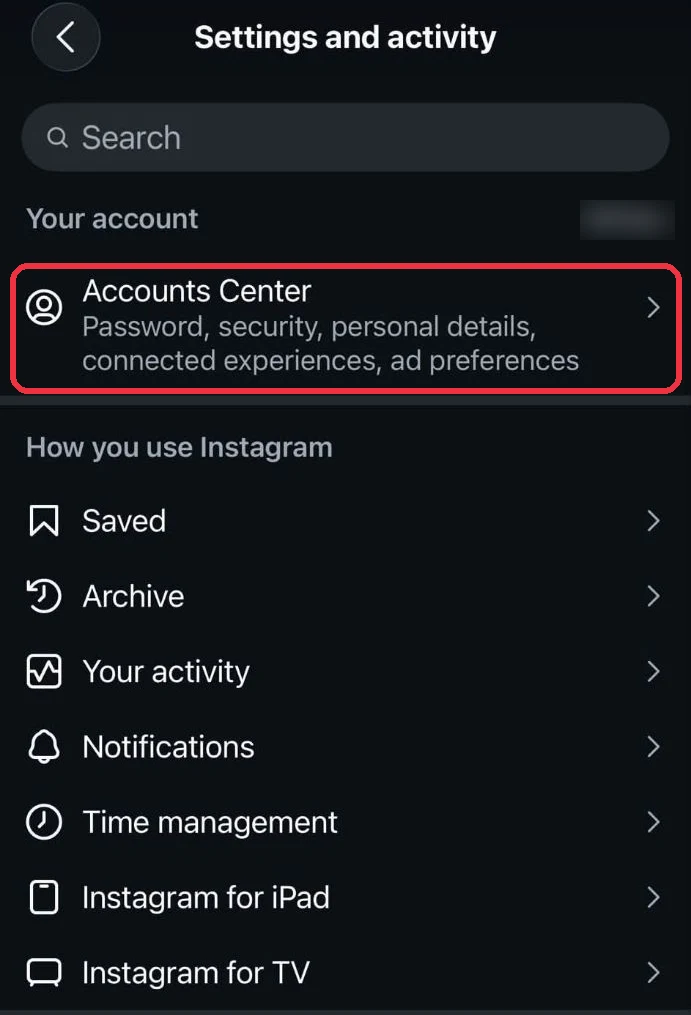
Step 3 Tap Accounts Center
Accounts Center is at the top of Settings and activity, under Your account.
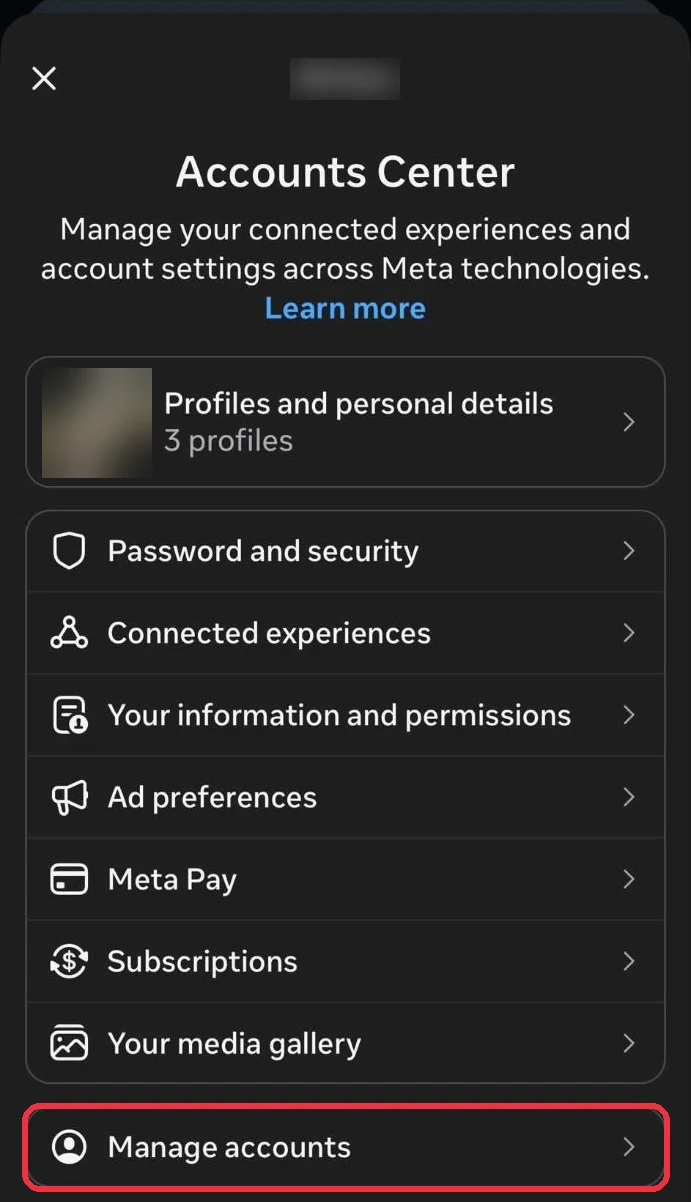
Step 4 Tap Manage accounts
Scroll down and tap Manage accounts, or Profiles and personal details if you don't see it.
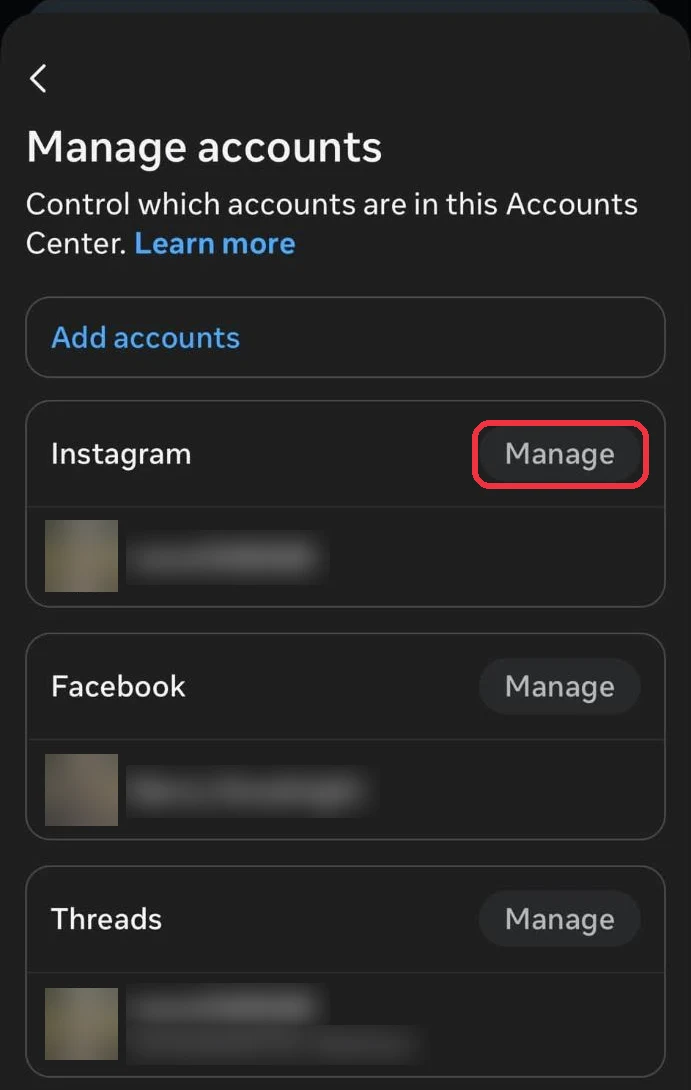
Step 5 Tap Manage next to Instagram
Tap Manage next to Instagram.
Step 6 Tap Deactivation or deletion
Tap Deactivation or deletion.
Step 7 Choose Delete account and tap Continue
Select Delete account, then tap Continue.
Step 8 Check what will be deleted
Tap Continue after checking the followers, posts, reels and saved items Instagram says will go.
Step 9 Pick a reason and tap Continue
Choose any reason and tap Continue.
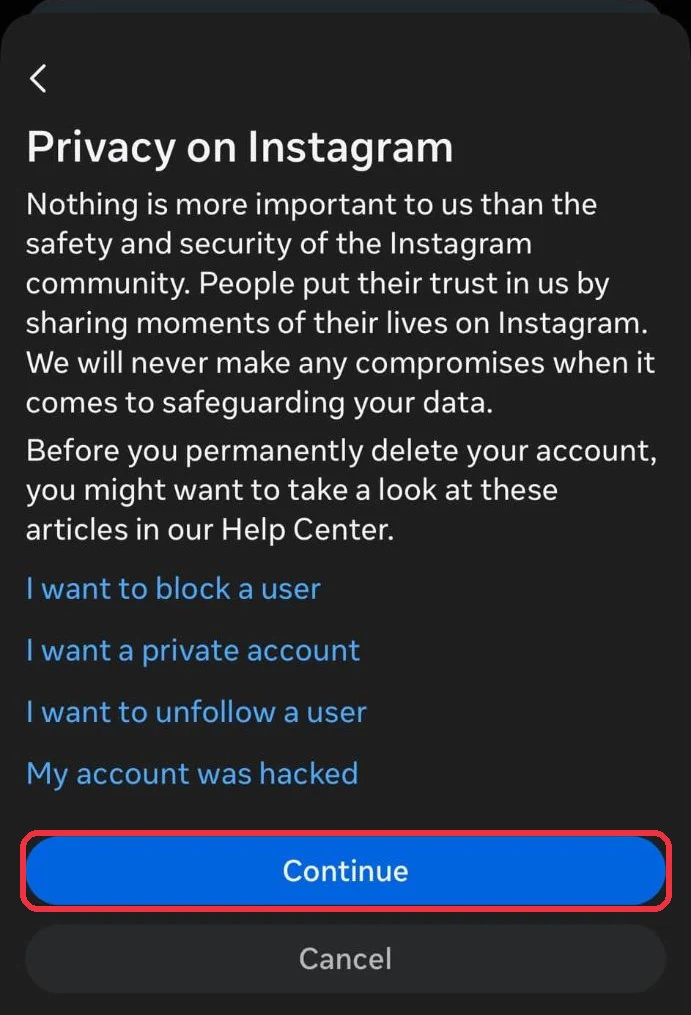
Step 10 Tap Continue past the help articles
Depending on your reason, Instagram may show a few help articles first, so tap Continue to move past them.
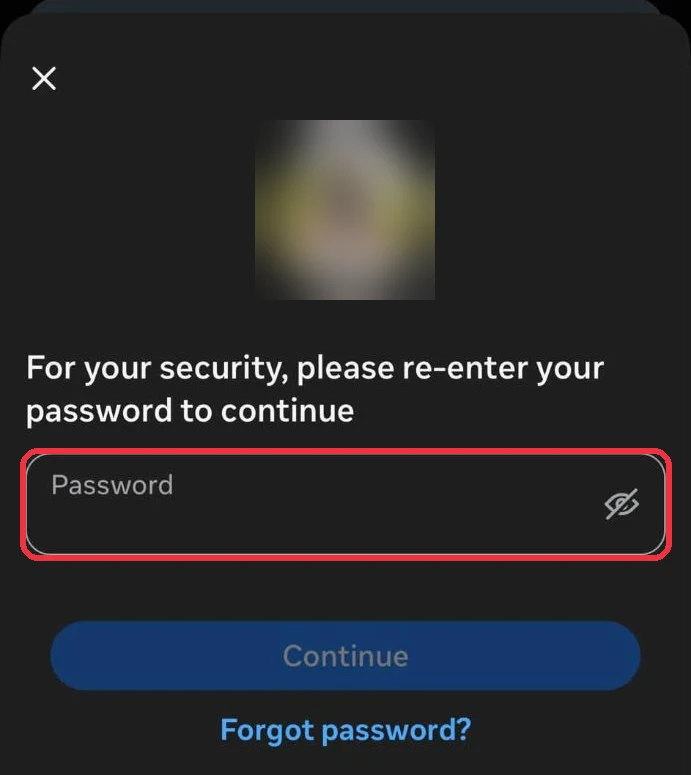
Step 11 Enter your password, then tap Delete account
Re-enter your password and tap Continue. The last screen shows your deletion date, like step 8 on the web, and tapping Delete account starts the 30 days.
What deleting your Instagram account leaves behind
Instagram's deletion guide and Meta's privacy policy are the sources for everything below.
- Your profile, photos, videos, comments, likes and followers are removed after the 30 days.
- It can take up to 90 days. Instagram says the deletion itself can take up to 90 days after it starts.
- Meta's backups keep copies longer. Meta says it can take up to another 90 days to remove your information from backups, and it may keep some for legal issues, terms violations or harm prevention.
- Your username is released. Anyone can register it once the account is gone.
- Other people's posts about you stay. Photos others posted that tag you, screenshots of your posts or DMs, and reposts on other sites belong to them.
- Your DMs aren't on Instagram's list. Instagram's list of what's removed doesn't mention direct messages, and the people you messaged have their own copy of each conversation. To take a message out of someone else's inbox, unsend it before you delete.
- Search engines keep what they cached until they recrawl, and other sites that copied your posts are out of Instagram's reach.
- Threads may go with it. Meta says your Threads profile may be deleted along with the account you signed up for Threads with. After a Threads profile is deleted, you wait 90 days before you can sign up again with the same Instagram account. A Facebook account in the same Accounts Center is deleted separately too, from its own Manage button. Our guide covers how to delete your Facebook account.
Want a fresh start instead? Keep the account, delete the content
Deleting the account gives your username away and takes your followers with it. Instagram's Your activity screen lets you select posts and delete them in batches in the app, and unsending DMs is one message at a time.
The other route is to keep the account and delete the history, which Redact does in bulk on your own device. Connect your Instagram account, pick what to delete, filter by date or keyword to keep some, preview and run.
- Posts, reels and carousels. Free for your last 30 days, older ones need Premium.
- DMs you've sent. Redact uses Instagram's unsend, so they leave the other person's inbox too (Premium).
- Likes, saved collections and accounts you follow (Premium).
Redact has limits too. It can't reach screenshots, copies on other sites or posts other people made, and it works at Instagram's pace, so a big history takes a while.
If you're still deleting the account, unsending your DMs first is the one cleanup Instagram won't do for you. Our guides to mass deleting Instagram messages and deleting Instagram posts in bulk show how.
If you still want the account gone, wait for your data download to arrive, then delete it using the steps above.
FAQ
How do I permanently delete my Instagram account?
Go to Settings > Accounts Center > Manage accounts, click Manage next to Instagram, then Deactivation or deletion > Delete account. Follow the prompts and click Delete account on the last screen. Don't log in for 30 days and the deletion goes through.
What's the difference between deactivating and deleting Instagram?
Deactivating hides your profile, photos, comments and likes until you log back in, and nothing is deleted. Deleting removes your profile, photos, videos, comments, likes and followers for good after 30 days.
How long does it take Instagram to delete an account?
The account is deleted 30 days after your request, though the window varies by region. Instagram says the deletion process can take up to 90 days, and Meta says copies can stay in its backups for up to another 90 days.
Can I get my Instagram account back after deleting it?
Only within the 30 days, by logging back in or cancelling in Accounts Center before your deletion date. After that the account and its content can't be recovered.
Does deleting Instagram delete my Threads profile?
It can. Meta's Threads privacy policy says your Threads profile may be deleted when you delete the account you signed up for Threads with. Going the other way is safe, since Meta says deleting Threads on its own doesn't delete Instagram.
Does deleting my Instagram account delete my messages?
Instagram's list of what's deleted doesn't mention direct messages, and the people you talked to keep their side of the conversation. To remove a message from their inbox, unsend it before you delete your account.
Can someone take my username after I delete my account?
Yes. Once the account is deleted, the username can be registered by anyone, and you can only get it back if nobody has taken it.
Why can't I find the delete option in Instagram?
It moved to Meta's Accounts Center. Open Settings > Accounts Center, then Manage accounts or Profiles and personal details, and look for Deactivation or deletion under your Instagram account.
Redact for Instagram
Delete your content, messages and unfollow accounts on Instagram