How to Delete Your Facebook Account (easy step by step guide)
It runs through Meta's Accounts Center now. Here are the steps for the web and the app, the 30-day window, and what deleting doesn't reach.
 Dan Saltman12 min read
On this page
To delete your Facebook account, open Settings & privacy > Settings > Accounts Center > Manage accounts, click Manage next to your Facebook account, then Deactivation or deletion > Delete account > Continue, and confirm. After 30 days, Facebook deletes it for good.
Deleting won't reach everything. Facebook says copies of the messages you sent stay in your friends' inboxes, and screenshots and copies other people made are out of its hands.
Below are Facebook's steps for the web and the app, how deleting differs from deactivating, the 30-day window, and what's left behind. It's one of our guides to deleting your social media accounts.
Delete or deactivate?
Facebook offers both on the same screen, and they do very different things. Here's what Facebook's help center says about each:
- Deactivating is a break. Nobody can see your profile, but your photos, posts and videos aren't deleted, and logging back in brings everything back. You can keep using Messenger, where friends can still find you by name and message you.
- Deleting is permanent. After the 30-day window, your profile and everything you've added are deleted, you can't reactivate, and you can't use Messenger any more.
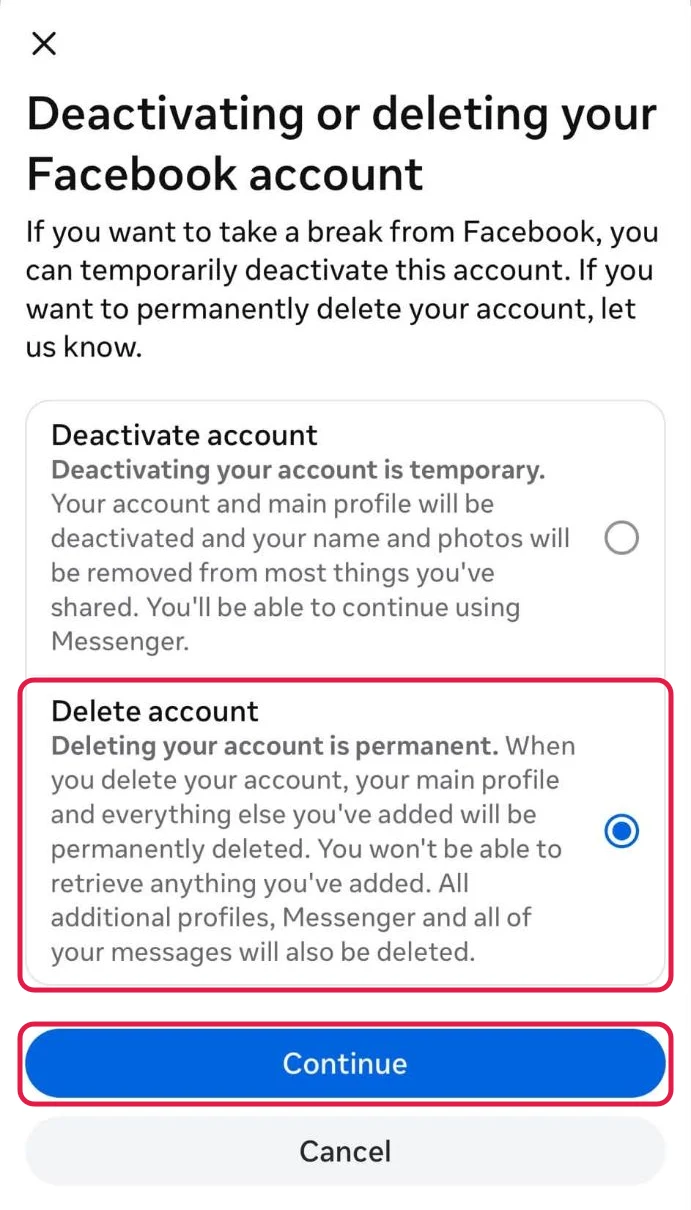
If you only want a pause, pick Deactivate account in the steps below instead of Delete account.
4 things to do before you delete

A Export your information first. Go to Meta Account (or Accounts Center) > Your information and permissions > Export your information and click Create export. Once your account is scheduled for deletion, Facebook won't export it, and a finished export is only available for 4 days, so download it before you delete. The steps are in Facebook's export guide, and our guide to downloading your Facebook data shows how to read the files.
B Hand over your Pages. Facebook says Pages that only you control are deleted with your account. To keep one, give someone else full control of it first, and the Page stays up after you go.
C Switch the apps you log into with Facebook. Once your account is deleted, Facebook Login stops working for apps like Spotify or Pinterest, and you may have to contact each one to get back in. Check the list under Apps and websites in Settings, and give each app an email and password before you delete. If you use Facebook to log into Meta Quest, deleting also deletes your Quest purchases, achievements and store credits.
D Decide about Instagram and Threads. Facebook says the other profiles in your Accounts Center aren't affected, so deleting Facebook leaves your Instagram account as it is. To delete Instagram too, click Manage on its own card in the same Manage accounts list.
How to delete your Facebook account
These steps follow Facebook's help article on deleting your profile and its deactivation article as of October 2026. Meta is moving people to "Meta Account" settings, so you may see Meta Account where these steps say Accounts Center, and Manage account instead of Manage accounts. The rest is the same. If you see Accounts at the bottom of Accounts Center instead, Facebook's route is Personal details > Account ownership and control > Deactivation or deletion. Pick your Facebook profile, click Continue and follow the instructions on the screen.
Option 1: Delete your account on facebook.com (computer)
Step 1 Open Settings & privacy
Click your profile picture at the top right of Facebook, then Settings & privacy.
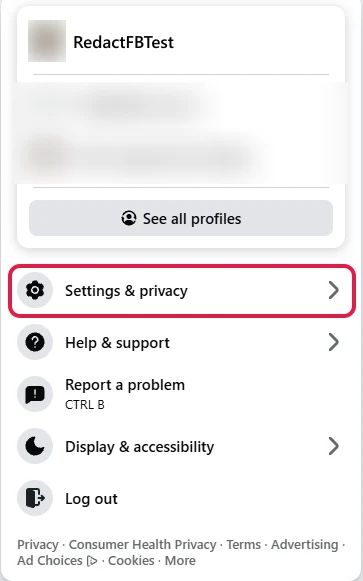
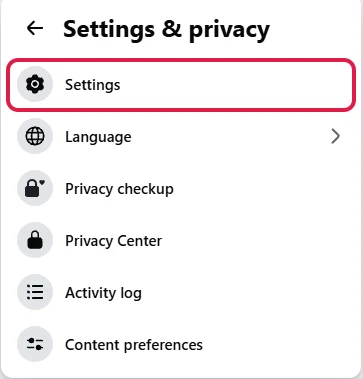
Step 2 Click Settings
Settings is the first item in the Settings & privacy menu.
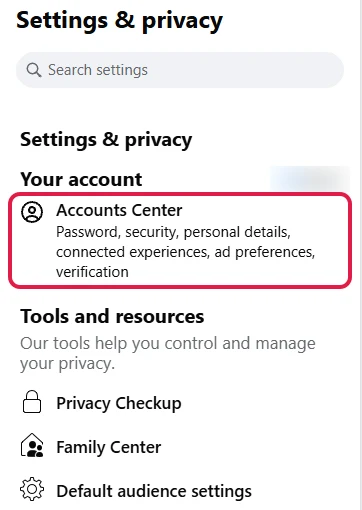
Step 3 Open Accounts Center
Click Accounts Center under Your account at the top left. It opens in Meta's account settings.
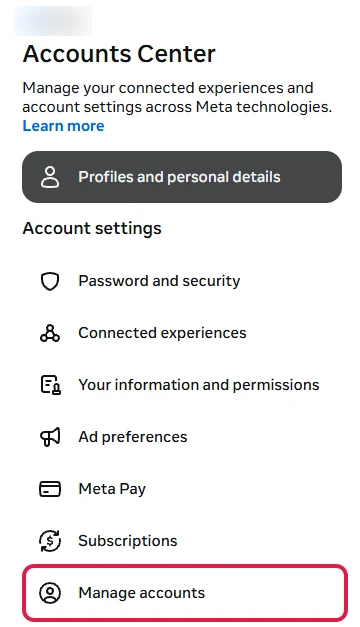
Step 4 Click Manage accounts
It's the last item under Account settings, below Subscriptions.
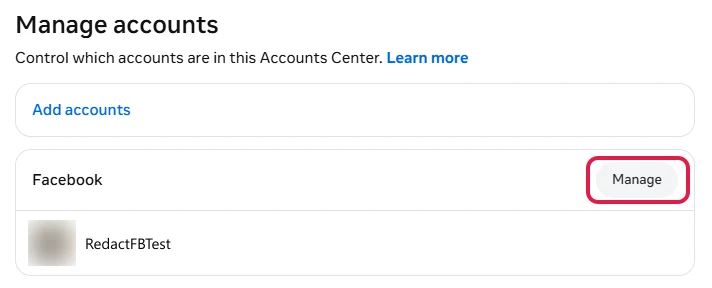
Step 5 Click Manage next to Facebook
Your Facebook, Instagram and Threads accounts each get their own card. Click Manage on the Facebook one.
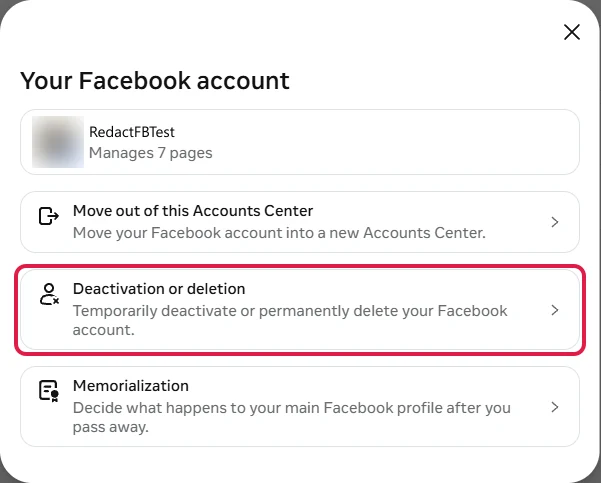
Step 6 Click Deactivation or deletion
It sits between Move out of this Accounts Center and Memorialization.
Step 7 Pick Delete account, click Continue and confirm
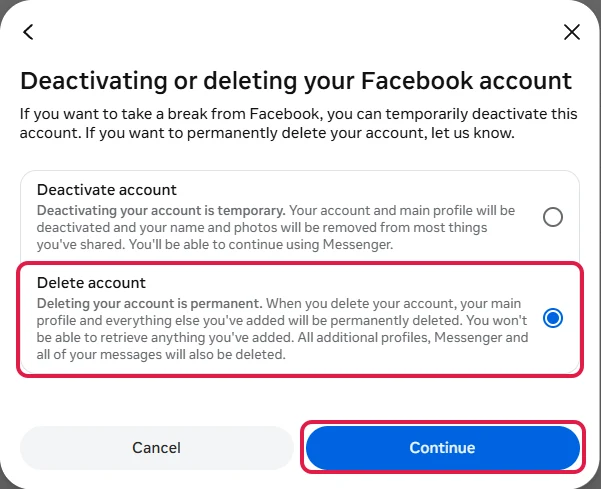
Select Delete account and click Continue, then follow Facebook's instructions to confirm. Your confirmation on the last screen starts the 30 days.
Option 2: Delete your account in the Facebook app (iPhone or Android)
The app takes more taps than the website, and Facebook puts a few screens in the way to talk you out of it. Facebook's help center starts from Menu > Settings & privacy > Settings > Meta Account, which opens the same Accounts Center screen as step 5 below. The screenshots were taken on an iPhone and start from your profile instead. From step 5 on, both routes are the same.
Step 1 Tap the 3 dots on your profile
Open your profile and tap the ⋯ button at the top right.

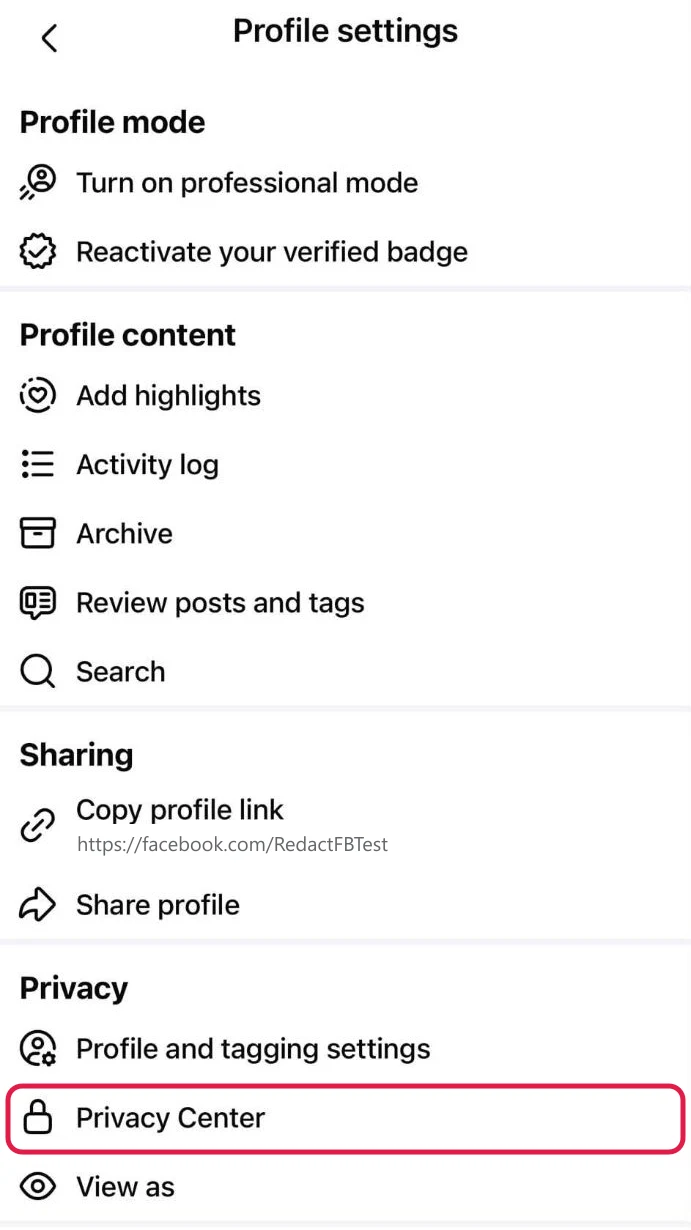
Step 2 Tap Privacy Center
In Profile settings, scroll to the Privacy section and tap Privacy Center.
Step 3 Tap Facebook at the bottom
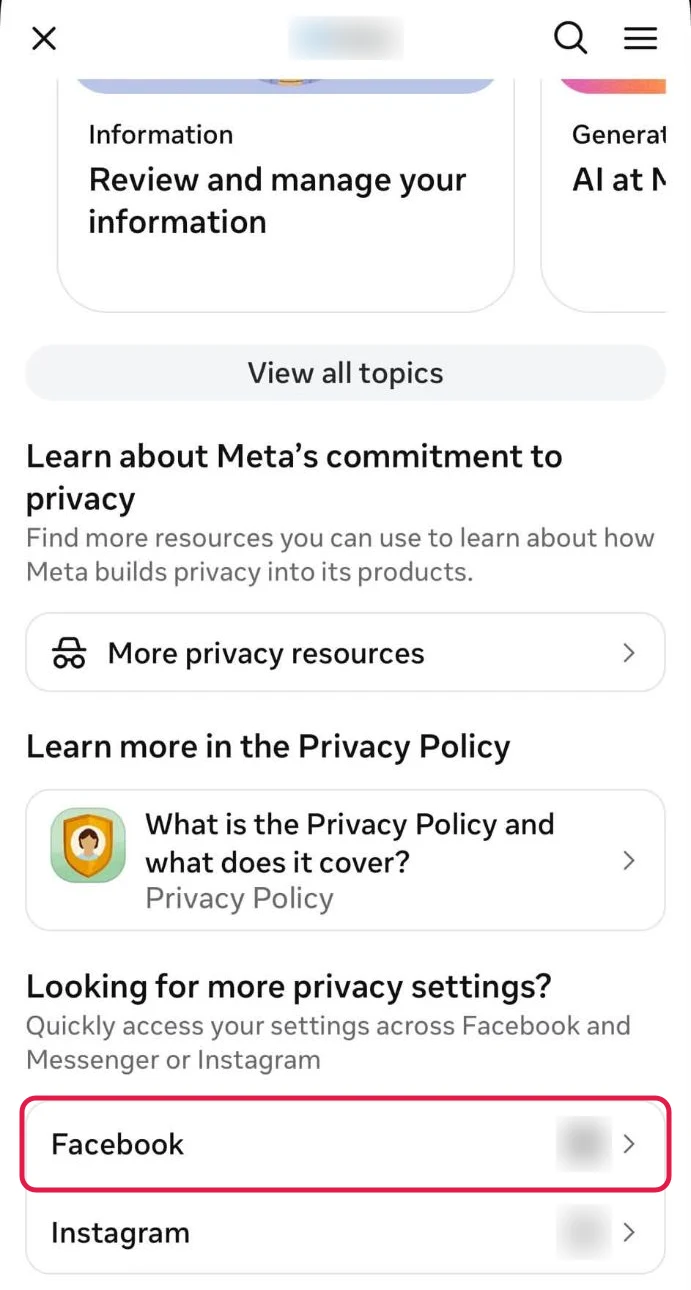
Scroll all the way down to Looking for more privacy settings? and tap Facebook.
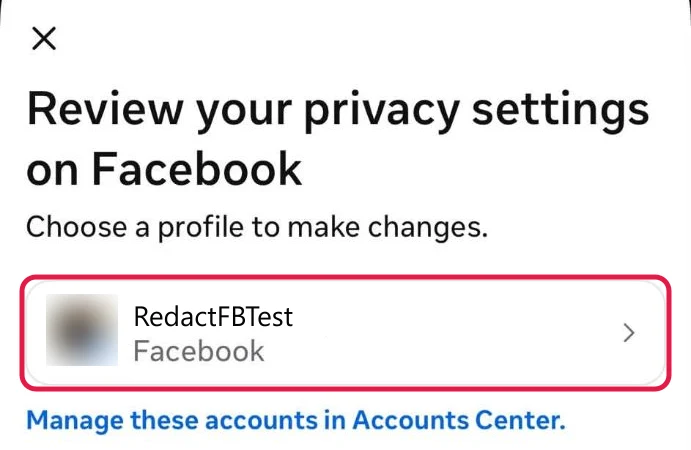
Step 4 Tap your profile
On Review your privacy settings on Facebook, tap your profile to open Accounts Center.
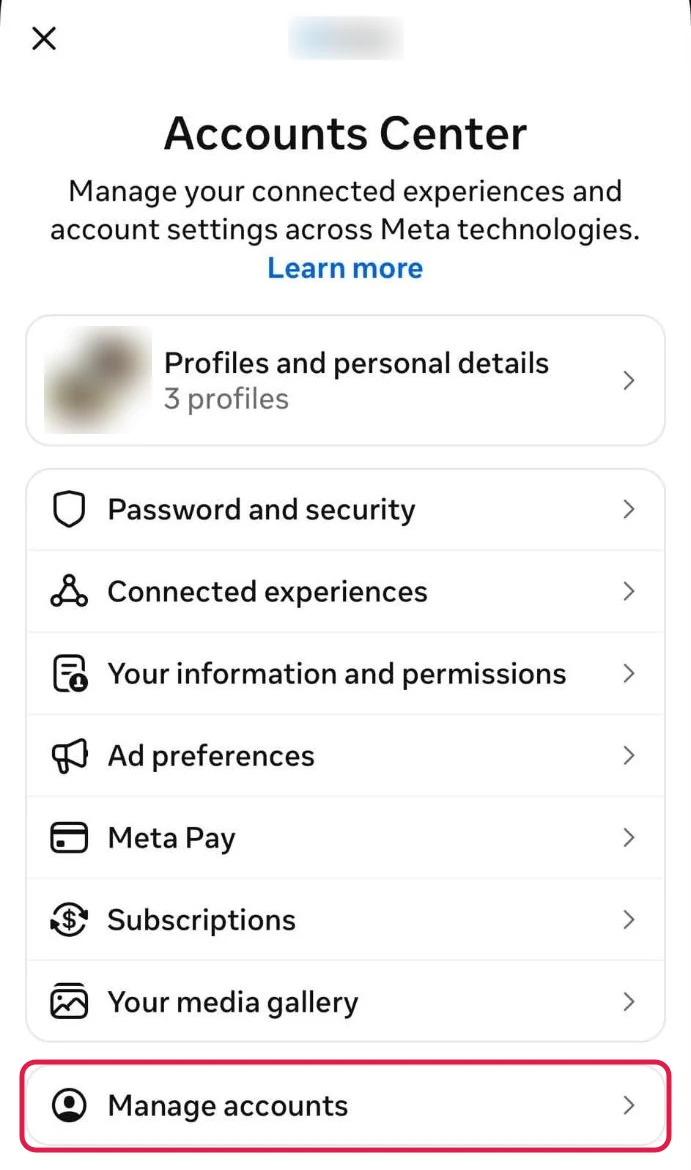
Step 5 Tap Manage accounts
It's at the bottom of Accounts Center, below Your media gallery.
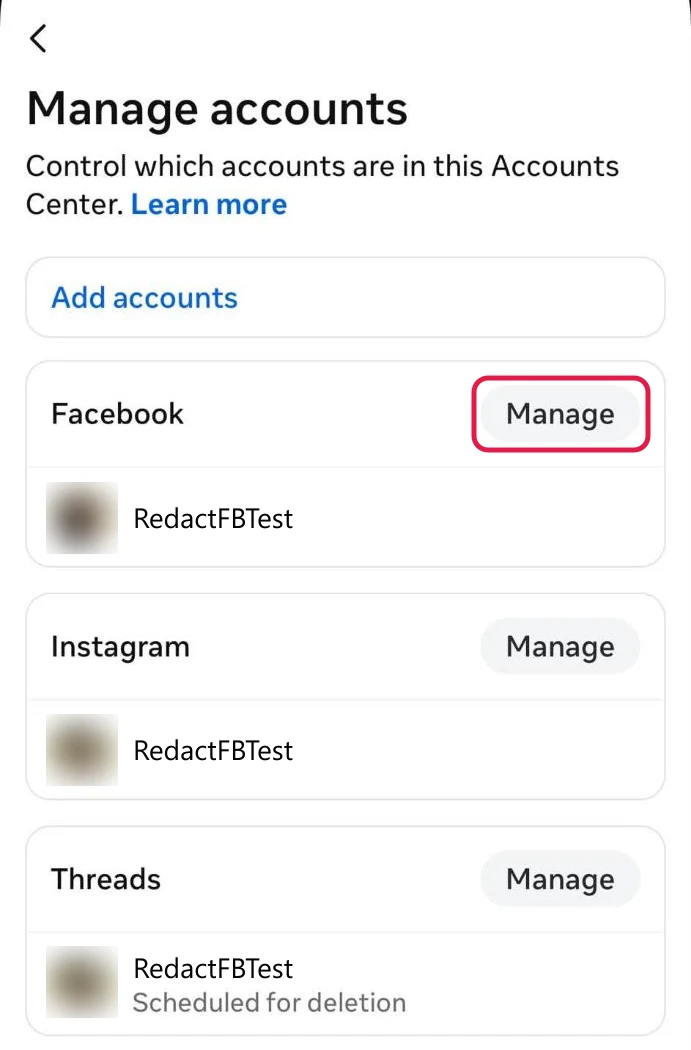
Step 6 Tap Manage next to Facebook
Your Instagram and Threads accounts show up here too if they're linked, so make sure you pick the Facebook card.
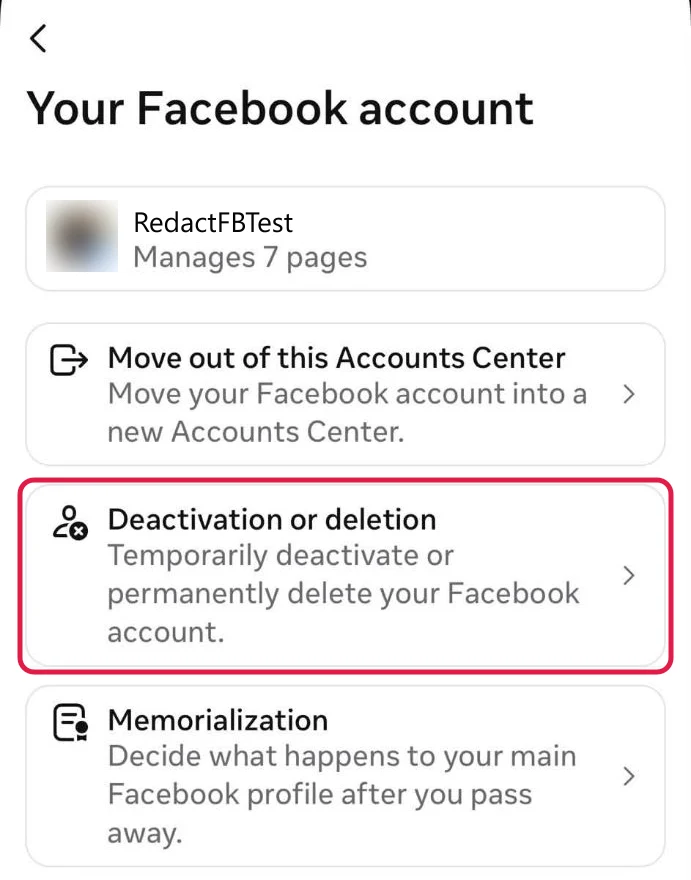
Step 7 Tap Deactivation or deletion
Step 8 Pick Delete account and tap Continue
Step 9 Check which Pages go with it
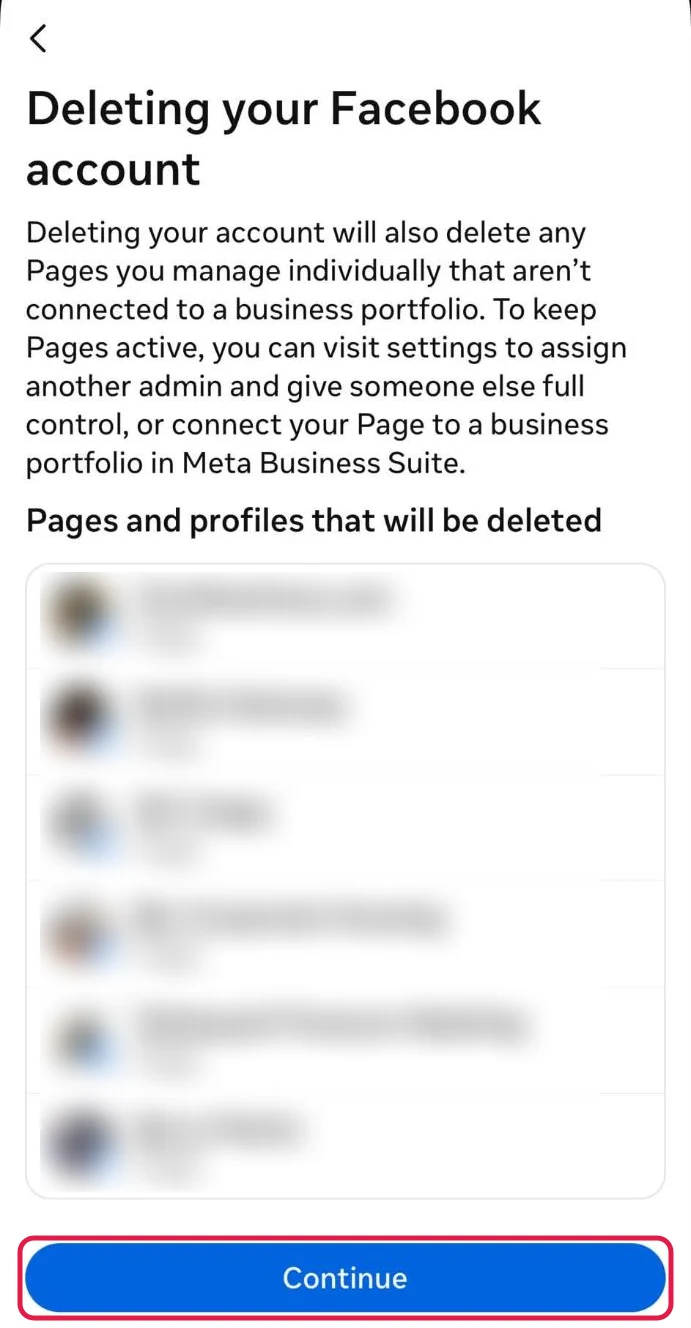
If you manage any Pages, Facebook lists the ones that will be deleted with your account. To keep one, back out and give someone else full control of it first. Otherwise tap Continue.
Step 10 Pick a reason if you like, then tap Continue
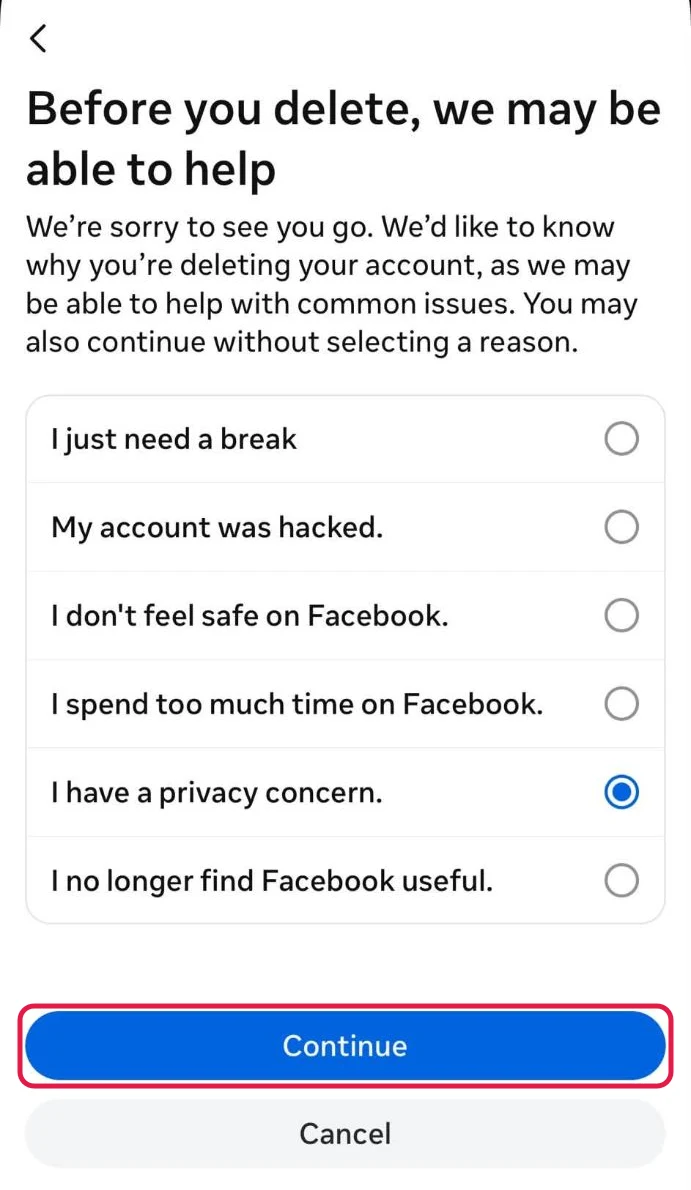
The reason is optional. Facebook says you can continue without picking one.
Step 11 Tap Continue past the privacy pitch
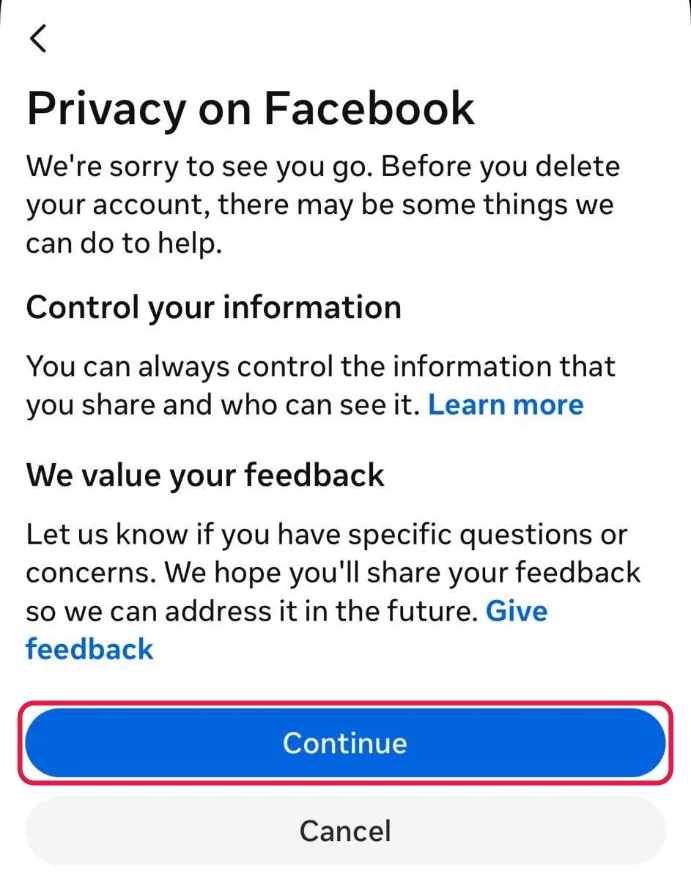
This screen is Facebook's attempt to keep you. Tap Continue.
Step 12 Scroll down and tap Continue again
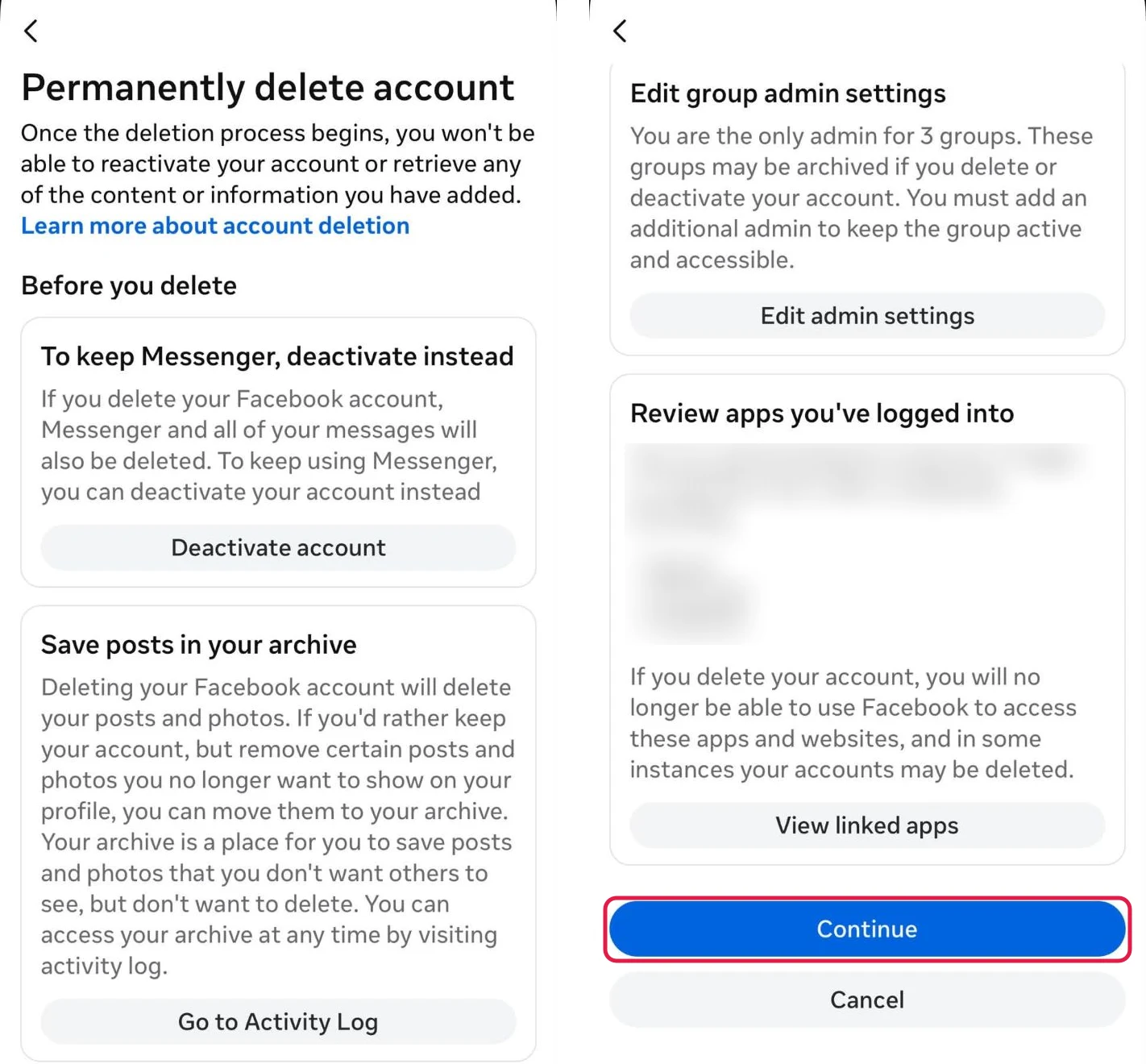
One more attempt to keep you: Permanently delete account suggests deactivating to keep Messenger, archiving posts instead, and lists groups you're the only admin of and apps you log into with Facebook. Scroll to the bottom and tap Continue.
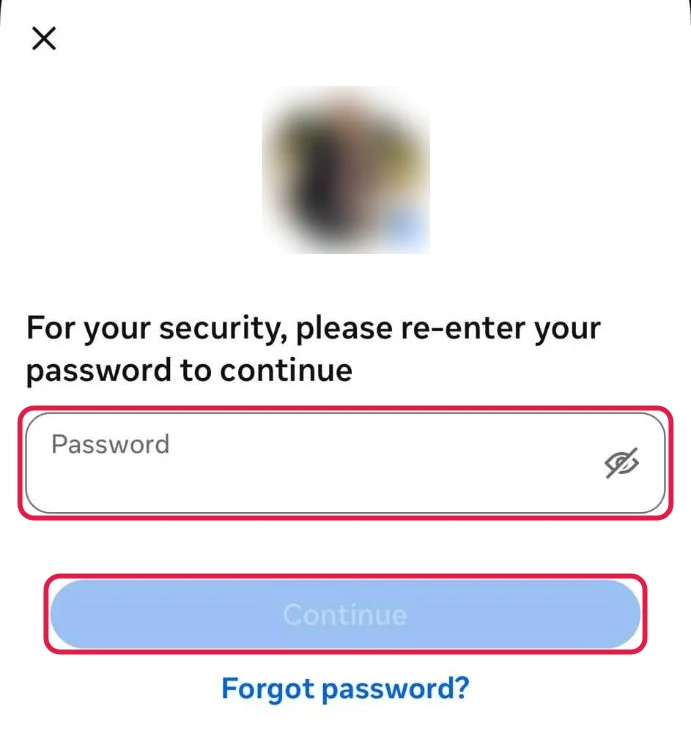
Step 13 Enter your password to confirm
Enter your password and tap Continue to confirm the deletion. That starts the 30 days.
What deleting your Facebook account leaves behind
Here's what Facebook says in its deletion guide and its export guide:
- Your profile, posts, photos and videos are deleted after the 30 days, along with everything else you've added.
- Messenger goes too. You can't use Messenger once the account is deleted. If you'd rather keep chatting, deactivate instead.
- Messages you sent stay with the people you sent them to. Facebook says your friends keep their copy, much like an email.
- Pages you control alone are deleted. Pages you share with another full-control admin stay up.
- Facebook Login stops working. Accounts you made elsewhere with Facebook Login may need the app's own support to recover.
- Instagram and Threads stay. Other profiles in your Accounts Center aren't touched.
- Copies other people made stay. Screenshots, downloads and anything reposted outside Facebook are out of its reach.
- Facebook keeps some data. Copies may remain in backup storage after the 90 days, and Facebook may keep information for legal issues, terms violations or harm prevention.
Want a fresh start instead? Keep the account, delete the history
Deleting the account takes Messenger, your Pages and every Facebook Login with it. If what bothers you is the history, you can keep the account and delete what's on it.
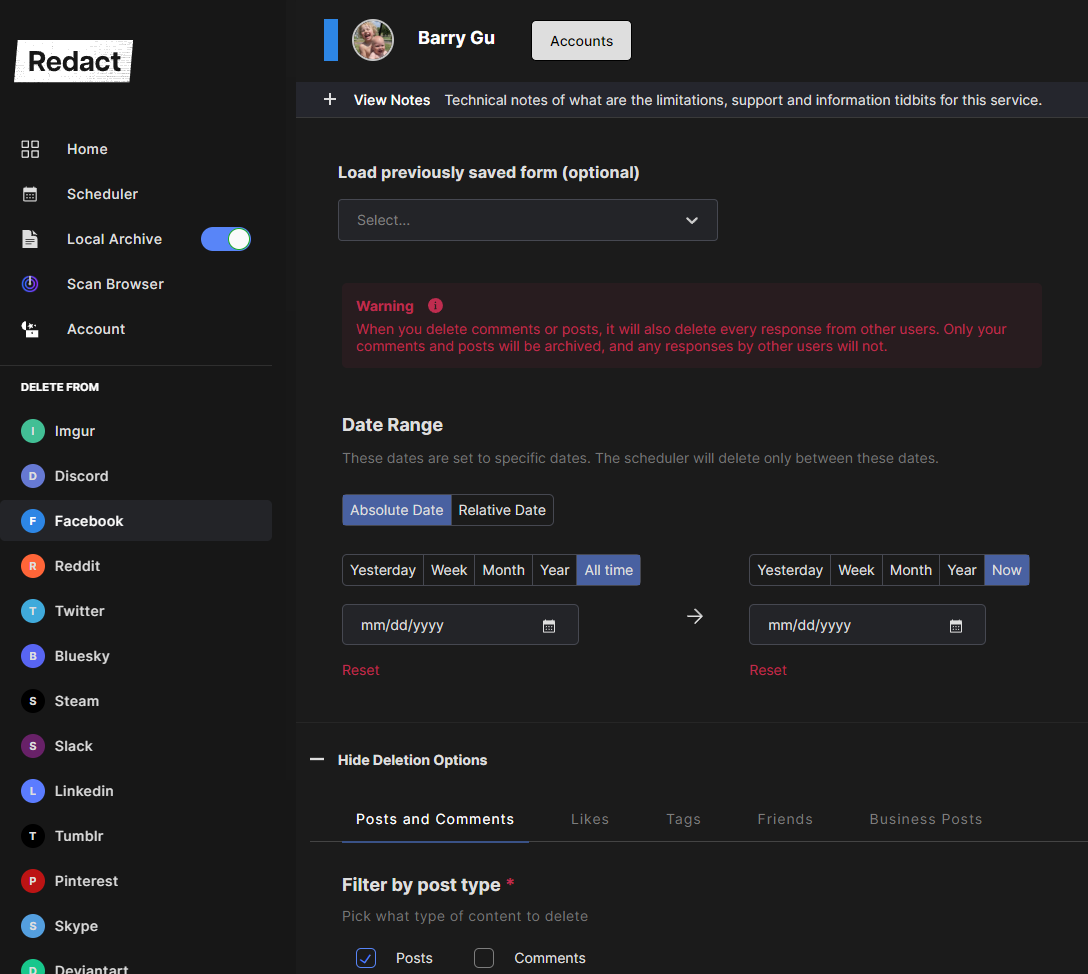
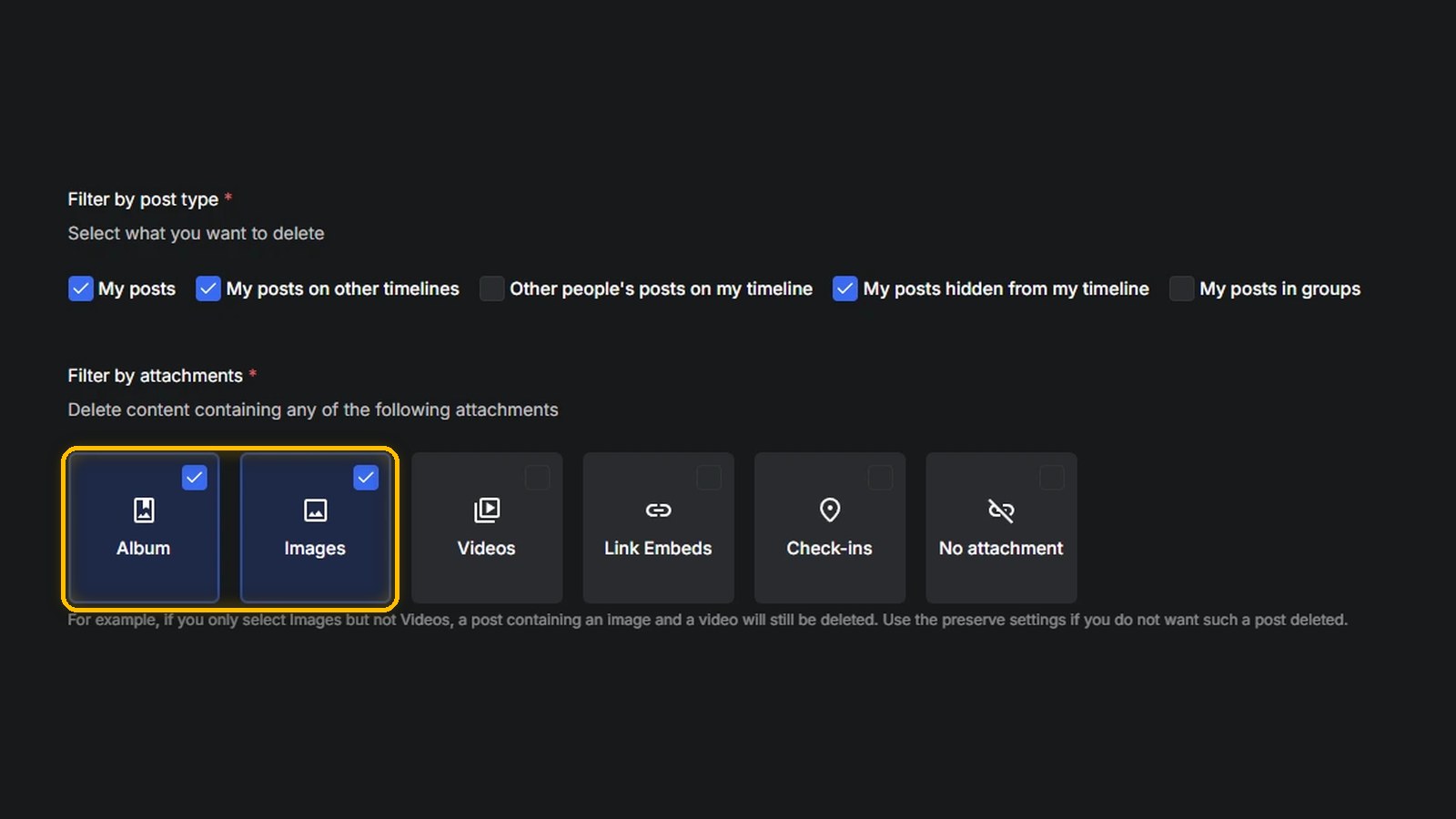
Redact deletes your Facebook posts and comments in bulk on your own device. Connect your account, pick what to delete (filter by date, keyword, post type or attachment to keep some), preview and run. You keep your friends, Pages, Messenger and logins.
Redact has limits too.
- The free plan covers your last 30 days. Older posts and comments, likes, tags, unfriending and search history need Premium.
- Sent Messenger messages are a separate tool. Redact's Messenger cleanup runs in the desktop apps and uses Messenger's Unsend where Messenger offers it. When Messenger only offers Remove for you, the other people keep their copy.
- It can't reach copies. Screenshots and shares of your posts stay, with Redact or Facebook.
Our walkthrough is How to delete everything from Facebook in bulk.
If you still want the account gone, download your export, hand over your Pages, then delete using the steps above.
FAQ
How do I permanently delete my Facebook account?
Go to Settings & privacy > Settings > Accounts Center > Manage accounts, click Manage next to Facebook, then Deactivation or deletion > Delete account > Continue, and confirm. After 30 days, Facebook deletes the account permanently unless you log in and click Cancel deletion first.
What's the difference between deactivating and deleting Facebook?
Deactivating hides your profile but keeps everything, and you can come back by logging in. Messenger keeps working. Deleting removes your profile, your content and Messenger for good once the 30-day window ends.
Can I still use Messenger if I delete Facebook?
No. Facebook says you can't use Messenger once your account is deleted. If you want to keep Messenger, deactivate your Facebook account instead.
How long does it take Facebook to delete your account?
The deletion becomes permanent 30 days after you start it, unless you log in and click Cancel deletion first. Facebook says removing everything you've posted can take up to 90 days from the start, and copies can stay in backups after that.
Can I recover a deleted Facebook account?
Only within the 30 days. Log in and click Cancel deletion. After that, the account and everything on it can't be retrieved.
Does deleting Facebook delete my Instagram account?
No. Facebook says the other profiles in your Accounts Center aren't affected, so Instagram and Threads stay. Delete each one separately.
What happens to my Facebook Pages when I delete my account?
Pages that only you control are deleted along with your account. Give someone else full control of a Page first and it stays up after you go.
Do my messages disappear when I delete Facebook?
Not for the people you sent them to. Facebook says copies of the messages you sent stay in your friends' inboxes after you delete your account.
Redact for Facebook
Delete anything that you posted either on your own profile or somebody else's