What Data Is in Your Instagram File, and How to Download It
 Dan Saltman20 min read
On this page
How to Download Your Instagram Data
Instagram used to call this tool Download your information. It’s now Export your information, and it lives in Meta’s account settings rather than Instagram’s own. These are the steps on a computer as of October 2026, and Instagram’s help page covers the same ground.
- 1
Open your settings
On a computer, go to instagram.com, click More in the bottom left, then Settings.
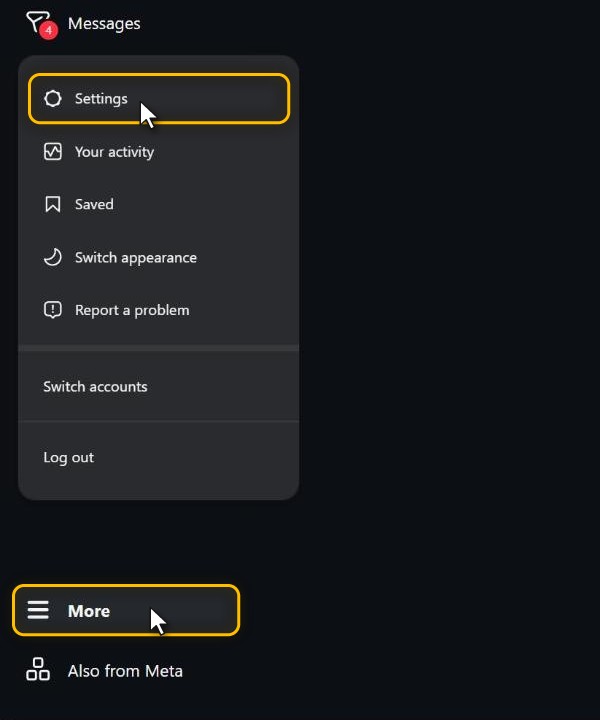
In the app, tap your profile picture in the bottom right, then the three lines in the top right.
- 2
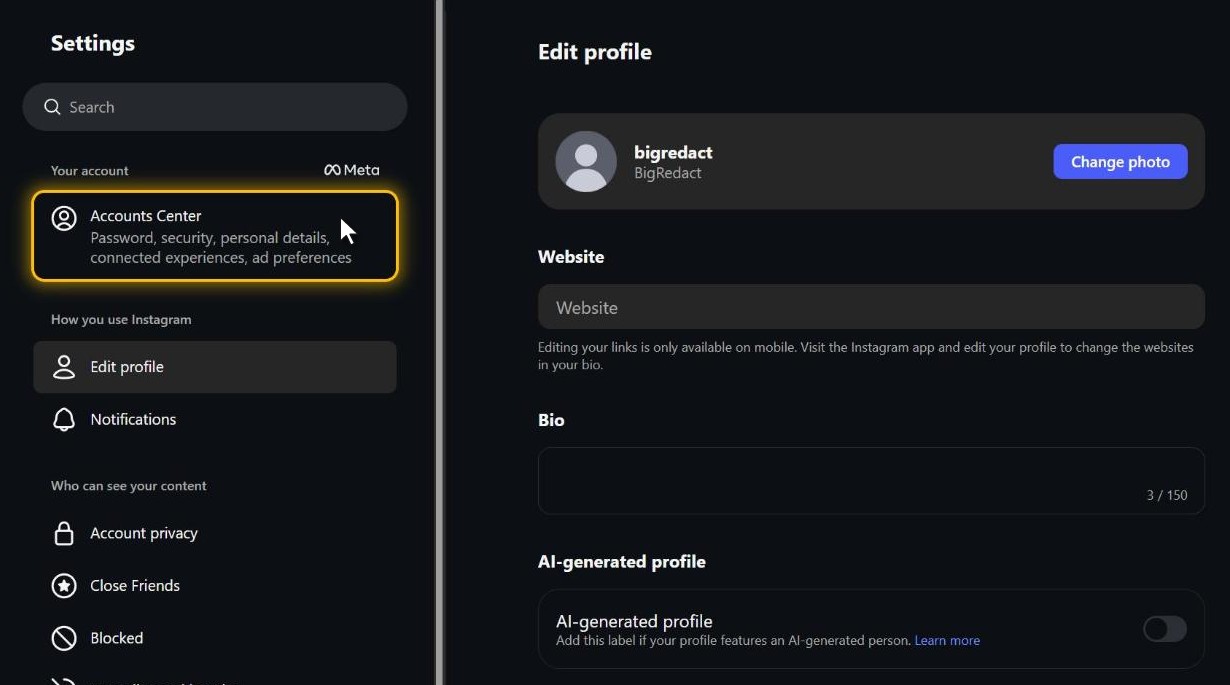
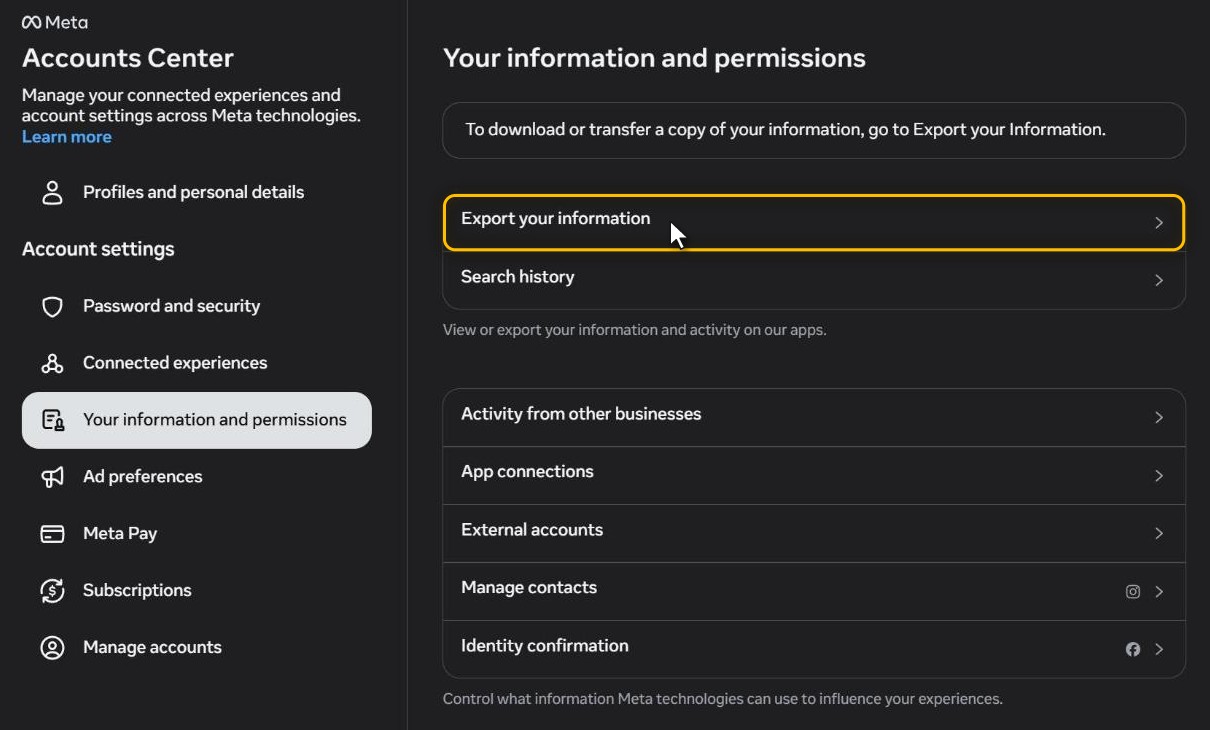
Find Export your information
Click Accounts Center at the top of the Settings menu, then Your information and permissions, then Export your information. Meta is renaming Accounts Center to Meta Account a few people at a time, so yours may say Meta Account. Everything under it is the same.
- 3
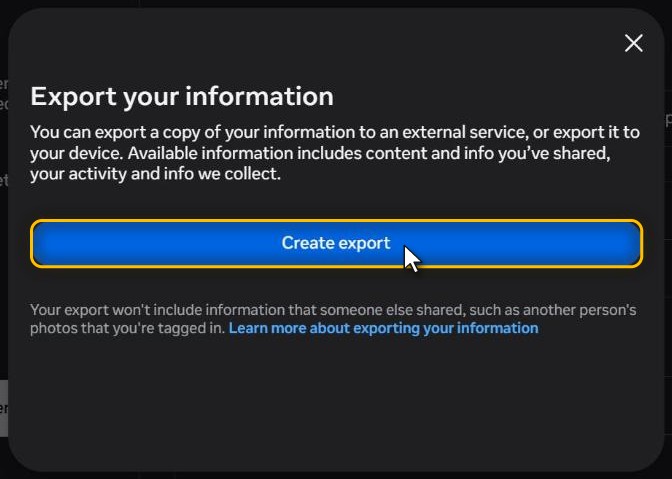
Start a new export
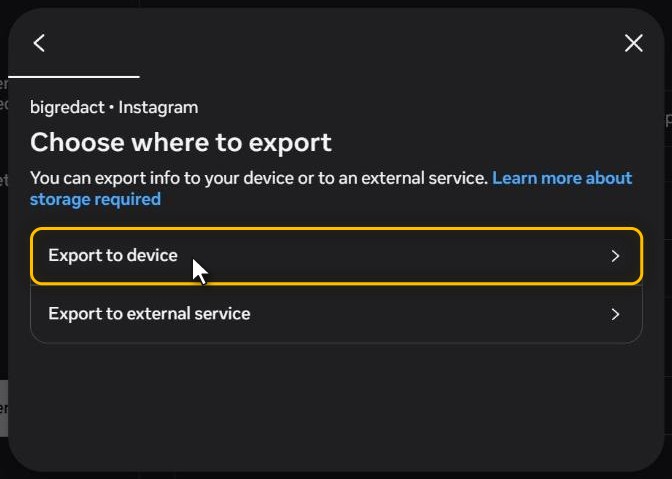
Click Create export, pick your Instagram profile, then choose Export to device. The other choice, Export to external service, sends a copy to a cloud service instead of your computer.
- 4
Choose what goes in it
The last screen is called Confirm your export, and it has five settings. Each one opens its own list, with a Save button at the bottom.
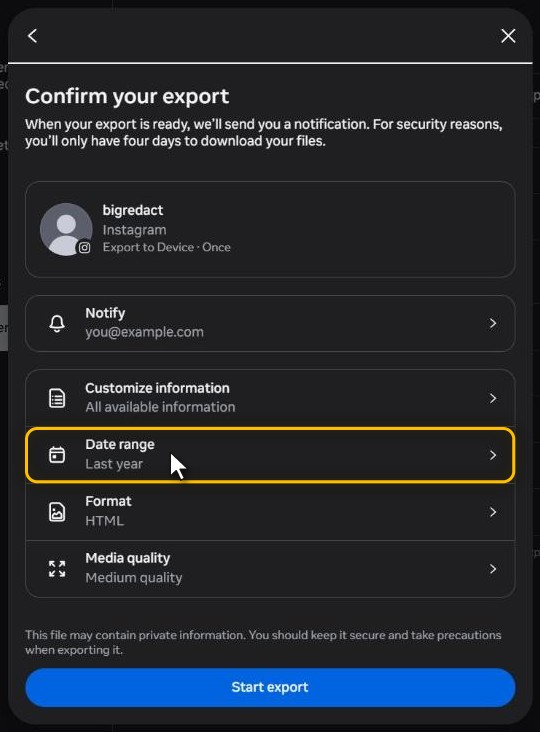
- Notify: the email address that hears when the export is ready.
- Customize information: starts on All available information. Open it to untick any category you don’t want. The categories are the same ones this post walks through below.
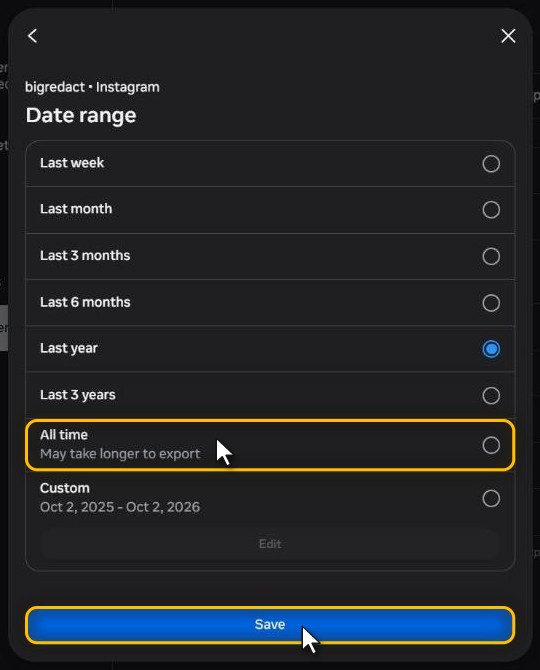
- Date range: starts on Last year. I’d pick All time, so nothing older gets left out. Instagram notes that All time may take longer.
- Format: starts on HTML, which opens as pages in your browser. JSON is raw data for importing into another site or app. I’d stay on HTML if you just want to read it.
- Media quality: Higher, Medium or Lower, starting on Medium. Higher quality makes the file bigger.
- 5
Submit it
Click Start export. Instagram may ask for your password before it starts.
- 6
Download it within four days
You’ll get an email and an Instagram notification when it’s ready. Meta says that can take up to 30 days, though small exports usually come much sooner. The file then sits under Available downloads in the same Export your information screen for 4 days. After that you’ll need to request a new one.
A big account can arrive as several ZIP files. Unzip them all into one folder, then open the one that ends in .html if you picked HTML.
What All is Inside the Download
Instagram’s data download gives you a copy of the account information Instagram has available for export. Depending on the categories selected and the information available for the account, it can include posts, reels, stories, comments, likes, followers, following, direct messages, search activity, ad information, login history, settings, and technical data logs.
The download isn’t identical for every account. Instagram builds the export based on the categories selected, the date range chosen, the account type, the features used, and the information Instagram still has available. A personal account with a few posts won’t produce the same export as a creator account with years of reels, messages, ads, shopping activity, and business tools.
I think the cleanest way to understand an Instagram data download is by category. When a category is included in the export, Instagram provides the files tied to that part of the account.
At a Glance
Categories an Instagram Download Can Contain
Your Account and Profile Information
The account information section includes basic details connected to the Instagram profile.
This can include the account’s username, display name, profile photo, bio, website field, email address, phone number, account type, account creation date, birthday, gender, and professional category if the account is set up as a creator or business profile, when those details are available for export.
It can also include some changes made to the account over time. For example, Instagram may include records of username changes, bio changes, email changes, phone number changes, and other profile updates when that history is available.
For accounts connected through Meta Accounts Center, the download can also include information related to linked Meta accounts and account center settings.
Your Personal Account Information
The personal information category includes identifying details the account holder added to Instagram or Meta.
What can show up here.
- Name
- Email address
- Phone number
- Birthday
- Gender
- Account identifiers
- Contact details
- Connected account information
- Meta Accounts Center details
This section is usually separate from public profile content. It focuses more on the account owner’s information than on what appears publicly on the Instagram profile.
Posts
When posts are included in the download, Instagram provides files connected to feed content.
Typical contents.
- Photos posted to the feed
- Videos posted to the feed
- Carousel posts
- Captions
- Post timestamps
- Media files
- Metadata connected to posts
This section is one of the most useful parts of the download for anyone who wants a backup of their Instagram content.
Deleted posts aren’t guaranteed to appear. If the content is still available through Instagram’s systems, it may be included. If Instagram no longer has it available for export, it won’t be part of the download.
Stories
When stories are included, the download contains story content connected to the account.
What the story files hold.
- Story photos
- Story videos
- Story timestamps
- Story text, captions, or related metadata, when available
- Story elements or related metadata, when available
- Highlights
- Archived stories, depending on the account’s settings and available data
Instagram story content is time-sensitive inside the app, but some story data may still appear in the export if it was archived or otherwise available for download.
A data download shouldn’t be treated as a guaranteed permanent record of every old story or every old story viewer.
Reels
The reels section includes short-form video content uploaded or created through Instagram Reels.
What the reels folder holds.
- Reel videos
- Reel captions
- Reel timestamps
- Reel thumbnails
- Audio information
- Remix-related information, when available
- Reel interaction data or related activity, depending on the export category selected
For accounts that post a lot of reels, this section can be one of the largest parts of the download.
Live Videos
If live video information is available, Instagram can include data connected to live broadcasts.
What can be included.
- Saved live videos
- Live video metadata
- Timestamps
- Related media files, when available
If a live video wasn’t saved or is no longer retained, it may not appear in the download.
Comments
The comments category includes comment activity connected to the account.
What’s in the comment files.
- Comments made by the account
- Comment timestamps
- Comment activity tied to the account, when included
- Comment-related interaction data
This section is useful for reviewing old public activity. If I wanted to clean up my Instagram history, the comments file is one of the first places I’d check.
Likes and Other Interactions
Instagram’s export can include interaction history.
Interaction data you might find.
- Posts liked
- Reels liked
- Comments liked
- Story reactions
- Poll responses
- Quiz responses
- Emoji slider responses
- Question sticker responses
- Content shared or sent, when available
- Content saved
- Interaction timestamps
This section shows how the account engaged with other content. It can also reveal old activity that may be hard to find manually in the app.
Followers and Following

The followers and following category includes account connection data.
When this category is included, Instagram provides files for each of these.
- Accounts following you
- Accounts you follow
- Pending follow requests
- Accounts that requested to follow you
- Follow activity or connection history, when available
- Close Friends
- Favorites
- Blocked accounts
- Restricted accounts
- Muted accounts
- Accounts or content hidden through privacy, recommendation, or safety controls, when available
- Story privacy settings tied to other accounts
This is the section people usually need when they want to compare followers and following.
Instagram doesn’t usually provide a simple “who unfollowed me” report. To figure that out, you need to compare an older followers file against a newer followers file. And if the comparison leaves you wanting to cut your following list down, Redact can bulk unfollow accounts for you.
Contacts
If contact syncing was enabled, the Instagram download can include uploaded contact information.
What contact syncing leaves behind.
- Synced contacts
- Contact upload history
- Phone numbers or email addresses uploaded from a device
- Contact matching information, when available
This is the section I’d expect to surprise people most, because it may contain information pulled from a phone’s address book if contact syncing was turned on.
Direct Messages
When messages are included in the export, Instagram provides conversation data from direct messages.
What the message folder holds.
- One-on-one direct messages
- Group messages
- Message participants
- Message timestamps
- Message text
- Message requests
- Sent photos
- Sent videos
- Voice messages
- Shared posts
- Shared reels
- Shared stories
- Shared links
- Stickers
- GIFs
- Reactions
- Group chat names
- Message attachments
- Media folders tied to conversations
Older accounts with years of DMs can produce a large message folder.
Deleted messages aren’t guaranteed to appear. If Instagram no longer has the message available for export, it won’t be included. As of May 8, 2026, Meta is removing end-to-end encryption from Instagram DMs, which changes how some message data is handled in the export going forward. End-to-end encrypted message data has also been handled differently from regular Instagram message exports, and Meta provides separate guidance for downloading affected encrypted message data.
Calls
If the account used Instagram’s voice or video call features, the download can include call records.
What the call records cover.
- Audio call history
- Video call history
- Call participants
- Call timestamps
- Missed calls
- Call duration, when available
This doesn’t mean Instagram provides recordings of calls. It usually means the export contains call metadata, such as who was involved and when the call happened.
Search History
The search history category includes searches made through Instagram.
What the search files contain.
- Accounts searched
- Hashtags searched
- Places searched
- Search timestamps, when available
- Recent searches
This section can be useful for people who want to review what they looked up on Instagram over time.
Explore, Reels, and Discovery Activity
Instagram can include data connected to how the account used discovery features, especially when activity files or data logs are included.
Signals that can appear.
- Explore activity
- Reels viewed, clicked, or interacted with, when included in activity files or data logs
- Suggested content interactions
- Content clicked, when included
- Content viewed, when included in activity files or data logs
- Topics Instagram associated with the account
- “Not interested” feedback
- Hidden suggested posts
- Sensitive content settings
This section helps show how Instagram builds recommendations around account behavior.
Saved Content and Collections
When saved content is included, the download can show posts, reels, or other content the account saved.
What the saved-content files hold.
- Saved posts
- Saved reels
- Saved collections
- Collection names
- Content saved into each collection
- Save timestamps, when available
This can be useful for backing up research, recipes, shopping ideas, travel plans, memes, or anything else saved over time.
Tags and Mentions
The download can include information about tags and mentions connected to the account.
What the tag data covers.
- Posts where the account was tagged
- Accounts tagged by the user
- Mentions in captions, comments, or stories
- Tagging settings
- Mention settings
This section can help users find where their profile has appeared across Instagram.
Ads Information
Instagram is part of Meta’s ad system, so the download can include advertising data tied to the account.
Ad data you might find.
- Ad interests
- Ad topics
- Ad preferences
- Ads clicked or interacted with
- Ad-related activity, when available
- Advertisers connected to the account
- Businesses that uploaded contact information matching the account
- Business interactions
- Ad personalization settings
This section helps explain why certain ads may have been shown to the account.
Shopping Activity
If the account used Instagram Shopping or checkout-related features, the download can include shopping-related activity.
What the shopping files track.
- Product views
- Product saves
- Shops visited
- Shopping interactions
- Checkout-related data, when used
- Order-related information, when applicable and available
Not every account will have much in this category. Accounts that never used Instagram Shopping may have little or nothing here.
Fundraisers and Donations
If the account interacted with fundraising tools, Instagram can include fundraiser-related information.
What can appear.
- Fundraisers created
- Fundraisers donated to
- Donation activity
- Fundraiser interactions
- Related timestamps
This category only matters for accounts that used Instagram’s fundraising or donation features.
Apps and Websites
The apps and websites section includes information about third-party services connected to Instagram.
What this section lists.
- Apps connected to the account
- Websites logged into using Instagram
- Permissions granted to third-party apps
- App connection history
- Off-platform activity connected to Meta systems, depending on settings
I’d open this section first in any privacy review. Old connected apps can sometimes remain connected longer than users realize.
Login and Security Information
The login and security section includes account access data.
Access data you might find.
- Login history
- Logout history
- Devices used
- Browser information
- App version information
- Login locations, when available
- IP-related login data, when available
- Two-factor authentication settings
- Security emails
- Password change timestamps
- Account recovery activity
- Login alerts
- Active or past sessions
This is where I’d look if I thought someone else had been in my account.
Instagram doesn’t include the actual account password in the download.
Account Settings
The settings section includes the account’s Instagram settings and preferences.
Settings that get exported.
- Privacy settings
- Notification settings
- Story settings
- Comment settings
- Message settings
- Tagging settings
- Mention settings
- Hidden words settings
- Language preferences
- Accessibility settings
- Account recommendation settings
- Sharing settings
- Cross-posting settings
- Connected account settings
- Supervision settings, when applicable
This section is especially useful for a privacy audit. It can show whether the account is public or private, who can message the account, who can tag it, and how content is shared across Meta products.
Professional Account Information

For creator and business accounts, the download can include additional professional account data.
Extra data for business accounts.
- Professional category
- Business contact information
- Creator or business settings
- Branded content activity
- Insights-related information, when available
- Monetization-related information, when applicable
- Professional dashboard activity, when available
Personal accounts usually have less information in this area.
Data Logs
Data logs are the more technical part of an Instagram data download. These files are usually harder to read than the main account categories.
The logs can cover a lot.
- Things viewed
- Things clicked
- Interaction logs
- Device logs
- App usage logs
- Browser logs
- Cookie-related data
- App and website connections
- Recommendation-related activity or signals, when available
- Feed activity signals or related activity, when available
- Reels activity signals or related activity, when available
- Ad-related signals or settings, when available
- Technical logs
- Diagnostic information
- Crash or performance data, when available
This section isn’t always written for easy reading. It’s often structured more like system records than normal account pages. Still, it can reveal how much behavioral and technical information may be tied to normal Instagram use.
What Instagram Data Downloads Usually Do Not Include
Instagram’s download is detailed, but it isn’t a full database dump of everything connected to the account.
Does Instagram Data Download Include Followers?
Yes. When the followers and following category is selected, Instagram provides follower and following data.
This usually includes the accounts following the profile and the accounts the profile follows. It can also include follow requests, Close Friends, blocked accounts, restricted accounts, muted accounts, and related connection settings.
Instagram doesn’t usually provide a direct unfollower report. To find who unfollowed an account, the user has to compare two different follower exports from different dates.
Does Instagram Data Download Include Direct Messages?
Yes. When messages are selected, Instagram provides direct message data that is available for export.
This can include message text, participants, timestamps, shared media, reactions, links, group chats, and attachments, depending on what message data is available for export.
Deleted messages aren’t guaranteed to appear. End-to-end encrypted message data has also been handled differently from regular Instagram message exports.
Does Instagram Data Download Include Deleted Messages?
Not reliably.
If Instagram still has a deleted message available for export, it may appear in the download. If the message is no longer available, it won’t be included.
A data download shouldn’t be treated as a guaranteed way to recover deleted conversations.
Does Instagram Data Download Include Deleted Posts?
Not reliably.
Recently deleted posts or archived content may appear if Instagram still has them available for export. Older deleted posts aren’t guaranteed to be included.
If the goal is to recover deleted content, the download may help, but it shouldn’t be treated as a complete recovery tool.
Does Instagram Data Download Include Story Viewers?
Usually, no.
Instagram data downloads aren’t a reliable way to recover a permanent list of everyone who viewed old stories. Story viewer information is limited inside the app and isn’t usually provided as a long-term archive in the download.
Does Instagram Data Download Include Search History?
Yes. When search activity is included, Instagram provides search history tied to the account.
This can include accounts, hashtags, places, or other searches made through Instagram.
Why Instagram Downloads Look Different From One Account to Another
Instagram downloads vary because users don’t all have the same account history.
What changes the export.
- Categories selected
- Date range selected
- File format selected
- Account age
- Account type
- Features used
- Region
- Connected Meta accounts
- Whether data logs are included
- Whether encrypted message data is involved
- Whether Instagram still retains certain older data
That’s why one person’s download might contain dozens of folders while another person’s download is much smaller.
After You’ve Downloaded It, Clearing Out Old Posts and DMs
Once you have a copy, I don’t see a reason for the account itself to keep holding years of old posts, comments and messages. The download doesn’t change anything on Instagram, so what’s public stays public until you remove it.
Instagram lets you delete posts, comments and likes from Your activity, a batch at a time. Direct messages are slower. Deleting a chat only clears it from your side, and taking back your own messages means unsending them one by one.
That’s the job Redact does in bulk. It can clear old posts, reels, likes and direct messages by date range or keyword, and it runs on your own computer, so the account never passes through our servers. Comments are the exception. Those still have to go through Your activity.
Bottom Line
An Instagram data download can include account information, personal information, posts, reels, stories, comments, likes, followers, following, direct messages, calls, search history, saved content, ad activity, shopping activity, apps and websites, login history, security information, account settings, professional account data, and technical data logs, depending on the categories selected and what information is available for the account.
The download is useful for backing up content, reviewing old activity, checking followers and following, auditing privacy settings, reviewing login history, and seeing what kinds of data Instagram keeps connected to the account.
It isn’t a complete record of everything that has ever happened on the account. It doesn’t usually include profile viewers, old story viewer lists, other users’ private data, or a simple unfollower report. Reviewing the export is also a useful way to see how much of your activity is sitting on Meta’s infrastructure, a fleet of 32 data centers and counting, increasingly built to train AI on the kind of data your download contains.