How to Download Your Facebook Data (and Read the File)
 Dan Saltman11 min read
On this page
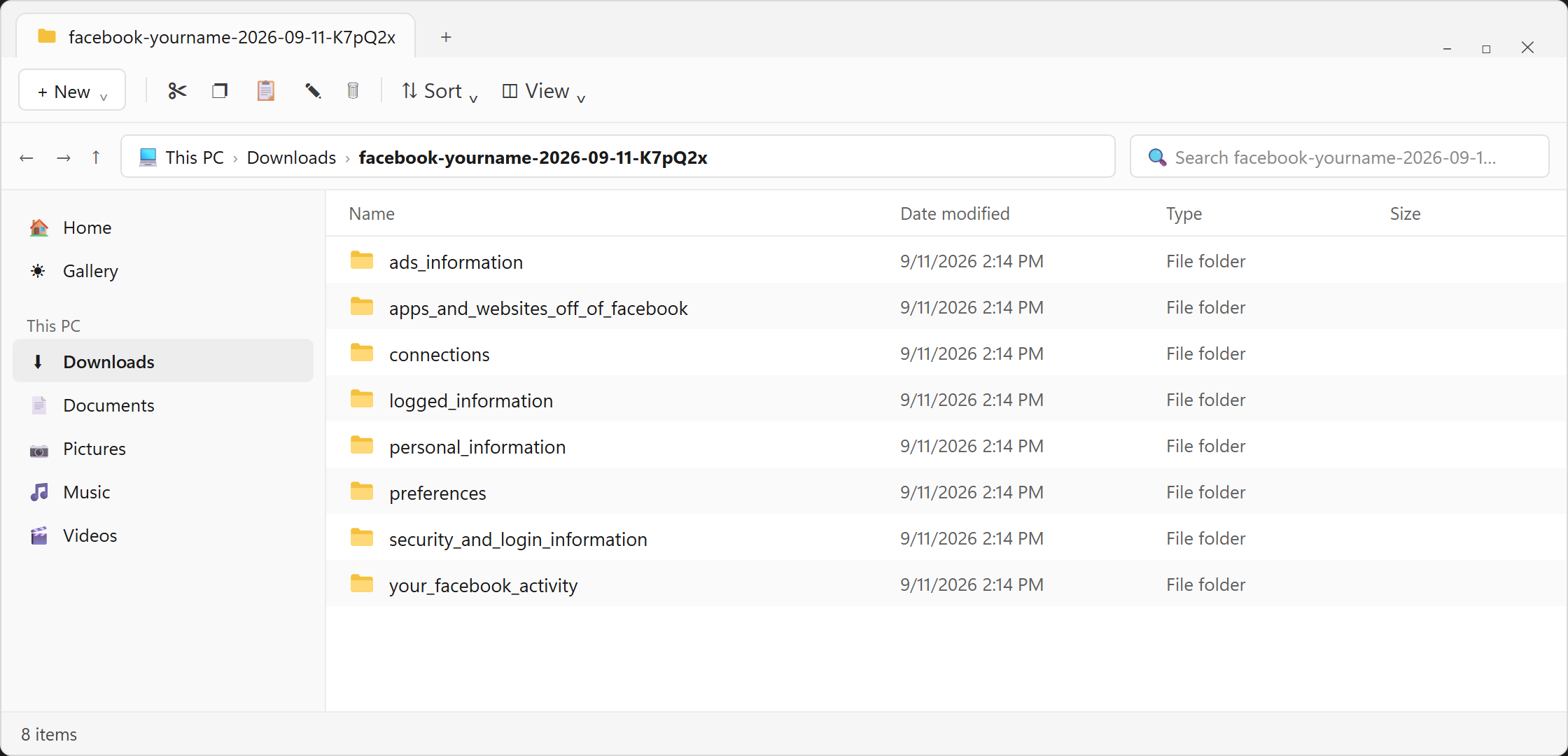
Facebook will give you a free ZIP of almost everything it keeps on your account, but no way to read it. The export is hundreds of raw JSON files with names like logged_information, and a decade of Messenger chats arrives as thousands of text files, newest message first.
Four free apps below turn it into message counts, searchable notes, a timeline or charts without uploading your file, ranked by how well they protect your privacy. I'll cover how to request the file, which app to use for what, and where to look for the answers the apps miss. It's one of our guides to downloading your social media data.
First, How to Request Your Facebook Data
Facebook calls the tool Export your information. These steps are for desktop and web, on facebook.com in your browser. The phone app has its own section after step 10.
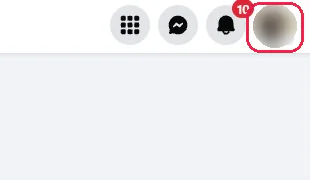
Step 1 Click your profile picture
It's at the top right of every Facebook page.
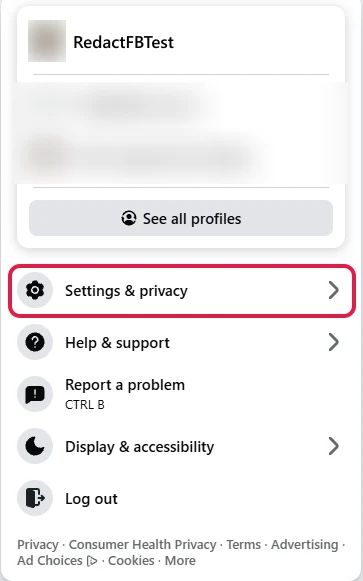
Step 2 Click Settings & privacy
It's below your profiles in the menu that opens.
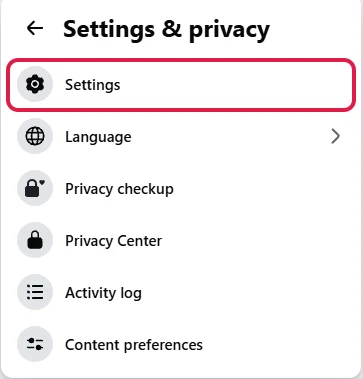
Step 3 Click Settings
Settings is the first item in the Settings & privacy menu.
Step 4 Open Accounts Center
Click Accounts Center under Your account at the top left. Yours may say Meta Account, since Meta is renaming it gradually. Everything after this is the same.
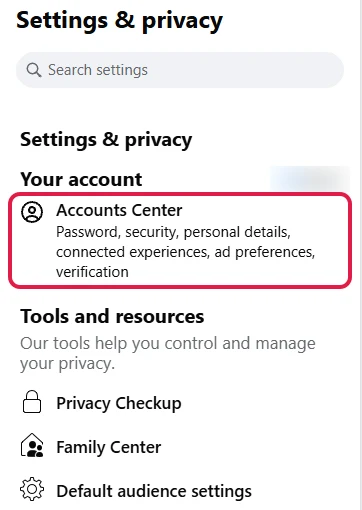
Step 5 Click Your information and permissions
It's in the Account settings menu on the left.
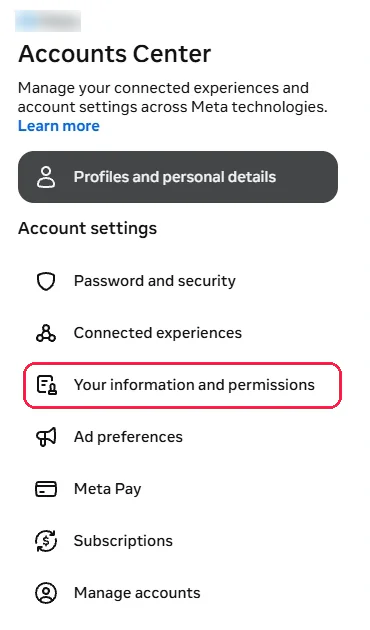
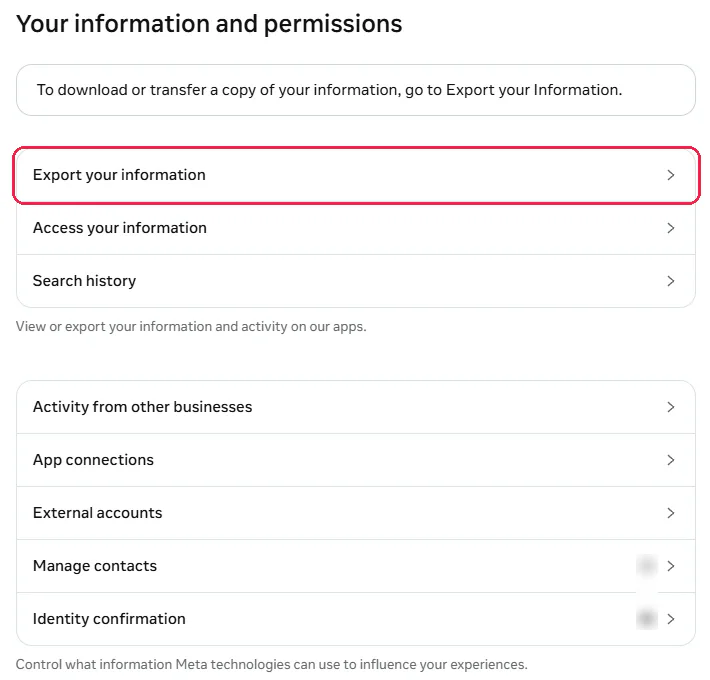
Step 6 Click Export your information
It's the first item on the Your information and permissions page.
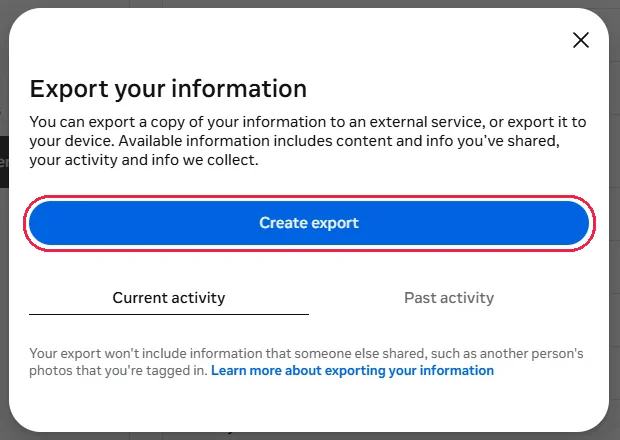
Step 7 Click Create export
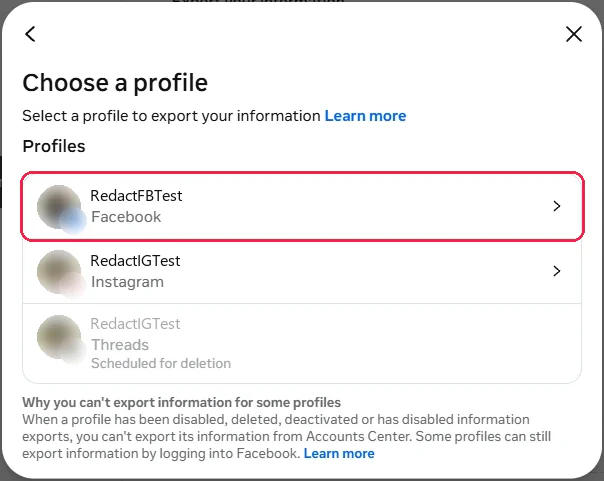
Step 8 Pick your Facebook profile
Every profile in your Accounts Center is listed, so a linked Instagram account shows up here too. Click the one marked Facebook.
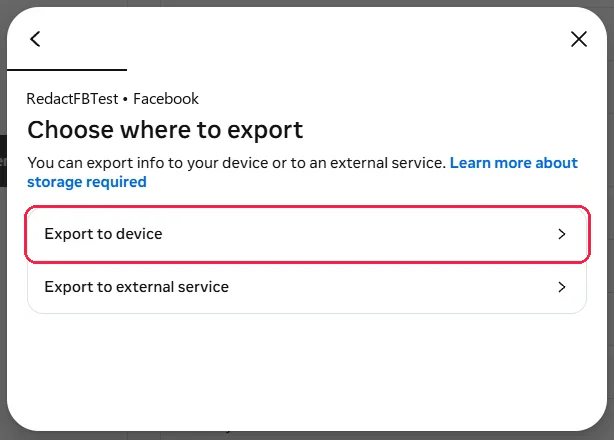
Step 9 Choose Export to device
Export to external service sends the copy to another company's service instead of your computer.
Step 10 Set the format and date range, then start the export
The last screen is called Confirm your export. Click Format and pick JSON, the one every app below reads, then click Date range and pick All time. Each one opens its own list with a Save button at the bottom, and the table below covers the other settings. Then click Start export, and enter your password when Facebook asks.
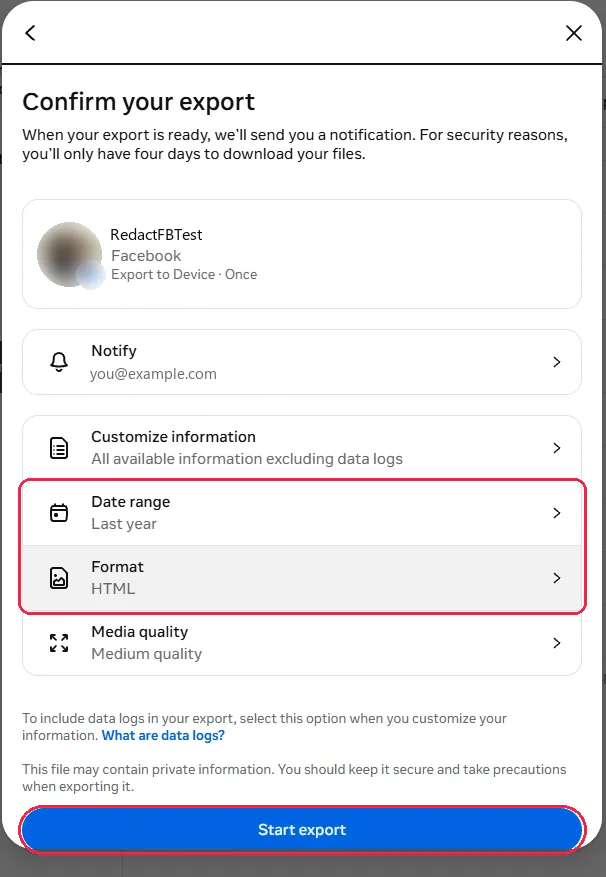
| Setting | What it changes | Pick this for the apps below |
|---|---|---|
| Information | Everything, or only the sections you tick. Data logs, the fine-grained record of things you've viewed and clicked, only come if you choose Customize information and add them | Everything. Leave data logs for a second export, since they can take up to 15 days |
| Date range | How far back the export reaches | The widest range it offers. A timeline of the last month isn't much of a timeline |
| Format | HTML is a set of pages you click through in a browser. JSON is raw data built for other programs | JSON. It's the format the apps take, and each export comes in one format only |
| Media quality | How big your photos and videos come out | The lowest, unless this export is also your photo backup. High-quality video is what makes these files huge |
| Notification email | Where the "it's ready" email goes | An inbox you'll check in the next few days |
Downloading Your Data on Your Mobile App?
In the Facebook app, tap Menu in the top left and start from step 2. The app adds a Next button before step 8. Meta's own shortcut skips the menus.
Download It Within Four Days
Meta says most exports are ready within a few hours (data logs, if you added them, arrive separately and can take up to 15 days).
You'll get an email and a Facebook notification, and the file then waits under Available downloads in the same Export your information tool, for 4 days only. Miss the window and you're requesting a new one.
Save it to your computer, because that's where the reader apps run. A big account can arrive as a whole batch of ZIP files, and some of them hold nothing but the photos and videos from your chats, so unzip every one of them into the same folder before you point an app at it.
The Apps That Make Your Facebook Export Readable
Your export holds your phone number, your contacts, your login history and years of private messages, so what matters most about a reader app is where that data goes, and nothing below uploads it. We read through each app's code, where it's published, and scored everything else it does out of five. Five stars means it never goes online. A star comes off for each outside company it talks to, and for code nobody can check. Where two apps tie, the easier one ranks first.
| # | App | Privacy | What it does | Best for |
|---|---|---|---|---|
| 1 | Counter For Messenger | Never goes online | Counts messages for every chat and person, over any date range you pick | Seeing who you really talk to |
| 2 | Jimmy | Never goes online | Turns your posts and one-to-one chats into Markdown notes, one per conversation, from a command line | A searchable archive in Obsidian or Joplin |
| 3 | Timelinize | Its map loads from Mapbox, which sees the places you view | Puts your posts, photos, check-ins and chats on one timeline, with a map and a gallery | Your whole Facebook history in one view |
| 4 | Excel | Closed source. Keep the file off OneDrive | Opens any one file as rows you can sort and filter, through Data > Get Data > From File > From JSON | The small files in the next section |
| 5 | FBMessage Explorer | Sends your clicks to Google Analytics, and a web page can change on any visit | Charts who you message, when and how much, right in your browser | A quick look with nothing to install |
The Small Files Worth Opening Yourself
The apps handle the big, unreadable parts of the export, but the sharpest privacy answers sit in small files that open in any spreadsheet or text editor, and no app goes looking for them.
| The question | Open this | What you'll see |
|---|---|---|
| Has anyone else been in my account? | security_and_login_information/account_activity.json | Every login and logout, with its date, IP address and browser |
| What does Facebook think I'm into? | logged_information/other_logged_information/ads_interests.json | The topics Meta files you under for ad targeting |
| Which companies gave Meta my details? | ads_information/advertisers_using_your_activity_or_information.json | Advertisers who sent Meta a customer list with your email or phone number on it |
| Which businesses report my visits? | apps_and_websites_off_of_facebook/your_activity_off_meta_technologies.json | One entry per shop, app or site that told Meta what you did there |
| What have I searched for? | logged_information/search/your_search_history.json | Every search you've typed into Facebook, with a timestamp |
| Who did I drop, and who turned me down? | connections/friends/removed_friends.json | The people you unfriended, each with a date. Sent and rejected requests sit beside it |
| Did I ever upload my phone's contacts? | personal_information/other_personal_information/contacts_uploaded_from_your_phone.json | Names and numbers from your address book, if contact syncing was ever on |
| What have I logged into with Facebook? | apps_and_websites_off_of_facebook/connected_apps_and_websites.json | Every app and site you've signed into with your account, including the forgotten ones |
Three of those are worth doing something about.
- A device you don't recognize. Sign it out under Password and security > Where you're logged in.
- Advertisers holding your details. Stop them using those lists to reach you in your Ad preferences, which shows the advertisers that put you in an audience and lets you turn each one off.
- Off-Meta activity. Keep this file, because Meta said in June 2026 that the setting for disconnecting it is going away.
By Meta's own account, the export never includes anything you deleted or anything someone else posted, including their photos you're tagged in.
Facebook isn't the only one. The Instagram, Snapchat and Discord exports each have a guide of their own.
Facebook Data Download FAQ
Which app should I start with?
Counter For Messenger if you're on Windows. It tops the privacy ranking because nothing in it ever goes online, and it's an ordinary app rather than a command-line tool. On a Mac or Linux, Timelinize gives you the most for an evening's setup, with your posts, photos and chats on one timeline, as long as you don't mind its map loading from Mapbox.
How long does it take to download your Facebook data?
Meta says most exports are ready in a few hours. Data logs are the slow part, at up to 15 days, and they arrive as a separate export. Once a file's ready you have 4 days to download it.
Does requesting my data change anything on my account?
No. It's a copy, and nothing comes off your account when you make one.
Why are some of my Messenger chats missing?
Chats that switched to end-to-end encryption aren't in the main export. You'll find the part of each one from before the switch in the e2ee_cutover folder, and the rest comes through Messenger's own download of your message storage, which only works on a computer. FBMessage Explorer and Counter For Messenger both read that second download alongside the first.
Can I get back posts or messages I deleted?
No. Meta says deleted content comes off its servers as well, so the export can't include it, and no app can show you what isn't there.
Is it safe to upload my Facebook data to an analyzer site?
Think twice. The export holds your messages, your contacts, every place you've logged in from and years of your activity. The apps above get the same answers without that file ever leaving your hands.
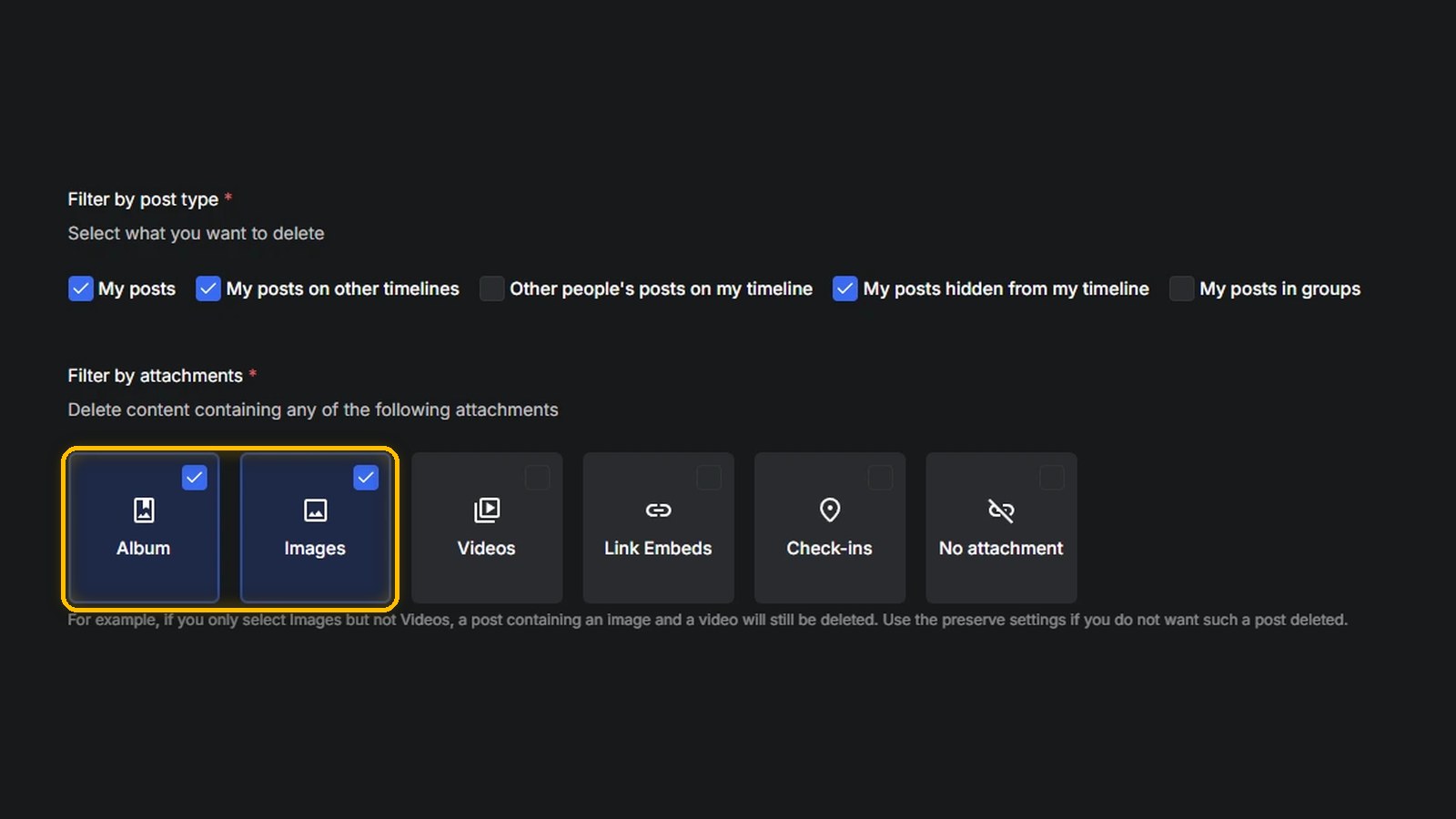
Redact for Facebook
Delete anything that you posted either on your own profile or somebody else's