What's Inside Your Snapchat Data File and How to Request It
 Dan Saltman11 min read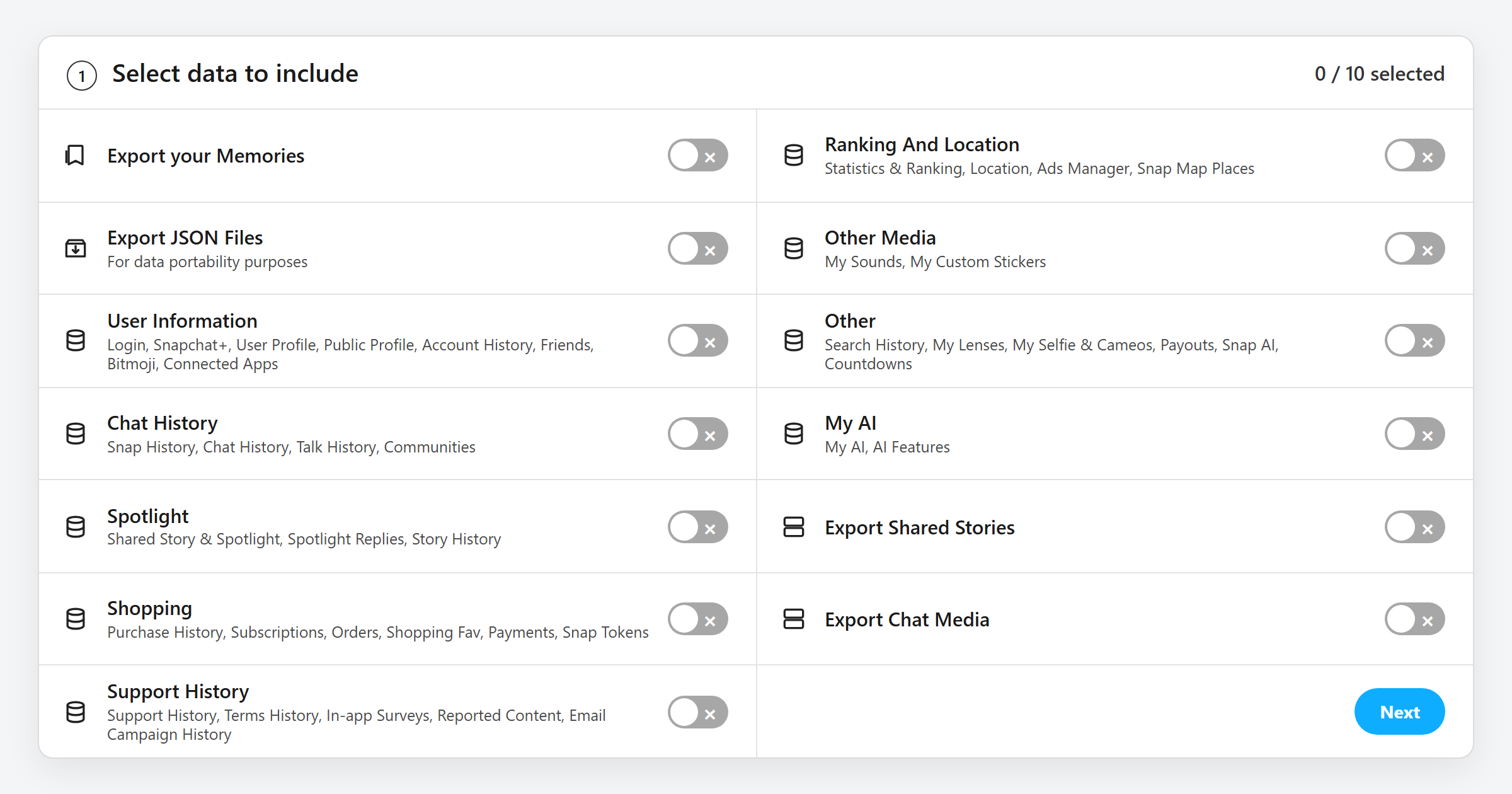
On this page
Snapchat feels like an app that forgets everything. The download file Snap's going to send you when you request your data says otherwise. It's a big ol' ZIP file with your saved chats, a log of every snap you've ever sent or received, your full friend list, your search history, a location log, plus every photo & video in your Memories, My Eyes Only aside.
Requesting your data is free and it usually turns up within a day or two. I'll cover what's in it, how to get it, and how to read it.
What's Inside Your Snapchat Data File?
When you unzip it you're greeted with an index.html page and an html folder, plus a json folder if you switched Export JSON Files on, and your Memories and chat media as real photo and video files if you switched those on. The html and json folders hold the same information twice. One version is web pages you can click through, the other is raw data for apps and scripts. Where a row names a category instead of a file, Snapchat splits it across several small ones.
| File | What's in it | Worth knowing |
|---|---|---|
| account.json, user_profile.json | Your username, display name, email, phone number, birthday, sign-up date, Snap Score and Bitmoji, plus a login log with dates, IP addresses and countries | The login log is the one to skim if you've ever wondered whether someone else has been in your account |
| friends.json | Current friends, deleted friends, blocked users, hidden friend suggestions, ignored requests and pending requests, each with a date | Deleted and blocked people stay on the list |
| chat_history.json | Every saved chat message, both sides, with who sent it, when, and whether it was text, a photo or a video | Only messages that you or the other person saved. Anything that vanished normally isn't kept, and Snapchat says saved chats with someone you've since removed may be gone too |
| snap_history.json | A log of every snap you sent and received, with the other person's username, the time and the media type | It's a log, not the snaps. Once a snap is opened, the picture is gone from Snapchat's side too |
| talk_history.json | Your voice and video call history | Who and when. Never a recording |
| memories_history.json | One entry per Memory with the date it was captured, whether it's a photo or video, the GPS location where Snapchat knew it, and a download link | The links stop working after about a week. The memories folder is where the actual files live |
| story_history.json, spotlight_history.json | Stories you posted and Spotlight submissions, with dates | Metadata unless the story was also saved to Memories |
| location_history.json, ranking.json | Timestamps paired with latitude and longitude wherever Snapchat recorded you, the Snap Map places you've visited, your Ads Manager activity, and Snapchat's own statistics and ranking of your account | Ghost Mode hides you from friends on the map. This log is what Snapchat keeps for itself |
| search_history.json and the rest of Other | Searches you've typed in the app with timestamps, plus your lenses, Selfie and Cameos, sounds, custom stickers, countdowns and any Creator payouts | Usernames, places, lenses, all of it |
| My AI | Your conversations with My AI and what you've used its features for | The one chat log that isn't tied to a friend |
| connected_apps.json | Third-party apps and sites you've signed into with Snapchat | Worth a look for anything you forgot you authorised |
| Shopping | In-app purchases, subscriptions, orders, shopping favourites, payments and Snap Tokens | Card numbers aren't in here, just what you bought and when |
| Support History | Support tickets you opened, surveys you answered, marketing emails you were sent, and the dates you accepted each Terms of Service | Anything you told support is in plain text |
Where to Request Your Snapchat Data
The request lives on one page, accounts.snapchat.com/accounts/downloadmydata. The app just sends you there.
- 1
Open My Data
On your phone, tap your Bitmoji, top left > the settings cogwheel (), top right > My Data. It opens Snapchat's website in your browser and asks you to sign in.
On a computer, sign in at accounts.snapchat.com and click My Data.
- 2
Pick what you want
The page is one list of switches, and every one of them starts off. Nine are data categories, and each row spells out what it covers.
Category What it covers User Information Login, Snapchat+, your profile and public profile, account history, friends, Bitmoji, connected apps Chat History Snap history, saved chat history, call history, Communities Spotlight Shared Stories and Spotlight, Spotlight replies, Story history Shopping Purchases, subscriptions, orders, shopping favourites, payments, Snap Tokens Support History Support tickets, Terms history, in-app surveys, reported content, marketing emails Ranking And Location Statistics and ranking, location, Ads Manager, Snap Map places Other Media Your sounds and custom stickers Other Search history, lenses, Selfie and Cameos, payouts, Snap AI, countdowns My AI Your My AI chats and AI features The other four switches add files rather than records. Export your Memories adds your Memories, both the list in
memories_history.jsonand the photo and video files, Export Chat Media adds the photos and videos saved in your chats, Export Shared Stories adds those, and Export JSON Files gives you the raw data files alongside the readable web pages. Turn on everything you want, including JSON, then hit Next. - 3
Set a date range, or don't
You can limit the export to Yesterday, Last week, Last month, Last year or 2 years, or switch the date range off to get everything. Everything is the useful answer here.
- 4
Confirm your email and submit
Snapchat emails the download link to whichever address you confirm on this screen. It doesn't have to be your account email, so pick one you can open, then click Submit. The same page has a See exports button where the file shows up too.
Snapchat says it tries to deliver within 7 days. A small export often lands in a few hours. Ticking Memories on a big account is what pushes it towards the long end, and it can arrive as several ZIP files rather than one. Download it on a computer if you can, and don't sit on the link, because it stops working after about a week.
How to Open the Snapchat Data File
Unzip it first. On Windows that's right click and Extract All, on a Mac it's a double click. If Snapchat sent more than one ZIP, the extra ones hold more of your memories and chat_media folders, so unzip them all and merge each of those folders into the matching folder from the first ZIP.
Then open index.html in any browser. That's the version Snapchat built for people to read. It has a menu down the side with one page per category, and the Memories page lists each item with a link.
The json folder is the same data as raw text. Any text editor opens it, but a year of chat history in raw JSON is a wall of text. That's what the apps below are for.
Apps Built for Reading a Snapchat Export
Your export holds your phone number, your location log, your saved chats and the IP addresses you've signed in from. So the first question about any reader app is where your data goes when you use it. Every app in this table does the work on your own computer. The two Memories tools do reach Snapchat's servers, because that's where the download links in the export point, but none of the four sends your data to anyone else.
| App | What it does | Best for |
|---|---|---|
| Snap Data Explorer | A desktop app for Windows, Mac and Linux. Drop the ZIP in and it rebuilds your chats as conversations, adds full-text search and a gallery for your media. Handles multi-part exports | Reading the whole thing the way you'd read the app |
| All-In-One Snapchat Downloader | A desktop app that saves every Memory with its original date, location and caption baked back into the file, and can do the same for chat media | Getting your Memories out properly before the links expire |
| SnapchatExportTools | Two Python scripts. Use the Memories one, which saves your files with the right timestamps. Skip the chat one, because it writes message text into a web page without cleaning it, so a booby-trapped message could run code when you open the page | A quick, no-frills Memories save |
| snaparser | A command-line tool that prints your chat history as plain, readable text, filtered by friend if you want | Pulling one conversation out fast |
The Memories tools exist because of a quirk in the export. Snapchat's own files arrive with today's date and no location, while the real capture time and GPS sit next to them in memories_history.json. These apps read that file and put the details back.
Make the Next Export a Shorter One
Everything in chat_history.json is there because somebody hit save. Redact clears the messages you've sent on Snapchat in bulk, across every conversation you pick, and once they're gone they stop showing up in your data file.
Snapchat Data Download FAQ
How long does the Snapchat data download take?
Snapchat's own line is up to 7 days. Small exports often arrive within hours, and a full export with Memories on a busy account takes the longest. You'll get an email when it's ready.
Can I see deleted or unsaved messages in it?
No. Snapchat deletes unsaved chats and opened snaps from its servers, so they can't be exported. Only messages that somebody saved are in chat_history.json.
Does the download include my actual Memories?
Only if you switch Export your Memories on before you submit. That switch is what puts your Memories in the export at all, both the list in memories_history.json and the photo and video files, which sometimes arrive split across several ZIPs. Export Chat Media does the same for the photos and videos saved in your chats. The download links inside memories_history.json expire after about a week.
Why do my exported Memories all show today's date?
Snapchat doesn't write the capture date or location into the files it exports, even though it has both. They sit in memories_history.json instead. The free Memories tools above read that file and put the details back into each photo and video.