How to Download Your Discord Data (and What's in the Package)
 Dan Saltman
On this page
Discord will send you a copy of your data for free. You request it from Data & Privacy in your settings, and a download link arrives by email within 30 days. Here's how to ask for it on desktop and on your phone, then what turns up, because a Discord data package is a ZIP of raw JSON, not the chat backup most people expect. It's one of our guides to downloading your social media data.
How to Request Your Data Package
- 1
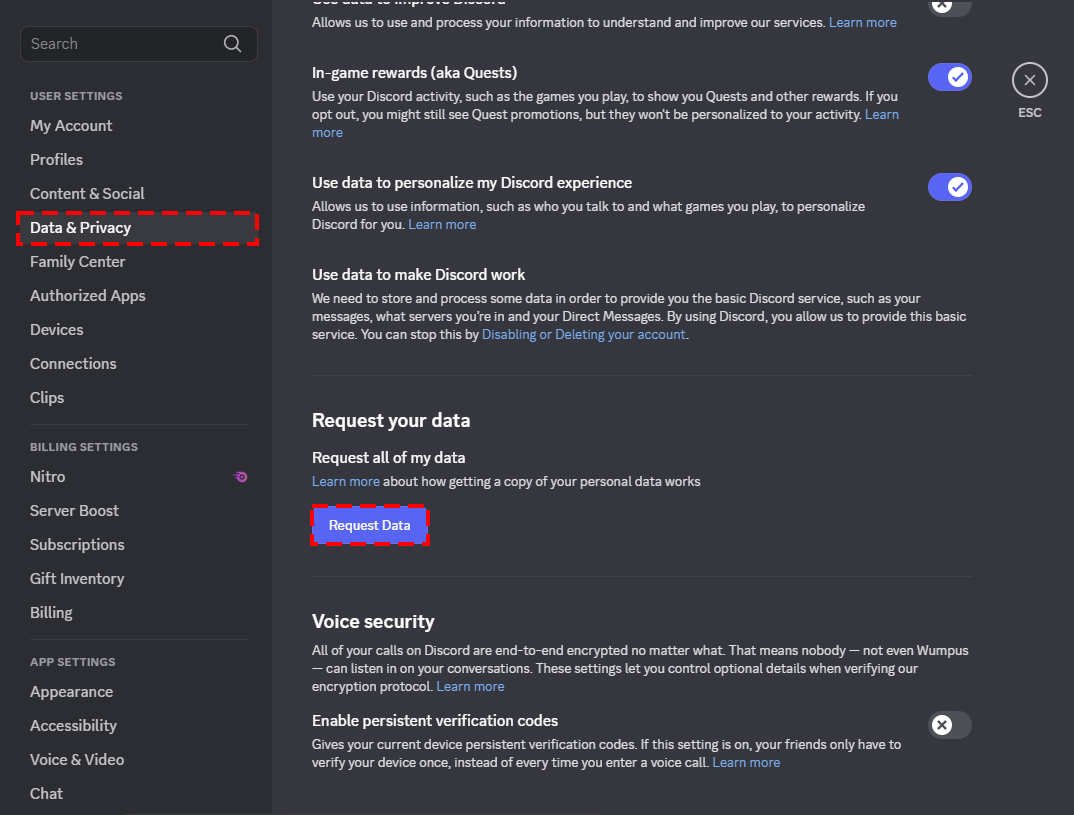
Open Data & Privacy Settings
On desktop or in a browser, click the settings cogwheel (), bottom left > User Settings > Data & Privacy > Request your data.
On the phone app it's your avatar, bottom right > cogwheel (), top right > Data & Privacy > Request all of my data.
- 2
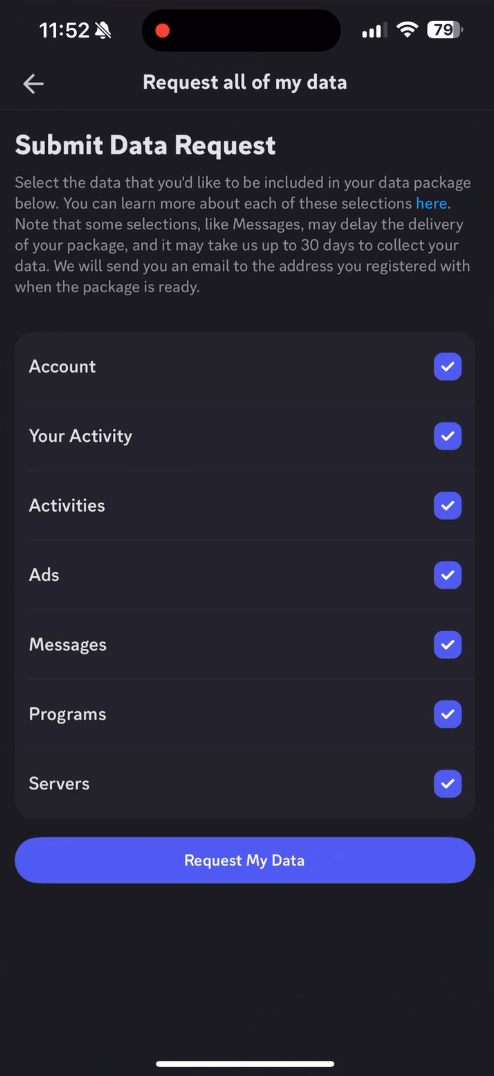
Check the boxes you want
You have seven categories to choose from, so Account, Your Activity, Activities, Ads, Messages, Programs and Servers. Tick everything for the full picture, or leave Messages out if you just want your data package as quickly as possible.
- 3
Wait for the email from Discord
Be patient, the download file can take up to a month to arrive. The download link then works for 30 days, and it goes to whatever address was on the account when you asked.

Two things will cancel the request. Deleting or disabling your account before your download link arrives, and having a second request already running. If you're leaving Discord, wait for the link, then follow our guide to deleting your Discord account.
Everything in a Discord Data Package
The chat transcript is one folder out of eight.
| Folder | What's inside | The bit people don't expect |
|---|---|---|
| account | Your current and recent avatars, and one JSON file holding your user ID, username, email, phone number, account settings, Nitro status, IP address, linked accounts like Steam and Spotify, active sessions, friend and block lists, payment history and Orbs balance | The private notes you've written on other people's profiles, in plain text |
| activity | Four logs. Analytics is what you did in the app, Modeling is what personalises it, Reporting is business data like messages sent, and TNS is safety data kept up to two years | Every entry is tagged with your IP, city, ISP, device and browser |
| activities | The built-in games and watch parties you joined, like Chess in the Park, Sketch Heads and Watch Together | Usually tiny, and it still logs your preferences |
| messages | One folder per channel or DM, each with a file describing where the messages went and a transcript with the text, timestamp and links to your attachments | Only messages you sent. Nothing anyone sent you is in here |
| servers | One folder per server. If you own the server, that folder holds the emoji you uploaded, its audit log, your channel list with permissions, the server settings and any webhooks. If you're only a member, it holds the server's ID and name plus the audit entries about you from the last 90 days | Servers you left a while ago are simply missing |
| ads | The Quests you've engaged with, plus the traits Discord uses to pick which ads you see | The traits file is a plain list of what advertisers think you are |
| support_tickets | Every Help Center ticket tied to your email, with the subject, status, and the full body of each public comment | If you ever sent ID to support, that thread is in here |
| programs | Discord programmes you're enrolled in, HypeSquad being the usual one | Empty for nearly everyone |
The activity folder is the one worth opening. Someone
published the event list from their own 2024 export
and it runs to 824 different kinds of event from a single account, covering things like
app_opened, join_voice_channel, start_speaking, message_deleted, keyboard_shortcut_used
and new_login_location. That's a minute by minute record of somebody using an app, tagged with
where they were sitting.
Apps for Browsing Your Discord Package
Your data files are plain JSON, so a browser or Notepad will open any of your files, but it's not ideal and it's definitely not visually appealing.
If you want to open and view your data in an orderly manner, you need to open it with one of the many Discord data package viewers. Below we will cover a few of the popular options.
| Tool | Where your data goes | Best for |
|---|---|---|
| Redact's viewer | Stays in your browser, opened from the ZIP or the unzipped folder | Searching what you've sent, and listing what's in servers you've left |
| DDPE | Stays in your browser, and it says so on the page | The safe first look. Message counts, top people and servers, favourite words |
| discordpackage.com | Stays in your browser, served straight from its own public code | The deepest breakdown, including devices, connections and what you've spent |
| Dumpus | Uploaded and processed on a server, encrypted with a key kept on your phone | A huge package, or reading it on a phone |
| A browser or Notepad | Nowhere | Checking one file yourself |
Redact's viewer, DDPE and discordpackage.com all do the work on your own machine, and the last two are open source. Dumpus is by the same developer as DDPE and is the only one here that sends your data anywhere.
Discord Data Package FAQ
How long does it take?
Up to 30 days. Ticking Messages is what pushes it towards the long end. The download link works for 30 days after it arrives.
Are deleted messages in there?
No. Discord stops storing a message once you delete it, so it won't be in the package no matter how many times you ask.
Does it include messages people sent me?
No. You get your side of every conversation and nothing else.
Can I ask for just part of it?
Yes. Every category has its own checkbox, so you can request Account on its own and skip the rest.
Redact for Discord
Cleanse your cringe Discord history by either nuking it all, or choosing a specific server or direct message, then specifying keywords and date ranges.

![How to quickly remove all images from Discord [Redact App]](/blog-images/2024/02/1df12454974a617bffd82bb1ad8d4218.png)