How to Delete Your Snapchat Account (easy step by step guide)
Snapchat only deletes accounts on its website, even when you start in the app. Here are the steps, the 30-day window, and what's still out there afterwards.
 Dan Saltman9 min read
On this page
To delete your Snapchat account, log in to the Snapchat accounts portal, click Delete my account, enter your password and click Continue. It works the same in your phone's browser. Snapchat deactivates the account for 30 days, then deletes it for good after 30 more.
Deleting won't reach everything. Screenshots and saves your friends made, and Snaps you put on Snap Map, can outlast the account.
Below are Snapchat's steps, the 30-day window, what's left behind, and how to delete your messages and keep the account. It's one of our guides to deleting your social media accounts.

4 things to do before you delete
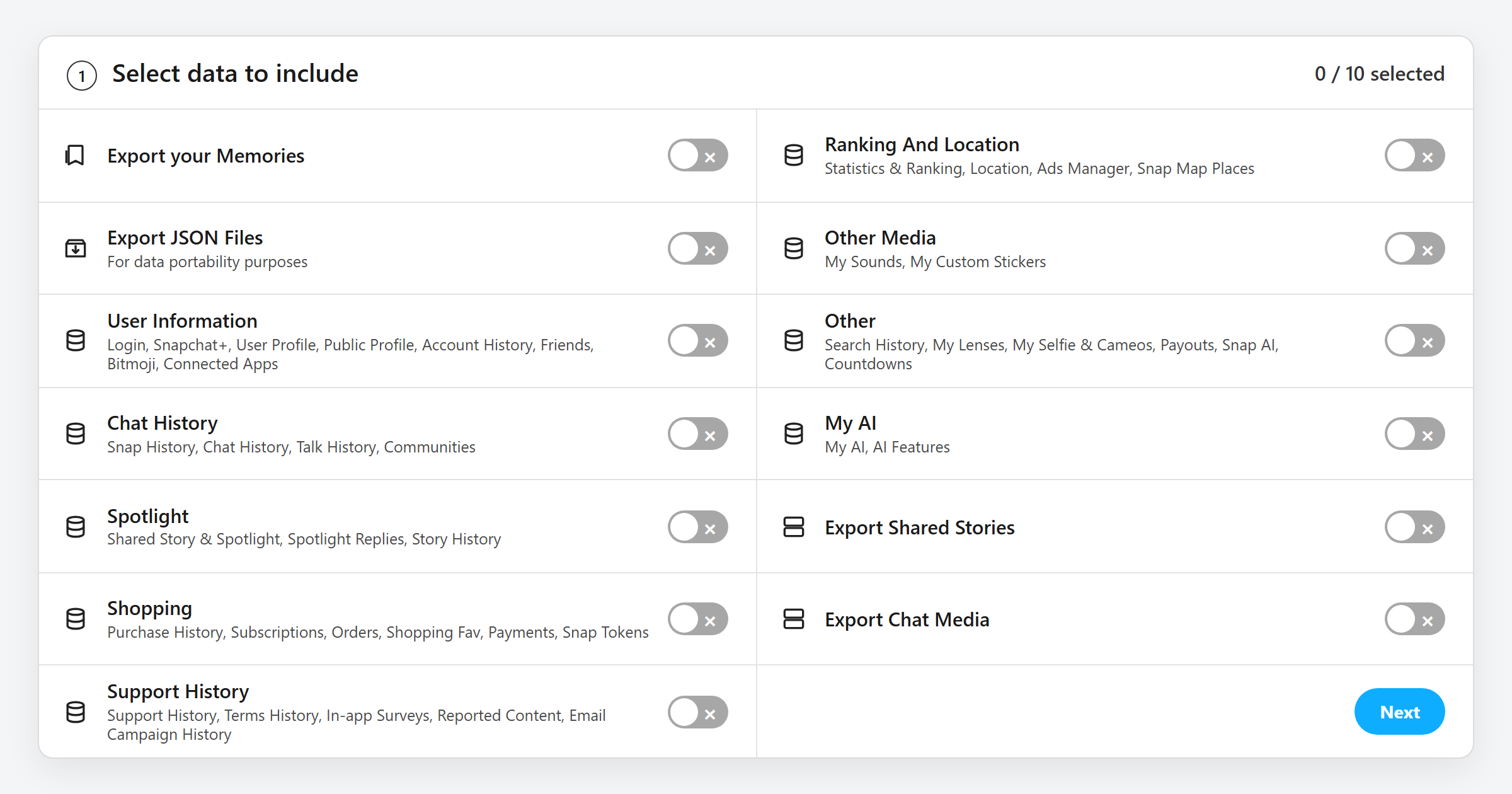
A Download your data and Memories. Go to accounts.snapchat.com (or Settings > My Data in the app), pick what to include and click Submit. For your saved photos and videos, switch on Export your Memories and click Request Only Memories. Snapchat aims to deliver it within 7 days, and big downloads take longer. Snaps in My Eyes Only stay out of the export, and only your passcode unlocks them, so move any you want to keep back into your regular Memories before you request the download. Wait for it before you delete, and open the files to check your Memories are all there. Snapchat's Delete Account page asks you to, because it can't contact you once the account is scheduled for deletion. Its help center says you have 30 days after deleting to download it, but don't count on the email reaching you. Our guide to what's inside your Snapchat data file walks through the download.
B Cancel Snapchat+. Snapchat's help doesn't say deleting the account stops the subscription. Cancel it where you signed up: the App Store on iPhone, Google Play on Android, or the accounts portal on the web. The same goes for Memories+. Refunds come from whoever sold you the plan, so Apple or Google if you paid in the app.
C Decide about your Bitmoji. If you made your Bitmoji through Snapchat, it lives in your Snapchat account. Snapchat says even unlinking one of those permanently deletes the avatar and every Closet item, purchases included. If you made it in the Bitmoji app, it's a separate account that you delete in the Bitmoji app by tapping the gear icon, then My Data > Delete Account.
D Know your password and username. The portal asks for your password, so reset it from the login page first if you've forgotten it. While the account is deactivated, Snapchat says you can't change your password or log in with your email or phone number, only your username.
How to delete your Snapchat account
These steps follow Snapchat's help article on deleting your account as of October 2026.
There are no separate app steps because Snapchat only deletes accounts on its accounts portal. In the iPhone app, Settings > Account Actions > Delete Account just opens that page in your browser. Snapchat's Android steps start on the portal itself. So the three steps below work the same on a computer or in your phone's browser.
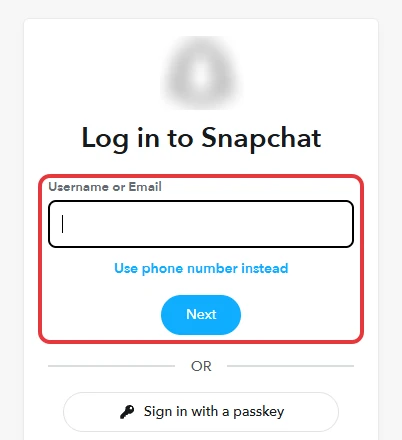
Step 1 Log in to the accounts portal
Go to accounts.snapchat.com and log in with your username or email and password.
Step 2 Click Delete my account
On the portal's home page, click Delete my account.
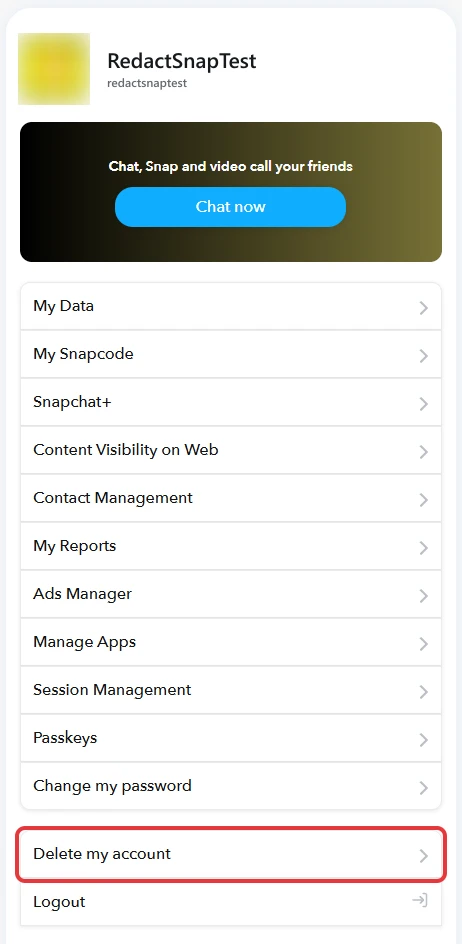
Step 3 Enter your password and click Continue
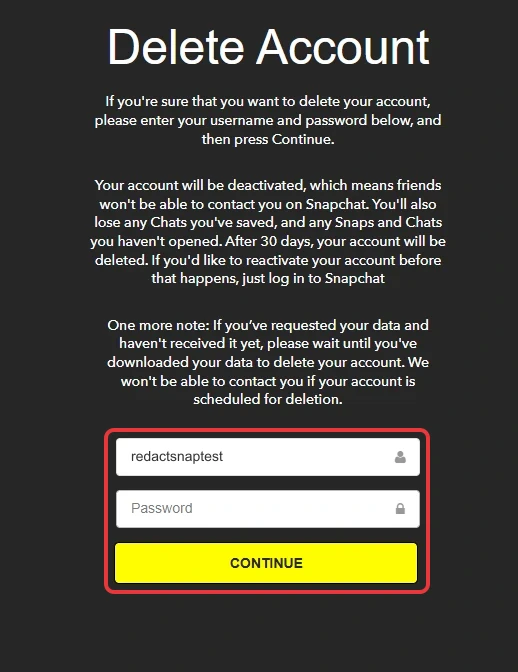
Snapchat opens a Delete Account page that explains what you'll lose, with your username already filled in. Enter your password and click Continue, which is the click that starts the 30 days.
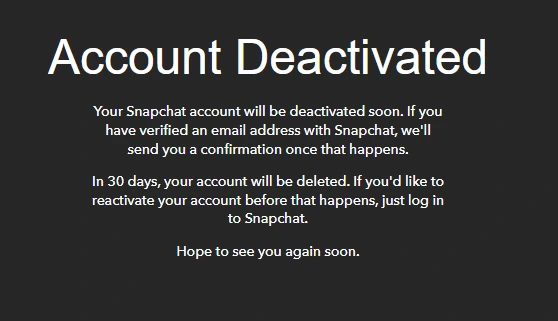
Snapchat then shows an Account Deactivated page. If you've verified an email address, it also emails you once the account is deactivated.
What deleting your Snapchat account leaves behind
Here's what Snapchat says in its deletion article, its privacy policy and its Snap Map privacy page:
- Your account and its data go. If you don't log in or download your data in the first 30 days, Snapchat says your data is permanently deleted after 60 days.
- Screenshots and saves stay. Snap's privacy policy reminds you that anyone who views your Snaps or Chats can screenshot, save or copy them outside the app. Those copies are on their phones, out of Snapchat's reach.
- Snap Map Snaps can linger. Snap says Snap Map submissions can stay visible for long periods, sometimes for years. It also keeps the location tied to a Snap for as long as it keeps the Snap. Remove the Snap Map and Spotlight Snaps you care about from your profile before you delete.
- Snapchat keeps some records. Snapchat says some deleted account data is retained for legal, security and business needs, such as your purchases and when you accepted its terms. Its privacy policy adds that it can't promise deletion happens by a specific time.
Snapchat's Delete Account page also warns that you'll lose any Chats you've saved, along with Snaps and Chats you haven't opened. It doesn't say what happens to the copies on your friends' side of those chats. If you'd rather not leave that to chance, delete the messages you sent first.
Want to keep the account? Delete your messages instead
Snapchat only lets you delete one chat message at a time: press and hold, delete, confirm, repeat. That's fine for a few and hopeless for years of saved chats.
Redact deletes the messages you've sent in bulk, on your own computer. Sign in to Snapchat Web through the Redact desktop app and pick the conversations, or Select All. Set a date range if you want to keep some, then preview and run. In Advanced mode it also deletes the photos, videos and saved snaps you sent in chat. Do it before you delete the account, or instead of deleting it.
Redact has limits too.
- It only deletes what you sent. Your friends' messages and media stay where they are, and so does the conversation itself.
- It works inside your chats. Memories, Stories and Snaps that were never saved are out of its reach.
- The free plan covers your last 30 days. Older messages and scheduled cleanups need Premium.
- It can't reach copies. Screenshots a friend took stay on their phone, with Redact or without it.
If you still want the account gone, wait for your data download, then delete it using the steps above.
FAQ
How do I permanently delete my Snapchat account?
Log in at accounts.snapchat.com, click Delete my account, enter your password and click Continue. Then don't log in again. Snapchat deactivates the account for 30 days and permanently deletes it after 30 more.
Can I delete my Snapchat account in the app?
Not inside the app. In the iPhone app, Settings > Account Actions > Delete Account just opens the accounts portal in your browser. Snapchat's Android steps start on the portal itself. Either way you finish with the web steps, which work fine in your phone's browser.
How do I reactivate my Snapchat account?
Log in to the Snapchat app with your username within 30 days of deleting. You can't use your email or phone number to log in while it's deactivated, and Snapchat Support can't reactivate it for you. After 30 days it can't be brought back.
How long does it take Snapchat to delete an account?
The account is deactivated for 30 days, then permanently deleted 30 days later. That's about 60 days in all. In India the second stage is 180 days.
Does deleting Snapchat delete my Memories?
Yes, along with the rest of your account. Download them first: on accounts.snapchat.com, switch on Export your Memories and click Request Only Memories. Move any Snaps you keep in My Eyes Only back into regular Memories first, because the export leaves them out. Wait for the download to arrive before you delete, as Snapchat's Delete Account page asks, and check the files open.
Does deleting my Snapchat account cancel Snapchat+?
Snapchat's help doesn't say it does. Cancel Snapchat+ where you subscribed (the App Store, Google Play or the accounts portal) before you delete.
What happens to my Bitmoji if I delete Snapchat?
A Bitmoji you made through Snapchat is tied to your Snapchat account, and Snapchat says even unlinking one deletes the avatar and its Closet. A Bitmoji you made in the Bitmoji app is a separate account you delete in that app.
Will my friends still have my messages and Snaps?
Anything a friend screenshotted, saved or copied outside the app stays with them. Snapchat says you lose the Chats you've saved. It doesn't say what happens on your friends' side. To be sure, delete the messages you sent before you delete the account.
Redact for Snapchat
Delete your chat messages, photos, videos and saved snaps from Snapchat.