Not Following Back Checker For Instagram
Works from your Instagram data file, not your login. Drop it in and see everyone you follow who doesn't follow you back.
- What it reads:
- Followers
- Following
- 1Get the download
- 2Drop it in
- 3See who
Our tool works from your data file, not your Instagram login
It reads the followers and following file Instagram lets you download, so it never asks for your Instagram username or password. The file stays on your device.
How to download your Instagram data file- In Settings, open Accounts Center, then Your information and permissions.
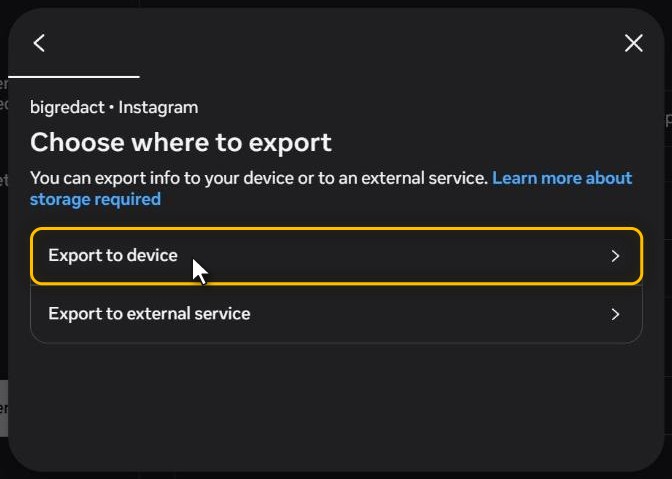
- Choose Export your information, then Create export, then Export to device.
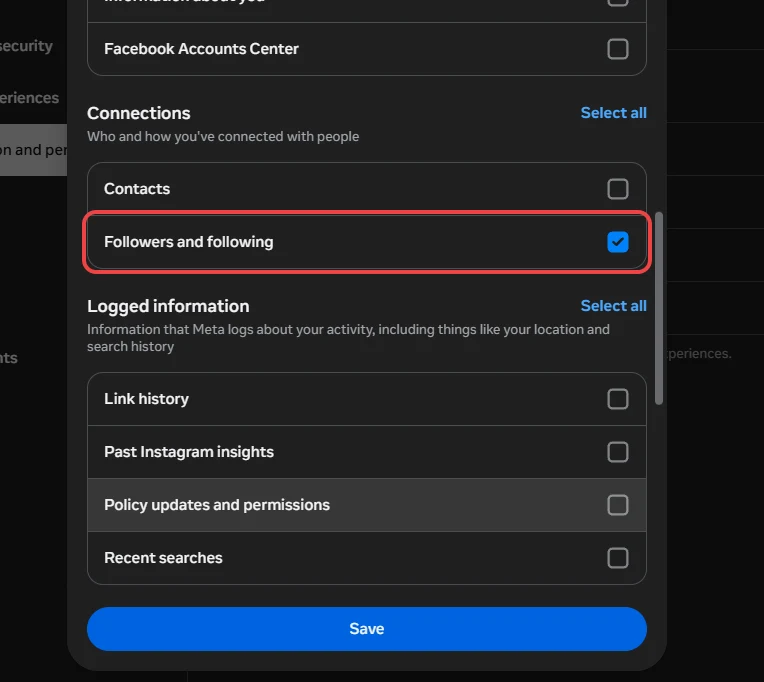
- Under Customize information, keep only Followers and following.
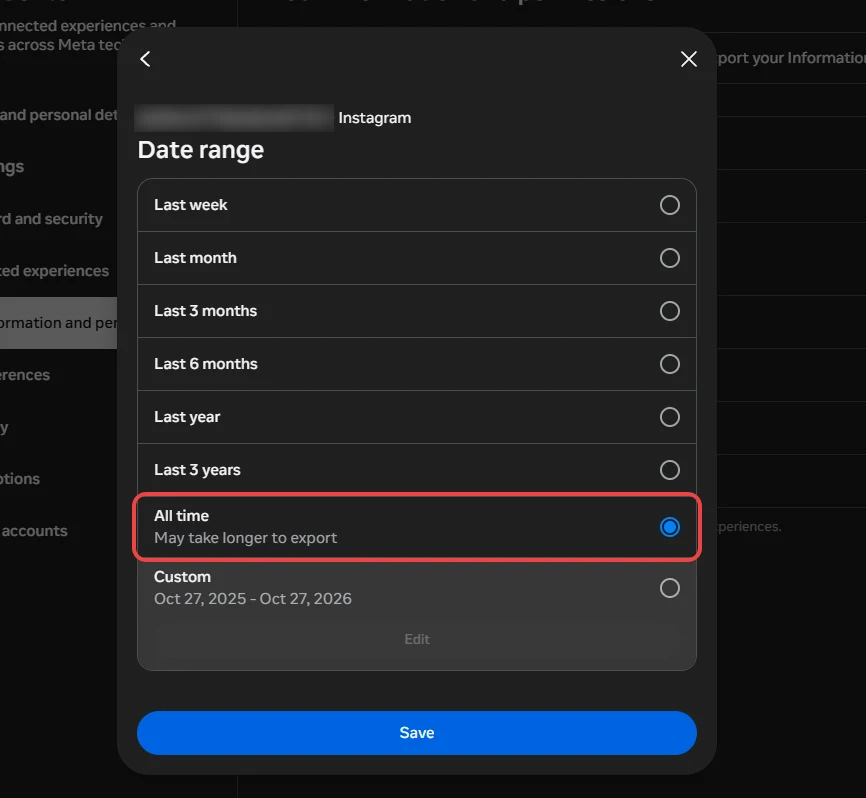
- Set Date range to All time and start it. Instagram emails you when it's ready.
What you can view with this free tool
- Who doesn't follow you back, who you don't, and who follows each other
- The accounts you followed in any year, or over 1, 2 or 5 years ago
- A badge on close friends, restricted accounts and hidden stories
- Search the list by username and sort it by date or name
- The usernames copied, or the list saved as a CSV table
- Every other list: requests, blocked, close friends and more
Do even more with Redact Premium
Redact unsends the messages you sent and unfollows accounts you follow. Premium does all eight, and posts, reels and carousels are free for your last 30 days.
- Delete your DMsEvery message you've sent, or only those to certain people.
- Delete your postsAll of your posts at once, or filtered by keyword or date.
- Delete your reelsClear your Reels in bulk, across the dates you choose.
- Delete carouselsClear your carousel and album posts in a single run.
- Mass unfollowEveryone you follow, or only those who don't follow back.
- Remove your likesTake your like back off posts, by date or by account.
- Delete saved collectionsClear collections by name. The posts inside stay saved.
- Delete by date rangeSet a start date, an end date, or both, for the run.
Questions
Made by Redact. Not made by, or affiliated with, Instagram or Meta.
See who doesn't follow you back
Your download has your followers and everyone you follow. The checker holds the two lists against each other, with no login and no password, and says how many files and accounts it read so you can check the count against your profile.
- Who doesn't follow you back, who you don't follow back, and who follows each other
- Every follower file read and joined, past 10,000 followers
- The date you followed each account
Find the accounts you followed years ago
Pick a year, or how long ago, and the list keeps only the accounts you followed then. It's the quickest way to find the follows from years back that you've forgotten about.
- Narrow the list to one year, with a count on every year
- Or to everyone you followed over 1, 2 or 5 years ago
- Sort newest first, oldest first or A to Z
Spot who's on your other lists
Your download also holds your close friends, the accounts you've restricted, the requests you've sent and who your story is hidden from, so anyone on one of those lists gets a badge wherever they show up.
- A badge on close friends, restricted accounts and pending requests
- And on anyone you've hidden your story from
- Show only the accounts on one of those lists
Copy it, save it, or open any other list
Take the list with you to work through later. Every other list in your download opens here too, with a count on each and a search by username.
- Copy the usernames in one click
- Save any list as a CSV that opens in a spreadsheet
- Requests, blocked, restricted, close friends and recently unfollowed
Checks without your password
Your followers and following are read from the download Instagram gives you, on your device.
Who doesn't follow me back on Instagram: FAQ
Ask Instagram for a download of your followers and following, then drop the ZIP it sends you into the checker above. It holds the two lists against each other and shows every account you follow that doesn't follow you, with a count at the top. Instagram has no screen for this.
In Instagram, open Settings, then Accounts Center, then Your information and permissions. Choose Export your information, then Create export, pick your Instagram profile and choose Export to device. Under Customize information, keep only Followers and following, set Date range to All time, and start the export. Instagram tells you when the file is ready to download.
No. The checker only reads the files Instagram sent you, so it never signs in to Instagram and never asks for a password.
An app that asks for your Instagram password signs in as you, which is against Instagram's terms and can get your account limited. It also hands your password to whoever runs the app. This checker reads your download on your own device instead, so there's nothing to sign in to.
Most often the download was asked for with a date range, so its followers list only holds people who followed you inside that range. Ask for it again with Date range set to All time. A download is also your lists as they stood on the day it was made, so anyone who followed you since isn't in it. If the download came as several ZIPs, drop them all in together.
No. A download is your lists as they stood on one day, so it shows who doesn't follow you now but not who used to follow you and left, or when.
Yes. Instagram splits a big followers list across several numbered files, and the checker reads them all and counts each account once. It shows how many files and accounts it read, so you can check the total against your profile.
Yes. Copy the usernames in one click, or save the list as a CSV table that opens in any spreadsheet. Before you do, you can narrow it to one year or to the accounts you followed over 1, 2 or 5 years ago, sort it by date or name, and search it by username.
No. Your browser reads the file where it sits on your device, and nothing in it is sent to Redact or anyone else. Turn off your internet after the page loads and the checker still works.
Yes. Redact mass unfollows on Instagram, everyone or only the accounts that don't follow you back, and keeps the ones you choose.
Step-by-Step Guide
How to download your Instagram followers and following
Instagram lets you export just your followers and following, which is all this checker needs. These are the steps on a computer as of October 2026.
Step 1 Open your settings
- A On a computer, go to instagram.com, click More in the bottom left, then Settings.
- B In the app, tap your profile picture in the bottom right, then the three lines in the top right.
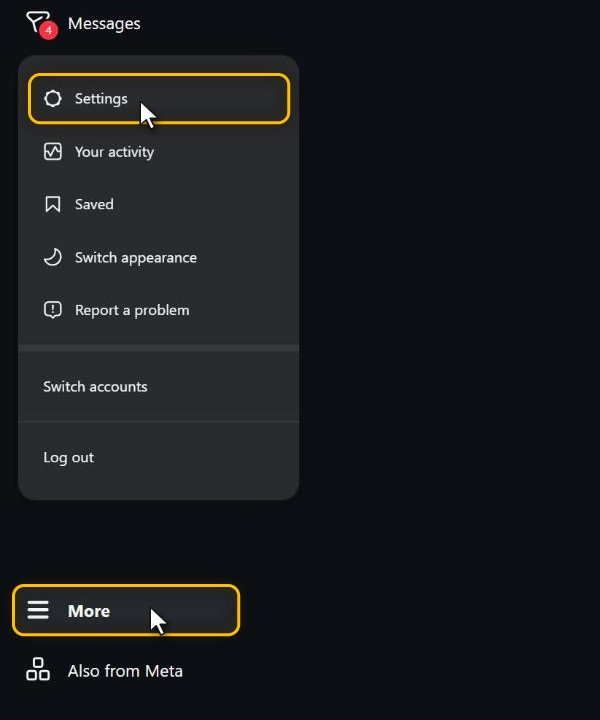
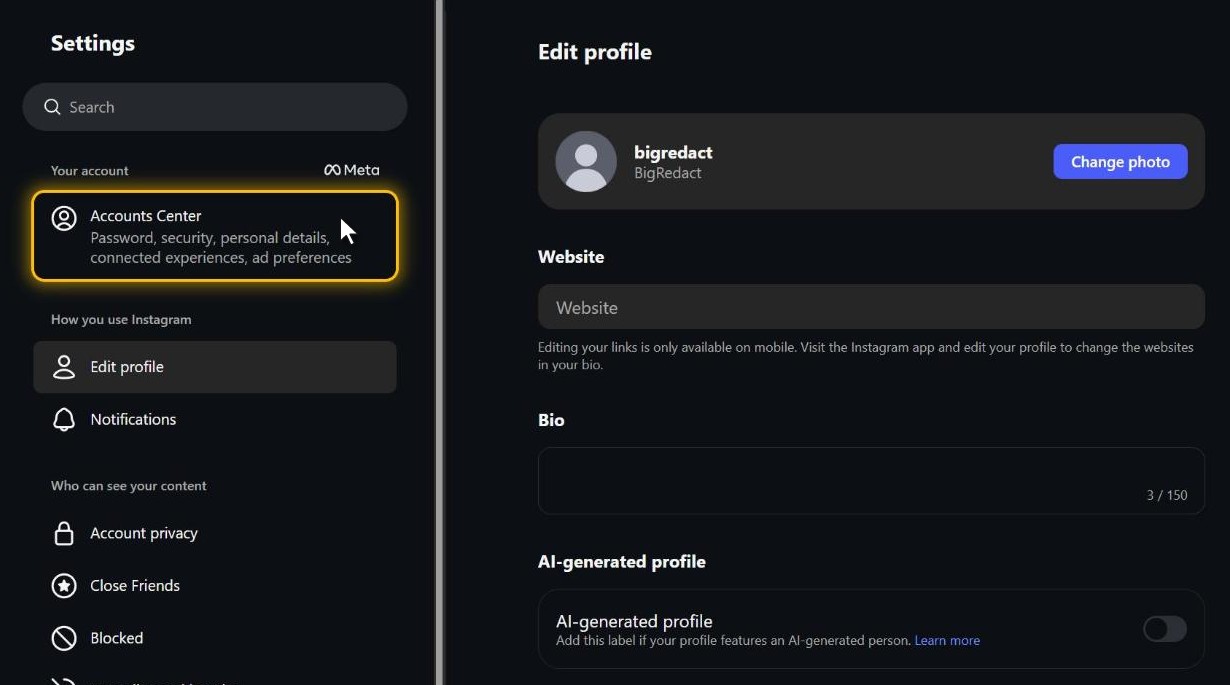
Step 2 Find Export your information
- A Click Accounts Center at the top of the Settings menu. Meta is renaming it to Meta Account a few people at a time, so yours may say that instead.
- B Open Your information and permissions, then Export your information.
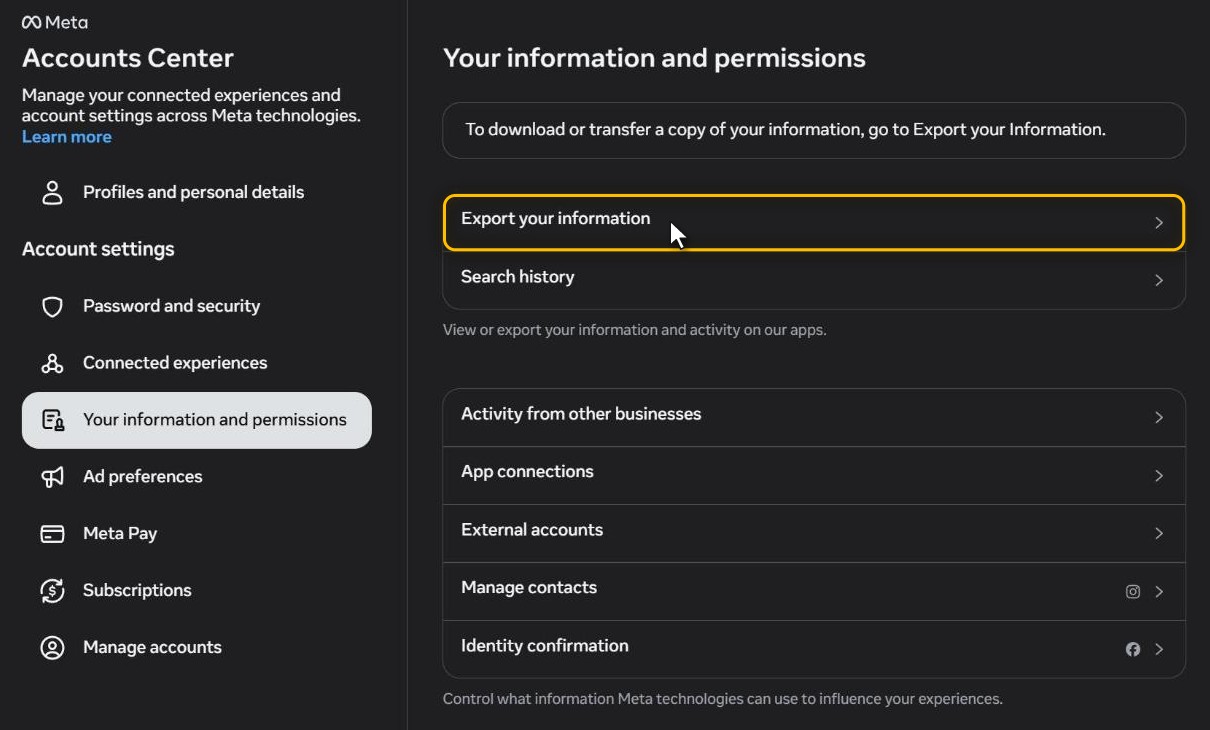
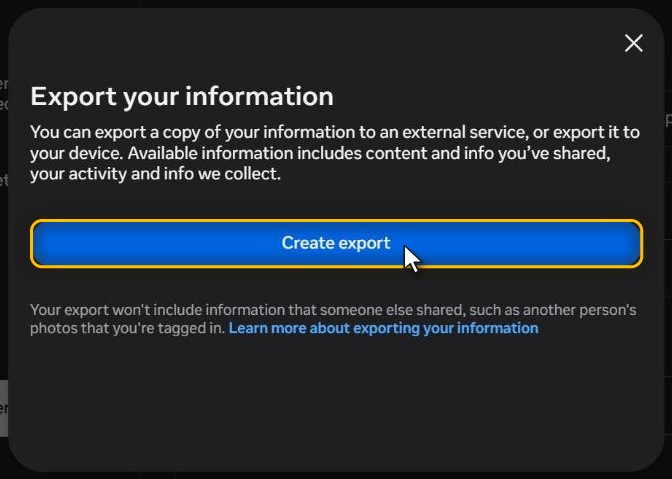
Step 3 Start a new export
- A Click Create export and pick your Instagram profile.
- B Choose Export to device, so the file comes to your computer.
Step 4 Keep only Followers and following
- A On the Confirm your export screen, open Customize information. It starts with every category ticked.
- B Untick everything except Followers and following, which sits under Connections, then click Save.
- C That's all the checker reads, and leaving out your messages, photos and videos keeps the file small.
Step 5 Set the date range to All time
- A Open Date range, which starts on Last year.
- B Pick All time and click Save.
- C With a shorter range, your followers list only holds people who followed you inside it, so everyone who followed you earlier would show up as not following you back.
Step 6 Start the export
- A Leave Format on HTML or switch it to JSON. The checker reads both, and Media quality doesn't matter here.
- B Click Start export. Instagram may ask for your password on its own screen, though this checker never will.
Step 7 Download the ZIP
- A You'll get an email and an Instagram notification when it's ready. Meta says that can take up to 30 days, though small exports usually come much sooner.
- B Download it from Available downloads on the Export your information screen. It stays there for 4 days, and after that you'll need to ask for a new one.
Step 8 Drop it into the checker
- A Drop the ZIP into the box at the top of this page without unzipping it.
- B If Instagram split it into several ZIPs, drop them all in together.
- C The Don't follow you back list opens first, with every account you follow that doesn't follow you.
Try Redact for Free
We are frequently adding support to other social network services. You can receive direct updates from us in Redact's Discord Channel.
