TikTok Data Viewer
A free way to open and read your TikTok data download. Watch history, searches, comments and chats.
- Free
- Nothing uploaded
- No login
- Works offline
Get started
How to download your data from TikTokHere's what you'll get
Visualize your TikTok data
Share your stats with friends
What you can view with this free tool
- Every video you watched, and the day it was posted
- Your liked videos, saved as a CSV that's yours to keep
- Every search and comment, word for word as typed
- Who you follow that doesn't follow you back
- Your logins, your devices and what else TikTok kept
- Charts of when you watch, and how much
- Your DMs, both sides, opened as chats
- Your Favorites and the videos you posted, each in a list
- How many videos you watched more than once
Made by Redact. Not made by, or affiliated with, TikTok or ByteDance.
See every video you watched
TikTok keeps a record of the videos you watch, and the download hands it to you as thousands of bare links. The viewer lays them out by time, counts them, and reads each video's posting date out of its link, with nothing sent to TikTok.
- Each video with the time you watched it and the day it was posted
- How many you watch on a day, and how many you came back to
- How old a video usually was on the day that you watched it
Export all your liked videos
Your liked videos, your Favorites and the videos you posted each get a list of their own, with a date beside every link. Any of them saves as a CSV file that opens in a spreadsheet, so your likes are yours to keep outside TikTok.
- Liked videos, Favorites and your own posts, each as its own list
- Save any of them as a CSV, with each link and both of its dates
- Your busiest day of liking, and your longest run of days in a row
Read back what you typed
Your search history says more about you than most of what's in the download, and it's the hardest part to read in the raw file. Here it's a plain list with a count of what comes up most, next to every comment you've posted on a video.
- Every search you made, with the ones you repeat most at the top
- Every comment you've left on a video, word for word as you typed it
- Charts of the months, hours and weekdays you search and comment
See who doesn't follow you back
The download has your followers and everyone you follow as two lists, and the viewer shows who's on one and not the other. Your chats open as chats, from the first message, and a whole chat or a list of accounts saves as a CSV.
- Your followers held against who you follow, with no login needed
- Every chat opened as a chat, with your side set apart from theirs
- Who you message the most, and how much of each chat is yours
See what else TikTok holds
A download goes past what you did in the app. It has every login with its device and IP address, the details on your account, and lists most people never see, like what other apps and sites reported to TikTok about you.
- Each login with its device, its network and its IP address beside it
- Your account's details, under the names TikTok gives each one
- All the other lists in the download, each one opened as a plain table
Find one thing, or save all of it
Every list has a box over it that narrows it as you type and picks out the match in each row. Flip a list oldest first to see where it began. Save as CSV keeps what's showing, so a narrowed list saves only the rows you asked for.
- A box over every list that narrows it down while you type
- Newest first or oldest first, whichever way you want to read it
- A Save as CSV button on every list, every table and every chat
See when the watching happens
The same history, laid out by the clock. See which hours you watch the most and which days of the week it peaks. Each chart switches to another view, or to a table of the numbers.
- Videos counted by month, by hour of the day and by day of the week
- The busiest day you had, and your longest run of days in a row
- Each chart as bars, a line or a pie, or as a plain table of every number in it
How it works
Three steps. Whichever format TikTok gave you, it opens.
Built to stay on your device
A data download is what you watched, searched for and said. It's treated that way.
TikTok data downloads: common questions
In the TikTok app, open your profile, tap the menu in the top corner, then Settings and privacy, then Account, then Download your data. Choose All data, pick a file format and tap Request data. TikTok takes up to a few days to make it. When it's ready it shows under the Download data tab on that same screen. You then have four days to download it before it expires and has to be asked for again.
Either one opens here, so there's no need to ask again if you already have one. JSON is the better pick if you're asking now. It's a single file that keeps every list in a fixed shape, which is what this viewer and most other tools read most reliably. TXT is a folder of plain text files, one for each list.
Your watch history, the videos you liked and saved, your searches, your comments, your direct messages, your followers and who you follow, your login history with devices and IP addresses, and your profile and settings. Depending on your account there's also shopping, LIVE and ad data. The viewer has a screen for each of the main lists and shows every other list as a table.
No. The download lists the videos you posted, watched and liked as links, with a date beside each. The video files aren't in it. The viewer shows each link as text along with the date the video was posted, which it reads from the link itself without asking TikTok for anything.
Every TikTok video has a long number in its link, and the first part of that number is the moment the video was posted. The viewer reads the date straight out of the number on your device. It never asks TikTok, so nobody learns which of your videos you were looking back at.
Yes, when the download has both your follower list and your following list in it. The viewer holds one against the other and shows who you follow that doesn't follow you, who follows you that you don't follow, and who's on both. It never signs in to TikTok, so there's no password to hand over to anyone.
Yes. Open the Likes, favorites & posts tab or the Watch history tab and press Save as CSV. The file has each video's link, the time you liked or watched it, and the date the video was posted. It opens in Excel, Google Sheets or any other spreadsheet program you already use.
On purpose. A link you click tells TikTok which video you opened and when, and a file from someone else could carry a link to anywhere. Everything from the download is shown as plain text. To open a video, copy its link and paste it into your browser's address bar yourself.
TikTok writes N/A where it has no date for an entry. Those entries are still in the list, at the end, and the viewer tells you how many there are. The charts leave them out, since there's no day or hour for them.
TikTok writes every time in the download in UTC. The viewer moves them to the time zone your device is set to, so the hour charts show the hours you were really awake. A CSV you save keeps the times in UTC, which is the one clock every spreadsheet program reads the same way.
Yes. Every list has a Save as CSV button that saves what's showing, so if you've narrowed the list with the box above it, only the matching rows are saved. A CSV opens in any spreadsheet. An open chat saves the same way, as one row for each message with its sender and its time.
Yes. Download the ZIP from TikTok to your phone, open this page in the phone's browser and tap the box to choose the ZIP. The phone reads it itself. A very long watch history can take a little longer to open there.
No. Your browser reads the file where it sits on your device. No part of it is sent to Redact or to anyone else, which you can check. Turn off your internet after the page loads, then open the download. It opens the same.
Redact mass-deletes your TikTok videos, likes and reposts, including the old ones you've forgotten about. The viewer itself only reads the download and can't change anything on your account.
Step-by-Step Guide
How to get your TikTok data download
The viewer reads the data download TikTok gives you on request. These are the steps on tiktok.com as of November 2026.
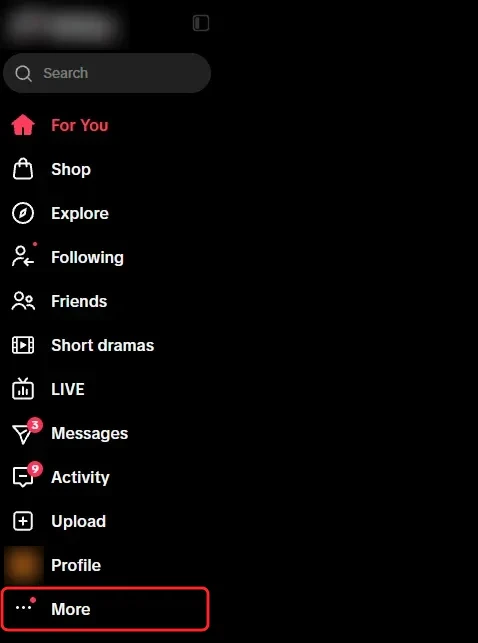
Step 1 Click More
- A Log in at tiktok.com on a computer and click More, the last item in the side menu.
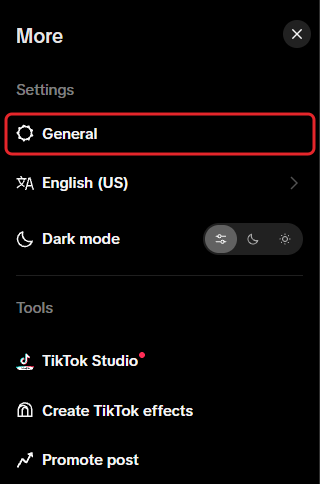
Step 2 Click General
- A General is the first item under Settings in the More menu, and it opens your settings page.
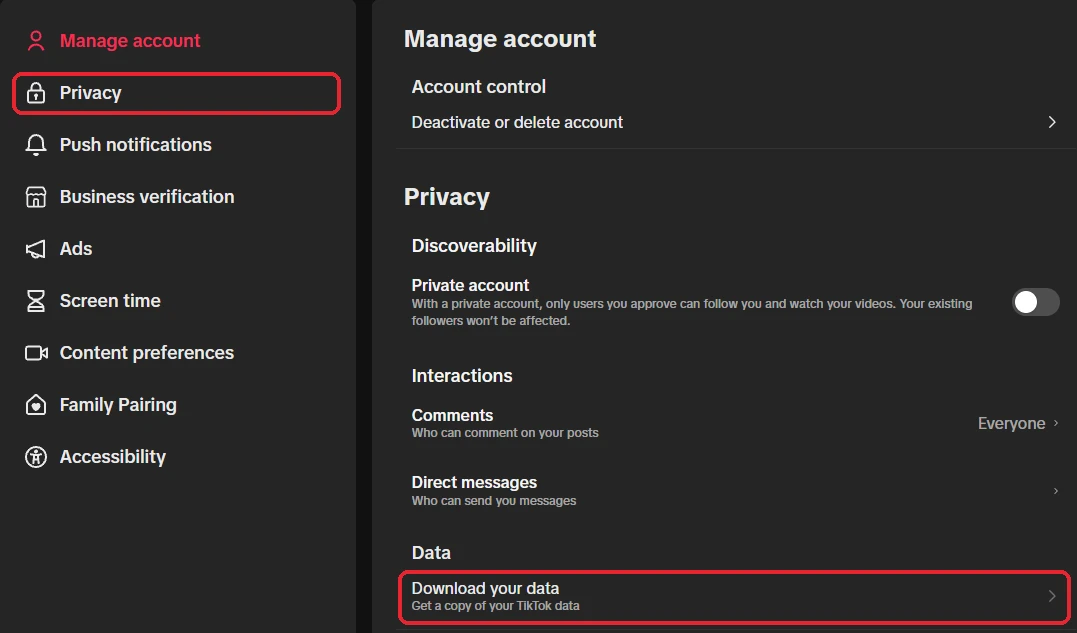
Step 3 Click Privacy, then Download your data
- A Click Privacy in the menu on the left.
- B Click Download your data, under Data.
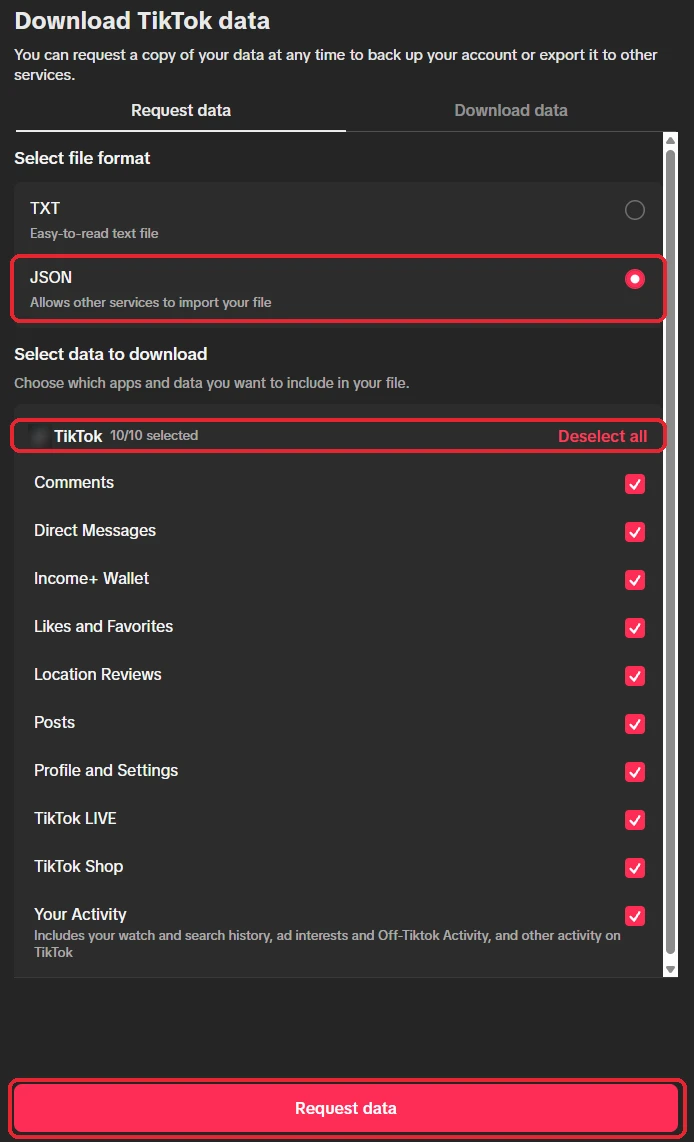
Step 4 Pick JSON and every kind of data
- A Choose JSON as the file format. The viewer also reads TXT and HTML files.
- B Click Select all so every kind of data is in the file, including Your Activity, which holds your watch history.
- C Click Request data.
Step 5 Download the file when it's ready
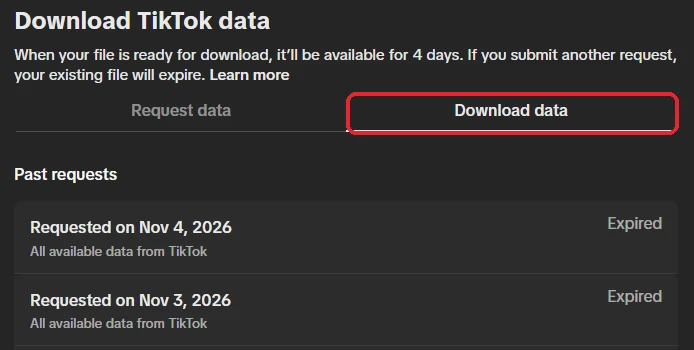
- A TikTok can take a few days. When the file is ready it appears under the Download data tab on the same screen.
- B Click Download. The file expires after four days, and then you'd have to ask for a new one.
Step 6 Drop it in here
- A Drop the ZIP into the box at the top of this page. There's no need to unzip it.
- B It opens on your watch history. The tabs at the top switch to your likes, searches, comments, messages and the rest.
Try Redact for Free
We are frequently adding support to other social network services. You can receive direct updates from us in Redact's Discord Channel.
