How to Opt Out of TikTok's AI Training
 Dan Saltman10 min read
On this page
Why There's No Obvious Way to Opt Out
TikTok has no on/off setting for AI training, just video settings and a legal form.
TikTok's US privacy policy, in the version that took effect on 15 July 2026, says it uses what it collects to "train, test, and improve technology, such as machine learning models and algorithms," including by "scanning, analyzing, and reviewing user content, messages, AI interactions." It also says TikTok may collect content "at the time of creation, import, or upload, regardless of whether you choose to save or publish" it. Its examples are audio, effects and captions, but nothing in the policy keeps those clips out of training.
So clips sitting in your drafts can still end up on TikTok's servers.
How to Stop AI Training As Best You Can
TikTok doesn't say whether it trains on drafts, so assume anything it holds could be trained on. That leaves three options, and none is an account-wide opt-out. The video settings cover reuse, not training. Deleting takes content off TikTok with no promise to drop copies. TikTok's objection page only names the EEA, UK and Switzerland. Together, they're the most you can do.
Lock Down Each Video's Permissions
Open any video you've posted, tap its ... menu, then Privacy settings. Turn off Reuse of content and tap Done. Nobody else can build Duets, Stitches or stickers from that clip after that.
That stops reuse, not training. The setting doesn't mention AI, TikTok doesn't say whether it affects training, and there's no account-wide version, so every clip needs turning off on its own.
Redact revokes reuse permission in one pass. On the Videos tab, change the operation from delete to revoke permissions, and every matched video stays on your profile while other people lose the right to reuse it. If your app still shows an AI remix option, leave it off. TikTok removed that control, so there's nothing left for Redact to turn off.
Delete Content You've Posted
Deleting a video takes it off TikTok and your profile for good, without waiting on TikTok to agree to anything. It isn't a recall, though. The US terms give TikTok a "non-exclusive, irrevocable, and royalty-free" licence over what you've submitted, and deleting only stops TikTok showing the video publicly. Nothing in the terms keeps a copy it already holds out of future training. It's a poor fit if you're building an audience, but it's the most you can do on your own.
If you just want everything gone, be ready for a slog. There's no select-all, so a five-year account means opening each clip, tapping the menu and confirming the delete, hundreds of times over.
How to automate the mass deletion of your TikTok content
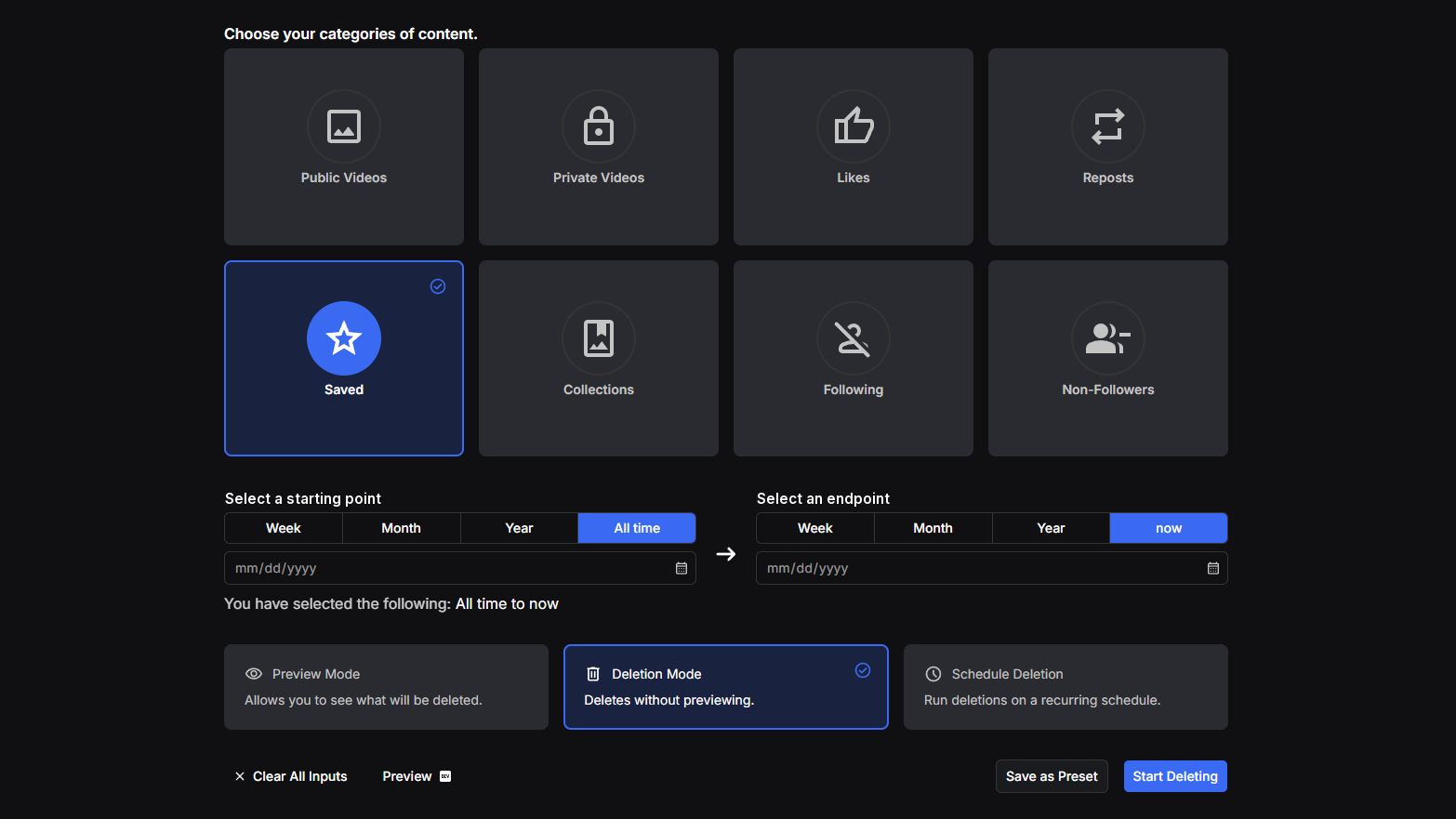
Redact (that's us) does the clicking in one pass, and its filters narrow a run by date range, view count, or public or private uploads, so you don't have to wipe the whole account.
- A
Connect TikTok in Redact
Download Redact, add TikTok, and sign in through the window it opens. Redact picks up the session itself and doesn't keep your password.
- B
Clear your videos, with a filter or without
On the Videos tab, leave the filters open for a full wipe, or narrow it by date range, view count, or public against private. Turn on Protect Pinned Videos to keep anything pinned. Run Preview first to list every video the run would touch without deleting anything.
TTikTokAction *
Delete, or revoke sharing permissions
Delete videosRevoke permissionsPrivacy *
Public or private videos
Public videosPrivate videosDate Range
Only delete videos in this window
Jan 2022Dec 2024View Count
Filter by min and max views
Min 0Max 1,000Protect Pinned VideosRedact's TikTok Videos form: a date range, a view-count band, the public and private filter, and Preview to list the matches before anything is deleted. - C
Don't forget the private ones
Most people skip this. Set the privacy filter to Private and Redact clears every video you hid rather than deleted. Full walkthrough in Delete all private videos on TikTok.
TTikTokPrivacy *
Only delete private videos
Public videosPrivate videosDate Range
Only delete videos in this window
Any timeTodayThe same form with the privacy filter set to Private, so only hidden videos are queued and public uploads stay put. - D
Then likes and reposts
Both are content TikTok holds against your account, so clear them too. See Delete all your liked videos and Delete all TikTok reposts for the steps.
- E
Comments? You have to do those by hand
Redact doesn't delete TikTok comments yet, and TikTok's bulk tool only covers comments other people left on your posts. Delete your own one at a time. Open the post, tap Comments, press and hold your comment, then tap Delete, the route TikTok documents. Start with anything that names a place, a person or a job.
- F
Deal with the drafts on your phone
Drafts live in the app on your phone, so Redact can't reach them. Open Profile, tap Drafts, and delete them. TikTok may have collected them already, so this only protects the next one.
Object If You're in the EEA, UK or Switzerland
TikTok's right-to-object page gives users in the EEA, UK and Switzerland a legal right to object, under GDPR, the UK's version of it, and Switzerland's data protection act. It only covers processing TikTok bases on its legitimate interests or the public interest. Choose "Make an objection to the processing of my data" and name the training of models on your content. TikTok says it weighs "the reasonable expectations you may have" and "whether there are less privacy intrusive means that achieve the same purpose."
It's a request, not a setting, and the slowest route here. In May 2026, Surfshark's research team counted the steps ten social platforms take to opt out of AI training. The chart shows nine, as Kwai wasn't available in Surfshark's region. TikTok came out worst of the platforms with any opt-out.
How many steps it takes to opt out of AI training
Each step is one tap, one form field or one toggle. A shorter bar means an easier opt-out.
TikTok
19 stepsOnly where a data protection law applies
Facebook
8 stepsNo promise outside the EU and UK
Instagram
8 stepsNo promise outside the EU and UK
Snapchat
3 to 5 stepsLinkedIn
3 to 5 stepsTwitter
3 to 5 stepsPinterest
3 to 5 stepsReddit
No way to opt out
Discord
Nothing to opt out of, it says it doesn't train on user data
The form itself is TikTok's privacy request form, which takes submissions from anywhere, so you can send one wherever you live. Some other countries' privacy laws give a similar right, so check yours first, but where no law gives you that right, TikTok doesn't have to weigh the request.
Why a Private TikTok Account Won't Help You
Going private is worth doing. Go to Profile, the Menu button, Settings and privacy, then Privacy, and turn on Private account. Only followers you approve can watch your videos and lives, read your bio or see your likes, and nobody can Duet, Stitch, make stickers from or download your posts. If you're 13 to 15, TikTok has done it for you since January 2021.
What a private account covers
Stops people, not TikTokStops
- Strangers watching, downloading or reposting your videos
- Scrapers that copy public TikTok video into third-party AI datasets
- Duets, Stitches and stickers made from your videos
- People-search and face-search sites indexing your videos
Doesn't stop
- TikTok's own use of your videos, including for training models
- Videos you set to "Only you", which stay on TikTok's servers
- Drafts and clips you never posted, which the policy says can be collected anyway
- Your messages and your chats with TikTok's AI features
Going private keeps your videos out of the datasets AI companies scrape from public TikTok, but it was never meant to stop TikTok, because "private" means private from other users.
Surfshark says TikTok, Pinterest and LinkedIn reserve the right to use private data too, and that TikTok "reportedly analyzes not only public videos but also private videos and even unsaved drafts for AI training." That's the study's reading, not TikTok's, but the policy draws no line between them.
Keep It From Filling Back Up
If you keep posting, use all of it. The video settings and a private account limit what other people and companies can do, and scheduled deletion keeps what's on TikTok small by clearing anything older than a window you pick. With a 30-day window, a video does its job and leaves.
Questions People Ask
FAQ
Does making my TikTok account private stop TikTok training AI on my videos?
No. Private controls other users, not TikTok. The policy lets TikTok collect content when it's created, imported or uploaded, published or not, and lets it train models on what it collects.
Can TikTok see videos I set to private or Only you?
They sit on TikTok's servers the same as a public upload. Surfshark's May 2026 study puts TikTok among the platforms that reserve the right to use private data as well as public.
Is there a TikTok AI opt-out switch?
Not in any region. In the EEA, UK and Switzerland you can object through TikTok's right-to-object form, which Surfshark counted at 19 steps, though the right only covers processing TikTok bases on its legitimate interests or the public interest. Anyone can submit the form, but where no law gives you that right, TikTok doesn't have to act on it.
Does deleting my videos remove them from a model that already trained on them?
No. A trained model keeps what it learned. Deleting takes a video off the platform, but TikTok's terms don't promise a copy it already holds is kept out of future training either.
What about drafts I never posted?
The policy covers them, because collection can happen at the moment a clip is created. Drafts live in the app on your device, so you clear them on the phone, not in Redact.
TikTok has no AI training opt-out, and it pulled the one AI setting it had. Turning off reuse stops other people, a private account stops strangers and scrapers, deleting takes your content off the platform, and the objection form is a legal right in the EEA, UK and Switzerland. None of it comes with a promise that TikTok keeps your content out of training.
TikTok isn't the only app training on your posts. Our AI opt-out hub lists what each major platform uses and what you can do about it.
Redact for TikTok
Banish your cringe TikTok videos to the shadow realm.