How to Quickly Remove All Your Followers on TikTok At Once
 Dan Saltman7 min read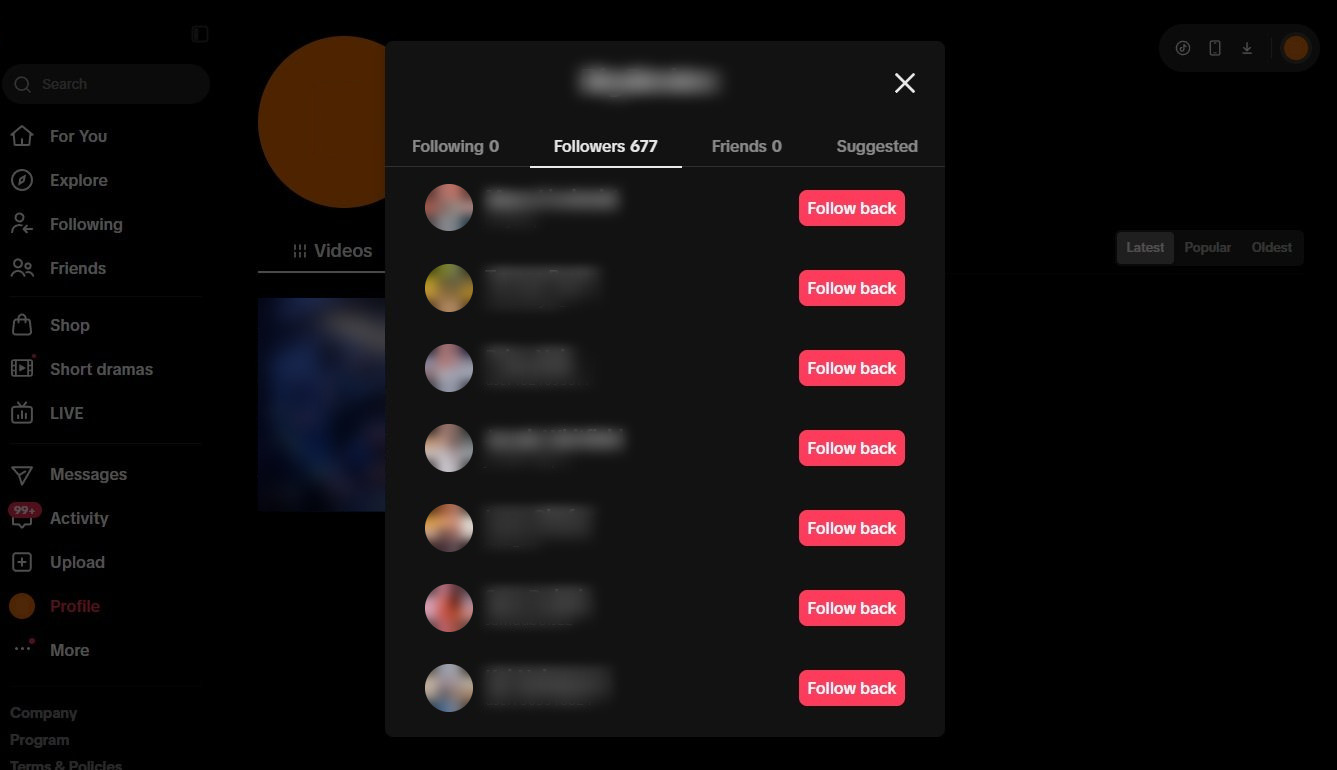
On this page
So you've just realized TikTok doesn't provide an easy method of removing large numbers of your followers at the same time and Google or someone else sent you here, right? The good news is that we do in fact have an app created especially for this problem.
Unfortunately, TikTok only gives you one way to remove followers and that's one at a time. It requires 4 different clicks per follower removed and about 20 seconds each cycle. As you can imagine, those clicks and seconds can add up fast if you have a few hundred followers you need to nuke.
How to remove all your TikTok followers at once
Our app, Redact, is built for Windows, macOS, and Linux. The topic of this page is obviously geared towards removing your followers in bulk, but our app actually does much more than that. Click here to see a full list of our TikTok tools.
Follower removal is a Premium feature, though the app itself is free to download. When you're ready to get started removing followers, follow the easy guide below.
- 1
Install Redact and sign in
Download Redact and open it. Sign-in is a code sent to your email, so there's no password to invent or forget.
- 2
Connect TikTok
Pick TikTok from the list of services. A browser window opens for you to log in to TikTok the normal way, and Redact picks up the session once you're in. The login goes straight to TikTok.
HomeSocial mediaOverviewAccountsRRedditstarlight_42FFacebookmidnight.scribeFFacebooklakeside_echoBBlueskyAccountDDisqusAccountShow more+ Add accountScheduleDisappearing ModeLocal ArchiveONPrivacy toolsExposed DataData BrokersBetaalex.pierce@example.comRedact Ultimate: Yearly - Launc...Connect Your Account
 T
TLog in to TikTok
Connect TikTok to start deleting your content
Your password is safe: We never see or store your credentials. They're sent directly to TikTok.
Your content, your device: Your content and logins stay on your device and never touch our servers.
Proven & trusted: Trusted by thousands of users. See what they have to say.
Log in to TikTokConnecting TikTok: you sign in to TikTok itself in a browser window, and Redact detects the session. - 3
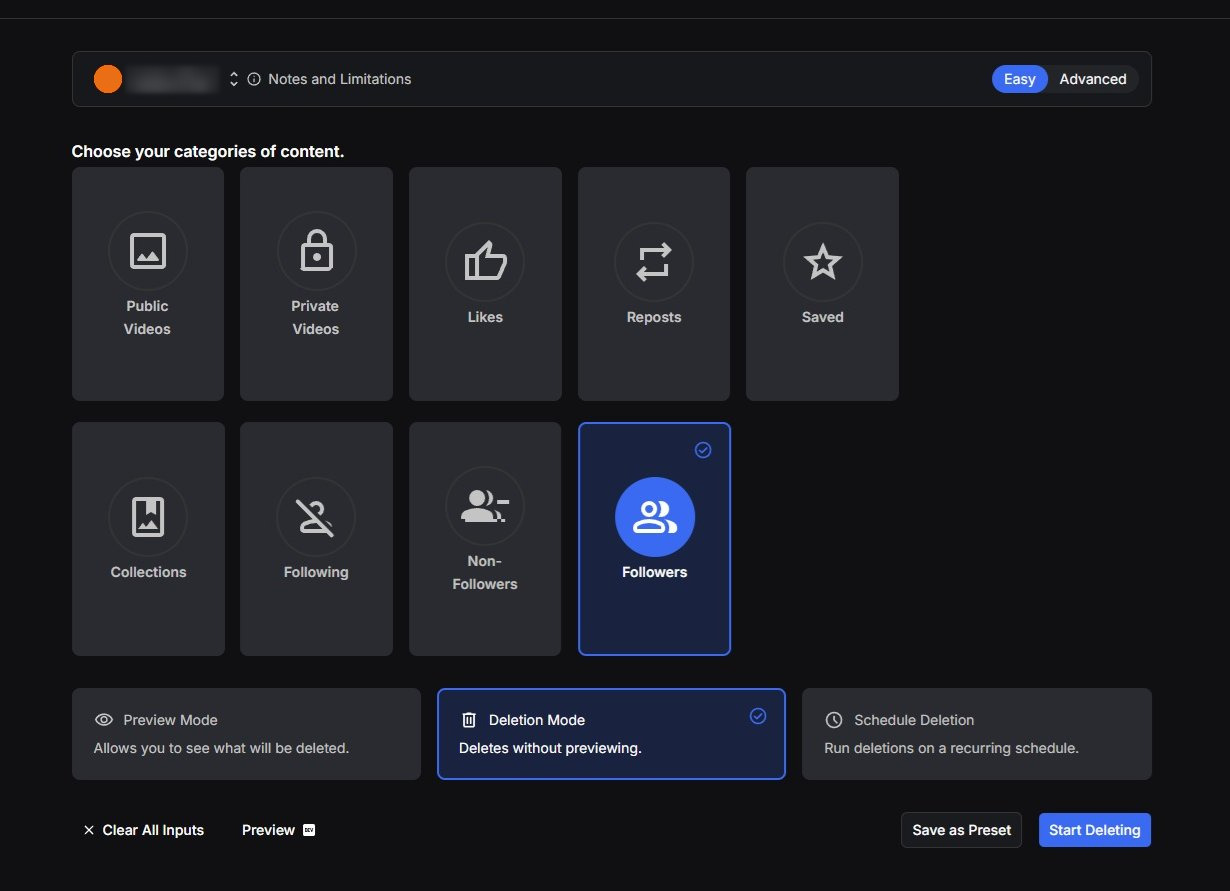
Choose Followers
Redact splits your TikTok account into categories, and Followers is one of them. Choosing it targets the accounts that follow you and nothing else. Your videos, your likes, and your reposts all stay put. If you follow someone back, removing them drops your follow of them too, because the block that does the removing cuts the follow in both directions and unblocking doesn't put it back.
You won't find a date filter on this one. TikTok attaches no timestamp to a follow, so the run works from your full list.
- 4
Preview the list, then run it
We suggest running Preview Mode first. Redact reads your Followers list and lays it out for you, one row per account, with a running count. Nothing is removed at this point. It's a look at what the run will clear, not a picker. There's no way to tick some accounts and spare the rest, so if the list holds people you'd want back, they'll need to follow you again once it's done.
When you're happy the whole list should go, start Deletion Mode and Redact works through it on its own. TikTok limits how quickly an account can make changes, so Redact paces itself to stay inside that limit. A big list takes a while, and it's fine to leave it running.
TTikTokFollowers
Accounts that follow you
p@promo.bot.xg@ghost_2018acctc@cold_dm_dealsr@randomviewer_s@spam_giveawaysf@free.crypto.nowRemoving followersRedact clearing a Followers list: each account is removed in turn while the run keeps its own count.
How Redact's remove follower feature works
There is no native way to remove followers in bulk on TikTok. However, blocking someone automatically removes them as a follower, and unblocking them doesn't bring that follow back. If you follow them as well, your follow of them gets cut too, and it doesn't come back either. So essentially, we mass block and then unblock your entire followers list.
Sometimes a follower's profile won't load, or it loads without the menu Redact needs. Redact skips those, marks the row with the reason, carries on with the rest of the list, and leaves them on your Followers list for you to deal with by hand. And every so often an account is still following you after the run even though everything looked fine, which is something to do with TikTok that we don't fully understand, and Redact has no way of spotting it. So don't be surprised if 1 or 2 followers won't seem to go away. Remove those by hand.
Were you looking for your Following list instead?
Followers are the accounts that follow you. Following is the accounts you follow, and it's easy to land on the wrong guide. If you want to clear out the accounts you follow, TikTok makes you unfollow them one at a time as well, with no bulk option in the Following menu either. Redact's mass unfollow for TikTok handles that list in bulk, and its one filter keeps the people who follow you back. It won't show you who unfollowed you, since that isn't what it's for.
Tidying up the rest of the account while you're at it? We've also got guides on deleting all your TikTok reposts and clearing your liked videos.
FAQ
Does someone get notified when I remove them as a follower?
Nothing is sent from your account either way, whether you remove them by hand or with Redact. TikTok doesn't publish what it does or doesn't notify people about, so the honest answer is that they'd find out the same way anyone does, by opening your profile and seeing they no longer follow you.
Are they blocked after I remove them?
Not when you do it by hand. Removing a follower and blocking someone are two different actions on TikTok. When Redact removes a follower it blocks and immediately unblocks the account, so in the normal case no block is left behind either. If that unblock ever fails, Redact flags the row so you can unblock the account yourself.
Can they follow me again?
Yes. Removal only ends the follow, it doesn't stop a new one. On a public account they can follow you again the moment they notice. On a private account they'd need to send a fresh follow request, which you can ignore or decline. If you never want to hear from an account again, blocking is the tool for that, and it's a separate step.
Can I remove only the followers from a certain period?
No, and that's a TikTok limit rather than a Redact one. TikTok doesn't record when an account started following you, so there's nothing to sort or filter by. By hand you work through the list in whatever order TikTok shows it. With Redact you preview the whole list and the run works through all of it, skipping any account TikTok won't let it work on and marking the row with the reason so you can deal with it by hand.
Is removing TikTok followers with Redact free?
No. Follower removal is a Premium feature, and so is running it on a schedule. Downloading Redact and setting up your account costs nothing. Removing a follower by hand in the TikTok app is free, one account at a time.
What's the difference between removing a follower and unfollowing?
They work on opposite lists. Removing a follower takes an account off your Followers list, so your videos stop showing up in their Following feed. On a public account they can still run into your videos through search or For You. Unfollowing takes an account off your Following list, so you stop seeing theirs. This guide covers the first. For the second, use Redact's mass unfollow for TikTok.
Redact for TikTok
Banish your cringe TikTok videos to the shadow realm.