How to Delete Your TikTok Account (easy step by step guide)
TikTok's steps for the app and the website, the 30 days you get to change your mind, and what's still out there after.
 Dan Saltman12 min read
On this page
To delete your TikTok account in the app, go to Profile > Menu ☰ > Settings and privacy > Account > Deactivate or delete account, then pick Delete account permanently and follow the prompts. On a computer, it's under More > General > Manage account on tiktok.com/setting. TikTok gives you 30 days to change your mind, then the account is gone.
Deleting won't reach everything. TikTok's help center only says what a deactivated account leaves behind: direct messages you sent may stay visible to the people you sent them to, and Duets or Stitches made with your videos may stay up. It doesn't say deleting removes them, so check afterwards.
Below are TikTok's steps for the website and the app, the difference between deactivating and deleting, and what's left behind. It's one of our guides to deleting your social media accounts.
Deactivate or delete?
TikTok offers both on the same screen, and they're not the same thing.
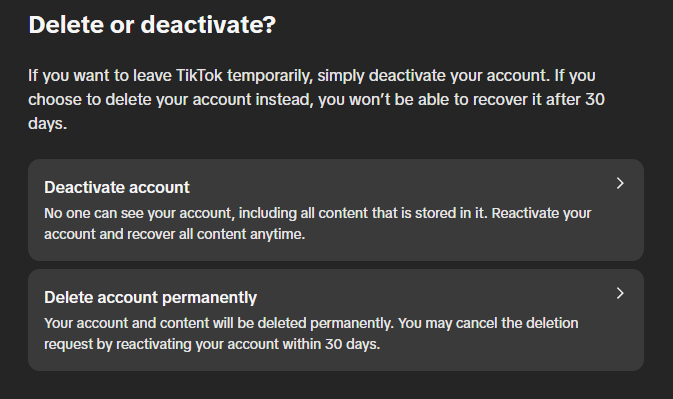
- Deactivating puts the account on hold. TikTok says no one will see your content or profile, it keeps your data, and you can come back any time by logging in and tapping Reactivate.
- Deleting is permanent. Your account and content are deleted, and you can only cancel by reactivating within 30 days.
If you might come back, deactivate. If you want the account gone, delete it, and do the five things below first.

5 things to do before you delete
A Download your TikTok data. TikTok's delete screen recommends it, because you can't download your data once the account is deleted, and drafts aren't included since they're not stored on TikTok's servers. Request it under Settings and privacy > Account > Download your data in the app, or Privacy > Download your data on tiktok.com/setting. If you've already asked for a copy, TikTok says to wait until you've downloaded it before you delete.
B Spend or cash out your Coins and rewards. Deleting doesn't refund anything you bought. TikTok's virtual items policy says your Coins expire when the account ends, and that there are no refunds for unused Coins, Gifts or Diamonds. If you've earned Diamonds or creator rewards, withdraw them first.
C Cancel your subscriptions. TikTok doesn't say deleting your account cancels a LIVE Subscription or anything else billed through Apple or Google. Cancel those where you pay for them, in your Apple subscriptions or Google Play subscriptions, before you delete.
D Check what else uses the account. If you sign in to other apps with TikTok, or run a TikTok Shop or an ads account through it, sort those out first. And logging back in during the 30 days is how you cancel a deletion, so log out on every phone, tablet and browser once you've deleted.
E Remove Duets and Stitches you don't want left up. TikTok's Stitch help article says to go to Settings and privacy > Privacy > Reuse of content > Reuse of content history, pick a video, tap More options ... and then Remove all posts. That permanently removes your original post and all the Duets and Stitches made with it, so download the original first if you want a copy.
How to delete your TikTok account
These steps follow TikTok's help articles on deleting and deactivating your account as of October 2026, and the delete screens on tiktok.com.
Option 1: Delete your account on tiktok.com (computer)
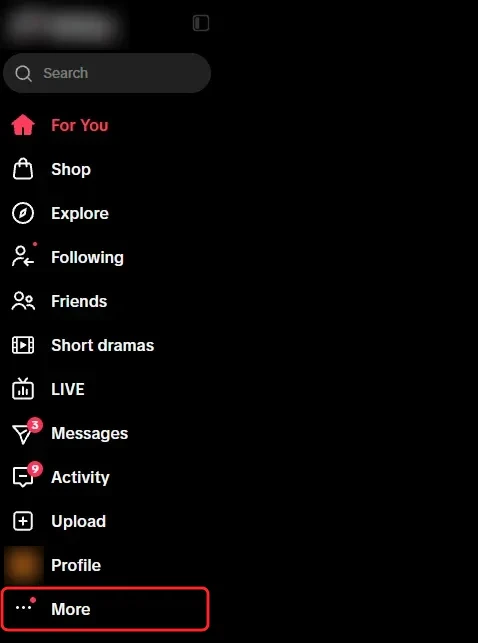
Step 1 Click More
Log in at tiktok.com and click More, the last item in the side menu.
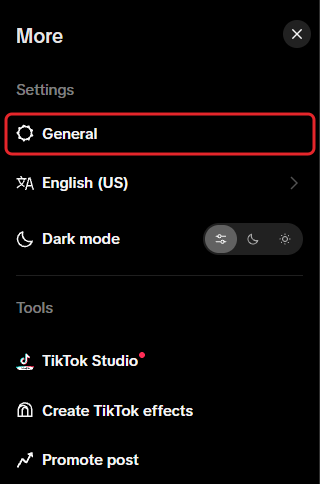
Step 2 Click General
General is the first item under Settings in the More menu, and it opens your settings page.
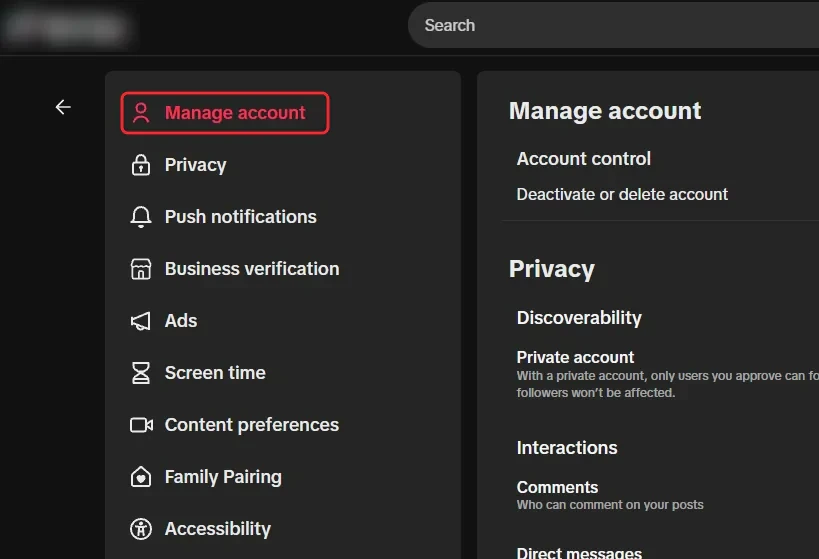
Step 3 Click Manage account
Manage account is at the top of the list on the left of the settings page.
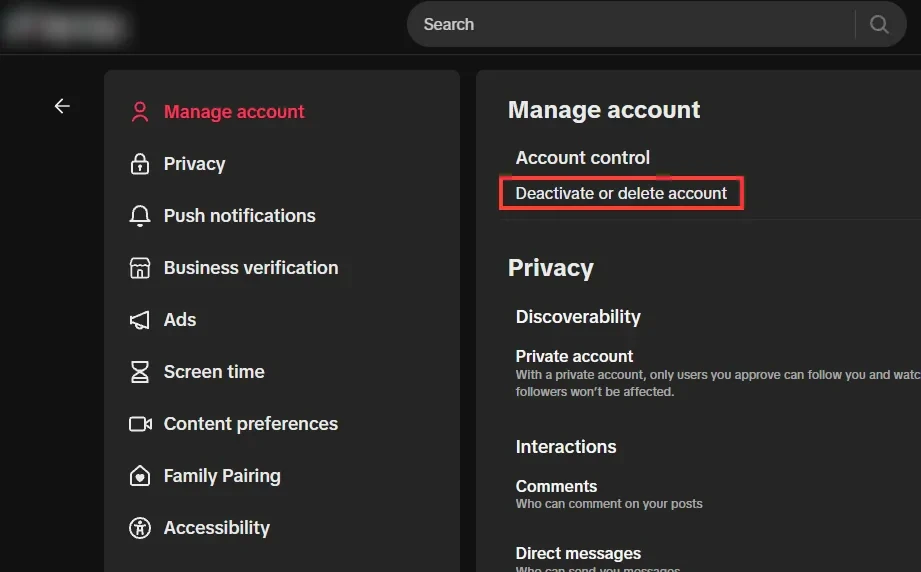
Step 4 Click Deactivate or delete account
It's under Account control, the first section of Manage account.
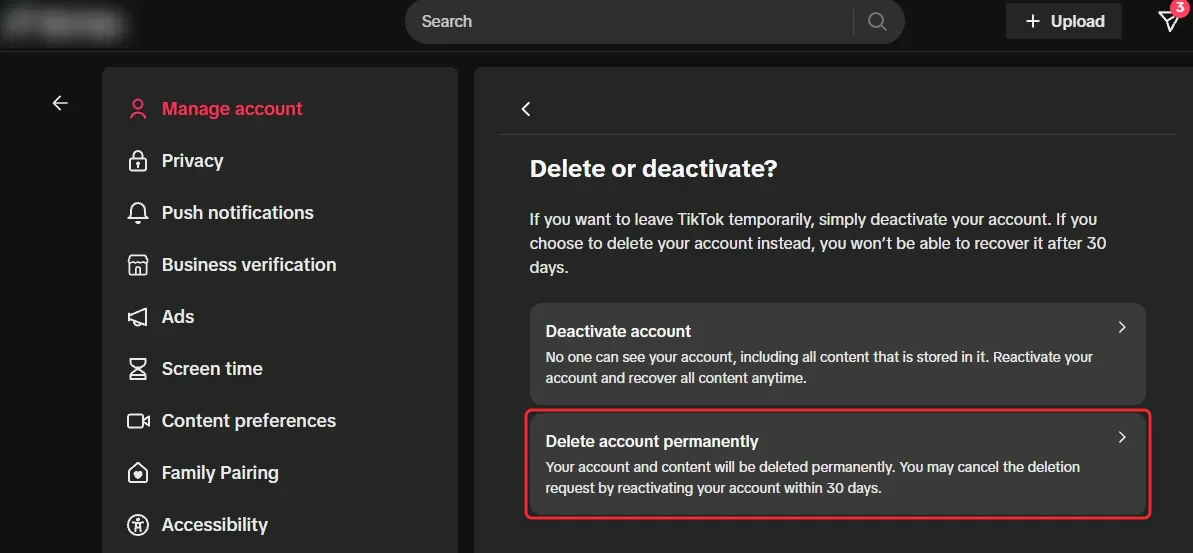
Step 5 Choose Delete account permanently
TikTok asks whether you want to deactivate or delete. Click Delete account permanently, the second option, or pick Deactivate account instead if you only want a break.
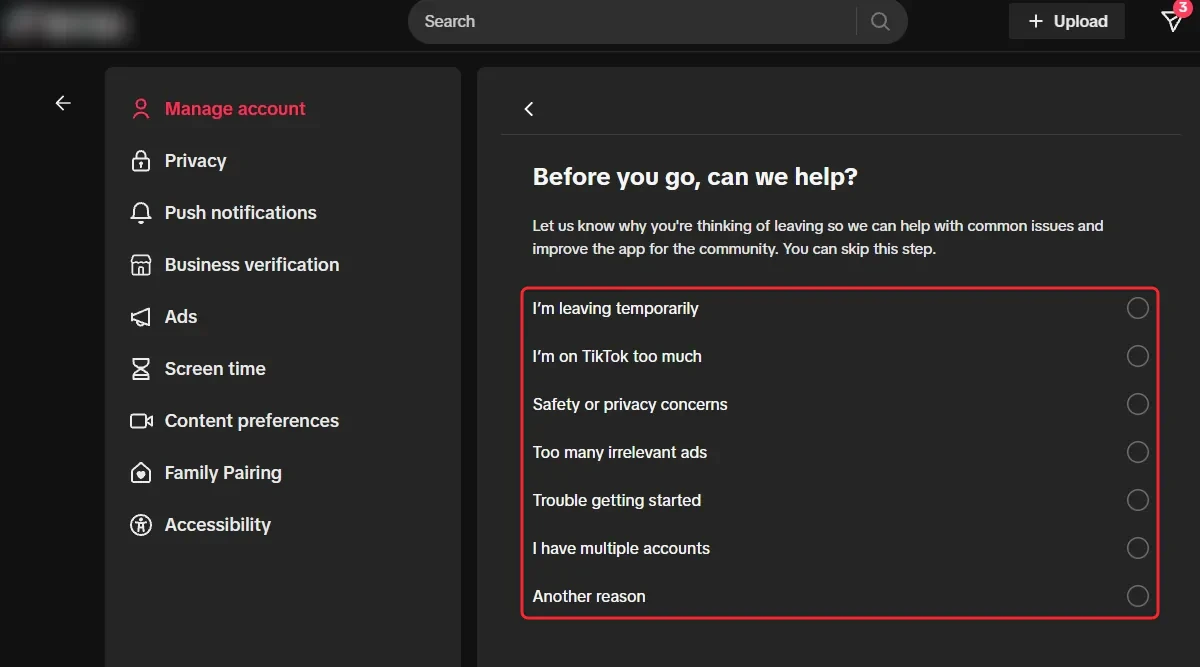
Step 6 Pick a reason or skip
TikTok asks why you're leaving, but answering is optional, so either pick a reason and click Continue or click Skip below the list.
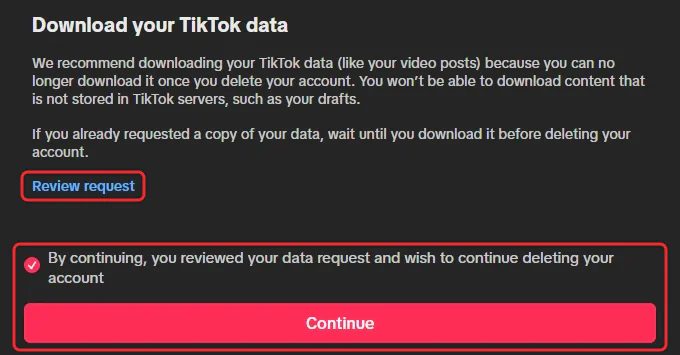
Step 7 Download your data, then delete
TikTok reminds you to download your data first, since you can't once the account is deleted. Review request takes you to your data request. When you're ready, tick the box and click Continue to delete the account, which starts the 30 days.
Option 2: Delete your account in the TikTok app (iPhone or Android)
The steps are the same on iPhone and Android, though the screenshots below were taken on an iPhone.
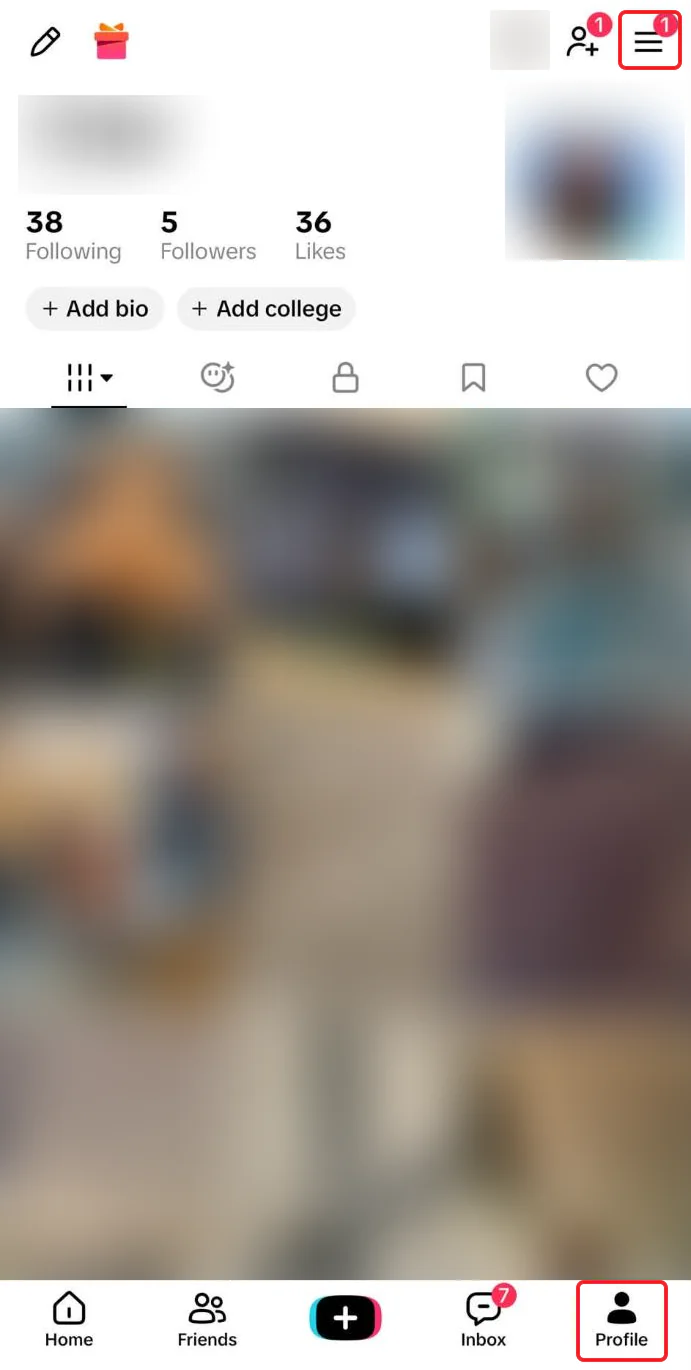
Step 1 Tap Profile, then the menu
Tap Profile at the bottom right, then the Menu ☰ button at the top right of your profile.
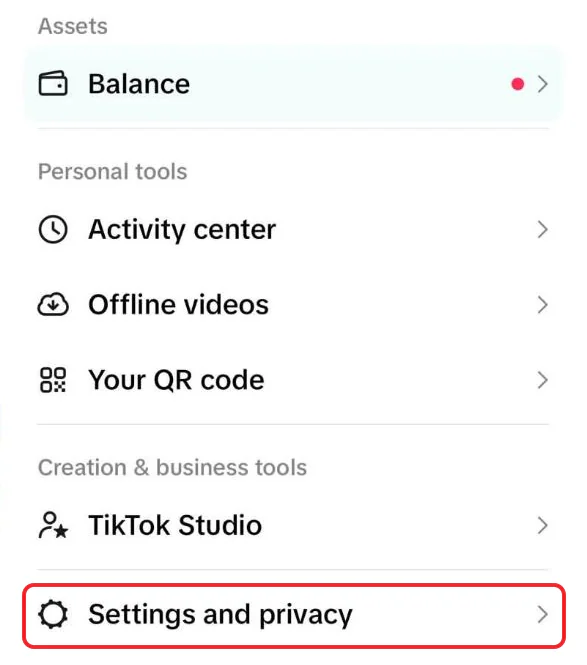
Step 2 Tap Settings and privacy
It's the last item in the menu that slides in from the right.
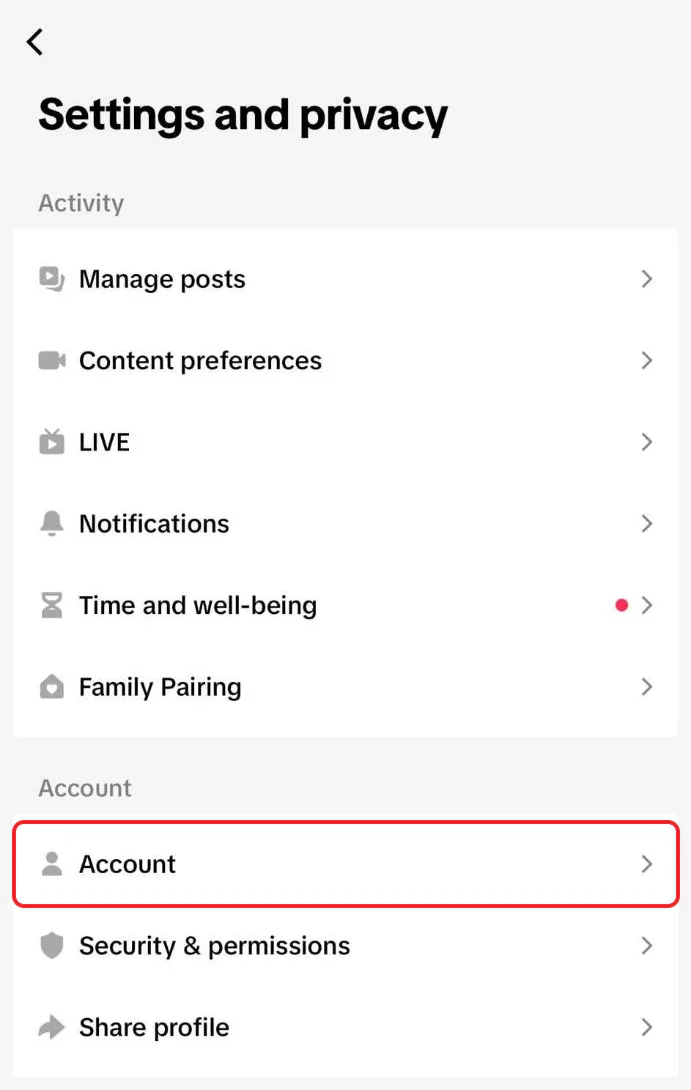
Step 3 Tap Account
Account is the first item in the Account section, below Activity.
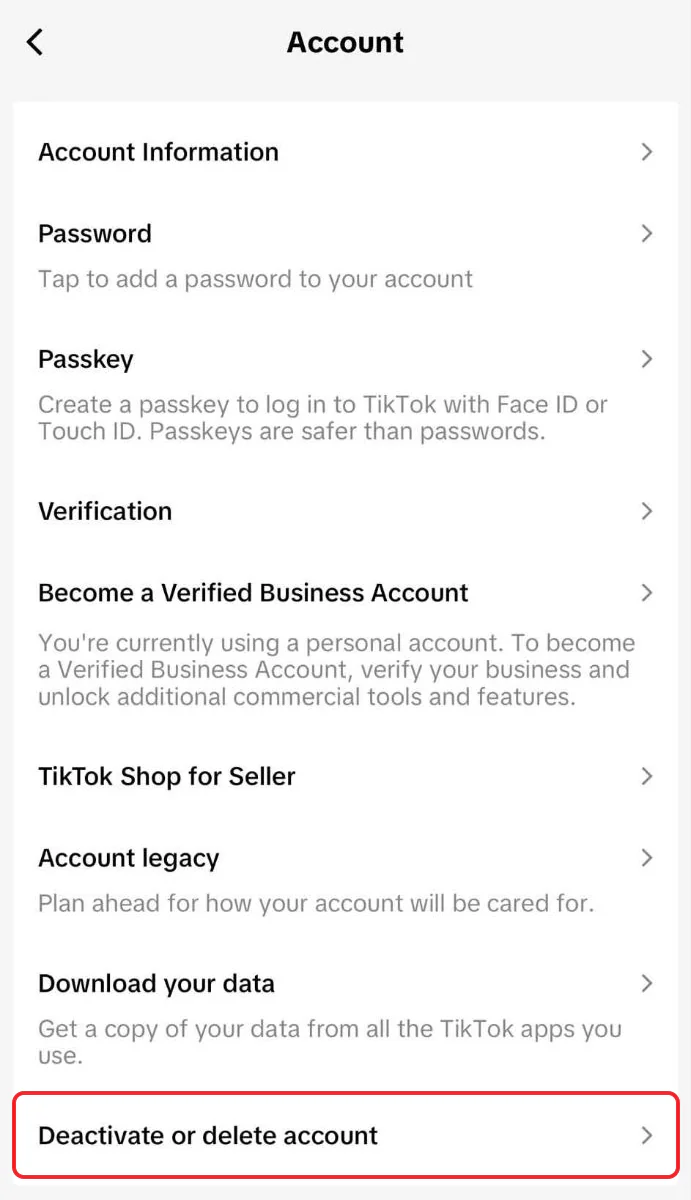
Step 4 Tap Deactivate or delete account
It's the last item on the Account screen, under Download your data.
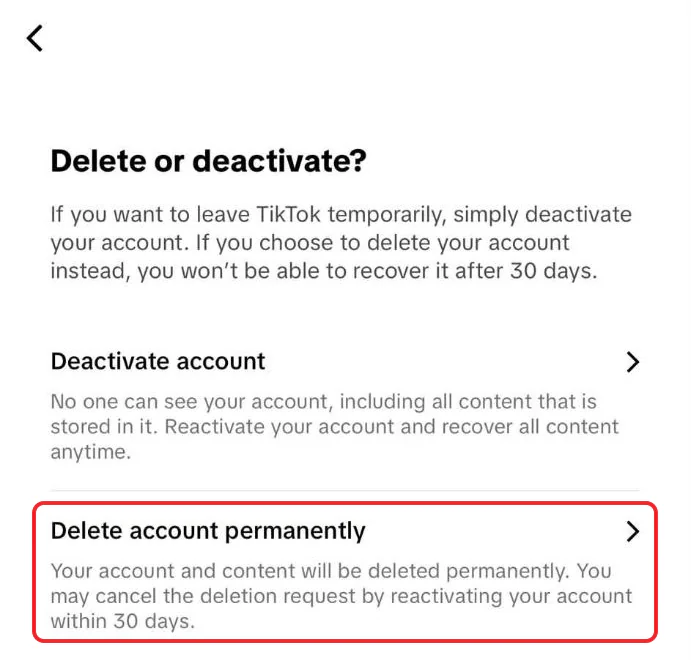
Step 5 Tap Delete account permanently
Tap Deactivate account instead if you only want a break.
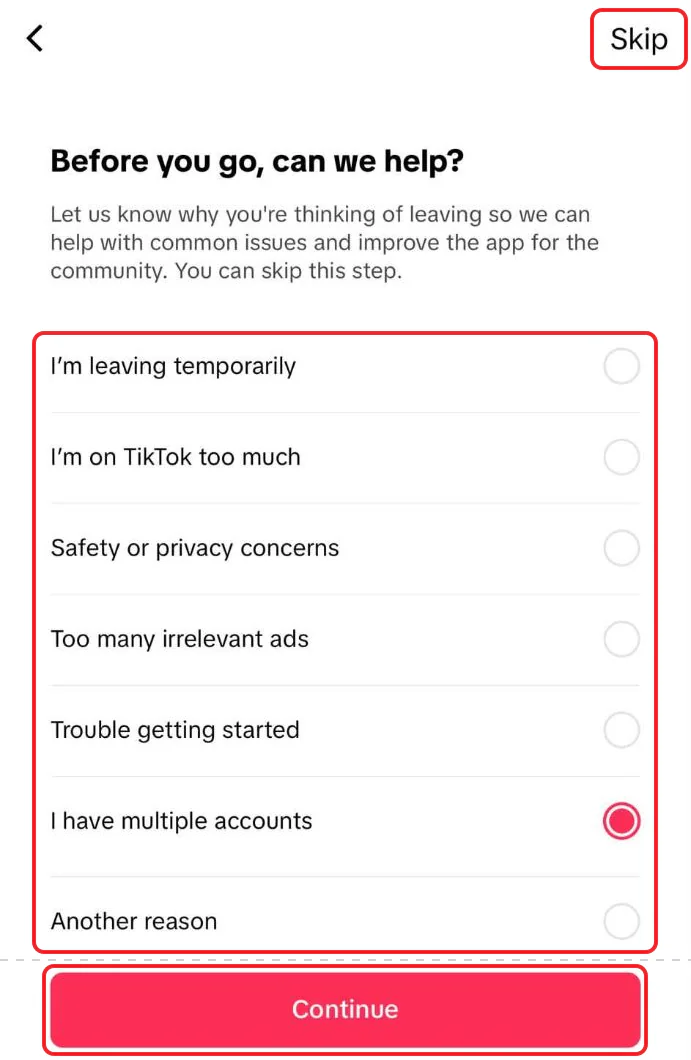
Step 6 Pick a reason or skip
Pick a reason and tap Continue, or tap Skip at the top right.
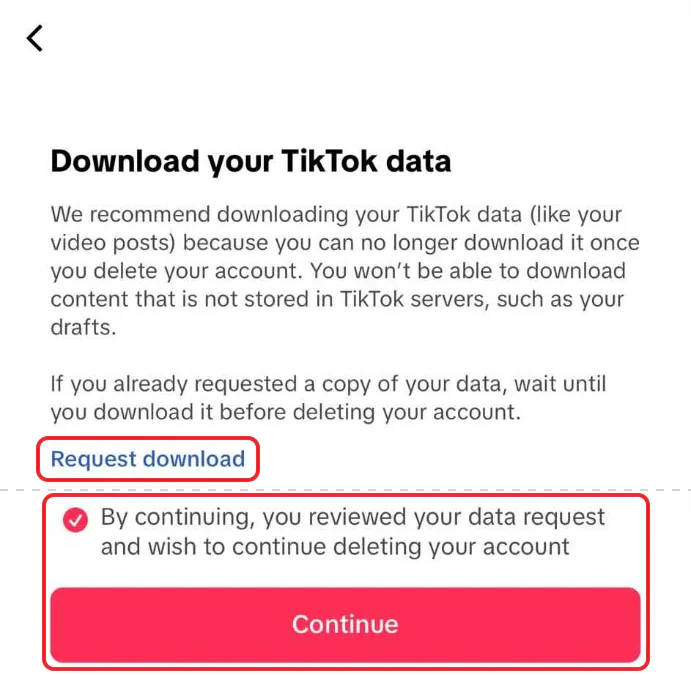
Step 7 Download your data, then delete
Tap Request download if you still want a copy of your data. When you're ready, tick the box and tap Continue to delete the account, which starts the 30 days.
What deleting your TikTok account leaves behind
Here's what TikTok says in its articles on deleting and deactivating an account, and on its delete screens:
- Your account and content are deleted after the 30 days, and you can't recover them.
- Messages you sent may stay. For a deactivated account, TikTok says direct messages you sent to others may remain visible to them. Its delete article doesn't say deleting removes them.
- Duets and Stitches may stay. For a deactivated account, TikTok says Duets or Stitches associated with your videos may still be visible to others. Those are other people's posts, and TikTok doesn't say they're deleted with yours, so remove them under Reuse of content history before you delete.
- Downloads and screen recordings stay. Anyone who saved your videos to their phone, or reposted them on another app, keeps their copy.
- Coins, Gifts and Diamonds are lost. TikTok's virtual items policy says Coins expire when the account ends, with no refund for unused Coins, Gifts or Diamonds.
- TikTok keeps some data. Its privacy policy says it can keep information to meet legal obligations, and about rule violations.
Want a fresh start instead? Keep the account, delete the content
Deleting the account takes your followers and username with it. TikTok has no way to delete your videos, likes or reposts in bulk, so if you'd rather start over on the same account, you're stuck deleting them one at a time.
Redact does it in bulk on your own computer. Log in to TikTok through the app, pick what to delete, preview the list, and run it. It covers:
- Your videos, filtered by date, views, or public vs private, with pinned videos protected if you like.
- Your liked videos, your saved videos and your reposts.
- Duets and Stitches. Revoke permissions switches off reuse on videos you keep, so nobody can Duet or Stitch them from now on. It doesn't remove Duets that already exist.
Redact has limits too.
- It works at TikTok's pace. TikTok only accepts so many changes from one account in a short time, so a big history takes a while.
- The free plan covers videos posted in the last 30 days. That includes your likes and saves on them, since a like or save is dated by when the video was posted, not when you tapped it. Older videos, likes and saves, plus reposts, collections and unfollowing, need Premium.
- It can't reach copies. Downloads and screen recordings other people made stay. Duets and Stitches stay too unless you remove them in TikTok under Reuse of content history.
It's also a good first step if you're still going to delete, since once your videos are gone there's nothing left on your profile to reuse.
If you still want the account gone, download your data, spend your Coins, then delete using the steps above.
FAQ
How do I permanently delete my TikTok account?
In the app, go to Profile > Menu ☰ > Settings and privacy > Account > Deactivate or delete account and choose Delete account permanently. On a computer, it's under More > General > Manage account. Don't log back in for 30 days, and the account is deleted for good.
What's the difference between deactivating and deleting TikTok?
Deactivating hides your account and keeps your data, so you can reactivate whenever you like. Deleting removes the account and its content permanently after 30 days.
Can I get my TikTok account back after deleting it?
Yes, if you log in with the same details and tap Reactivate within 30 days. After that, TikTok says you won't be able to recover it.
Does deleting TikTok delete my videos?
Your videos come off TikTok with the account. Duets and Stitches other people made with them may stay up unless you remove them first under Reuse of content history, which also deletes your original. Copies people downloaded stay.
Do I get my TikTok Coins back if I delete my account?
No. TikTok's virtual items policy says Coins expire when an account is closed, and unused Coins, Gifts and Diamonds aren't refunded. Spend them, or withdraw your rewards, before you delete.
Does deleting TikTok delete my messages?
Not necessarily for the people you messaged. TikTok says direct messages you sent from a deactivated account may remain visible to the people you sent them to, and it doesn't say deleting removes them.
Can I delete my TikTok account on a computer?
Yes. On tiktok.com, click More > General, then Deactivate or delete account under Manage account, and choose Delete account permanently.
Redact for TikTok
Banish your cringe TikTok videos to the shadow realm.