PeopleLooker's opt-out is free and self-service: search yourself on PeopleLooker's own opt-out form, pick your record, and confirm by email. That form is the route that counts - the family-wide portal LTVCO filed with California only suppresses BeenVerified, since each brand in the family keeps its own suppression list.
Want the background first? The PeopleLooker profile covers who owns it, the thirteen-domain family it belongs to, and what its reports contain.
At a glance
What this takes
Cost
Free
Time
About 5 minutes, plus the email click when it lands
This is a removal, not a cancellation. If you're being billed, opting out doesn't stop the subscription. Cancel separately through your account or on (800) 218-3309. Trial-conversion charges are the most common complaint on this brand's BBB file, so check the date before you assume you're clear.
The steps
Remove your listing
01
Open PeopleLooker's opt-out form and search for yourself
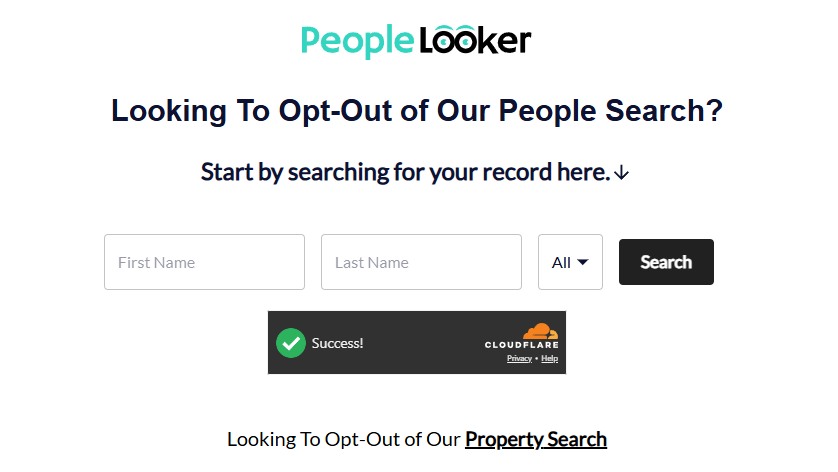
Open peoplelooker.com/app/optout/search. The page is titled "Looking To Opt-Out of Our People Search?" - enter your first and last name, pick your state (or leave it on All), pass the Cloudflare check, and hit Search.
Note the link at the foot of the page: "Looking To Opt-Out of Our Property Search". That is a second, separate opt-out with its own suppression list - if you own property, run it too after finishing this one.
The opt-out form - and note the separate Property Search opt-out linked at the bottom.
02
Click Proceed to Opt Out on the result that's your data
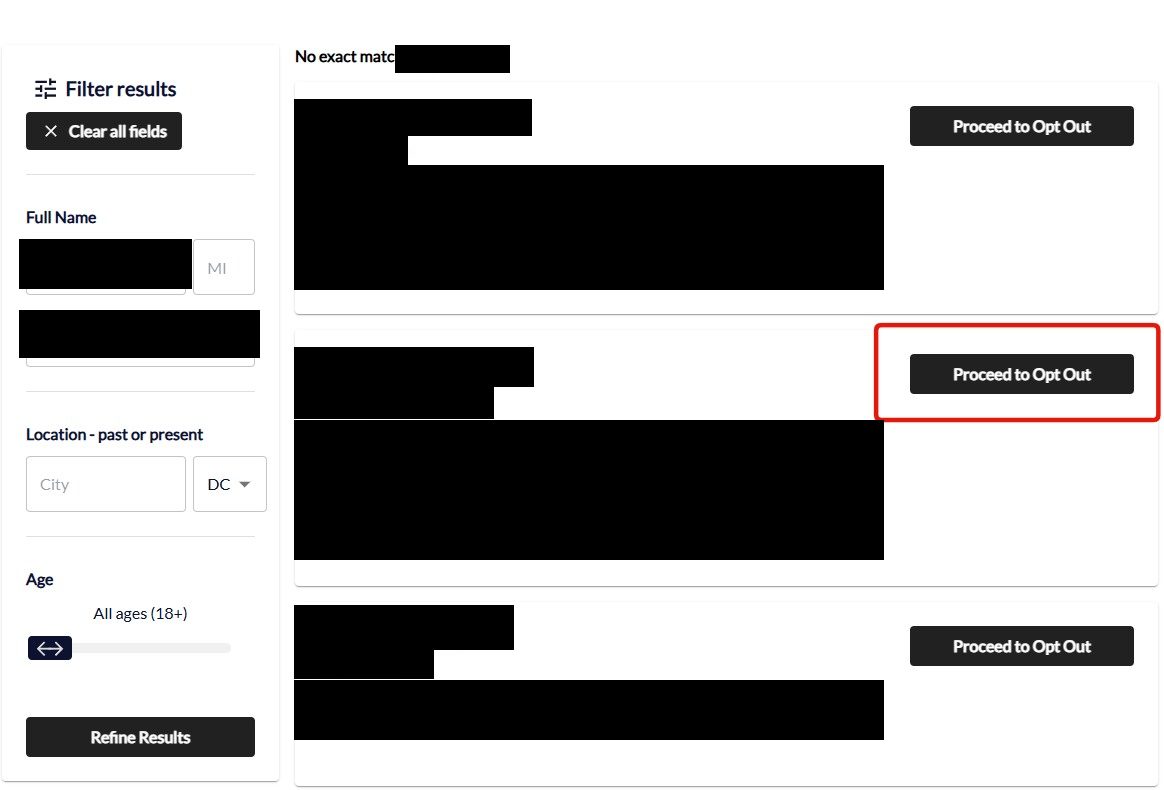
The results list each candidate with locations, aliases, birth month and relatives. Pick the record that's actually you - check the age, the city, and the listed relatives, because common names cluster and removing the wrong record leaves yours live. Use the Filter results sidebar (name, city, state, age) if the list is long, then press Proceed to Opt Out on that profile.
Pick the record that's actually you and press Proceed to Opt Out.
Screenshot the listing before you remove it. If the record comes back later, a dated screenshot of what was published is the evidence you'll want.
03
Enter your email and send the verification email
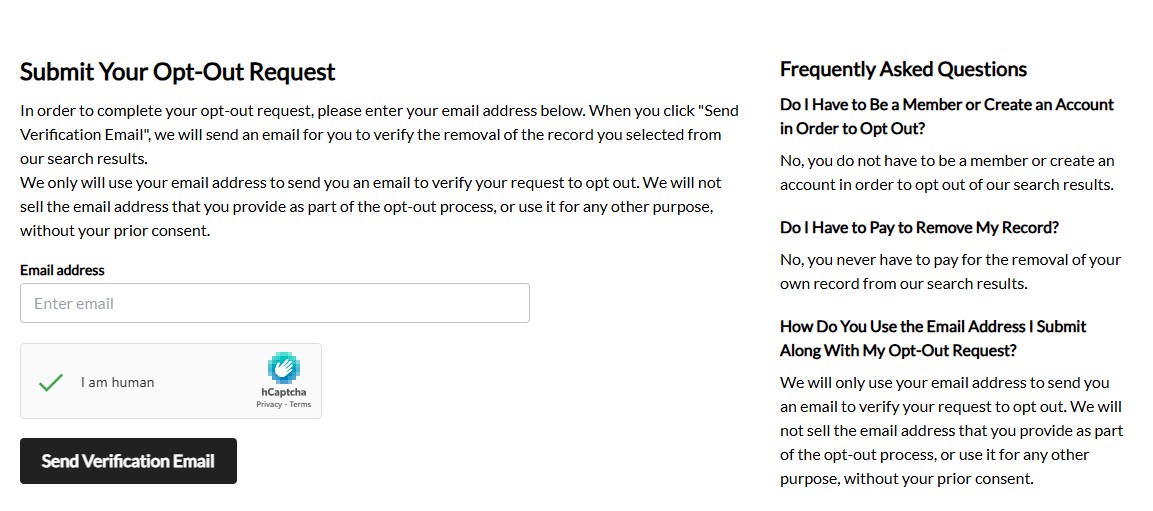
You land on Submit Your Opt-Out Request. Enter an email address, tick the I am human hCaptcha, and click Send Verification Email. Nothing happens until you act on that email, so use an address you can open straight away - a masked or secondary one is better than your primary, and the page's own FAQ confirms no account and no payment are needed, and that the address is used only to verify the request.
The verification email can take an hour or longer to arrive - that's normal for this operator's forms, so a quiet inbox means pending, not failed. Give it a full day before assuming anything is broken. Removal is stated to take about 24 hours once confirmed.
Email plus captcha, then wait - the verification email is slow to arrive.
Skip the "family-wide" BeenVerified portal. LTVCO's California filing names beenverified.com's opt-out as the rights page for all thirteen of its domains, but testing across the family in August 2026 found each brand serves its own copy of that form on its own domain and keeps its own suppression list. A submission there suppresses BeenVerified, not PeopleLooker - the form below is the one that removes you from this site.
The family
Check the rest of the family
A PeopleLooker opt-out is a PeopleLooker opt-out and nothing more - every other LTVCO brand needs its own submission. Thirteen domains sit on the one California filing. The ones most likely to be showing the same record as PeopleLooker are BeenVerified and PeopleSmart, which run the same people-search index. NeighborWho and Ownerly publish property history, so they matter if you own a home. NumberGuru and ReversePhone are the phone-lookup side.
wingmate.com is on the filing but is no longer a people-search site. As of August 2026 it serves an astrology and personal-development app - birth charts, horoscopes, tarot, compatibility - with no way to look anyone up. Its opt-out paths return errors because the product they belonged to is gone. There's nothing to remove there.
BackgroundChecks.me needs nothing separate.It's a storefront that routes searches into PeopleLooker and holds no database of its own, so clearing your PeopleLooker record clears it.
Confirm
Check it worked
Search your name again on PeopleLooker a day or two later, then on BeenVerified and PeopleSmart. Also search the web for your name alongside site:peoplelooker.com - listing pages get indexed, and a removed record can sit in a search cache for a while after it's gone from the site.
Keep every confirmation email. On this family in particular they're worth holding onto, because the operator's own filing reports that a large share of deletion requests get granted only in part.
If it fails
Troubleshooting
Removed here, still on BeenVerified. That's the expected outcome if the family portal didn't propagate. Submit on each brand individually rather than re-running the comprehensive form.
No verification email. Check spam, then try again with a different address. The form is the only thing that triggers it.
Granted, but the record is only half gone. LTVCO reported 11,512 of its 31,905 deletion requests in 2024 as complied with in part, against 19,791 in full. If yours came back partial, reply to the confirmation naming the fields still showing and ask for the rest.
International or formal requests. Use privacy@peoplelooker.com rather than the search form. It's the route the brand publishes for data-subject requests.
Still being billed. Removal and cancellation are separate processes on separate systems. Call (800) 218-3309, and dispute with your card issuer if support won't refund.
Staying off
Keeping it from coming back
One opt-out is a snapshot, not a permanent state. LTVCO rebuilds its index from public records, partner feeds, and new crawls, so a new address, a court filing, or a fresh social profile can put you back even after a successful removal.
Recheck quarterly, and recheck the family rather than the brand - a record that reappears on PeopleLooker has usually reappeared on BeenVerified and PeopleSmart at the same time, because it's one dataset with thirteen front doors. Redact's data-broker scan tracks the whole set so you don't have to remember which is which.
Take yourself off data broker sites
Redact scans data broker sites from your device, finds where your details are listed, and submits the removal requests for you. If a broker relists you, it files again.
August 5, 2026 · The family portal URL comes from LTVCO's own California data-broker filing. PeopleLooker's opt-out pages block automated readers, so their on-page wording is secondhand and flagged where it matters.