How to Delete Your Discord Account (easy step by step guide)
Discord's steps for the desktop app, the web and your phone, the 15 days you have to change your mind, and why your messages outlast the account.
 Dan Saltman10 min read
On this page
To delete your Discord account on desktop, open User Settings with the cogwheel () at the bottom left, go to Account, and click Delete Account at the bottom of the page. Enter your password (and your two-factor code, if you use one) and confirm. You'll have to hand over or delete any servers you own first.
What deleting your account doesn't do is delete your messages. Discord anonymizes your account "across all servers and messages", in its words. The messages themselves stay where you sent them, in servers and in other people's DMs, and once your account is gone you can't delete them any more.
This guide covers Discord's steps on desktop and mobile, the 15-day window, what's left behind, and how to delete your messages before you go. It's one of our guides to deleting your social media accounts.
4 things to do before you delete
A Download your data. In User Settings > Data & Privacy, click Request Data. Discord says the package can take up to 30 days, and your request is canceled if you disable or delete your account before the download link arrives. Your email has to be verified first, and the link goes to the address on your account when you ask, even if you change it later. Wait for the email. Our guide to the Discord data package explains what's in it.
B Check your subscriptions. Deleting your account cancels Nitro and Server Boosts. If you pay for Nitro through an iPhone or iPad, Discord says only Apple can cancel it, so cancel it in your Apple subscriptions first. If you only want a break, disabling your account (below) doesn't cancel subscriptions, and you'll keep being charged.
C Transfer or delete the servers you own. Discord won't delete your account until you do. Pick the new owner carefully, because once a server is transferred, Discord's support team can't move it back, and a deleted server can't be restored. Discord's guides cover transferring ownership and deleting a server.
D Delete the messages you don't want left behind. Once the account is gone, you can't. More on it below.
How to delete your Discord account
These steps follow Discord's help article as of October 2026.
Option 1: Delete your account in the Discord desktop app or browser
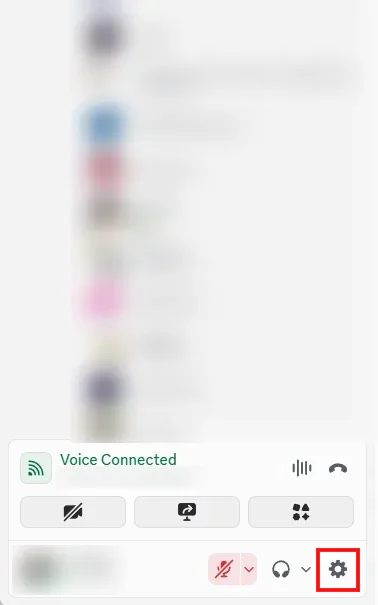
Step 1 Open User Settings
Click the cogwheel () next to your name in the bottom left corner of Discord.
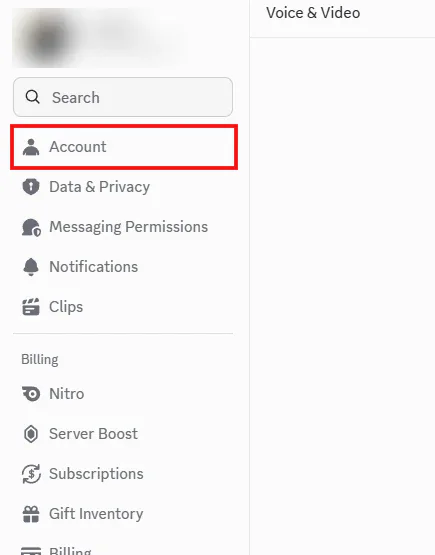
Step 2 Click Account
Account is at the top of the settings menu, under Search. Discord's help article still calls it My Account.
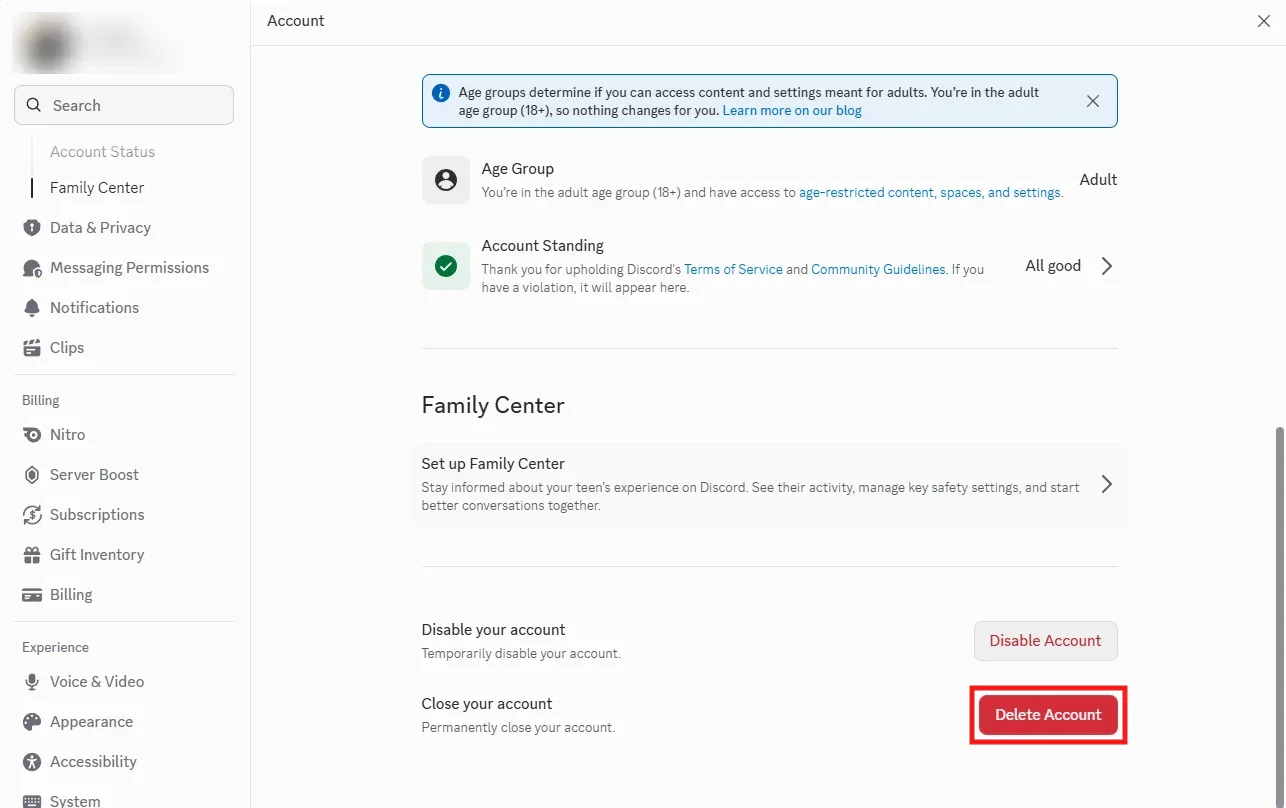
Step 3 Click Delete Account
Scroll to the bottom of the Account page and click Delete Account, under Close your account.
Step 4 Transfer or delete your servers if Discord asks
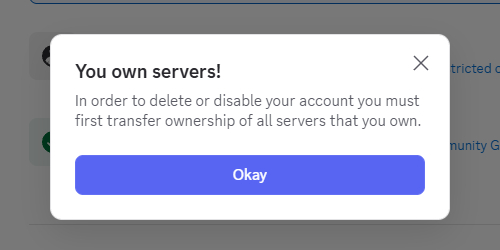
If you still own a server, Discord stops you here with a "You own servers!" notice. Transfer or delete each one, then go back to User Settings > Account and click Delete Account again.
Step 5 Confirm with your password
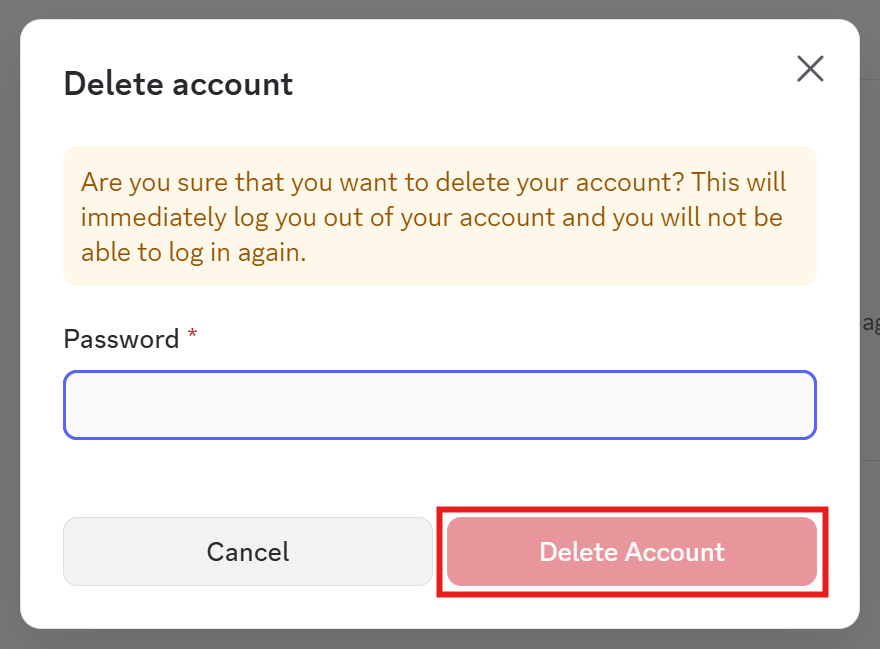
Discord warns that deleting logs you out straight away. Enter your password, plus your two-factor code if you use one, and click Delete Account. This is the click that starts the 15 days.
Option 2: Delete your account in the Discord app (iPhone or Android)
The steps are the same on iPhone and Android, though the screenshots below were taken on an iPhone.
Step 1 Tap your avatar, then Settings
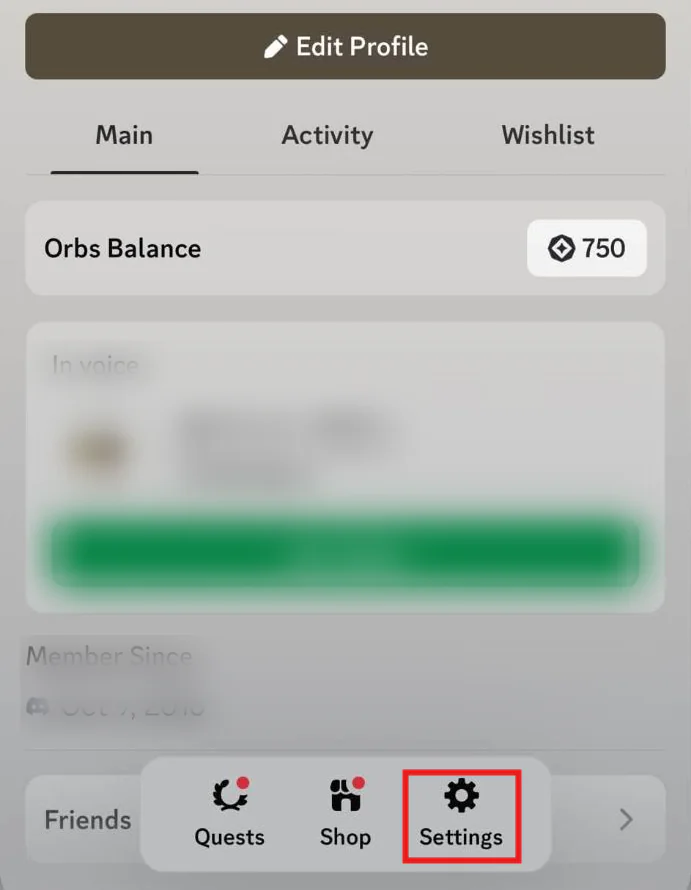
Tap your profile picture in the bottom right corner of the app. Your profile opens, with Settings in the bar at the bottom. Tap it.
Step 2 Tap Account
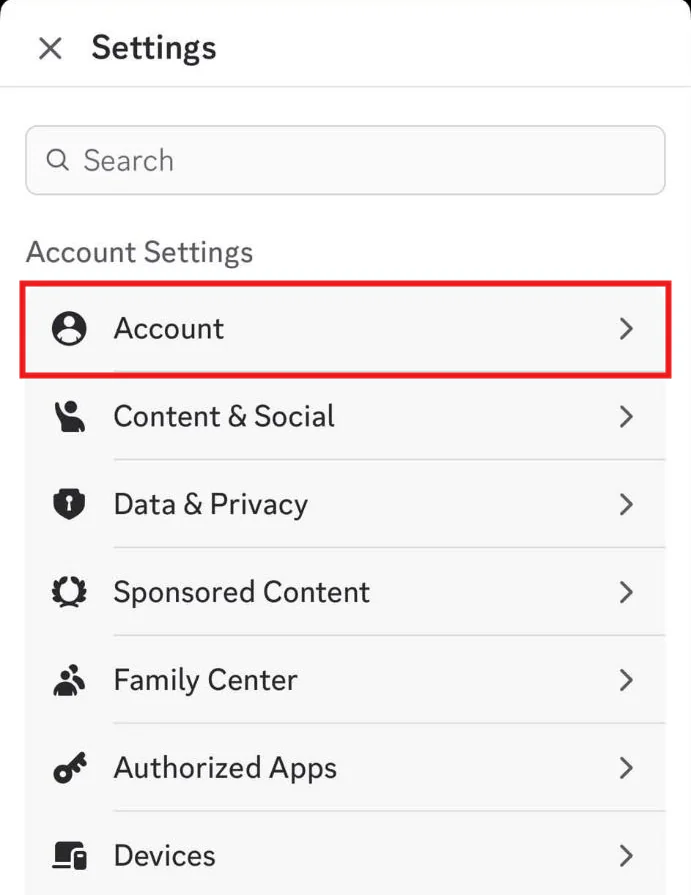
Account is the first item under Account Settings.
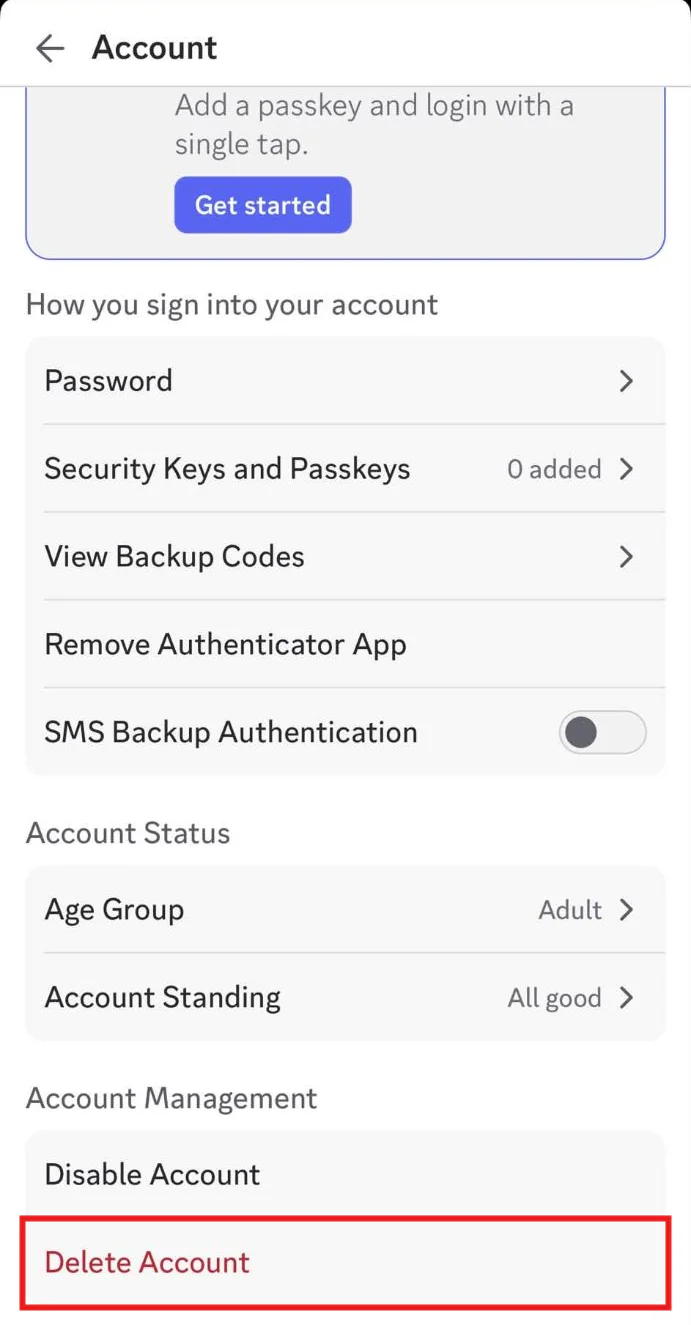
Step 3 Tap Delete Account
Scroll to the bottom of the Account screen and tap Delete Account, under Account Management. If you still own a server, Discord asks you to transfer it first, then come back here.
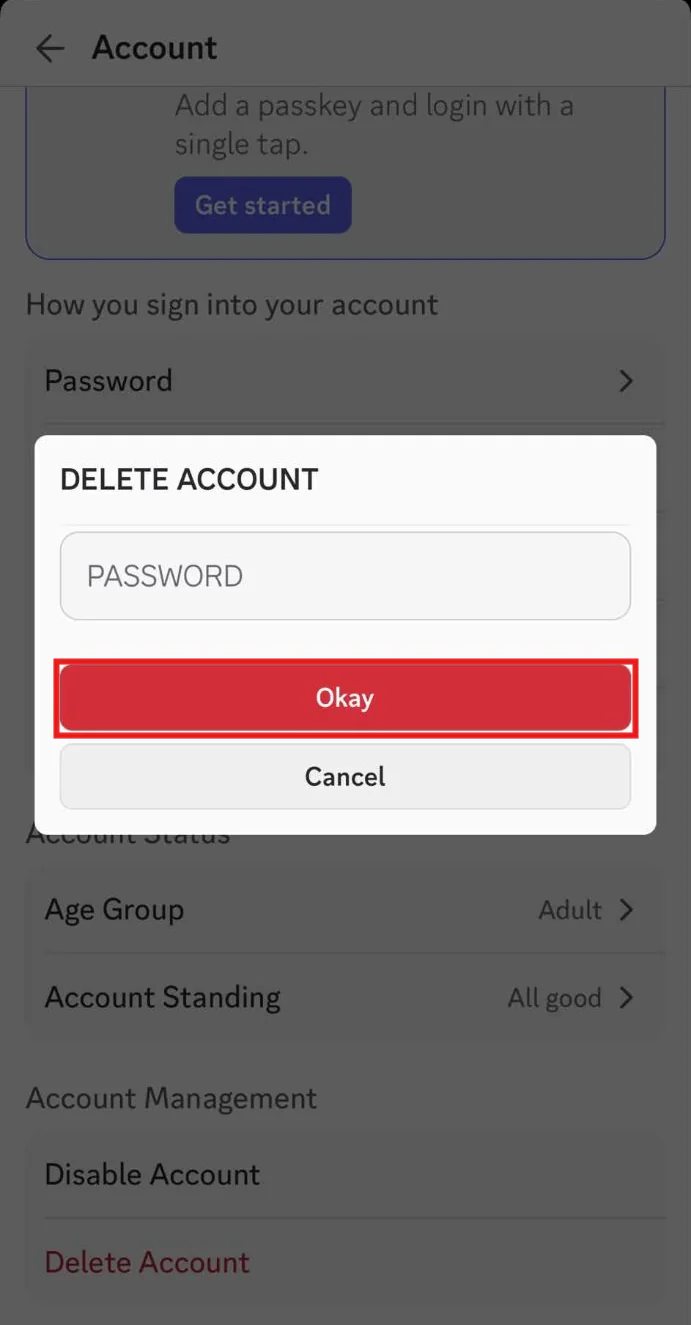
Step 4 Enter your password and tap Okay
Type your password into the Delete Account box and tap Okay.
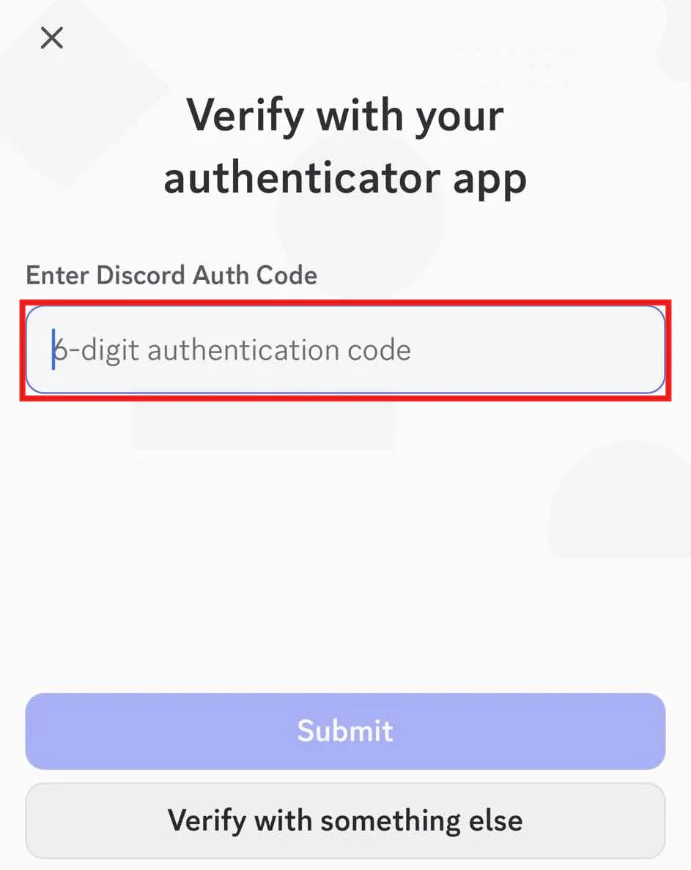
Step 5 Enter your authenticator code
If you use two-factor authentication, Discord asks for the 6-digit code from your authenticator app, or offers another way under Verify with something else. Submitting it is the last step, and it starts the 15 days.
What deleting your Discord account leaves behind
Discord lists what happens once the account is deleted:
- You lose access to all your servers, DMs, group DMs and purchases.
- Nitro and Server Boosts are cancelled.
- Servers you owned keep running under the new owner you picked.
- Your account is anonymized across all servers and messages.
Anonymized doesn't mean deleted. Your messages stay in every server channel and every DM you sent them in, shown under a placeholder name instead of yours. People who were in those conversations can still scroll back and read them, and a message that mentions your name, your town or a photo of you still points back to you.
And after deletion, you can't delete them yourself any more. Discord's own retention page says you can delete a message "if you still have access to the space where you posted it," and a deleted account has access to nothing. The same page asks you to delete specific content before you delete your account, and says you can write to privacy@discord.com if you need help deleting content. That's a request to Discord, not a guarantee the content will be removed.
Discord's data doesn't all go at the 15-day mark either. Its retention page says accounts are typically on hold for 15 to 30 days, and that identifying information can take up to 45 days more to leave its backups. Discord keeps aggregated and anonymized information after that. Content you delete yourself can stay too, since public posts may be kept for 180 days to two years, for example to train the models Discord uses to detect content that breaks its rules.
Delete your messages before you delete the account
Discord has no bulk delete for your own messages. You can delete them one at a time, from each message's own menu. For years of chat across dozens of servers and DMs, that isn't realistic.
Redact deletes your Discord messages in bulk, on your own device. Connect your Discord account, pick which servers and DMs to delete from (or all of them), filter by date or keyword if you want to keep some, and let it run. A few things worth knowing:
- It can only reach servers you're still in. Redact reads each channel's history through your account, so run it before you leave servers or delete the account.
- Closed DMs need their user ID. The DMs tab lists only the conversations you still have open. For DMs you've closed, Premium's Delete DMs by User ID deletes your messages with the user IDs you enter.
- Your data package speeds things up. Importing it, a Premium feature, helps Redact find old messages faster, though Discord's rate limits still set the pace. Another reason to request it first.
- It deletes your messages, not the other person's. In a DM, their side of the conversation stays. Our guide to deleting DMs from both sides explains what you can and can't do about that.
- The free plan covers your last 30 days. Deleting your full history needs Premium.
Our step-by-step walkthrough is How to bulk delete Discord messages, and there's a separate guide for images you've posted.
Once the messages you care about are gone and your data package has arrived, go back and delete the account using the steps above.
FAQ
Does deleting my Discord account delete my messages?
No. Discord anonymizes your account across servers and messages, but the messages stay where you sent them. Delete them before you delete your account, while you can still reach them.
How long does it take to delete a Discord account?
Discord keeps the account in a pending deletion state for 15 days, then deletes it permanently. Discord's support team can't make it faster.
Can I cancel a Discord account deletion?
Yes, within the 15 days. Log back in and choose Restore Account. After 15 days it can't be undone.
Why can't I delete my Discord account?
Usually because you still own a server. Discord won't delete an account until you've transferred ownership of every server you own or deleted them. If you still can't start the deletion, or you think your account has been compromised, Discord says to contact its support team.
What's the difference between disabling and deleting a Discord account?
Disabling puts the account on hold and you can come back any time by logging in. Deleting is permanent after 15 days. Disabling doesn't cancel subscriptions, so you'll keep being charged for Nitro unless you cancel it.
Can I still get my Discord data after deleting my account?
Request your data package first. Discord says deleting or disabling your account before the download link arrives cancels the request. If you've already lost access to your account, Discord points you to privacy@discord.com.
Does Discord delete inactive accounts?
Yes. Discord says accounts that have been inactive for two years or more are scheduled for deletion, and it may tell you by email or text first. That deletion leaves your messages behind too.
Redact for Discord
Cleanse your cringe Discord history by either nuking it all, or choosing a specific server or direct message, then specifying keywords and date ranges.

![How to quickly remove all images from Discord [Redact App]](/blog-images/2024/02/1df12454974a617bffd82bb1ad8d4218.png)