Discord Wrapped 2026: See Your Year on Phone or PC
Get started
How to download your data from DiscordHere's what you'll get
Visualize your Discord data
Share your stats with friends
A recap that never needs your login
Everything here is counted on your device from the package Discord sent you.
More free tools
- Discord Data Package ViewerDrop in your Discord package. Read, search and save the messages you've sent.
- TikTok WrappedSee your year on TikTok from your own data download, then save a card. Nothing is uploaded.
- Instagram WrappedSee your year on Instagram from your own data download, then save a card. No login, nothing uploaded.
- Discord Account Age CheckerSee the day a Discord account was made.
Discord Wrapped: common questions
Discord's own recap is called Checkpoint. The first one opened on December 4, 2025, showed up for some accounts and not others, and stayed up until January 15, 2026. You don't have to wait for Discord's, though, because this recap works from your data package, so request it now and you'll see your year as soon as the file arrives.
Discord has Checkpoint, a year-end recap in the app, but it only appears for some accounts, and many people never see it. This recap is made by Redact from your data package instead, which every account can request, and your browser opens that file without sending it anywhere.
In Discord on a computer, open User Settings with the cogwheel, choose Data & Privacy, and under Request your data press Request Data. Make sure Messages is ticked, then press Request My Data. Discord emails a download link to the address on your account. It says this can take up to 30 days, and the link stays active for 30 days once it arrives.
No. Your browser reads package.zip where it sits on your device, and no part of it is sent to Redact or anyone else. You can check by turning off your internet connection after the page loads, and the recap still works.
The package only holds messages you still have. Anything you deleted is gone from it, so it's not in the recap either. Other people's messages are never in your package, so the recap only counts what you sent.
From the activity files in your package, which log when you joined and left voice channels. They can be very large, so the recap only reads them when you press Add voice and app activity. Not every package has them, and Discord doesn't keep that log forever, so older years may show less than you spent.
No. Who you messaged most stays on this page and never goes on your card. Your top server, top channel and top word can go on the card, but only if you tick them yourself.
It comes from your own numbers for that year, and the reason is shown right under it. Someone who sends more than a hundred messages a day is a Rapid-fire texter, for example, and someone who's mostly on late at night is a Night owl.
Yes. The recap opens on the newest year in your package, which is this year if you've sent a message in it, and you can switch to any year in your package or to All time.
Step-by-Step Guide
How to get your Discord data package for your recap
Your recap is made from the data package anyone can request from Discord. These are the steps on a computer or the phone app as of November 2026.
Step 1 Open Data & Privacy
- A In Discord on a computer, open User Settings with the cogwheel next to your name.
- B Choose Data & Privacy in the list on the left.
- C On the phone app, tap your avatar at the bottom right, then the cogwheel at the top right, then Data & Privacy.
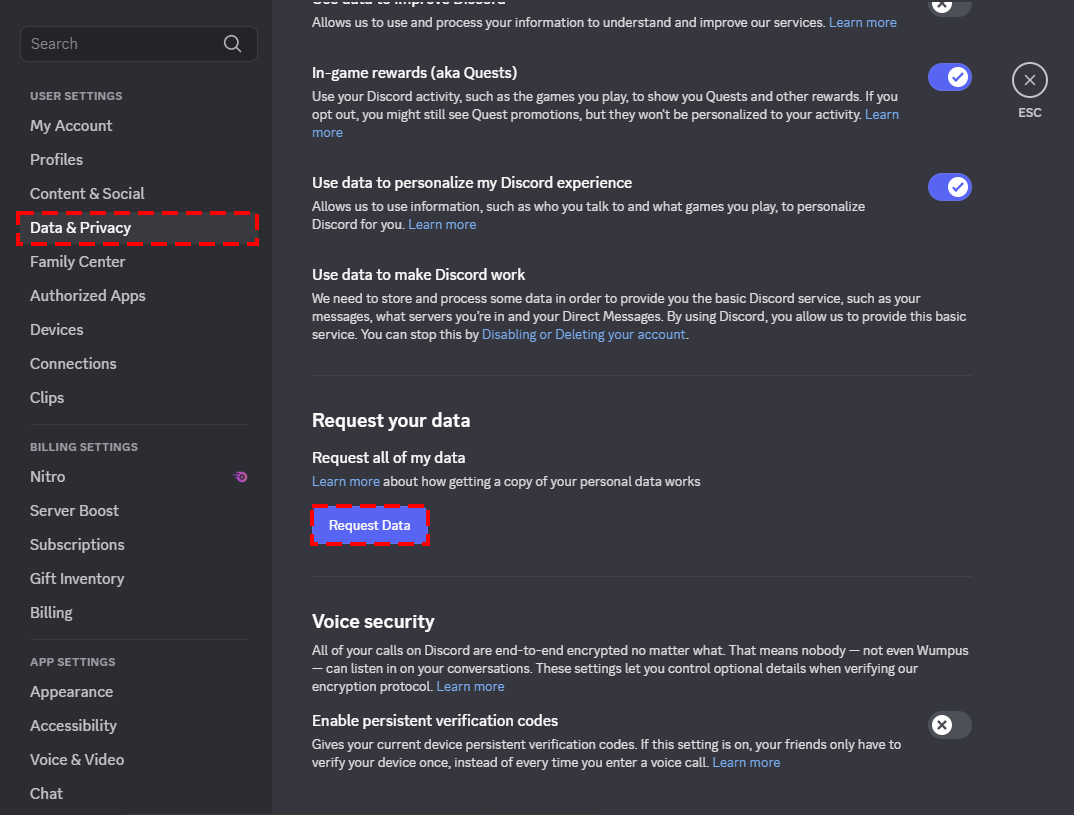
Step 2 Request your data
- A Scroll to Request your data and press Request Data. On the phone app, tap Request all of my data.
- B Make sure Messages is ticked, since every message count in the recap comes from it.
- C Leave Your Activity ticked too if you want your time in voice, calls and app opens in the recap.
- D Press Request My Data.
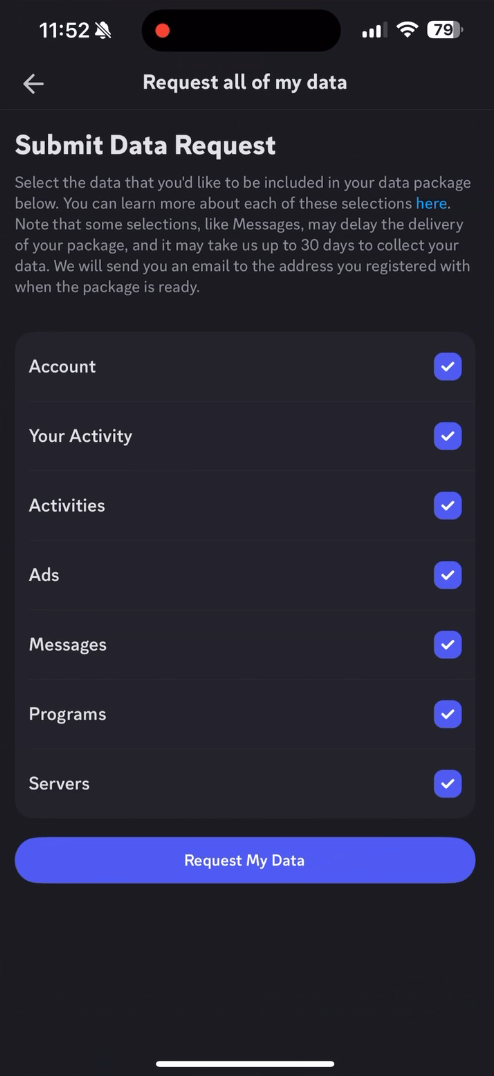
Step 3 Request it early
- A Discord says a package can take up to 30 days, and it emails a download link to the address on your account when it's ready.
- B Request it now, and the file will be waiting by the time you want your recap.

Step 4 Download package.zip
- A Open the email from Discord and download package.zip. The link stays active for 30 days.
- B There's no need to unzip it, though the unzipped folder works too.
Step 5 Drop it in here
- A Drag package.zip into the box at the top of this page.
- B Your recap opens on the newest year in your package, and you can pick another year, or All time, from the list above it.
Try Redact for Free
We are frequently adding support to other social network services. You can receive direct updates from us in Redact's Discord Channel.
