Bulk Delete via Twitter/X Data Export
With tens of thousands of tweets, finding every item through the live timeline can take a long time. Importing avoids that discovery step. Request your Twitter/X archive, give the .zip to Redact's desktop app, and Redact reads the items from the file before sending the same deletion requests to Twitter/X. Deleted posts can't be restored.
Available on
Plan
Import Data Package *
Drop your Twitter/X data export
Why import
Find a large account history without timeline paging
A live run must page through your Twitter/X timeline before it can delete each item. An archive gives Redact the item list directly, so discovery does not depend on timeline paging. Twitter/X still applies its limits to the deletion requests.
Live runs page through the timeline
A live run finds items by paging through your Twitter/X timeline. Finding a large account history can take time before Redact sends each deletion request.
Import reads the file instead
Give Redact your archive .zip and it reads the file rather than crawling your live timeline, so it skips the timeline paging step.
Import helps with large account histories
Archive import removes the timeline paging step for accounts with many years of posts. Twitter/X still applies the same limits when Redact sends deletion requests.
Live vs import
Find posts locally, delete through X
Import reads your archive on your device, so Redact can find items without paging through your live timeline. Import covers tweets, retweets, replies, quotes, X Articles, and likes. DMs, follows, blocks, lists, Grok chats, and bookmarks still need a live run.
Importing changes how Redact finds your items. Instead of paging through your live timeline, Redact reads your downloaded archive. Deletion still uses Twitter/X requests and remains subject to Twitter/X limits. Here's how to get your Twitter data file.
- No timeline paging
- Local archive reading
- Your usual filters
- Desktop app
Import Data Package *
Drop your Twitter/X data export
How it works
Delete from your Twitter/X archive
First, request your archive from Twitter/X. Second, import the archive into Redact's desktop app. Third, choose your filters and start the deletion.
Request your archive
Ask Twitter/X for a copy of your data. It takes a little time to build, and Twitter/X notifies you when the .zip is ready. You can start this request on desktop or on the iOS and Android apps.
Import the .zip
Open Redact's desktop app, connect your Twitter/X account, open the data import section, and upload the archive. Redact reads it right on your device.
Delete with your filters
Run it like any Redact job. Tweets keep the date range, keyword, hashtag, media type, and engagement filters; likes keep keyword and preserve filters. Wipe everything or target an exact slice.
How-to guide
How to import your Twitter/X data file into Redact's app
The full walkthrough, start to finish. You only do the Twitter/X download once; after that it all happens inside Redact's desktop app.
- 1
Request your archive on desktop
On Twitter/X for desktop, open the menu and head into Settings to ask for a copy of your data. Twitter/X builds the file and notifies you when it's ready.
Path: More, then Settings and privacy, then Your account, then Download an archive of your data.
Need a hand? Our step-by-step guide to getting your Twitter data file walks through the whole request with screenshots.
- 2
Or request it on mobile
On the iOS or Android app the archive lives in the same place, just reached through search. Open Settings and privacy, search for "data," and tap the download option.
Path: profile picture, then Settings and privacy, then search "data," then Download archive.
- 3
Import it and delete
Download for your device →Once your .zip arrives, open Redact's desktop app and connect your Twitter/X account. In the Twitter/X overview, use Import Data Package to upload the archive, then choose your categories and filters, run a Preview, and confirm which posts to delete. Deleted posts can't be restored.
Heads up: archive import runs in the desktop app. You can request the archive from mobile, but the import and deletion happen on desktop.
Your archive never leaves your device
The archive is read and processed on your own computer. Your archive and your login never get uploaded to a Redact server. Redact takes only the access it needs to do the deleting, and you can disconnect Twitter/X the moment you're done.
Try Redact Today
We are frequently adding support to other social network services. You can receive direct updates from us in Redact's Discord Channel.

Frequently asked questions
Archive import can finish sooner because Redact reads the item list from your file instead of paging through your live timeline. Twitter/X still applies its limits when Redact sends deletion requests.
Mostly. For tweets, retweets, replies, quotes, and X Articles, import keeps the filters you would use on a live run: date range, keyword, hashtag, media type, and engagement count. Likes are the exception, because the archive carries far less data for them, so only keywords, preserve lists, sponsored-post protection, and pinned-tweet protection apply there. Live deletion also has two things import does not: the Hashtags to Preserve list and the offensive-content classifier.
On desktop: More, then Settings and privacy, then Your account, then Download an archive of your data. On mobile: open Settings and privacy, search "data," and tap Download archive. Twitter/X prepares the file and notifies you when it's ready to download. For a full walkthrough, see our guide on getting your Twitter data file into Redact.
Yes. The archive request works on the iOS and Android apps as well as desktop. The import itself runs in Redact's desktop app, so once Twitter/X sends your .zip, move it to your computer and import it there.
Yes. The archive is read and processed on your own device. Your archive and login are never uploaded to a Redact server, so its contents stay on your computer, and only the deletion requests Redact sends to Twitter/X go out.
Use archive import when finding every item through the live timeline would take a long time. Redact reads the item list from the archive, but Twitter/X still applies its limits to each deletion request.
More Twitter/X features
Mass Delete Tweets and X Posts
Bulk delete your tweets, retweets, quote tweets, and replies. Wipe the whole timeline or filter by keyword, hashtag, date, media, or engagement first.
Mass Delete Tweets by Date Range
Clear a whole era of old tweets at once. Set exact dates or a relative window like older than two years, across tweets, replies, likes, and DMs.
Mass Delete Tweets by Hashtag
Bulk delete tweets by hashtag, one tag or many, with a preserve list for the tagged tweets you keep.
Mass Delete Tweets by Keyword
Bulk delete tweets by keyword or phrase, with preserve filters and a built-in offensive-content classifier.
Mass Delete Replies on Twitter/X
Bulk delete the replies you've left under other people's tweets, by date, keyword, or engagement. Your tweets stay untouched.
Mass Delete Retweets on Twitter/X
Un-retweet your whole history in one pass, or filter by date, keyword, or hashtag first. Your own tweets and the originals stay untouched.
Filter Twitter/X Posts by Content Type and Media
Pick exactly which content types to remove, then narrow by media attribute. Delete only retweets, clear every quote tweet, or wipe just your video posts.
Mass Delete Twitter/X DMs
Bulk delete your Twitter/X DMs by date or recipient. Clears your side of every conversation. A premium feature.
Delete Your Grok Chat History
Wipe your Grok chat history in one pass, or search and pick the conversations that go. Starred chats and anything you preserve stay untouched.
Remove Twitter/X Bookmarks
Remove saved posts from your bookmarks in bulk, by keyword or post date, and keep any that mention words you pick.
Mass Delete Twitter/X Likes
Bulk unlike years of Twitter/X likes, all of them or filtered by date, keyword, hashtag, or engagement. Free to start.
Mass Unblock and Unmute Twitter/X Accounts
Bulk unblock and unmute Twitter/X accounts in one pass. Clear your whole block list and mute list, or just named handles, with a preserve list for the rest.
Mass Unfollow Twitter/X Accounts
Bulk unfollow the accounts you follow on Twitter/X, all at once or filtered by account type and follower count, with a preserve list for the handles you keep.
Bulk Delete Twitter/X Lists
Bulk delete the Twitter/X Lists you own, all at once or filtered by title, description, or member count. Deleting a list never unfollows anyone.
Delete Your Entire Twitter/X History
Wipe your whole Twitter/X account in one sweep, every content type at once, with a local archive saved to your computer first.
Delete from a data export on other platforms
Twitter/X guides
See all
How to import your Twitter data into Redact
Learn to request your Twitter Data Archive, and import it into Redact.dev for easy mass deletion.
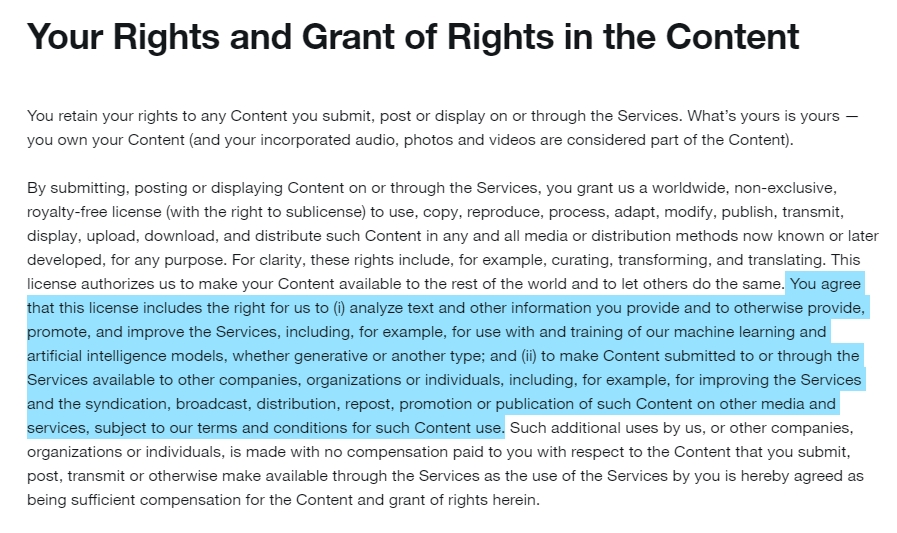
Did You Consent to Twitter/X Using Your Data to Train AI?
In this article, we break down recent changes to Twitter/X terms of service, regarding the use of user data for training machine learning models and more.

X is killing “twitter.com” Update your account settings to avoid lockout.
X is retiring twitter.com. See what changes and how to update your login, apps, and bookmarks now so you do not get locked out of your account.
Related services
See allBluesky
Delete your posts, reposts, replies and likes
- posts
- reposts
- likes
- replies
Nextdoor
Mass delete your Nextdoor posts and comments, with filters for date range and content keywords, plus a preserve list for the neighbourhood posts you want to keep.
- Posts
- comments
Threads
Delete your posts, reposts, replies, quotes and likes
- posts
- reposts
- likes
- replies
- quotes
Delete LinkedIn conversations, posts, comments, and reactions in bulk. You can also unfollow companies, groups, and people or leave groups.
- Conversations
- Posts
- Comments
- Reactions
- Follows
Mastodon
Delete your posts, reposts, favorites and replies
- posts
- reposts
- favorites
- replies
Tumblr
Remove unwanted content from your Tumblr page, from published and queued posts to likes, replies, and follows.
- Posts
- Queued Posts
- Likes
- Comments
- Follows