How to Delete Your Twitter Account (and What Stays Behind)
On X it's called deactivating. Here are the steps for the web and the app, and what's still out there after the 30 days.
 Dan Saltman9 min read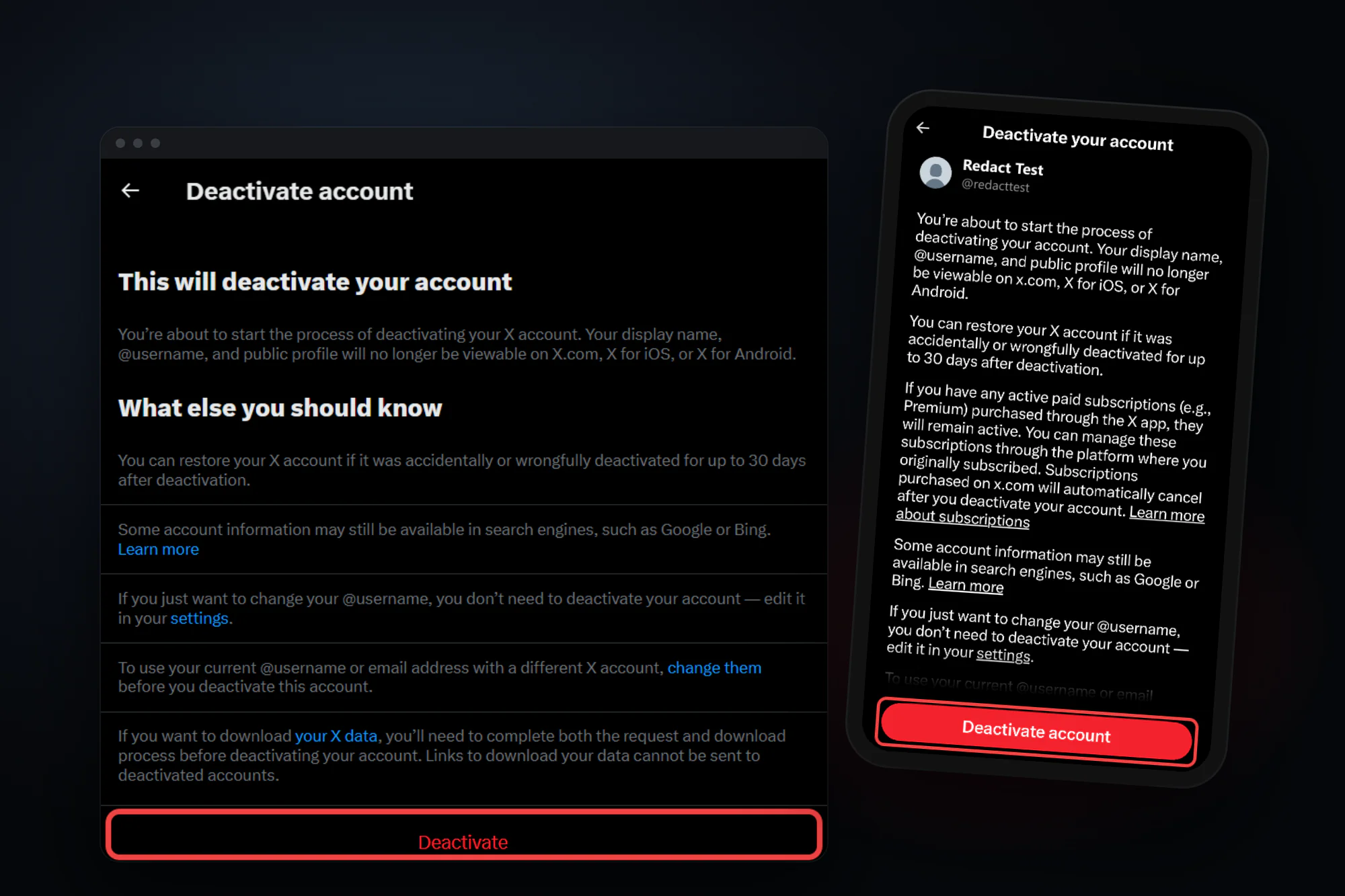
On this page
To delete your X (Twitter) account, go to Settings and privacy > Your account > Deactivate your account, click Deactivate and enter your password. Stay logged out for 30 days and X deletes it for good. There's no separate "delete" button.
Deleting won't reach everything. Copies, quote posts and search engine results of your posts can stay up after the account is gone.
Below are X's steps for the web and the app, the 30-day window, what's left behind, and how to keep your handle with a clean slate. It's one of our guides to deleting your social media accounts.

4 things to do before you deactivate
A Download your X archive. X says you need to request it before you deactivate. Go to Settings and privacy > Your account > Download an archive of your data, confirm your password and a code, and click Request data. X says it can take a few days, and you download the .zip while logged in, so wait for it. The steps are in X's archive guide.
B Cancel your subscriptions. X says deactivating doesn't cancel X Premium or Super Follows bought through the X app on iPhone or Android. Cancel those where you bought them. Subscriptions bought on x.com cancel automatically when you deactivate.
C Disconnect third-party apps. Any app you've connected can log in for you, and logging in reactivates the account. X names this as the usual reason a deactivated account "keeps getting reactivated". Revoke them in the Apps and sessions section of Settings and privacy (X's guide).
D Decide about your handle. Once the account is deleted, X says your username becomes available for anyone to register. If you'd rather nobody else gets it, see the alternative below.
You don't need to delete the account to change your username or email. X says you can update both under Account information at any time.
How to delete your X (Twitter) account
These steps follow X's help article on deactivating your account as of October 2026. You'll need your password, so reset it first if you don't have it.
Option 1: Delete your account on x.com (desktop or mobile browser)
Step 1 Open Settings and privacy
Click More in the side menu, then Settings and privacy.

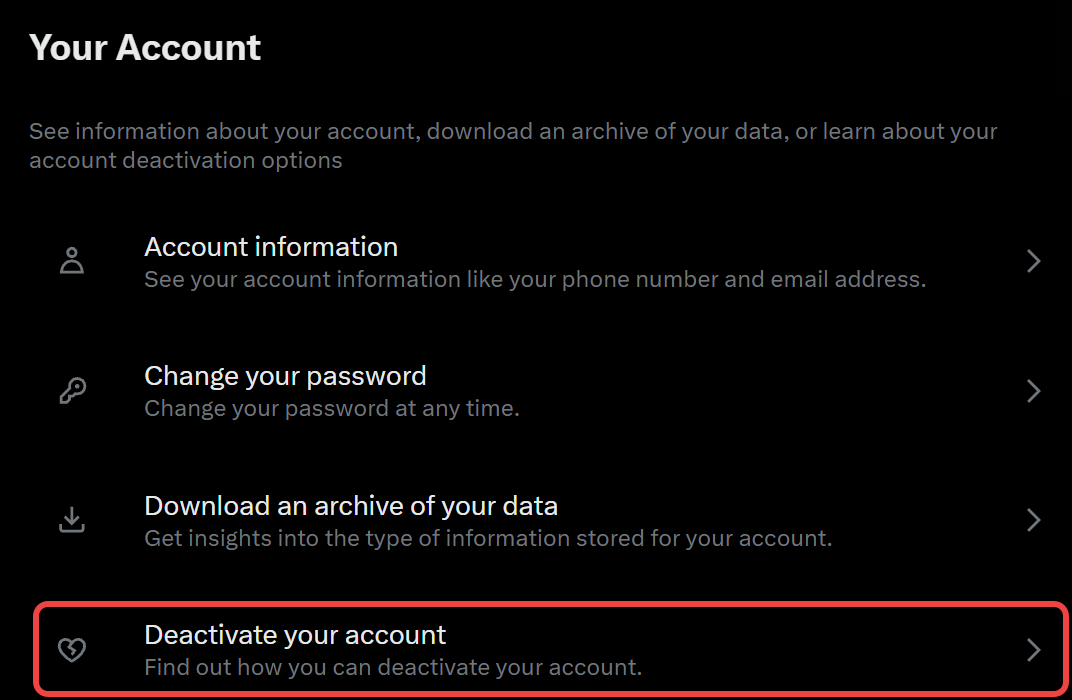
Step 2 Click Deactivate your account
In the Your account tab, click Deactivate your account, the last item under Download an archive of your data.
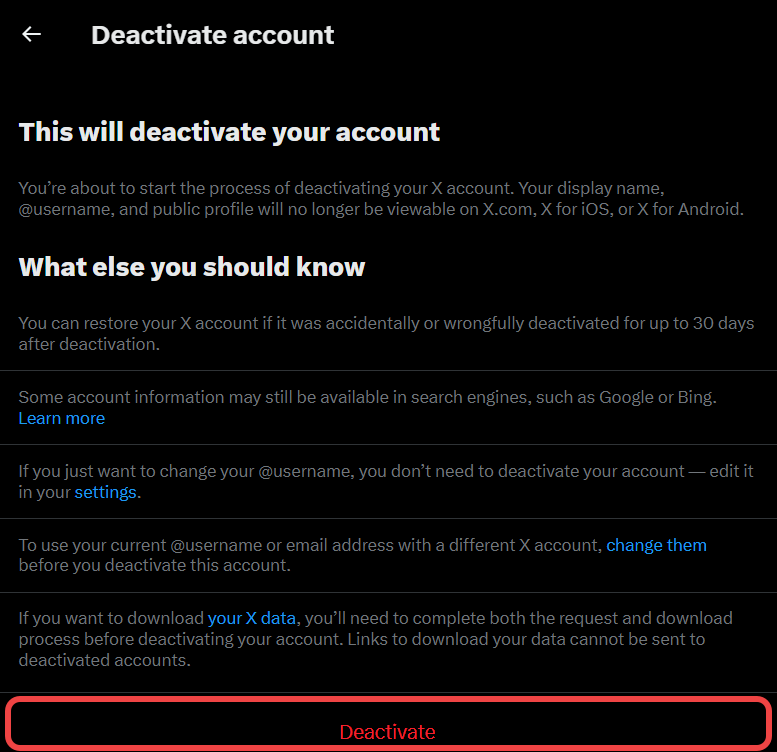
Step 3 Read the notice and click Deactivate
Once you've read X's notice, which also reminds you that archive links can't be sent to a deactivated account, click Deactivate at the bottom.
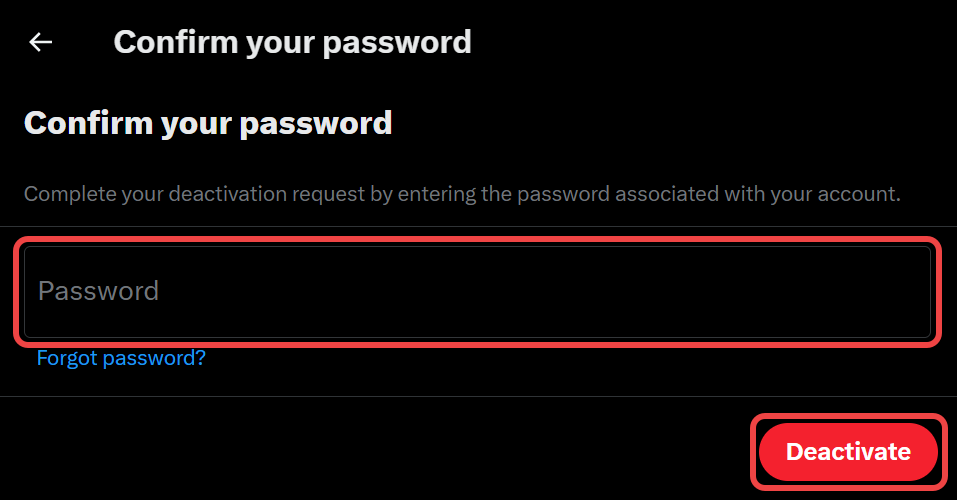
Step 4 Confirm with your password
Enter your password and click Deactivate, which is the click that starts the 30 days.
Option 2: Delete your account in the X app (iPhone or Android)
The steps are the same on iPhone and Android, though the screenshots below were taken on an iPhone.
Step 1 Open Settings and privacy
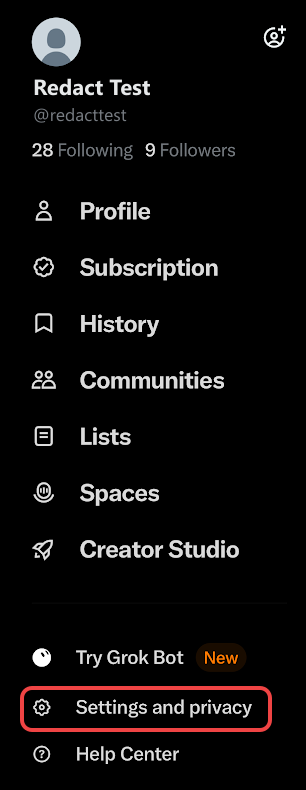
Tap your profile picture or the menu icon at the top left, whichever your app shows, to open the side menu. Then tap Settings and privacy near the bottom.
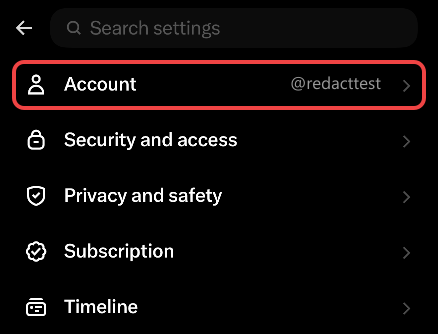
Step 2 Tap Account
Account is the first item in the settings list, with your @username next to it. X's iPhone steps call it Your account.
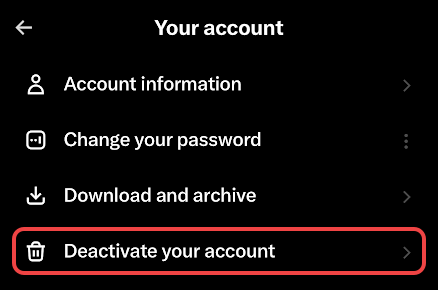
Step 3 Tap Deactivate your account
It's the last item on the Your account screen, under Download and archive.
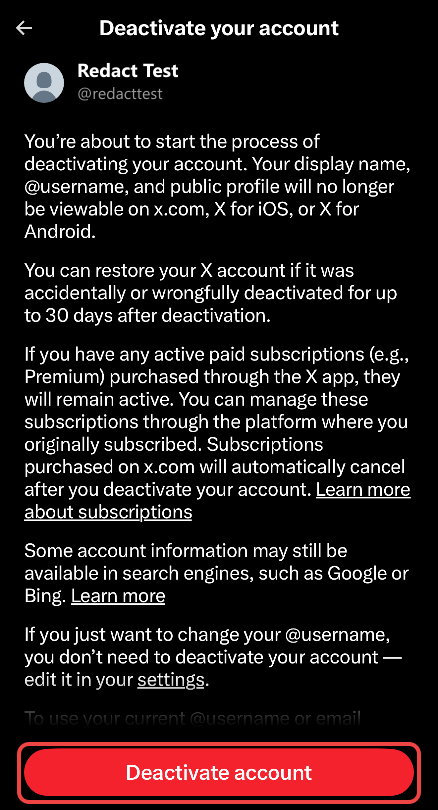
Step 4 Tap Deactivate account and confirm
Read the notice, then tap the red Deactivate account button at the bottom. Enter your password, tap Deactivate, then tap Yes, deactivate to confirm, which starts the 30 days.
If your account is locked or suspended, you can't use these steps. X asks you to submit a request instead.
What deleting your X account leaves behind

Here's what X says in its deactivation guide and its article on what happens to deleted posts:
- Your profile and posts come off X after the 30 days, for everyone, you included.
- The DMs you sent are deleted at the end of the 30 days.
- Your handle is released. It stays tied to your account for the 30 days (X says), then anyone can register it.
- Mentions of you stay. X says other people's posts that mention your @username still exist but no longer link to your profile. Once someone else registers the handle, those old mentions could point to their account instead.
- Quote posts and copies stay. X says reposts with someone's own comment and copied-and-pasted text aren't removed.
- Search engines and other sites keep what they cached. Google, Bing and other sites are out of X's reach (X says), so you have to ask them yourself. X has a guide to removing your profile from Google search.
- X keeps some data. X says it may retain some information on a deactivated account for safety and security.
Plain reposts go with the post. X says reposts of a deleted post are removed too, so the copies that outlast you are the ones other people made their own.
Want a fresh start instead? Keep the account, delete the tweets
Deleting the account gives your handle away. X has no bulk delete for posts, and for a fresh start its help center suggests swapping usernames with a second account.
The simpler route is to keep the account and delete the tweets, which Redact does in bulk on your own device. Connect your X account, pick tweets, replies, reposts and likes (filter by keyword to keep some, or by date when you run it live, since likes read from an X archive skip the date range), preview and run. You keep your handle, followers and DMs.
Redact has limits too.
- It works at X's pace. X rate-limits deletions, so a big history takes a while.
- Your archive speeds up big histories. Over about 1,000 posts, import your X archive (Premium, desktop apps).
- The free plan covers your last 30 days. Older posts, archive import and deleting DMs need Premium.
- It can't reach copies. Quote posts and screenshots of your tweets stay, with Redact or X.
Our full walkthrough is How to delete all your tweets and X posts at once.
If you still want the account gone, wait for your archive to arrive, then deactivate using the steps above.
FAQ
How do I permanently delete my X (Twitter) account?
Deactivate it in Settings and privacy > Your account > Deactivate your account, then don't log in for 30 days. X deletes the account permanently at the end of that window. There's no way to skip the 30 days.
Is deactivating the same as deleting on X?
Deactivating is the first step of deleting. Your profile is hidden straight away, and if you don't log back in within 30 days, the account is deleted. Log in before then and it's restored.
Does deleting my X account delete my tweets?
Your posts come off X along with the account. Copies don't: quote posts with someone else's comment, text other people pasted into their own posts, screenshots, and pages cached by search engines or other sites all stay.
How do I reactivate my Twitter account?
Log in on x.com or the X app within 30 days of deactivating, and confirm that you want to reactivate. After 30 days, the account is deleted and can't be brought back.
Why does my deactivated X account keep reactivating?
Something is logging in for you, usually a third-party app you connected. Logging in reactivates the account, so revoke app access under Apps and sessions and log out on every device before you deactivate again.
Can someone take my username after I delete my account?
Yes. X says your username becomes available for registration by other accounts once your account is deleted after the 30-day window.
Does deactivating cancel X Premium?
Only if you subscribed on x.com. X says Premium and Super Follows bought through the X app stay active after you deactivate, so cancel them through the platform you bought them on.
Does deleting my X account delete my DMs?
The DMs you've sent stay in place during the 30-day window and are deleted along with the account when it ends.
Redact for Twitter/X
Delete old tweets, posts, pictures, and videos for rebranding, spring cleaning, or just plain peace of mind.