Removal guide · US Search

How to remove your info from US Search

Your US Search listing isn't really US Search's. The record lives with PeopleConnect, the parent whose one database feeds US Search, Intelius, TruthFinder and Instant Checkmate alike — so removal happens on PeopleConnect's Suppression Center, and a single request there clears all four sites. Expect about 15 minutes. The shared flow was walked for real on August 10, 2026, and the screenshots below show the form itself. Ignore the footer's "Do Not Sell" link, which goes nowhere — the working entry point is Exercise My Data Privacy Rights. The PeopleConnect removal guide is the same walkthrough at the source.

US Search homepage screenshot

The full picture: See the US Search data broker profile for who operates it, what its reports contain, and the two domains that redirect into it.

Quick facts

At a glance

Shared portal
Method

Email confirm → date of birth → legal name → request and submit a code to a contact on the record → set Desired Behavior to Suppressed and save

Entry point

suppression.peopleconnect.us/login, or Exercise My Data Privacy Rights in the footer

Time needed

About 15 minutes in one sitting - two verification round-trips, no saved progress

Cost

Free

Covers

US Search · Intelius · TruthFinder · Instant Checkmate

Also clears

PeopleLookup and PublicRecords360, which redirect here

Typical turnaround

One-day median per Intelius, LLC's 2024 California filing

Prereqs

What to have ready

  • Your full legal name — first, middle and last.

  • Your date of birth.

  • Access to an old email address or phone number of yours — the verification step has you pick a masked contact from your own record and retype it in full before it will send a code there, so it has to be one you can still open.

  • About 15 minutes, uninterrupted — there's an email round-trip and progress isn't saved.

The steps

Suppress your listing

01

Get to the Suppression Center

At the bottom of ussearch.com, click Exercise My Data Privacy Rights - the Do Not Sell or Share My Personal Information link next to it points at # and does nothing, which is worth knowing before you conclude the opt-out is broken. You'll land on ussearch.com/privacy-center, which hands off to PeopleConnect's portal at suppression.peopleconnect.us; going straight there works just as well. Notice you're on PeopleConnect's own site from here on, not US Search's - this is where the record actually lives.
02

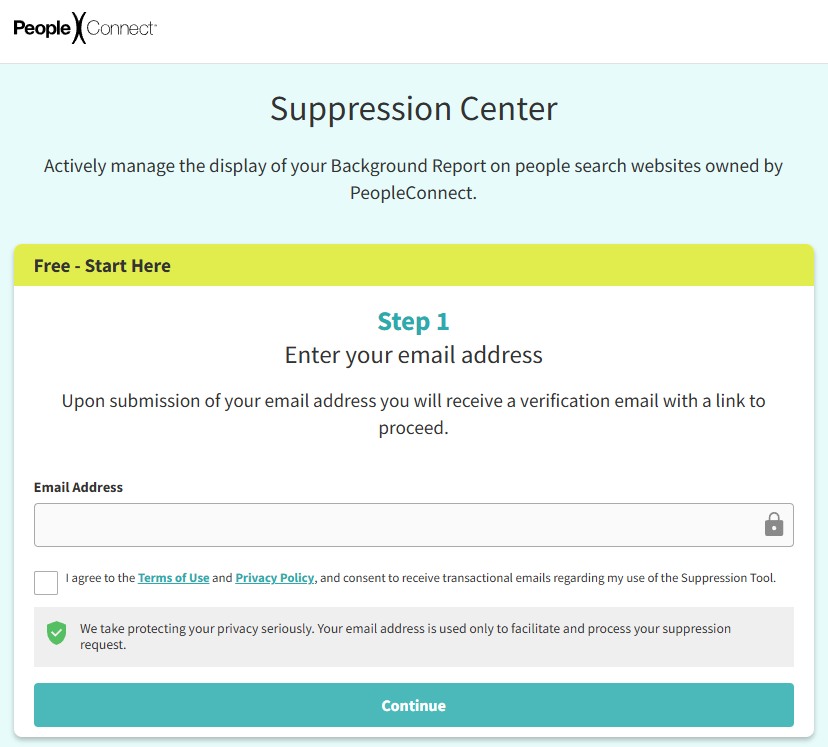
Enter your email

Submit your email address on the "Free - Start Here" panel, agree to the Terms of Use and Privacy Policy, and hit Continue.

The PeopleConnect Suppression Center's 'Free - Start Here' panel, with a Step 1 email address field, a Terms of Use and Privacy Policy checkbox, and a Continue button
The Suppression Center - PeopleConnect's page, covering US Search.
03

Click the verification email quickly

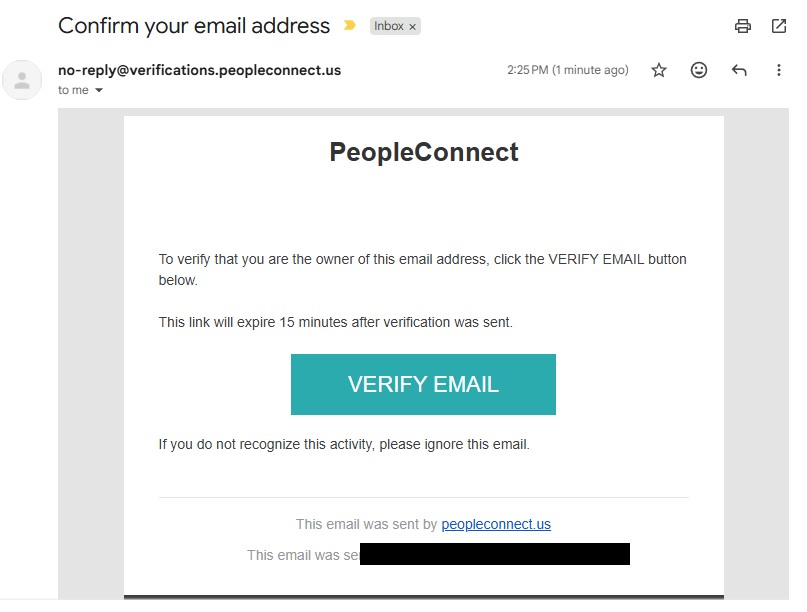
Click VERIFY EMAIL in the "Confirm your email address" message from no-reply@verifications.peopleconnect.us. The email's own text says the link expires 15 minutes after it was sent, so open it right away - it brings you back to the portal.

PeopleConnect's verification email with a VERIFY EMAIL button and a note that the link expires 15 minutes after it was sent
The verification email - the link is only good for 15 minutes.
04

Give your date of birth

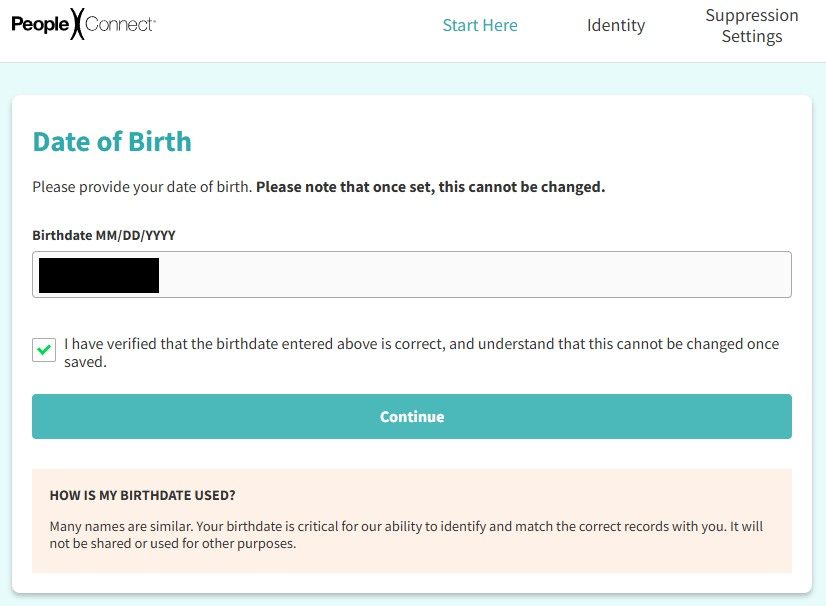
Enter your date of birth - the page warns in bold that once set, it cannot be changed, so check it - then tick the verification box and continue.

The Suppression Center's Date of Birth page, warning in bold that the birthdate cannot be changed once set, with a confirmation checkbox and Continue button
The Date of Birth screen - check it before you continue.
05

Give your legal name

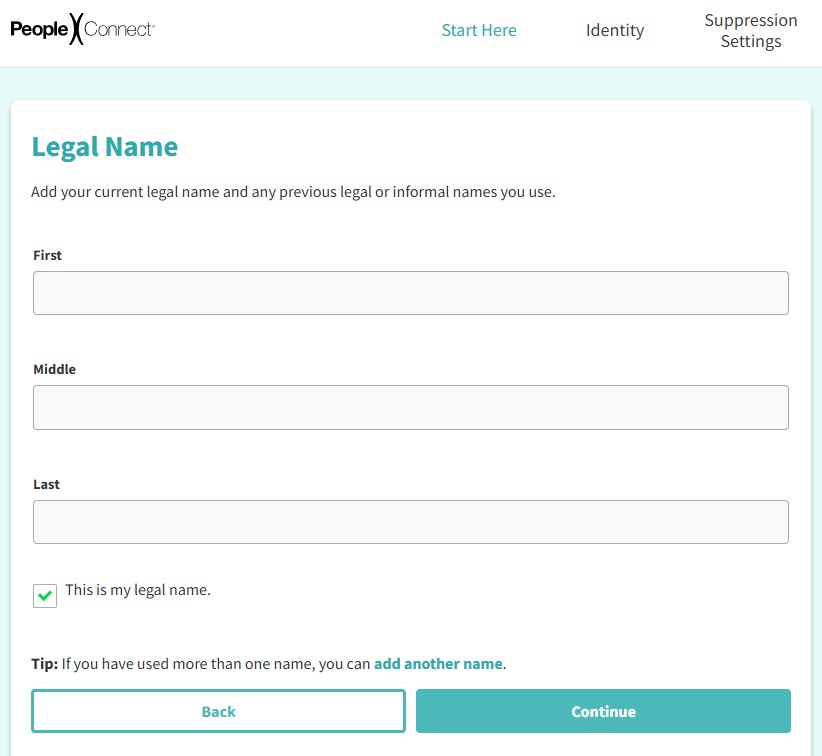
Enter your first, middle and last name as public records would have them, tick the This is my legal name box, and use add another name for former names.

The Suppression Center's Legal Name page with First, Middle and Last fields, a 'This is my legal name' checkbox, and an 'add another name' link
The Legal Name page - add former names here too.
06

Select your record

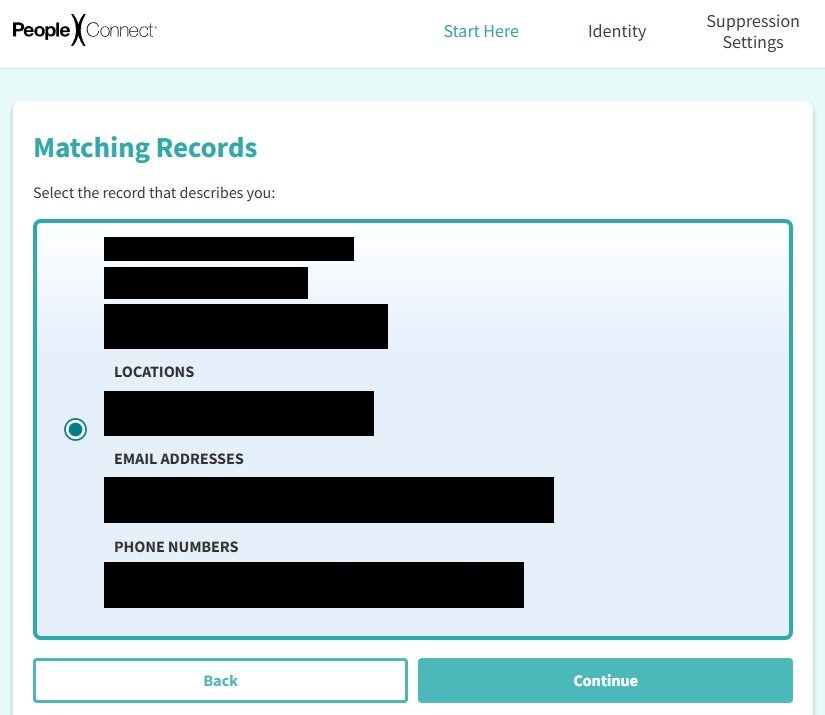
The Matching Records page lists candidates with their aliases, location history, and partially masked contact details. Age and city are what distinguish people with the same name - pick your record and hit Continue.

The Suppression Center's Matching Records page showing a candidate record with aliases, location history, and partially masked email addresses and phone numbers, with a selection radio button
Matching Records - check the aliases and locations, then select yours.
07

Verify through a contact method on the record

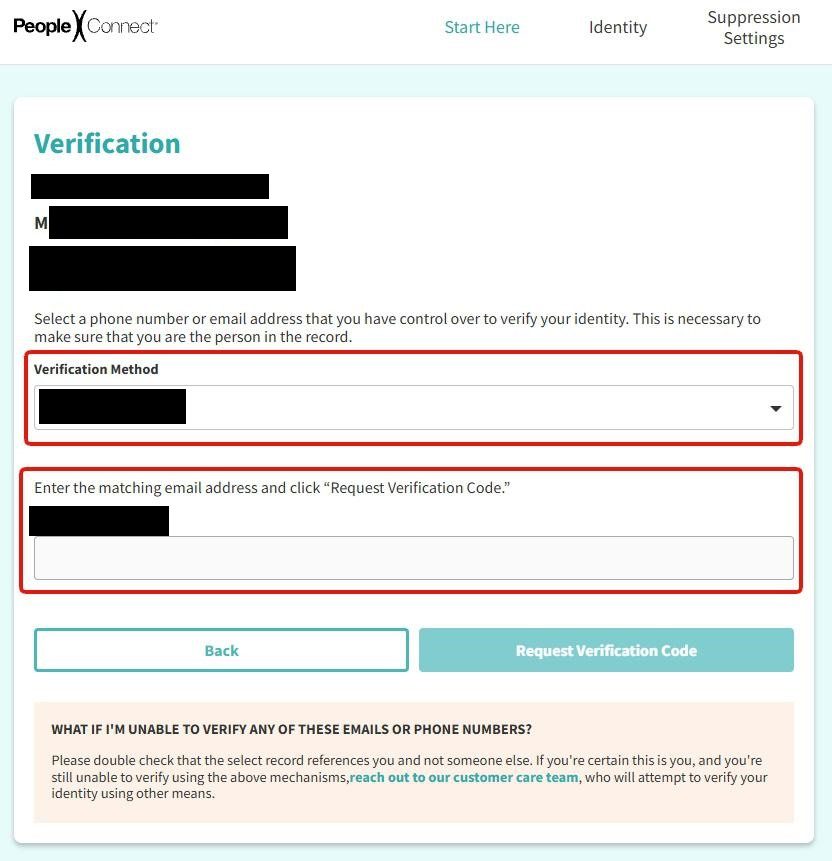
The Verification Method dropdown lists partially masked emails and phone numbers taken from your own record — pick one you can still open, not just one you recognise. No code goes out at that point. Underneath it is a field asking you to write the contact out in full, and a Request Verification Code button that sends the code once you have. A Verification Code box appears on the same page once it is on its way.

PeopleConnect's Verification page: a Verification Method dropdown holding a partially masked contact, a field below it headed "Enter the matching email address and click 'Request Verification Code'", and a Request Verification Code button
The dropdown alone sends nothing; the button below it is what dispatches the code.

If you don't have access to any of the contact methods in the dropdown, the tool dead-ends. Reach out manually at privacy@peopleconnect.us instead.

08

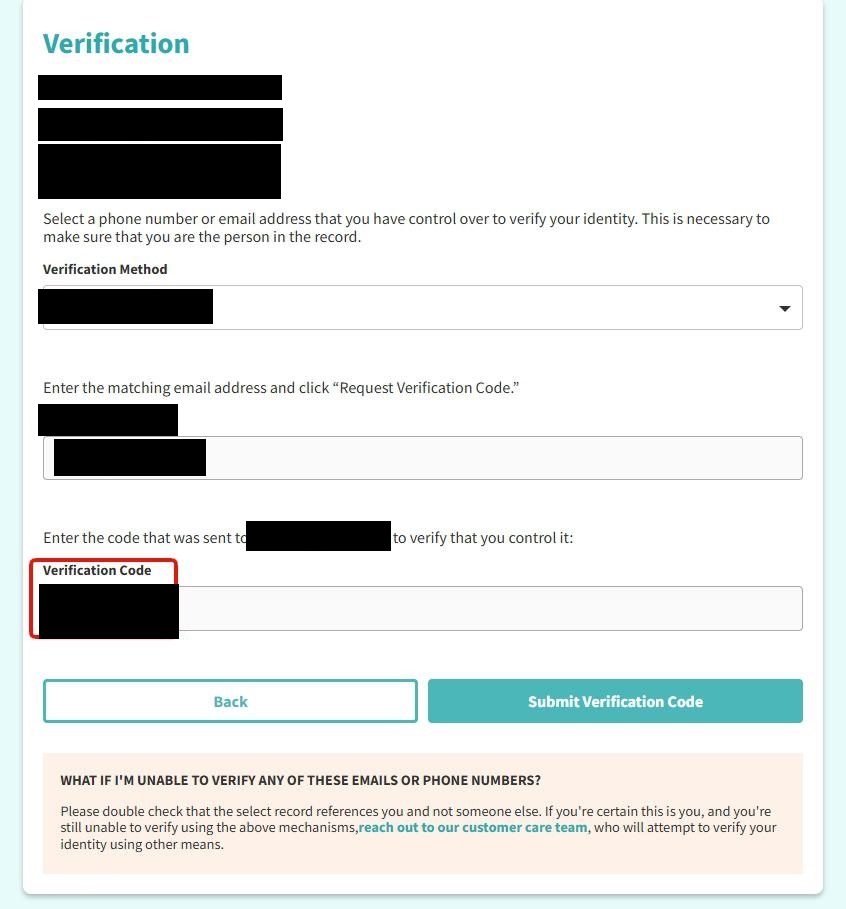
Submit the code

Put the code into the Verification Code box that has appeared, then click Submit Verification Code. Entering the code is not enough on its own - the button is what sends it, and without the click the flow stops here.

PeopleConnect's Verification page after requesting a code: the Verification Method and matching-contact fields already filled, a Verification Code box beneath them, and a Submit Verification Code button
Enter the code, then click Submit Verification Code to move on.
09

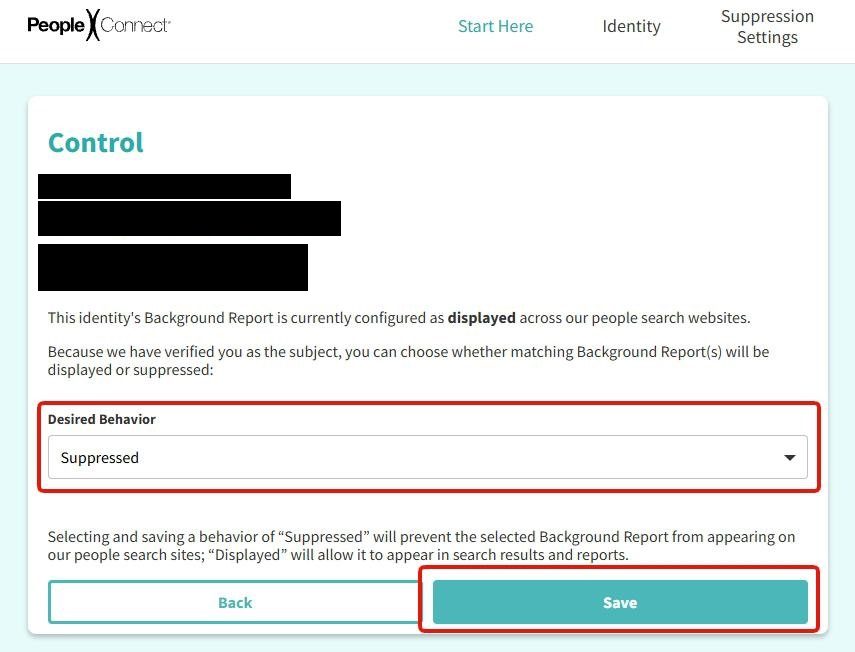
Click Continue, then set Desired Behavior to Suppressed and save

The code only confirms you are the subject of the record. The next screen tells you to "Select 'Continue' to manage suppression rules", and the Control page it opens still lists the report as displayed. Set Desired Behavior to Suppressed and click Save - that is the click that takes the listing down, across US Search, Intelius, TruthFinder and Instant Checkmate.

PeopleConnect's Control page, reading that the report is currently configured as displayed, with a Desired Behavior dropdown set to Suppressed and a Save button
The record stays displayed until you choose Suppressed and save.

Stopping at the green "Verified" banner leaves you listed. Verifying and suppressing are two different screens, and only the second one changes what the sites show.

Confirm

Confirm it worked

Intelius, LLC reported a one-day median response to deletion requests in its 2024 California filing, so give it 72 hours and then check. Search your name on US Search, and on Intelius, TruthFinder and Instant Checkmate as well, since one request is meant to cover all four.

Then check PeopleLookup and PublicRecords360. Both redirect into US Search, so they should be clear too — but they're not on the Suppression Center's named list, so confirming costs nothing and assuming could cost you.

Scope

What this doesn't reach

  • Name searches only, by PeopleConnect's own wording. A report pulled by phone number or address isn't described as covered.

  • Not the other 18 domains on the filing. Intelius, LLC files for 22 domains; the Suppression Center names four sites. ZabaSearch, Addresses.com and PublicRecords.com all route their own rights links to Intelius' privacy center, so the Intelius suppression is the one that reaches them — check each afterwards.

  • Not Classmates, which PeopleConnect excludes explicitly and which needs its own request.

  • Not the underlying public records. Suppression hides a listing; the county and state records behind it stay where they are.

If it fails

Troubleshooting

  • The "Do Not Sell" link did nothing. It genuinely does nothing — its target is #. Use Exercise My Data Privacy Rights instead.

  • None of the masked contact methods are ones you can still open. Recognising them isn't enough — the code has to reach you. If every listed method is dead, email privacy@peopleconnect.us and ask for the suppression manually.

  • Request denied. Escalate against the registrant. The entity on California's registry is Intelius, LLC, not US Search, so name Intelius, LLC in a Delete Act complaint.

  • Billing rather than privacy. Call (888) 712-0108 on a weekday between 7:00am and 4:00pm PT, and dispute post-cancellation charges with your card issuer.

Stay off

Keep your record off

The record gets rebuilt from the same public sources it came from, so a move, a property transaction, or a new court filing can put you back. Recheck quarterly and after anything that changes your address of record. Redact's data-broker scan watches the PeopleConnect brands and refiles when your details come back.

Take yourself off data broker sites

Redact scans 120+ data broker sites from your device, finds where your details are listed, and submits the removal requests for you. If a broker relists you, it files again.

Last updated:

August 10, 2026 · Flow confirmed by a real walkthrough of the shared Suppression Center - the same form serves all four PeopleConnect sites, and the step screenshots live on the PeopleConnect removal guide. Nothing is sent by choosing a masked contact alone: the verification gate wants that contact typed out in full and the Request Verification Code button clicked before a code goes anywhere. The email link earlier in the flow expires after 15 minutes. The August walk stopped at record selection; the verification screens and the two after them are documented from the Intelius walk of May 21, 2026, which captured all four. This corrects an earlier revision that described the code as completing the removal - it verifies identity, and the record stays displayed until 'Desired Behavior → Suppressed' is saved.