What's the 'Use Data to Improve Discord' Setting? Is It AI? How to Shut It Off
 Dan Saltman4 min read
On this page
Use data to improve Discord is the setting that lets Discord study how you use its app. It may be on by default, depending on your age and where you live, and while it's on you're part of a standing focus group, probably without realizing it. How you move around the app, the games you play and how your servers are set up all help Discord decide what to build next.
It seems innocent on the surface, but Discord's privacy policy is written vaguely enough to leave some "wiggle room".
If you're like me, you'll just turn it off, because why take the risk? That takes you out of the focus group from here on, and the only downside Discord's own help page mentions is losing voice and video quality that adjusts to how you use them. Your app still sends the same signals, though, and Discord keeps what it's already learned.
Is This Discord's AI Training Switch?
Not by name. Discord's help page says the switch covers how you use Discord, the games you play and how your servers are structured, and it never mentions AI. The privacy policy is where AI comes in. The policy says Discord uses that data to decide which features to build, that the work can involve machine learning systems, and that content posted in servers anyone can find or join may help build features like conversation catch-up. It points to your privacy settings as the way to limit that, but the switch it describes only stops Discord collecting how you use and move around the app. That makes it the nearest thing Discord has to an AI training opt-out for your activity, and the policy never says it covers what you post in servers.
You can see what it collects in your own data package. Discord's guide to the package describes its Analytics file as a record of your actions in the app, and names this switch as the way to stop it being used.
How to Disable the Feature
FYI, it's one switch per account rather than per device, so changing it once covers your phone, your PC and Discord in a browser.
- Open User Settings with the cog () next to your name in the bottom left. On the phone app, tap your profile picture in the bottom right, then the cog () in the top right.
- Pick Data & Privacy.
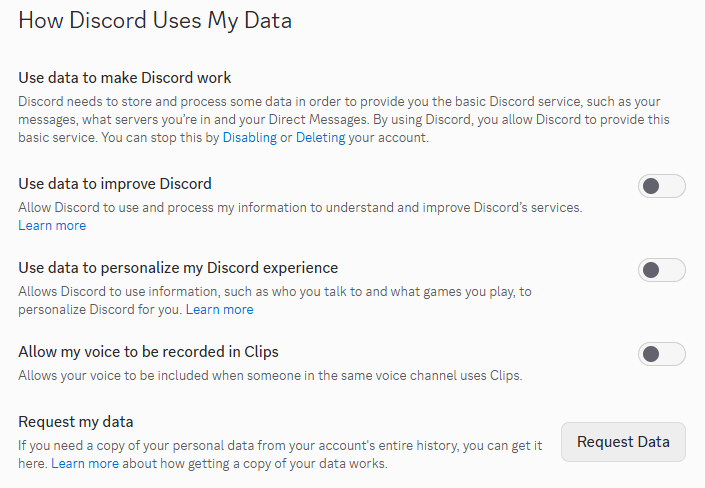
- Under How Discord Uses My Data, turn off Use data to improve Discord.
Other Settings Under "How Discord Uses My Data"
How Discord Uses My Data has three more settings below this one, and each is worth a look while you're there, as they're all directly related to your privacy.
- Use data to personalize my Discord experience covers the games you play, who you talk to, how you use Discord, the servers you join and any accounts you've connected, like Xbox or Steam. It's how Discord moves the friends you talk to most up the Active Now section of your Friends list. Turn it off and Discord stops using your account's details to recommend content and promotions, and your conversations and voice channels aren't affected. Discord explains it here.
- Allow my voice to be recorded in Clips decides whether your voice is included when someone else in the same voice channel uses Clips. Turn it off and your voice stays out of their clips.
- Request my data is the section that lets you get a copy of everything Discord holds on your account, including the Analytics log mentioned above. It can take up to 30 days to arrive, and we've walked through requesting it step by step.
Quests and other sponsored content are handled separately. Discord's page on them covers the switches that decide whether they're picked using your Discord activity or data from advertisers and third-party data providers. Turning off the activity one switches off both, and you'll still see Quests either way, just not ones chosen with your data.
Asking Discord to Delete Your Data
The switch only works going forward. For what's already there, Discord's help page says you can email privacy@discord.com to object to it processing your data, and depending on where you live, local privacy law may give you more rights than that.
The bluntest tools are on the account itself. Disabling it stops Discord processing new data, and deleting it removes your identifying information and anonymizes the rest, according to the privacy policy.
Redact for Discord
Cleanse your cringe Discord history by either nuking it all, or choosing a specific server or direct message, then specifying keywords and date ranges.
![How to quickly remove all images from Discord [Redact App]](/blog-images/2024/02/1df12454974a617bffd82bb1ad8d4218.png)