Instagram Instants: What It Is, How to Delete It, and Why Your Photos Might Not Actually Be Gone
 Dan Saltman11 min read
On this page
On 13 May 2026, Instagram globally launched a new feature called Instants. It lets you send disappearing, unedited photos directly to your mutuals or closest friends without the polish and permanence of a standard post or Story. The photos vanish after the recipient views them. There are no filters, no editing tools, and no option to upload from your camera roll. What you capture is what you send.
If you’re trying to disable your Instants Archive (which may be viewable by Meta), or Instants completely, use the links below.
The feature has been met with mixed reactions since launch. Some users welcome the lower-pressure format. Others have shared the feature to their feeds in frustration after accidentally sending photos to everyone on their friends list before understanding how it works. And a growing number of people are asking what happens to their photos on Meta’s servers, whether the “disappearing” label is fully accurate, and how to opt out entirely.
This guide covers all of it. What Instants is, exactly how it works, how to use and delete it, and the privacy questions it raises.
What Is Instagram Instants and Why Did Meta Build It?
Instants is Instagram’s answer to the kind of casual, unfiltered photo sharing that has migrated away from Instagram itself over recent years. The core feed has become increasingly polished, algorithm-driven, and creator-focused. TechCrunch describes the feature as borrowing ideas from Snapchat, BeReal, and Locket, all of which are built around quick, real-life snapshots rather than curated content.
Meta’s official description of the feature, published on about.fb.com, plainly calls it “a new way to share photos in the moment with your Close Friends or mutual followers.”
The underlying business logic is also clear. Meta has watched casual friend sharing drift toward private messaging, Stories, and rival apps. Instants is an attempt to recapture that behavior within Instagram’s existing network, without dismantling the creator economy that drives the main feed.
Meta has also launched a standalone Instants companion app for iOS and Android in select countries, giving users immediate camera access without opening Instagram first. Both the in-app feature and the standalone app share the same functionality and the same archive.
How Instagram Instants Works: A Step-by-Step Breakdown
Understanding exactly how Instants operates is important, because several aspects of the design aren’t immediately obvious and have already led to accidental sharing among users who didn’t read the small print.
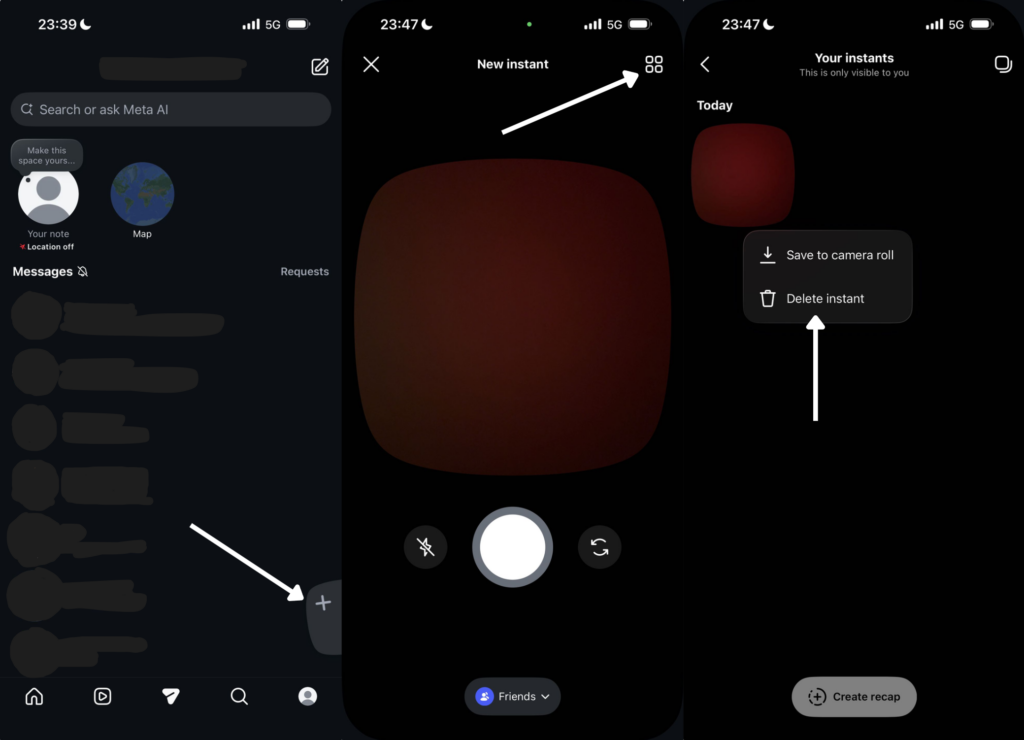
Where to find it. Meta’s documented route is through the photo stack in the bottom right corner of your Instagram messages inbox. You can also open the standalone Instants app, where available, to go directly to the camera. The entry point may differ in your version of Instagram.
How to capture and send. Once the camera is open, you write your caption first in the text box at the top of the screen. Then you take the photo. Tom’s Guide notes that this order is the reverse of how Stories work, and catches many users off guard. You can’t select a photo from your camera roll, and you can’t apply any filters or edits.
Who you can send to. You choose between your Close Friends list or your mutual followers, meaning people who follow you and whom you follow back. Instants aren’t sent to all followers. According to Meta, the default audience is set to Close Friends or Mutuals depending on your settings, and this needs to be checked before sending.
What happens after you send. The photo appears in recipients’ inboxes as part of the photo stack. They can view it once. After viewing, it disappears for them. If the recipient doesn’t open it within 24 hours, it becomes inaccessible to them. Recipients can react with emojis or reply, and those replies arrive in your DMs as regular messages.
Screenshots and screen recordings. Meta says recipients can’t screenshot or screen record Instants. As noted by analysts at ALM Corp, this is a deterrent, not a guarantee. Devices can photograph other devices. The restriction reduces casual misuse but doesn’t create absolute privacy.
The Undo button. Immediately after sending, an Undo button appears. Tapping it retracts the Instant before any recipient opens it. Once someone has opened it, it can’t be recalled. TODAY reports that many users who sent photos accidentally missed the Undo window entirely due to the surprise of having already shared something.
The Part Instagram Does Not Emphasize: Your Private Archive
Here is where the “disappearing” framing requires careful reading.
Instants disappear for the recipient after viewing. They don’t disappear from your account. Meta confirms that every Instant you send is automatically saved to a private archive on your account for up to one year. Only you can see this archive. You can access it from the top right corner of the Instants screen.
From this archive you can also create “recaps,” compiling older Instants into a single Story that can be shared with your broader follower base. This means content you sent as a private, disappearing photo to a small group of close friends can, with a few taps, be redistributed as a public Story to all your followers.
Instants are ephemeral for recipients. They aren’t ephemeral for Meta or for the sender. Every photo is stored in your archive for twelve months, and Meta’s standard data policy applies to everything in that archive.
As dmbio notes, Meta’s data policy for Instagram continues to apply to Instants in full. Content metadata, sending patterns, and engagement signals are processed for service operation and ad targeting. The photos themselves are stored in a server-side archive that Meta holds for a full year after sending.
Privacy Implications of Instagram Instants
Several privacy considerations apply to Instants that aren’t clearly communicated in Meta’s own description of the feature.
The archive sits on Meta’s infrastructure without end-to-end encryption. As of 8 May 2026, Instagram removed end-to-end encryption from all direct messages. We covered that change in detail in our post on Instagram’s encryption removal. Instants launched five days after that change took effect. Every photo you send via Instants, along with its metadata, is accessible to Meta in the same way as any other DM content. The “disappearing” nature of Instants applies to what recipients see, not to what Meta holds.
The default audience setting has caused widespread accidental sharing. Multiple reports confirm that users have sent photos to their entire friends list or mutual follower group without intending to, because the design sends immediately on capture without a confirmation step. Meta doesn’t clearly communicate before the first use that tapping the camera button sends the photo at the moment of capture.
The no-screenshot restriction is an Instagram rule, not a technical guarantee. Meta’s policy prevents in-app screenshots and screen recordings of Instants. It doesn’t prevent someone from photographing their screen with a second device. Users sharing sensitive content should be aware of this distinction.
Teen account protections are in place, but they depend on correct setup. Meta confirms that Teen Accounts and Family Center protections apply to Instants. Time spent in Instants counts toward a teen’s daily Instagram time limit. Sleep Mode restricts access between 10pm and 7am. Parents of supervised teens receive a notification the first time their teen downloads the standalone Instants app. These protections only apply to accounts that have been correctly identified as belonging to teens and are under active parental supervision.
Instants launched in the same week as Instagram’s encryption removal. The timing matters. MacRumors highlighted that Instants launched just days after Meta removed end-to-end encryption from Instagram DMs, meaning users who might have assumed some privacy protection on their photo sharing no longer have that layer. Content shared via Instants is accessible to Meta in the same way as all other DM activity on Instagram.
How to Delete Your Instants Archive
If you’ve already sent Instants and want to remove them from your archive, follow these steps.
- Open Instagram and go to your messages inbox.
- Tap the Instants photo stack in the bottom right corner, following Meta’s documented route. If your layout differs, you can open the standalone Instants app instead, where available. Don’t press the shutter button: taking a photo can share a new Instant.
- Tap the archive icon in the top right corner of the Instants screen. This opens your private archive.
- To delete an individual Instant, tap and hold it, then select Delete.
- If the recipient hasn’t yet opened the Instant, deleting it from your archive will also unsend it, meaning they’ll no longer be able to view it.
- If the recipient has already opened it, deleting from your archive removes it from your own stored history but doesn’t affect anything the recipient may have already seen.
Note that deleting from your archive removes your stored copy. It doesn’t provide any guarantee about what metadata or signals Meta has already processed in connection with that content.
How to Turn Off Instagram Instants Completely
If you don’t want to use Instants and don’t want the feature appearing in your inbox, you can hide it. According to India.com, and confirmed by multiple user reports, it takes four steps.
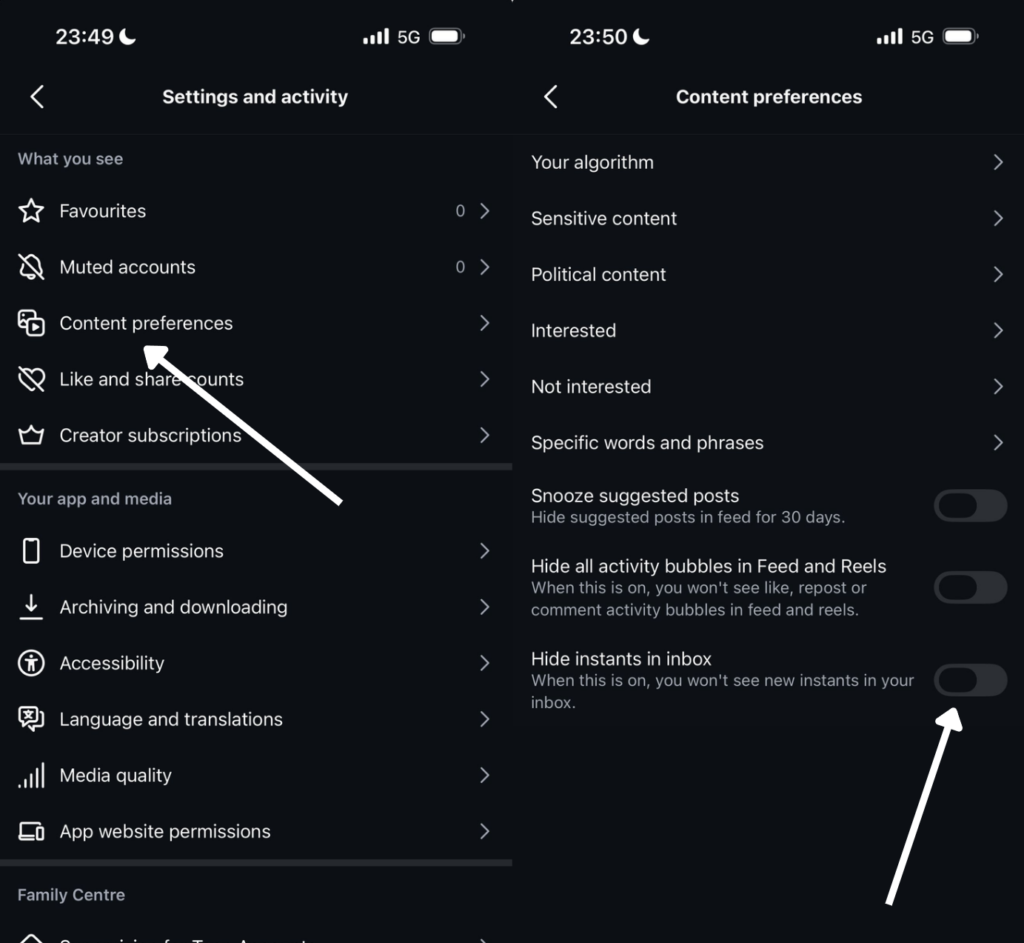
- Go to your Instagram profile by tapping your profile photo in the bottom right corner.
- Tap the three-line menu in the top right corner to open Settings.
- Scroll down to Content Preferences.
- Find the Hide Instants in Inbox toggle and turn it on.
Once enabled, the Instants stack will no longer appear in your inbox and you’ll stop receiving Instants from others. If you want a temporary pause rather than a permanent disable, you can hold down the photo stack in your inbox and swipe right to snooze incoming Instants without fully turning the feature off.
How Instants Compares to Snapchat and BeReal
The comparisons to Snapchat are obvious and intentional. Both use disappearing photos as the core format, both restrict editing, and both are positioned as more authentic alternatives to curated social media. TechCrunch notes that Instants also borrows BeReal’s emphasis on unfiltered, in-the-moment capture.
The key difference is dependence on Instagram. Snapchat is a destination in its own right with its own social graph. Instants is a layer built on top of Instagram’s existing network. That gives it an immediate advantage in reach, since your friends are already on Instagram, but it also means it coexists with all of Instagram’s other incentives: the algorithm, the ads, the Reels, and the creator content. Whether users will treat it as a genuinely separate space for casual sharing, or simply ignore it as another feature in an already crowded app, remains to be seen.
TechCrunch also observes that Instagram may be late to this particular trend. BeReal isn’t as popular as it once was, and many users already use Instagram Stories for informal updates. The appetite for yet another casual sharing format within the same app is unclear.
What This Means for Your Instagram Data More Broadly
Instants is one feature on an app where a significant amount of personal data accumulates over time. Posts, Stories, DMs, comments, likes, and now a year-long photo archive all sit on Meta’s infrastructure, subject to Meta’s data policies, and accessible to Meta in the absence of end-to-end encryption.
If you have years of content on Instagram that you’d rather not leave on Meta’s servers, Redact’s Instagram tool lets you bulk delete posts, comments, messages, and other activity. Everything runs locally on your device, meaning your credentials and content are never processed on Redact’s servers. You can learn more about managing your overall digital footprint in our guide to data brokers and personal data exposure. Get started at redact.dev.
Instants is a well-designed feature for the use case it targets. But like every social media feature, understanding what it actually does with your data, rather than what its marketing describes, is the starting point for using it on your own terms.
Redact doesn’t currently support the deletion of Instants.