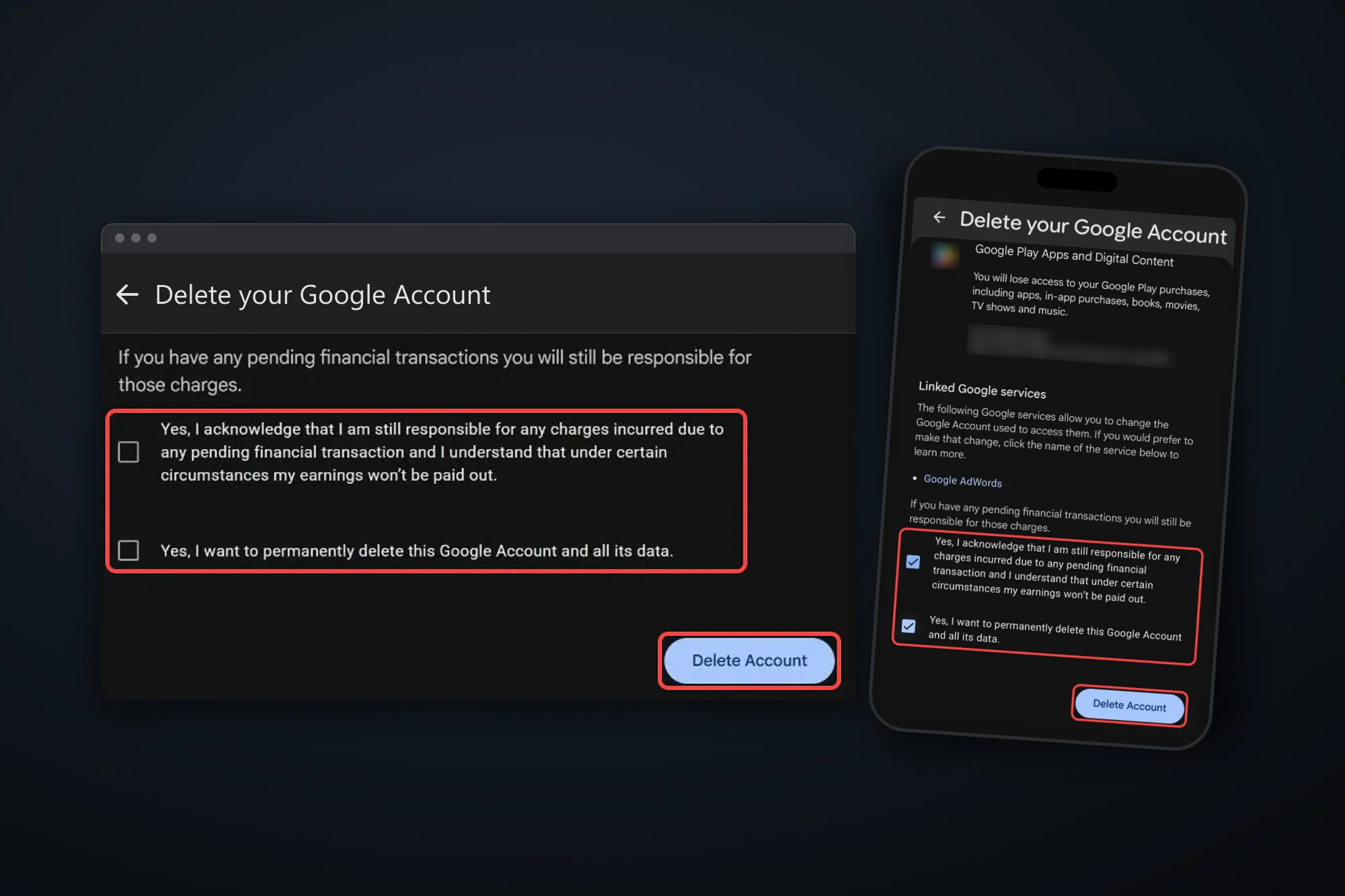
How to Delete Your Telegram Account (easy step by step guide)
There's no 30-day window on Telegram. Here are the steps on the web and in the app, and what to sort out before you press delete.
 Dan Saltman10 min read
On this page
To delete your Telegram account, go to my.telegram.org/delete, sign in with your phone number and the code Telegram sends to your app, then click Delete My Account and confirm. It works in any browser, on a computer or a phone. Telegram deletes the account straight away, and it can't be undone.
There's no grace period to change your mind, so export anything you want to keep and hand over your groups and channels first.
Below are Telegram's steps for the web and the iPhone app, its self-destruct timer, what to do before you delete, and what's left behind. It's one of our guides to deleting your social media accounts.

4 things to do before you delete
A Export your chats. Once the account is gone, so is your own copy of your messages. In Telegram Desktop, go to Settings > Advanced > Export Telegram data and pick the chats, photos and media you want, as HTML or JSON. To save one conversation, open its ⋮ menu and choose Export chat history. Telegram describes both in its export announcement.
B Cancel Telegram Premium where you bought it. If you pay through @PremiumBot, Telegram says deleting your account ends the payments, with no refund for the rest of the month. If you subscribed in the App Store or Google Play, cancel there first. Telegram warns those stores may keep charging you after the account is deleted.
C Hand over your groups and channels. Groups and channels you created keep running without you. Telegram says they're "orphaned and left without a creator", and admins keep their rights. To pick the next owner yourself, transfer ownership to another member before you delete. Telegram asks for your Two-Step Verification password to do that, so turn it on first under Settings > Privacy and Security.
D Make sure you can get the login code. my.telegram.org sends its code to your Telegram app, not by SMS, so do this while you're still logged in on a phone or computer.
Read your export before you delete
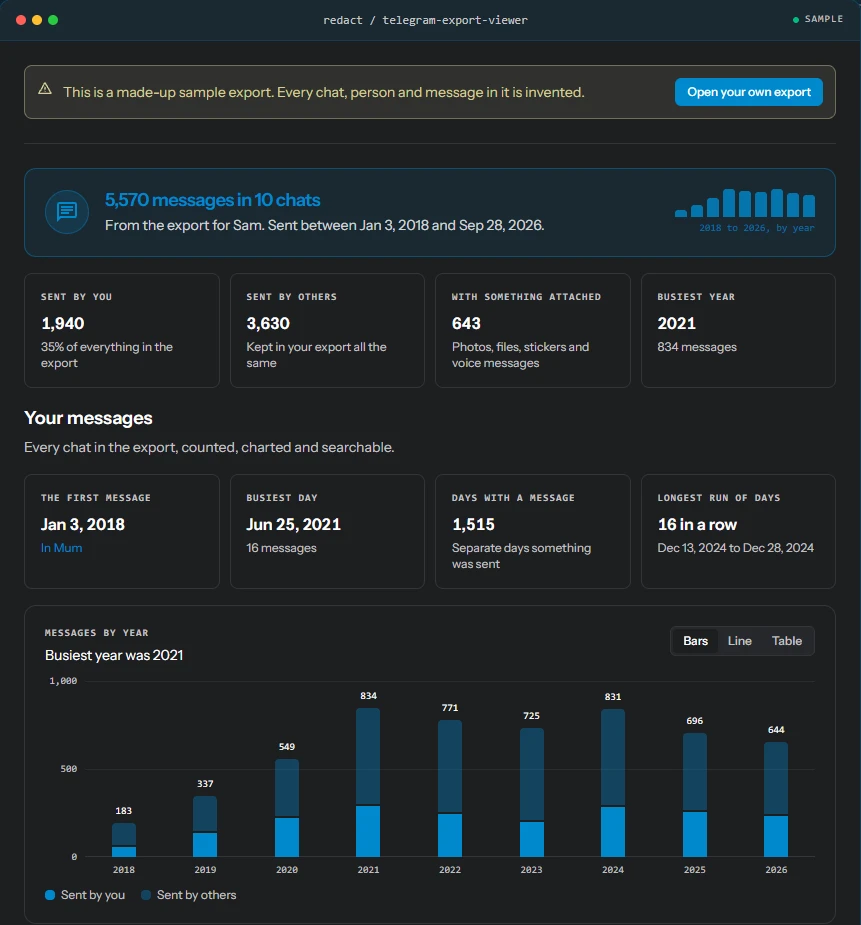
Telegram Desktop saves your export as a folder of HTML or JSON files. Drop that folder into our free Telegram Chat Export Viewer to read and search every chat, and see how much of it you sent yourself. It runs in your browser, and your export is never uploaded, so you can check you've got what you need before the account goes.
If you only want a new number, you don't need to delete anything. The delete page itself links to Telegram's change number option, which keeps your chats and contacts.
How to delete your Telegram account
These steps follow Telegram's FAQ on deleting your account and its delete page as of October 2026.
Option 1: Delete your account on my.telegram.org (any browser)
Step 1 Sign in with your phone number
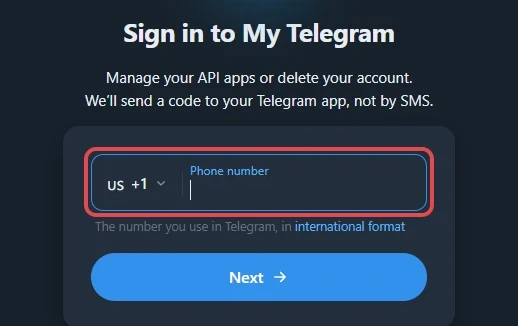
Open my.telegram.org/delete, enter the number you use on Telegram in international format and click Next. Telegram sends a confirmation code to your Telegram app. Type it in and click Sign in.
Step 2 Click Delete next to your account
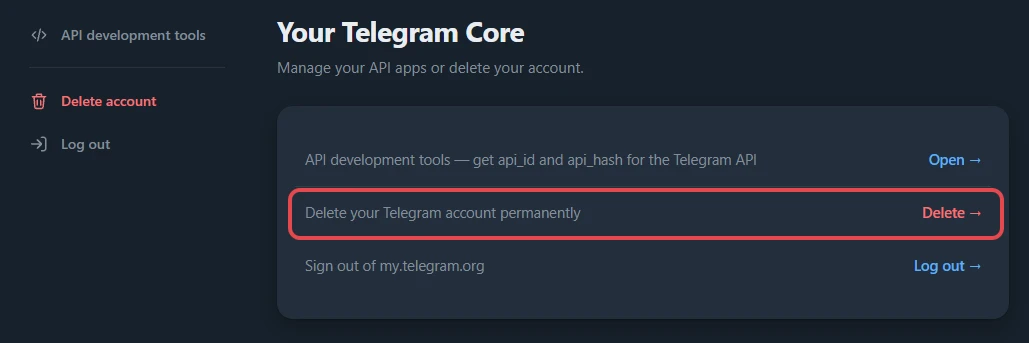
On the Your Telegram Core page, click Delete on the "Delete your Telegram account permanently" row. You can also click Delete account in the side menu.
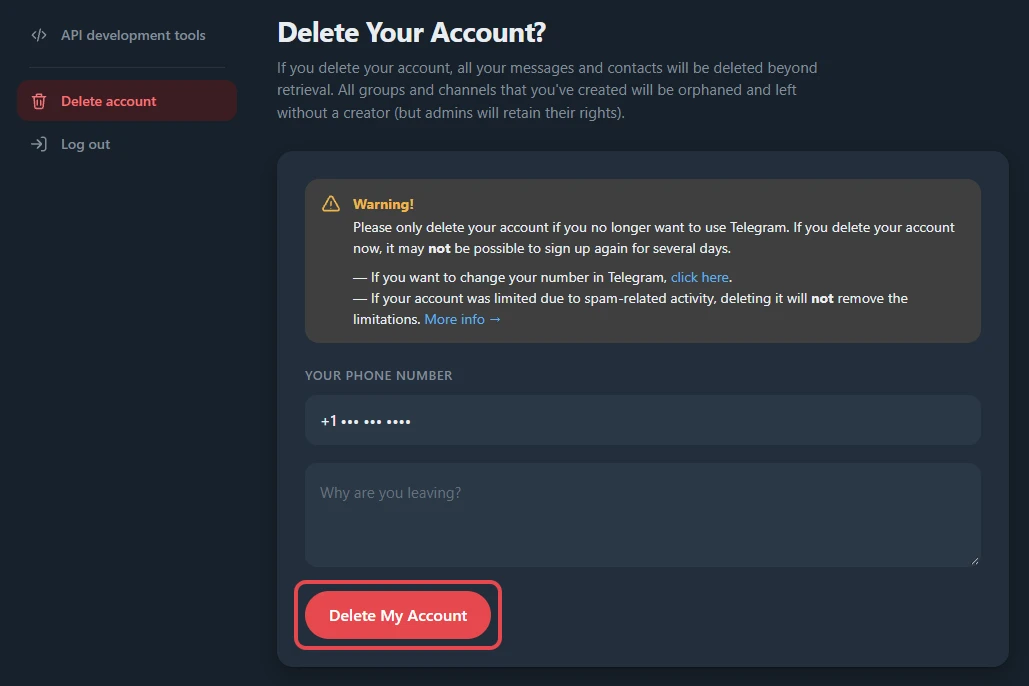
Step 3 Click Delete My Account
Read the warning, add a reason if you like, and click Delete My Account. Telegram then shows a confirmation box below the form. Click its confirm button to finish. That second click deletes the account for good.
Option 2: Delete your account in the Telegram app (iPhone)
The iPhone app can delete your account straight away from the same menu as Telegram's self-destruct timer. Telegram's FAQ says an account that doesn't come online for 18 months is deleted, and that timer lives here too.
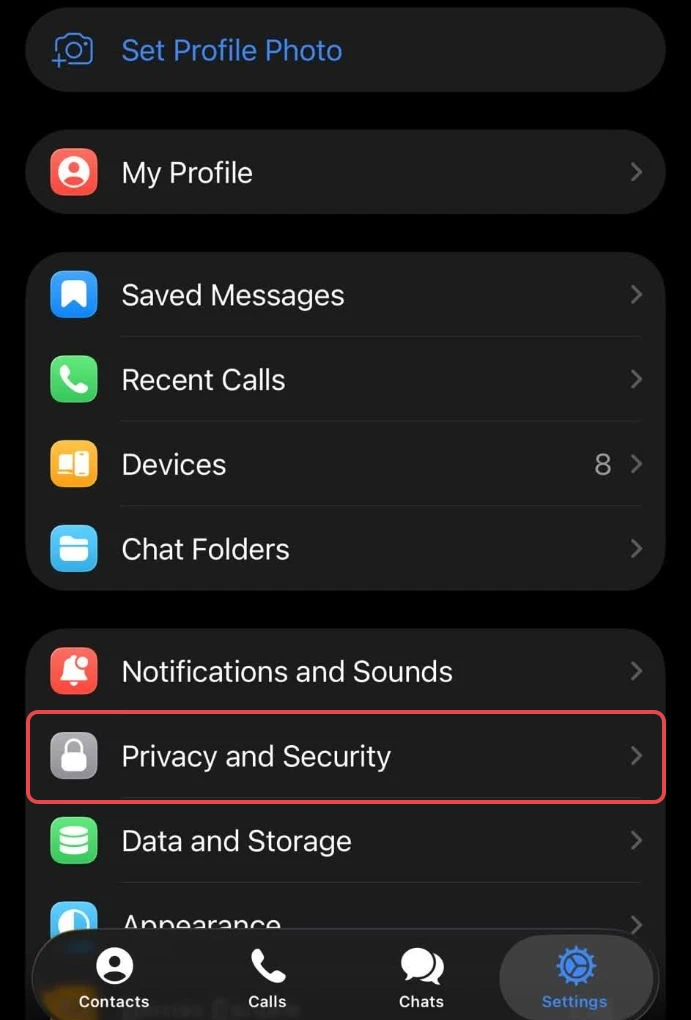
Step 1 Open Privacy and Security
Tap Settings at the bottom right, then Privacy and Security.
Step 2 Tap If Away For
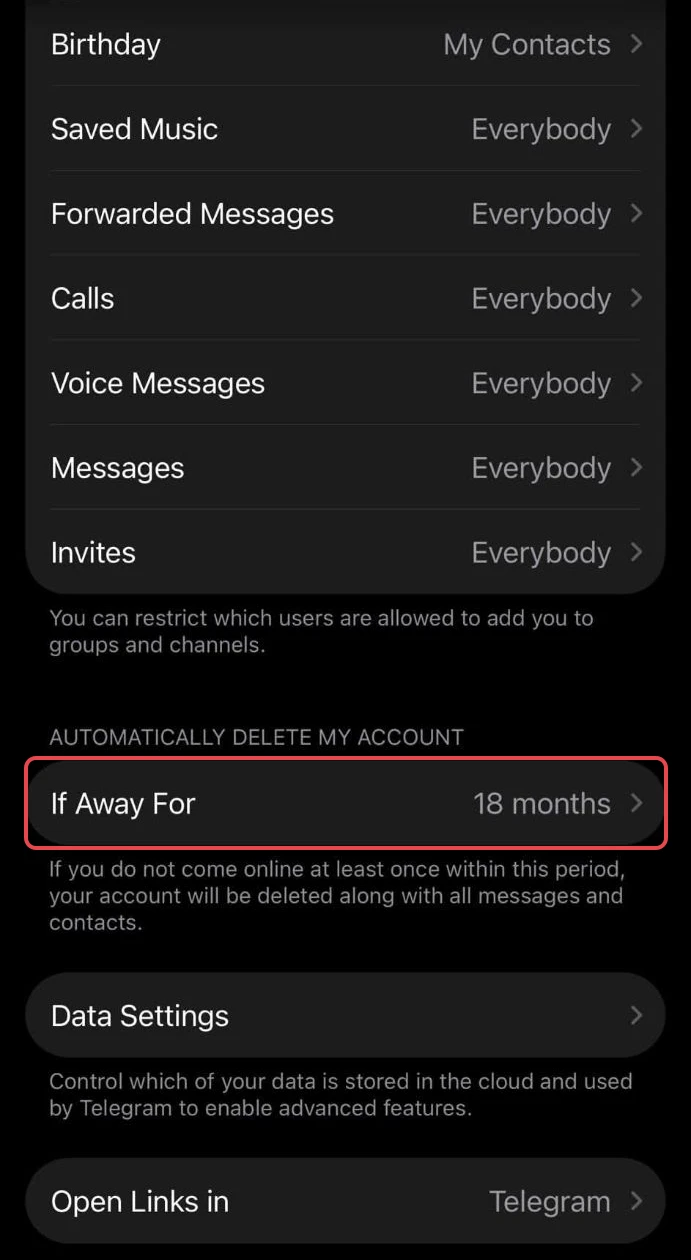
Scroll down to Automatically Delete My Account and tap If Away For. It shows your current period, 18 months unless you've changed it.
Step 3 Tap Delete Account Now
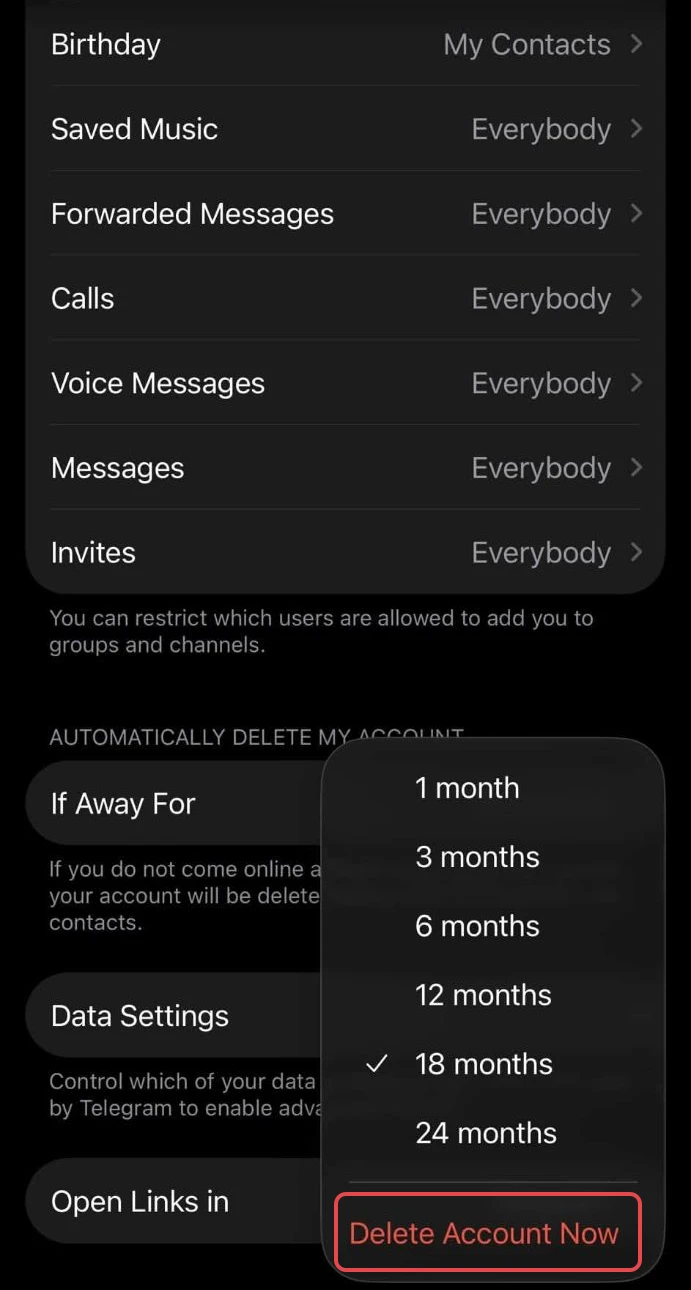
The menu lists periods from 1 to 24 months, with Delete Account Now in red at the bottom. Tap it and follow Telegram's prompts to delete the account straight away.
Would rather let it lapse? Pick a period instead and log out on every device. Telegram deletes the account once you've been offline that long, and logging in again resets the clock. On Android and Telegram Desktop, If away for is under Privacy and Security too. If your app doesn't offer Delete Account Now, use Option 1.
What deleting your Telegram account leaves behind
Here's what Telegram says in its FAQ and on the delete page itself:
- Your messages and contacts are deleted from Telegram's system, "beyond retrieval".
- The people you messaged keep their copies. Telegram says your contacts "will still have their copy of the messages you sent them". To remove those too, delete your chats for both sides before you delete the account.
- Groups and channels you created stay. Your contacts can keep chatting in them, and admins keep their rights, but they're left without a creator.
- App store subscriptions can keep billing. Telegram Premium bought through Apple or Google has to be cancelled there (Telegram says).
- Copies outside Telegram stay. Screenshots, chat exports and media other people saved to their own devices are out of Telegram's reach.
- Spam limits don't reset. The delete page says deleting won't remove limits placed on an account for spam.
Want a fresh start instead? Keep the account, delete the messages
Deleting the account ends everything at once, including your groups, contacts and number history. If what you want gone is the history, Telegram says you can delete most of your data and keep the account. In the app you can select messages or whole chats and delete them for both sides, and in one-on-one chats you can delete a day or date range from the calendar. That works one chat at a time, though, not in groups, and you can't keep a chat's photos and files while deleting its messages.
Redact does that in bulk on your own device. Connect your Telegram account, pick DMs, group chats and channels (or select them all), filter by date, keep photos, videos or files if you want them, preview and run. You keep your number, contacts and groups.
Redact has limits too.
- It needs Premium. In the current Redact app, Telegram deletions are part of Redact Premium, with no free tier for Telegram.
- It only deletes what Telegram allows. In groups and channels, deleting other people's messages needs admin rights.
- It deletes messages, not chats. Redact never deletes a group or channel itself. Leave or delete those in Telegram.
- It can't reach copies. Screenshots and exports other people made stay, with Redact or Telegram.
Our full walkthrough is How to delete all your Telegram messages.
If you still want the account gone, export your chats, hand over your groups, then use the steps above.
FAQ
How do I permanently delete my Telegram account?
Go to my.telegram.org/delete, sign in with your phone number and the code Telegram sends to your app, click Delete My Account, then confirm in the box that appears. The account is deleted straight away.
Can I delete my Telegram account in the app?
On iPhone, yes: go to Settings > Privacy and Security > If Away For and tap Delete Account Now. If your app doesn't show that option, use my.telegram.org/delete in any browser, including your phone's, or shorten If away for so Telegram deletes the account once you've been offline that long.
Can I recover a deleted Telegram account?
No. Telegram says deleting an account is irreversible. If you sign up again with the same number, you start as a new user without your old messages, contacts or groups.
What happens to my groups and channels when I delete Telegram?
They keep working. Telegram says they're left without a creator and admins keep their rights. Transfer ownership before you delete if you want to choose who runs them.
Why didn't I get the Telegram login code?
my.telegram.org sends the code to your Telegram app, not by SMS. Open Telegram on a phone or computer where you're still logged in and look for a message from Telegram.
How long does Telegram take to delete an inactive account?
18 months by default. In Settings > Privacy and Security > If away for you can pick anything from 1 to 24 months, and logging in on any device resets the clock.
Does deleting my Telegram account cancel Telegram Premium?
Only if you pay through @PremiumBot. Premium bought in the App Store or Google Play has to be cancelled in your Apple or Google account, and Telegram warns those stores may keep charging you otherwise.
Can I sign up again with the same number?
Yes, but the delete page warns it may not be possible for several days, and you'll come back as a new user with no history.
Redact for Telegram
Delete your messages from Telegram.