How to Delete Your Roblox Account (easy step by step guide)
Roblox now has a Delete button in Settings. Here's where it is, what you lose with it, and what parents need to know.
 Dan Saltman9 min read
On this page
To delete your Roblox account, click the gear icon, go to Settings > Privacy & content restrictions > Account data, deactivation & deletion and click Delete. You need a verified email address on the account, and Roblox checks it's really you before it deletes anything. If you can't log in, use the Roblox support form instead.
Deleting is permanent, and Roblox doesn't refund what's left. Robux, Premium and the items you bought go with the account.
Below are Roblox's steps on roblox.com, what to do first, how parents can delete a child's account, and what stays after. It's one of our guides to deleting your social media accounts.
5 things to do before you delete
A Add and verify an email. The Delete button stays greyed out until the account has a verified email, as in our screenshots below. Click Add next to Email on that page (or go to Settings > Account info) and confirm the address from the email Roblox sends.
B Download your data, if you want it. On the same page, Request Account Data gets you a copy of what Roblox holds, such as account details, login history and payment history. Roblox sends the link to your Roblox messages and your email, and the link expires 7 days after it's sent, so wait for it and save it before you delete.
C Cancel Premium or Roblox Plus. Go to Settings > Subscriptions and click Cancel Renewal. If you subscribed in the iPhone or Android app, cancel in the App Store or Google Play instead, because Roblox can't cancel those. Roblox says memberships are non-refundable, and since April 30, 2026 Premium can't be bought again once you cancel.
D Spend or give up your Robux. Roblox's terms say payments for Robux are final, and the Delete screen warns you'll lose access to all your Roblox items and data. There's no cash-out for a normal account.
E Hand over communities and experiences you own. For a community (Roblox's new name for groups), open it, click Configure Community and change the owner under Information. Roblox says an ownership transfer can't be undone, and a community whose owner leaves without transferring it is owned by no one. For an experience you made, move it to a community you can publish to with Creator Hub's ownership transfer before you delete.
If you used Sign in with Roblox on other sites, check those too. Roblox's privacy policy says you may lose access to them once the account is gone.
How to delete your Roblox account
These steps follow Roblox's help article on deactivating or deleting your account and the Settings pages as of October 2026.
Delete your account on roblox.com (desktop or mobile browser)
Step 1 Open Settings
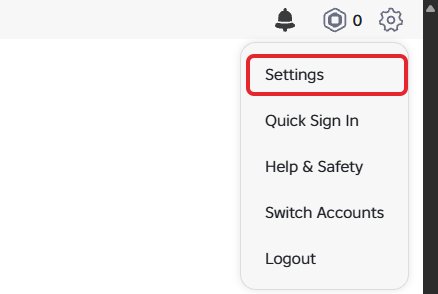
Log in at roblox.com, click the gear icon at the top right, then Settings.
Step 2 Open Account data, deactivation & deletion
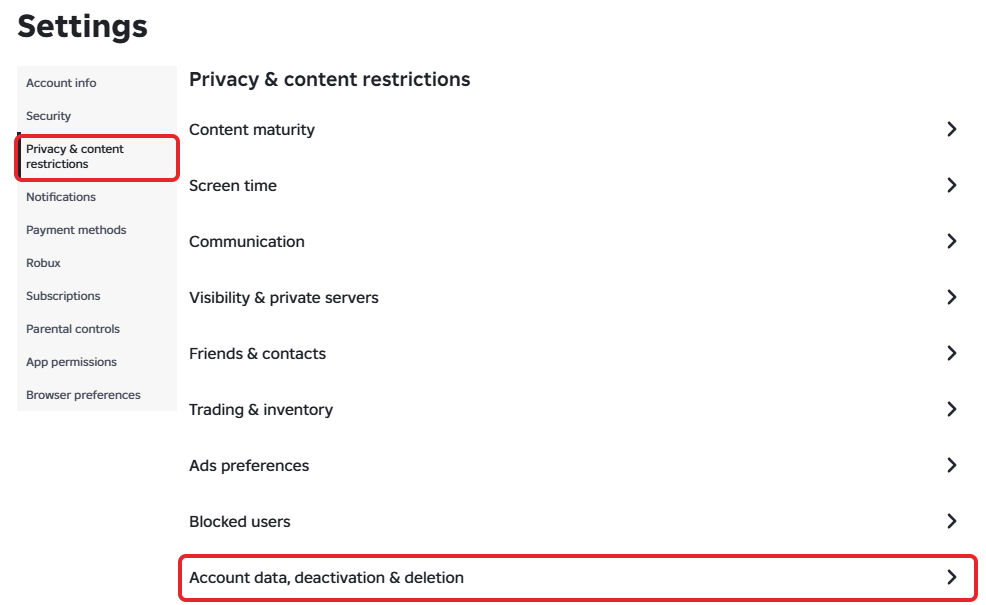
Click Privacy & content restrictions in the left menu, then Account data, deactivation & deletion, the last item in the list.
Step 3 Click Delete next to Delete Account
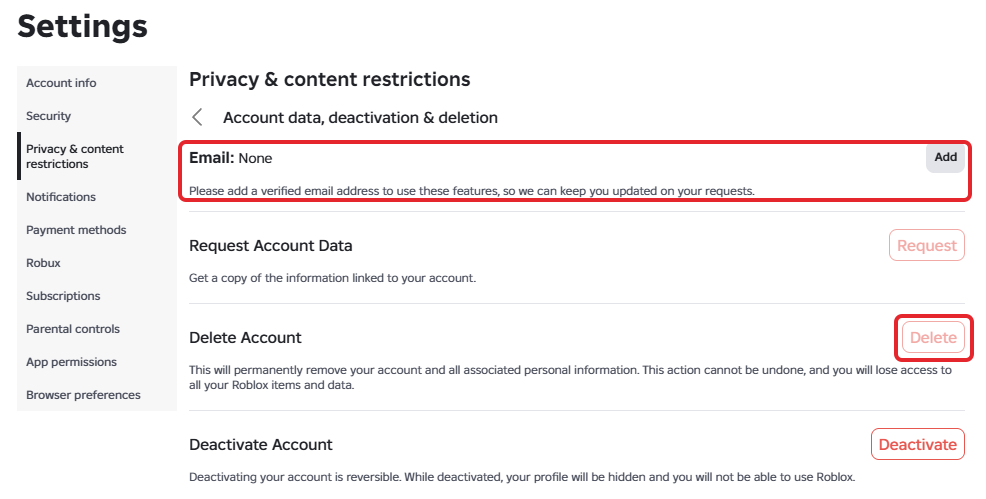
Check that the Email line at the top shows a verified address, then click Delete next to Delete Account and follow Roblox's prompts to confirm who you are. In our test account below, there's no email yet, so Delete and Request are greyed out.
If you can't log in, ask Roblox Support to delete it
If you can't log in, or the Delete button won't work for you, Roblox says to reach out through its support form. Pick Data Privacy Requests as the type of help and Right to be Forgotten as the subcategory, as Roblox's privacy FAQ describes. Roblox will still check that the account is yours.
If you're a parent: deleting your child's account
You can delete a child's account the same way, from their account: log in as your child, then follow the steps above. The account needs a verified email, which may be your own.
If you can't get into your child's account, Roblox's terms say a parent or guardian can ask Roblox to close it through Roblox Support, and its privacy policy says you can ask it to delete your child's personal information the same way. Include your child's username, and expect Roblox to check that you're the parent.
A few things parents ask about:
- A linked parent account doesn't delete anything by itself. Linking your own Roblox account to your child's (under Settings > Parental controls) lets you set limits, see their Robux balance and approve requests. Setting one up means verifying your age with facial age estimation, an ID or a credit card. Roblox's Parental Controls FAQ points parents to the same deactivate and delete article for closing a child's account.
- Deactivating is a softer step. If your child only needs a break, deactivate from Privacy & content restrictions on your child's account. Logging back in restores it.
- Robux and Premium are lost the same way. Cancel any subscription on your own App Store or Google Play account first if that's where you paid.
- Unlinking isn't deleting. Unlinking your parent account (Parental controls, the pencil icon, Unlink accounts) only removes your controls. Your child's account keeps working.
What deleting your Roblox account leaves behind
Here's what Roblox says in its help article, privacy policy and terms:
- Your account, Robux and items are gone. The Delete screen warns the action "cannot be undone".
- Some records stay for a while. Roblox may keep certain data for tax, legal or security reasons, and device and account identifiers for up to two years to stop bots and abuse.
- Items other players bought from you stay with them. Roblox's creator terms say avatar items and other virtual content someone validly bought can keep being used, even after the creator's account is closed.
- Your work in other people's experiences can stay. If you built or uploaded something that's already in use, the same terms say Roblox's right to use it continues in perpetuity.
- Communities you own are a gap in Roblox's help. It doesn't say what happens to a community when its owner deletes their account, so transfer yours first, as above.
- Chats and screenshots other players kept are out of Roblox's reach. Roblox doesn't say what happens to chat messages you sent once the account is deleted, and nothing it does can reach a screenshot or a video someone else saved, or a post they made on another site.
Redact doesn't support Roblox, so the steps above are the way to do it. If Roblox is one of several accounts you're closing, the series hub covers the others, and for services Redact does support, such as Discord, it can delete your messages before you go.
FAQ
Can you delete a Roblox account yourself?
Yes. Go to Settings > Privacy & content restrictions > Account data, deactivation & deletion and click Delete. The account needs a verified email, and Roblox checks your identity before it deletes anything. If you can't log in, use the Roblox support form.
Why is the Delete button greyed out on Roblox?
The account doesn't have a verified email address. Click Add next to Email on the same page, confirm it from the email Roblox sends, and the Delete and Request buttons turn on.
How do I delete my child's Roblox account?
Log in to your child's account and use the same Settings steps, with a verified email on the account. If you can't get in, ask Roblox through its support form. Roblox's terms say a parent or guardian can ask it to close a child's account.
Do I get my Robux back if I delete my Roblox account?
No. Roblox says payments for Robux are final and not refundable, and the Delete screen warns you'll lose access to all your Roblox items and data.
Does deleting my Roblox account cancel Premium?
Cancel it yourself first, under Settings > Subscriptions or in the App Store or Google Play if you subscribed in the app. Roblox says memberships are non-refundable, and Premium can't be bought again once you cancel.
Can I get my Roblox account back after deleting it?
No. Deleting can't be undone. If you might come back, choose Deactivate on the same page instead, and log in again whenever you want the account back.
Does deleting the Roblox app delete the account?
No. Removing the app only takes it off that device. The account stays until you delete it in Settings or through Roblox Support.
What happens to my Roblox community or game when I delete my account?
Transfer them first. Roblox doesn't say what happens to a community when its owner deletes their account, only that a community left by its owner without a transfer is owned by no one. An experience can be moved to a community with Creator Hub's ownership transfer.