How to Delete Your Google Account (easy step by step guide)
Delete the whole account, or just Gmail or YouTube. Here are Google's steps for a computer and a phone, and what's still out there after.
 Dan Saltman13 min read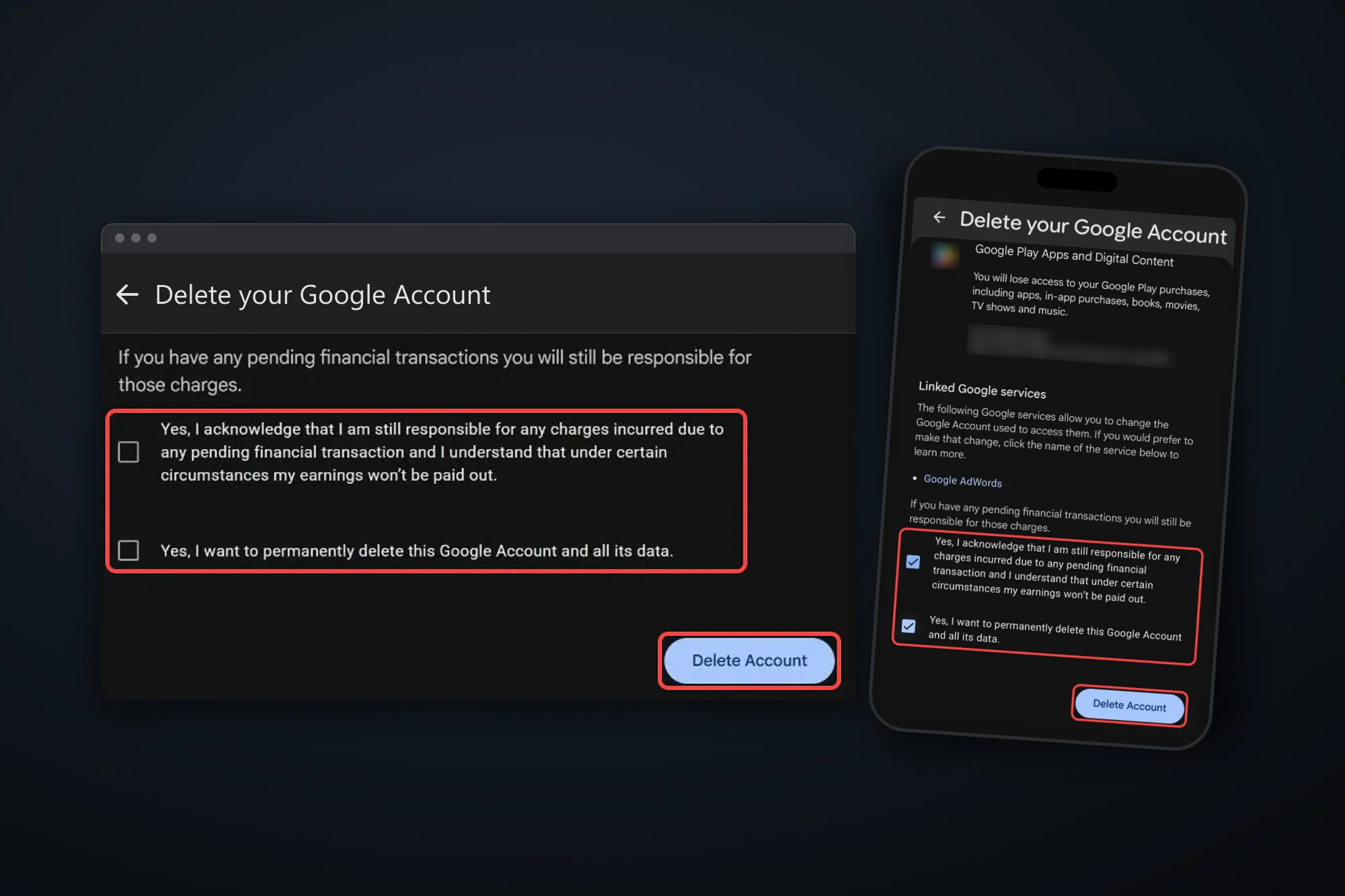
On this page
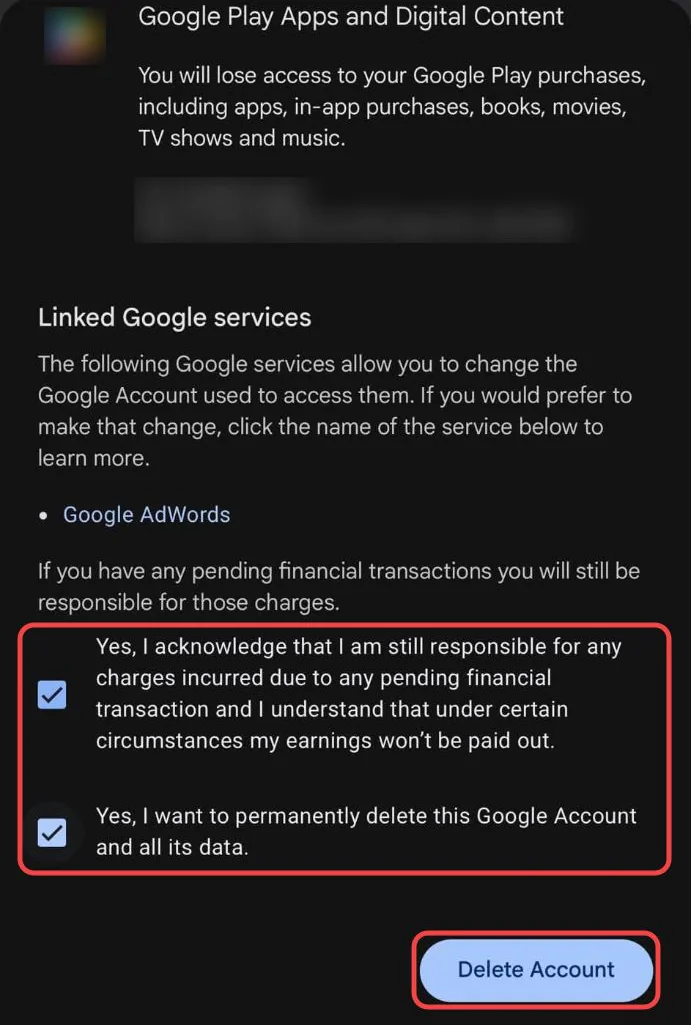
To delete your Google Account, open Data & privacy in your Google Account, scroll to Tools and click Delete your Google Account. Google asks you to verify it's you, lists everything that will be deleted, and has you tick two boxes before the Delete Account button.
That deletes everything at once: Gmail, Drive, Photos, your YouTube channel, your Google Play purchases and every "Sign in with Google" login. If you only want to be rid of Gmail or YouTube, you can delete that one service and keep the rest.
Deleting won't reach everything either. Emails you sent stay in other people's inboxes, and search engines and other sites keep what they copied. Below are Google's steps for a computer and a phone, the short window to change your mind, and what's left behind. It's one of our guides to deleting your social media accounts.

4 things to do before you delete your Google Account
A Download your data with Google Takeout. Go to Google Takeout, pick the products you want (Gmail, Drive, Photos and YouTube are ticked if you use them) and create an export. Google says it can take from a few minutes to a few days, and it emails you the link, so wait for it before you delete. Pick a delivery method other than Add to Drive, since Drive goes with the account.
B Sort out subscriptions and purchases. Google says you lose access to subscriptions and content you bought on YouTube or Google Play, like apps, movies, games, music and TV shows. Google doesn't say deleting stops the billing, so cancel paid subscriptions first, through whoever bills you. YouTube Premium is cancelled in YouTube's paid memberships, or in your Apple account if you joined from the iPhone app. Google One is cancelled in the Google One app, or in the App Store if you signed up on an iPhone or iPad. Apps you subscribed to through Google Play are cancelled in Google Play.
C Move your logins off your Gmail address. Google says that if you use your Gmail address for banking, social media or apps, add a new email address there. Check your linked apps too: any site you log in to with Sign in with Google needs another way in, such as a password or a different email, before the account goes.
D Check what else hangs off the account. On an Android phone, Google says you can't get or update apps from the Play Store, and your phone backups are stored in the account. Deletion also takes your YouTube channel, and Google's delete page warns about your family group and anything you administer, like payment profiles or Brand Accounts with you as the only owner. Add a backup owner or a new account first.
Deleting one Google Account doesn't touch the others. Google says that if you have more than one, deleting one won't delete the rest.
Only want to get rid of Gmail or YouTube? You can pick and choose which services to close down
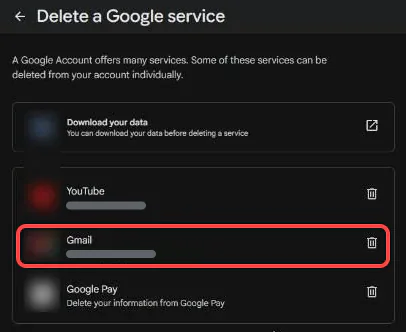
You don't have to delete the whole account to leave Gmail or YouTube. Google lets you remove a single product and keep the account, your other services and your Google Play purchases.
- Gmail. In Data & privacy, scroll to Tools, click Remove data from services you no longer use and click the bin next to Gmail. You'll need another email address that isn't Gmail to sign in with, and Google sends it a verification link. Google says Gmail deletes your emails and settings after 30 days, and your Gmail address can't be used by anyone in the future, you included.
- YouTube. Use the same Delete a Google service page, or in YouTube Studio go to Settings > Channel > Advanced settings > Remove YouTube content. YouTube says deleting your channel permanently deletes your videos, comments, messages, playlists and history, and that you can't do it on a phone. You can also hide the channel instead and bring it back later.
If what you want gone is your YouTube history rather than the account, see below.
How to delete your Google Account
These steps follow Google's help article Delete your Google Account as of October 2026. Google will ask you to verify it's you, so have your password and phone to hand.
Option 1: Delete your Google Account on a computer
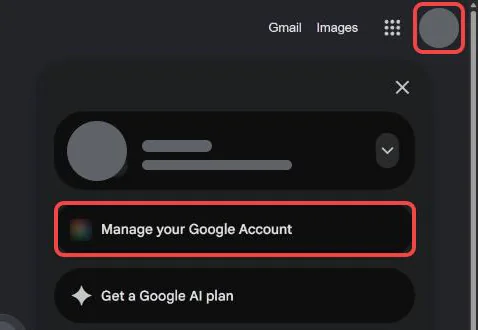
Step 1 Click your profile picture and Manage your Google Account
Open myaccount.google.com and sign in if Google asks. To get there from google.com or Gmail instead, click your profile picture (or the circle with your initial) at the top right, then click Manage your Google Account.
Step 2 Click Data & privacy, then Delete your Google Account
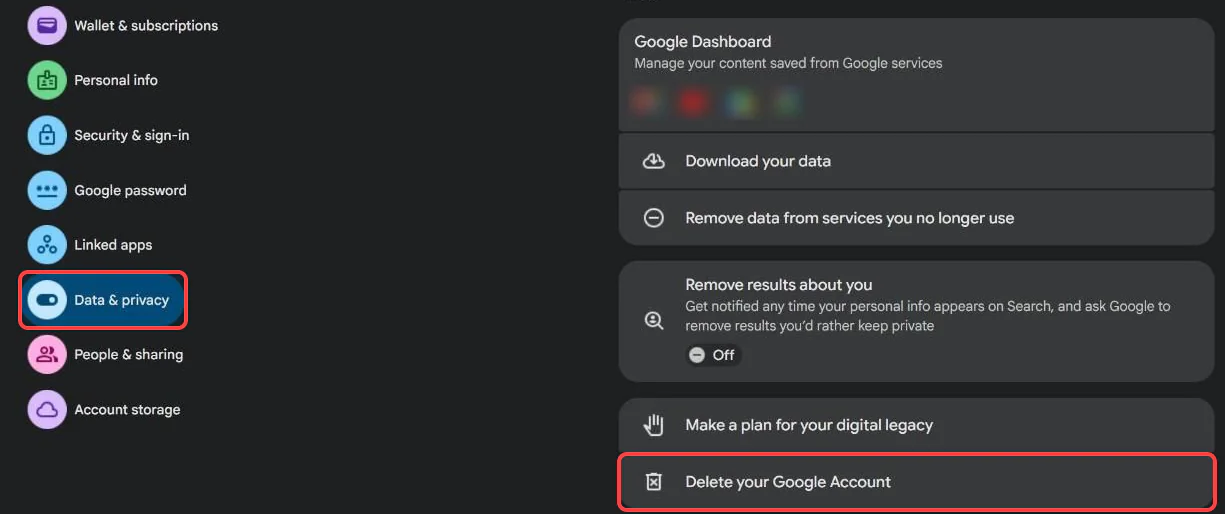
On your Google Account page, click Data & privacy in the menu on the left. Scroll down to the Tools section and click Delete your Google Account, the last item.
Step 3 Verify it's you
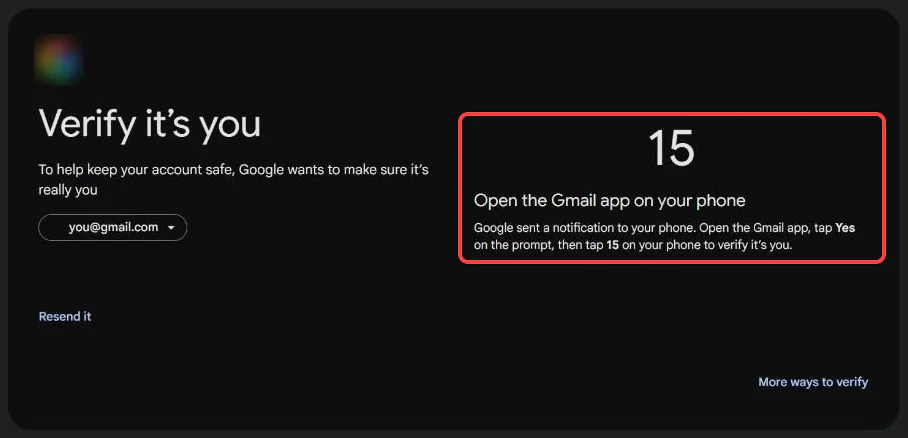
Google asks you to sign in again. Depending on your account, that's your password, a code, or a prompt on your phone where you tap Yes and the number shown on screen.
Step 4 Read what will be deleted
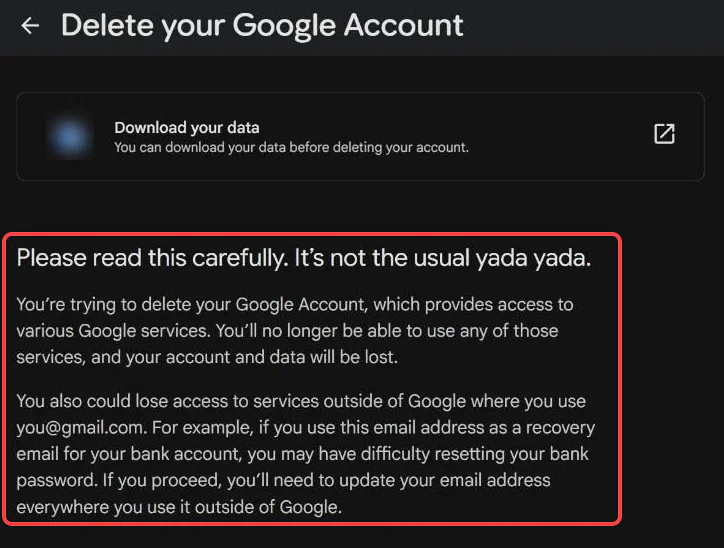
The Delete your Google Account page opens with a warning that you could lose access to sites outside Google that use your address. Below it, All this content will be deleted lists each service with what you'll lose, like your Gmail conversations, photos, YouTube uploads and Play purchases. There's a Download your data link at the top if you haven't run Takeout yet.
Step 5 Tick the boxes and click Delete Account
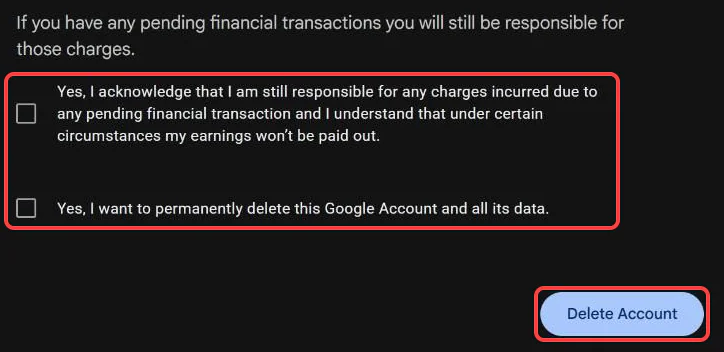
At the bottom, tick the box accepting that you're still responsible for any pending charges, then Yes, I want to permanently delete this Google Account and all its data. Click Delete Account, which is the click that deletes it.
Option 2: Delete your Google Account on Android or iPhone
On a phone you go through the same pages as on a computer, laid out as a list instead of a side menu.
Step 1 Open your Google Account and tap Data & privacy
Open myaccount.google.com in your phone's browser and sign in if Google asks. From an app instead: on Android, open your phone's Settings app, tap Google, then Manage your Google Account. On iPhone, open the Gmail app, tap your profile picture at the top right, then Manage your Google Account (Google's steps). Then tap Data & privacy.
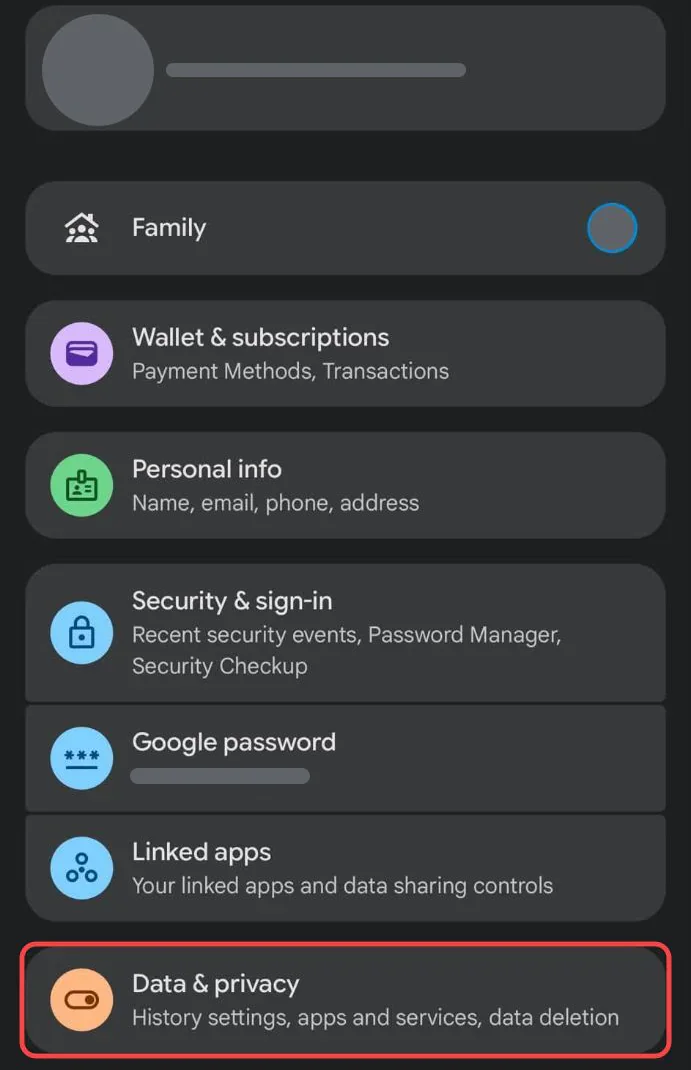
Step 2 Scroll to Tools and tap Delete your Google Account
Scroll down the Data & privacy page to Tools. Delete your Google Account is the last item.
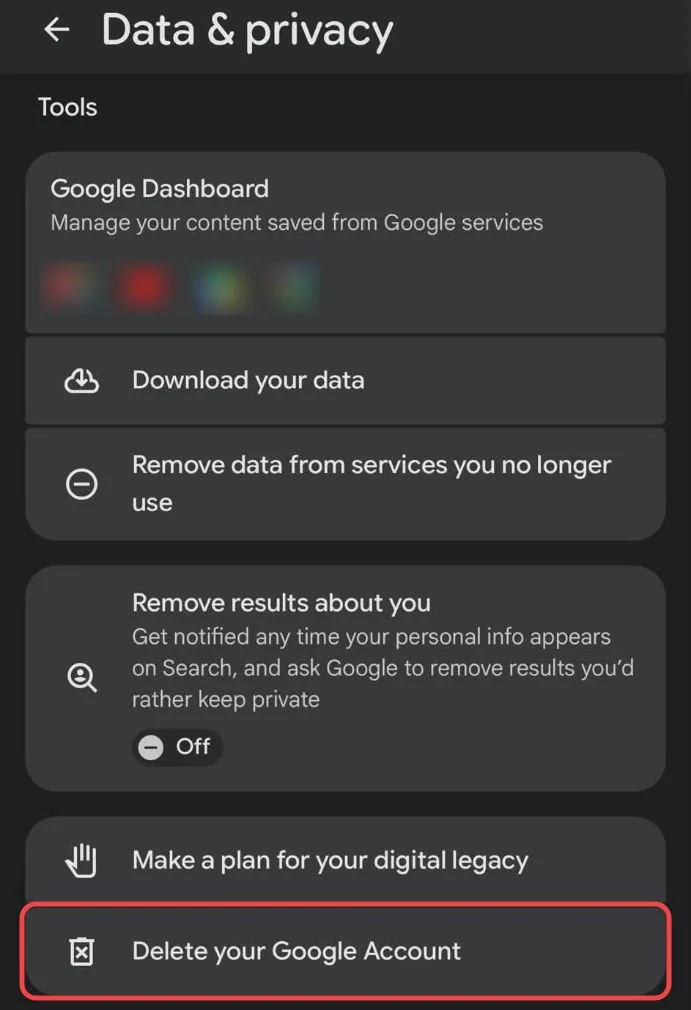
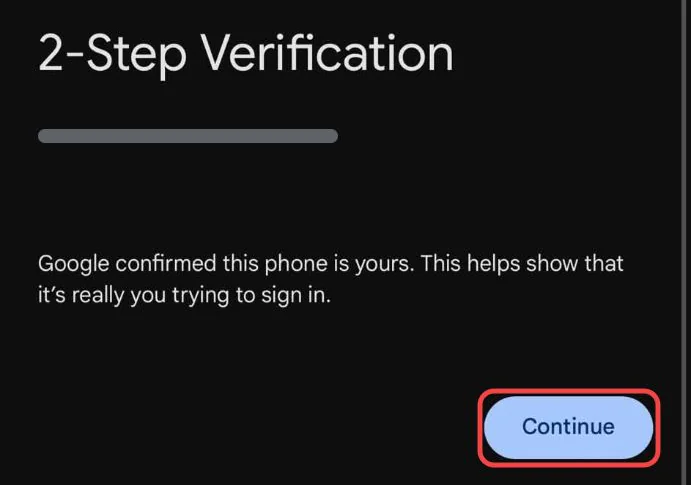
Step 3 Verify it's you
Google asks you to sign in again. If you're on the phone Google already knows, it may just confirm it and show a Continue button. Otherwise enter your password or approve the prompt on your phone.
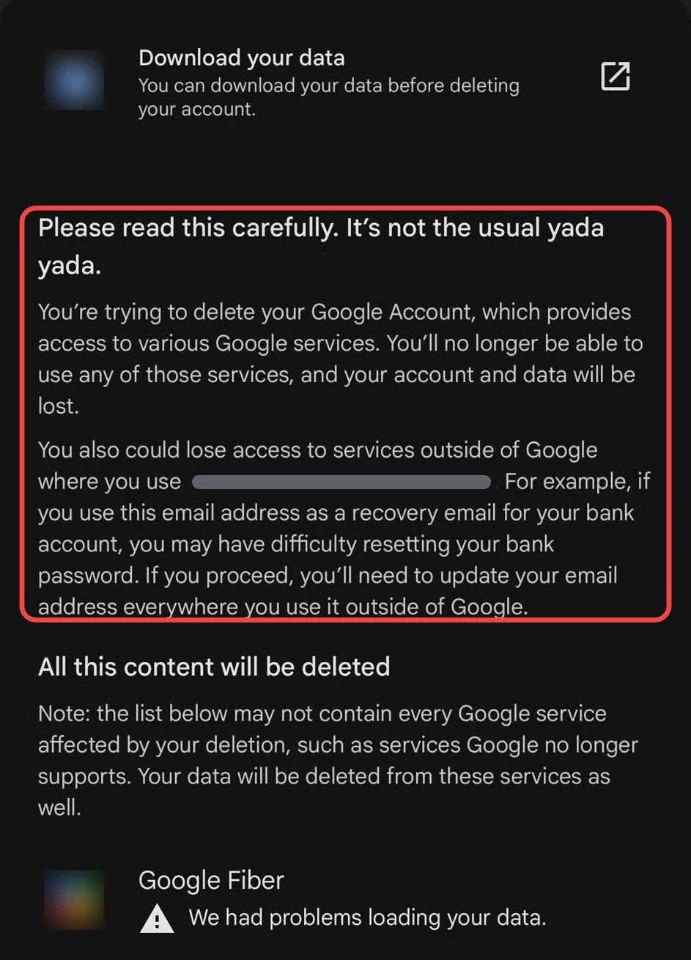
Step 4 Read what will be deleted
The warning at the top says you could lose access to sites outside Google that use your address. Scroll through All this content will be deleted to see what goes with each service. Tap Download your data at the top if you haven't run Takeout yet.
Step 5 Tick both boxes and tap Delete Account
At the bottom of the same page, tick the box about pending charges and Yes, I want to permanently delete this Google Account and all its data, then tap Delete Account.
Deleting the account isn't the same as removing it from your phone. If you only want the account off one device, Google's help page links to each phone maker's steps for removing it, and the account stays.
What deleting your Google Account leaves behind

Here's what Google says in Delete your Google Account, Remove Gmail from your Google Account and its data retention policy:
- Your data in the account goes. Google says you lose all the data and content in it, like emails, files, calendars and photos, plus contacts stored only in your account.
- Your Gmail address is retired, not freed. Google says nobody can use it in the future, so a stranger can't sign up with it and receive your mail.
- Emails you sent stay. Anything in other people's inboxes is theirs, and deleting your account doesn't reach it.
- Logins elsewhere stop working, but the accounts stay. Google says removing a Sign in with Google link doesn't delete your data on that app. Accounts you made with Sign in with Google need deleting on each site.
- Shared files you didn't own stay. Docs and folders other people shared with you belong to them.
- Search engines and other sites keep what they copied. Comments, reviews or videos that other sites cached or reposted are out of Google's reach.
- Some copies last a while. Google says deleted data can remain in its encrypted backups for up to 6 months.
Want to keep the account? Delete your YouTube history instead
Redact doesn't work with Gmail, Drive or Photos, so it can't help with most of a Google Account. It does work with YouTube, which is often the part people want gone when they search for this.
If it's your comments, watch history or likes you're worried about, you can keep the account and delete those instead. Redact deletes your YouTube comments, watch and search history, liked videos, Watch Later, playlists and uploads in bulk, and unsubscribes you from channels, from your own computer. You sign in to Google in a browser window on your machine, so your login never reaches Redact's servers.
Redact has limits too.
- It's desktop only. YouTube runs in the Redact app on Windows, macOS and Linux.
- The free plan covers your last 30 days. Comments, watch and search history are free for that window. Older items, plus playlists, subscriptions and uploads at any age, need Premium.
- It can't reach copies. Reuploads, screenshots and quotes of your comments stay.
Our full walkthrough is Introducing Redact for YouTube.
If you still want the whole account gone, wait for your Takeout export to arrive, then delete it using the steps above.
FAQ
How do I permanently delete my Google Account?
Go to Data & privacy in your Google Account, scroll to Tools and choose Delete your Google Account. Verify it's you, tick both boxes at the bottom and click Delete Account. Google may let you recover it for a short time after, so it's permanent once that window passes.
Can I delete Gmail without deleting my Google Account?
Yes. Under Data & privacy > Remove data from services you no longer use, click the bin next to Gmail. You'll need a non-Gmail email address to keep signing in with. Your other services and Google Play purchases stay.
Does deleting my Google Account delete my YouTube channel?
Yes. Your channel and its videos, comments and playlists are deleted with the account. To delete only the channel, use Remove YouTube content in YouTube Studio settings on a computer.
Can I recover a deleted Google Account?
Sometimes, if you act quickly. Google doesn't give a fixed window, but its retention policy describes a recovery period of up to about a month. Use Google's account recovery page and answer as many questions as you can.
Can someone else take my Gmail address after I delete it?
No. Google says a deleted Gmail address can't be used by anyone in the future, and that includes you if you open a new account.
What happens to my Android phone if I delete my Google Account?
You can't get or update apps from the Play Store with that account, and you lose the apps, movies and books you bought. Your phone's backups and anything synced only to the account go with it. Add another Google Account to the phone if you want to keep using Play.
Will deleting my Google Account cancel my subscriptions?
Google says you lose access to subscriptions you bought on YouTube or Google Play, but it doesn't say the billing stops. Cancel them before you delete, with whoever bills you: YouTube Premium through YouTube or Apple, Google One through the Google One app or the App Store, and app subscriptions in Google Play.
What happens to websites where I used Sign in with Google?
You can't log in to them with Google any more, but your accounts on those sites aren't deleted. Add a password or another email on each one first, or delete those accounts separately.