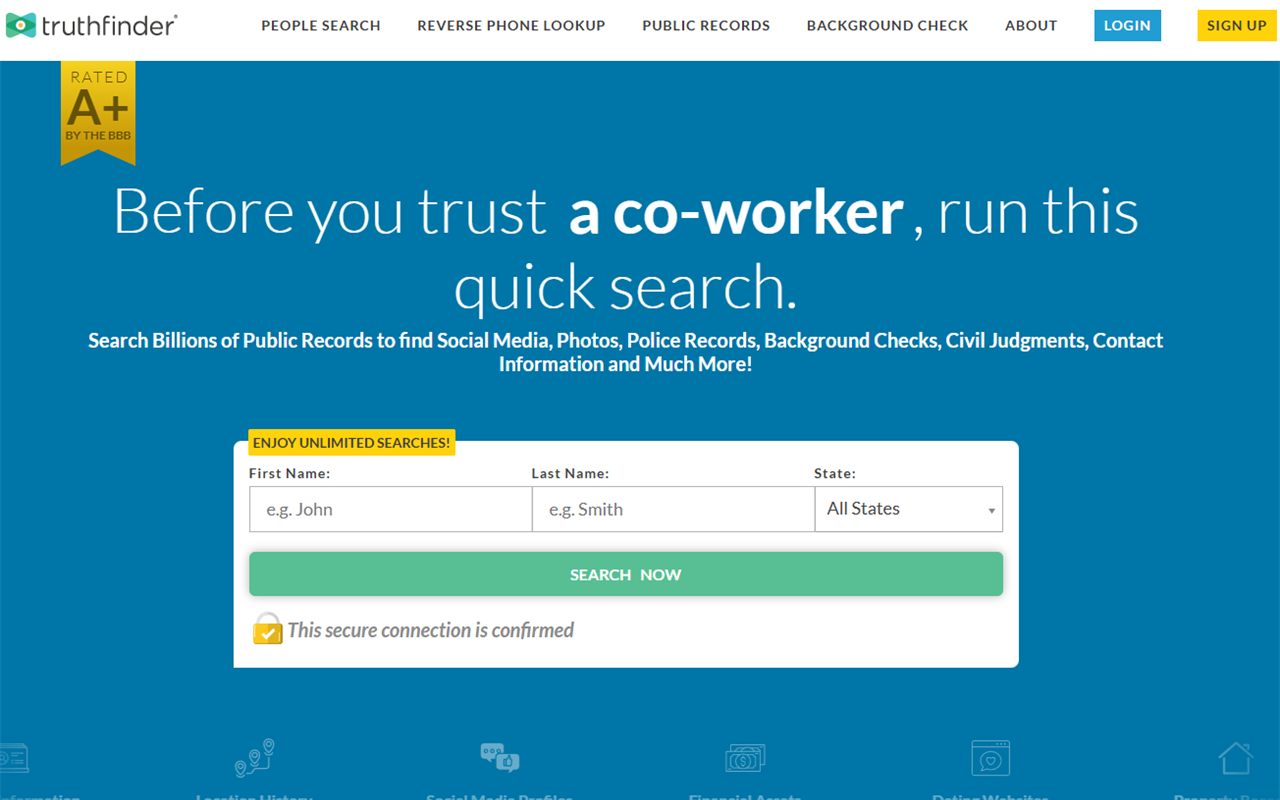
Your TruthFinder listing isn't really TruthFinder's. The record lives with PeopleConnect, the parent whose one database feeds TruthFinder, Intelius, Instant Checkmate, and US Search alike - which is why the opt-out doesn't live on truthfinder.com either. It runs on PeopleConnect's own Suppression Center, and one verified request there clears all four sites at once. The flow was walked for real on August 10, 2026, and the screenshots below show the shared form itself - the same screens whichever brand sent you. Three catches: the verification link expires after 15 minutes, the verification gate needs access to an email or phone number already on your record, and verifying isn't the end - the record stays displayed until you set Desired Behavior to Suppressed and save. The PeopleConnect removal guide is the same walkthrough at the source.
The full picture: See the TruthFinder data broker profile for ownership, the FTC order, the Fischer settlement, and the 2023 leak disclosure.
Quick facts
At a glance
Method
PeopleConnect Suppression Center + email verification
Skip the in-report buttons. The FTC's 2023 complaint found the in-product "Remove" button only hid a record from the clicking customer's own view, and "Flag as Inaccurate" triggered no investigation. The Suppression Center below is the path that actually suppresses the public record.
Prereqs
What you'll need
An email address you can check immediately - the verification email's own text says the link expires 15 minutes after it's sent.
Your date of birth and full legal name - the flow asks for both, with an attestation checkbox that the name is legally yours.
Access to an email address or phone number that's already on your record - you pick one from a dropdown, type it out in full, and the portal then sends a code to it.
A few spare minutes in a week or two to confirm the record dropped across the four named sites.
Use a masked or secondary email if you have one. The flow needs a working inbox for the verification link, but there's no reason to hand a data broker your primary address.
The steps
Remove your listing
01
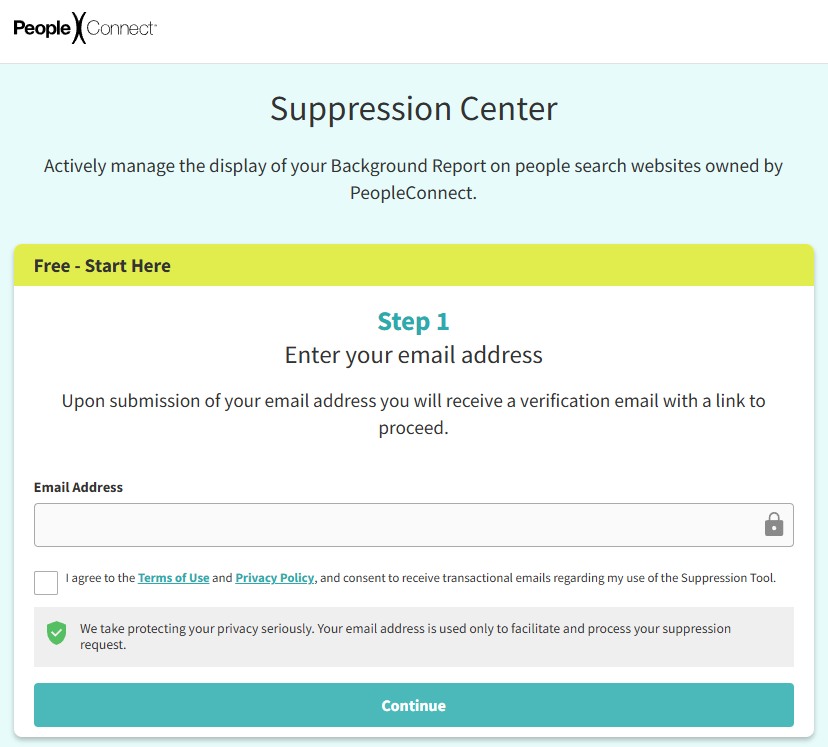
Open the Suppression Center and enter your email
Go to suppression.peopleconnect.us/privacy-center - you can also reach it from truthfinder.com's footer via Do Not Sell or Share My Personal Information, then View Public Data Tools, then Manage My Suppression Rules. Notice you're on PeopleConnect's own site now, not TruthFinder's - this is where the record actually lives. Enter your email address, agree to the Terms of Use and Privacy Policy, and hit Continue.
The Suppression Center - PeopleConnect's page, covering TruthFinder.
02
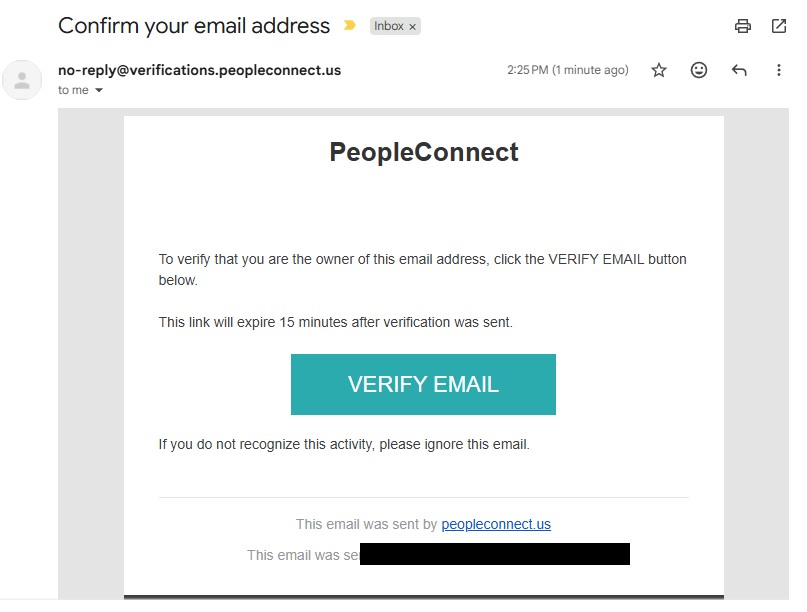
Click the verification email quickly
Open the "Confirm your email address" email from no-reply@verifications.peopleconnect.us and click VERIFY EMAIL as soon as it lands. The email's own text says the link expires 15 minutes after it was sent - if it lapses, restart from the previous step.
The verification email - the link is only good for 15 minutes.
03
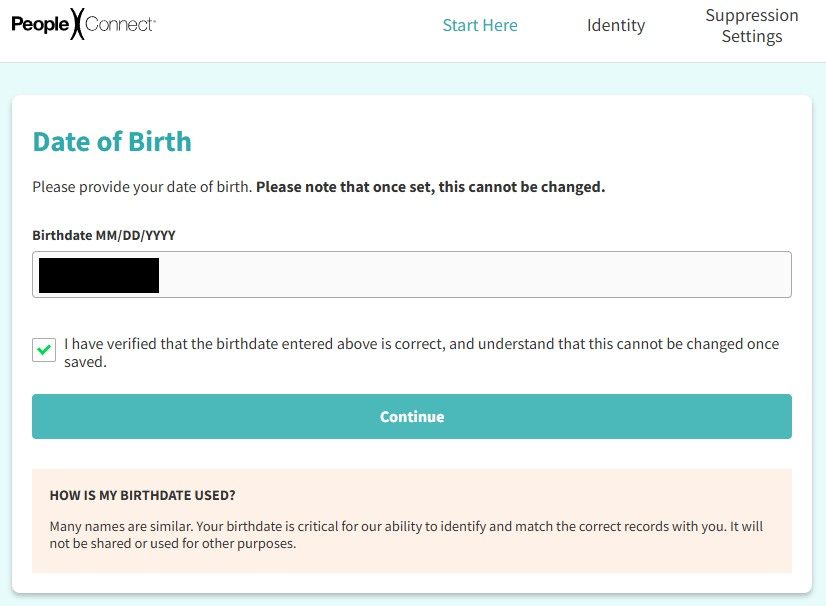
Enter your date of birth
Enter your date of birth and tick the confirmation checkbox. The page warns in bold that once set, it can't be changed - double-check it before continuing.
The Date of Birth screen - check it before you continue.
04
Enter your legal name
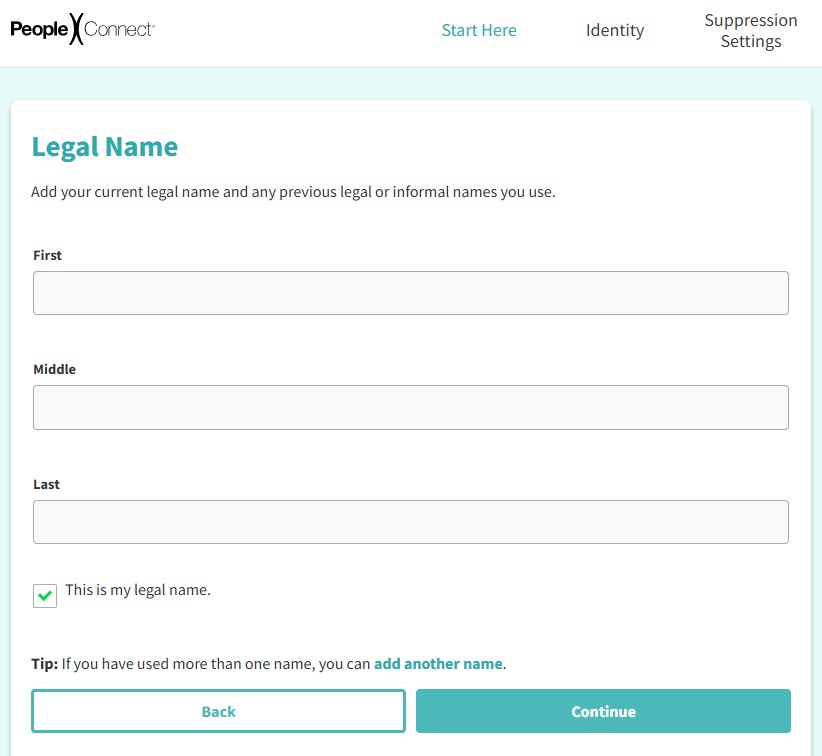
Enter your full legal name, tick the This is my legal name attestation, and use add another name for maiden or former names so the search covers them all.
The Legal Name page - add former names here too.
05
Find your record
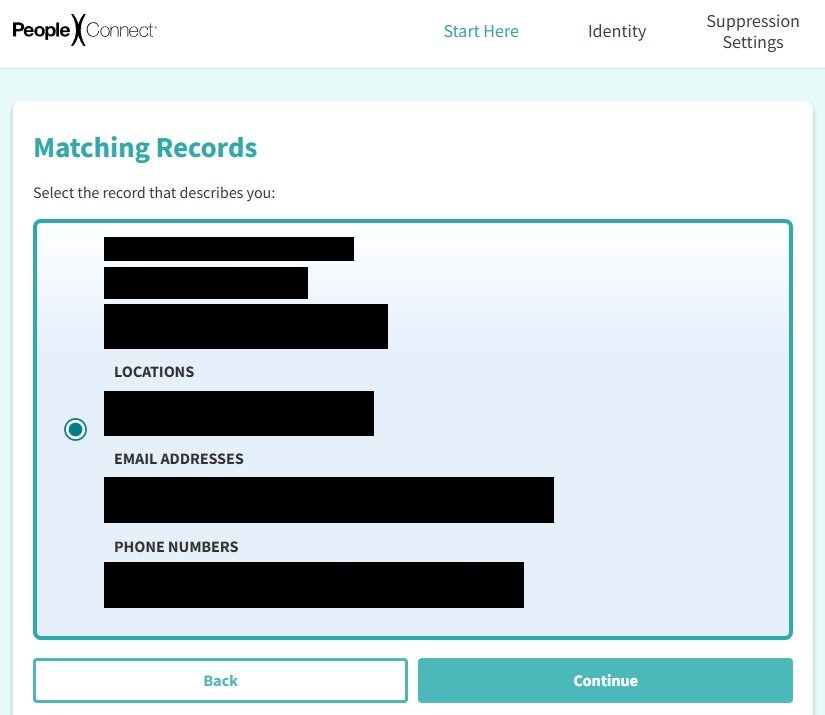
The Matching Records page lists candidates with their aliases, location history, and partially masked contact details - check them before deciding a listing isn't yours, because aggregated records are messy. Select the record that's you and hit Continue.
Matching Records - check the aliases and locations, then select yours.
06
Verify through a contact method on the record
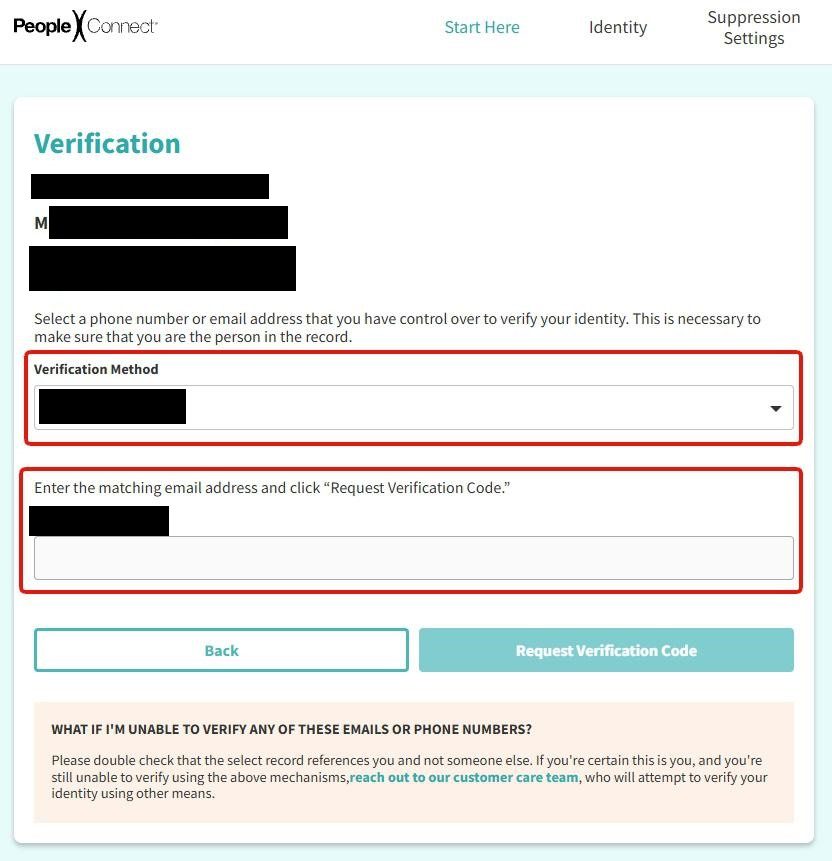
The verification gate is a Verification Method dropdown of the contact methods already on your record - old phone numbers and email addresses, partially masked. Picking one does not send anything on its own: type the full, unmasked value into the field underneath, headed "Enter the matching email address and click 'Request Verification Code.'", then click Request Verification Code. A code field appears on the same page once you do.
Pick the masked credential, type it out in full, then request the code.
If you don't have access to any of the contact methods in the dropdown, the tool dead-ends. Reach out manually at privacy@peopleconnect.us instead.
07
Enter the code and click Submit Verification Code
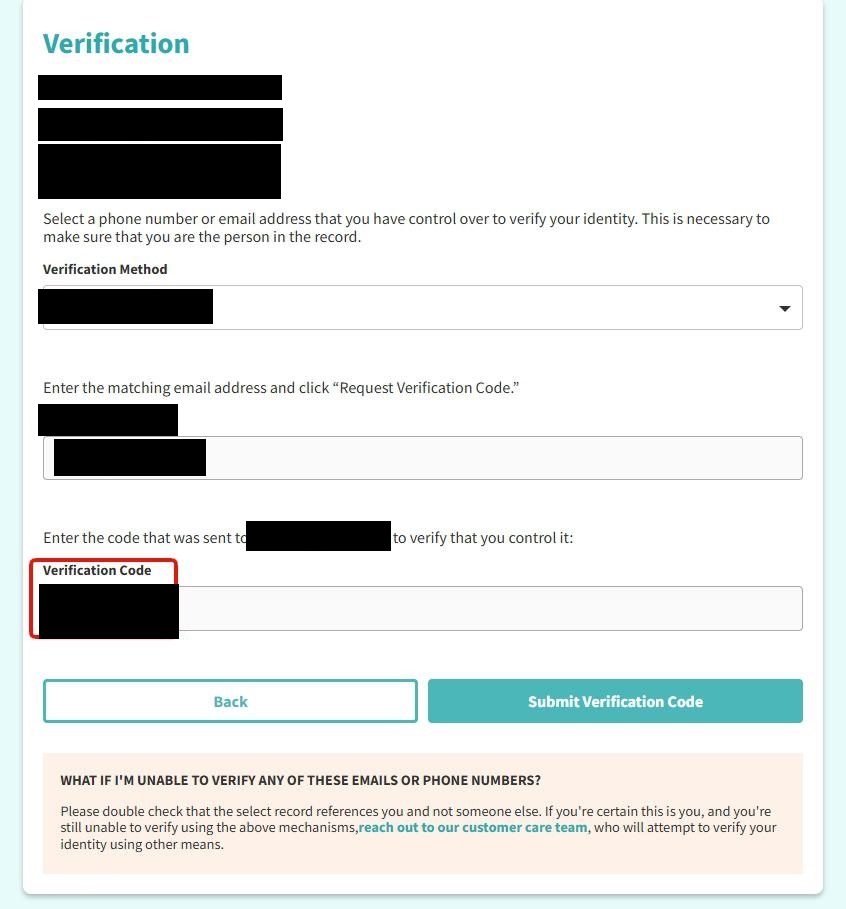
The page grows a Verification Code box under the contact you verified. Type the code in and click Submit Verification Code - it does not submit on its own, and a reader who types the code and waits sits on this screen indefinitely.
Type the code into the box, then click the button - nothing submits automatically.
08
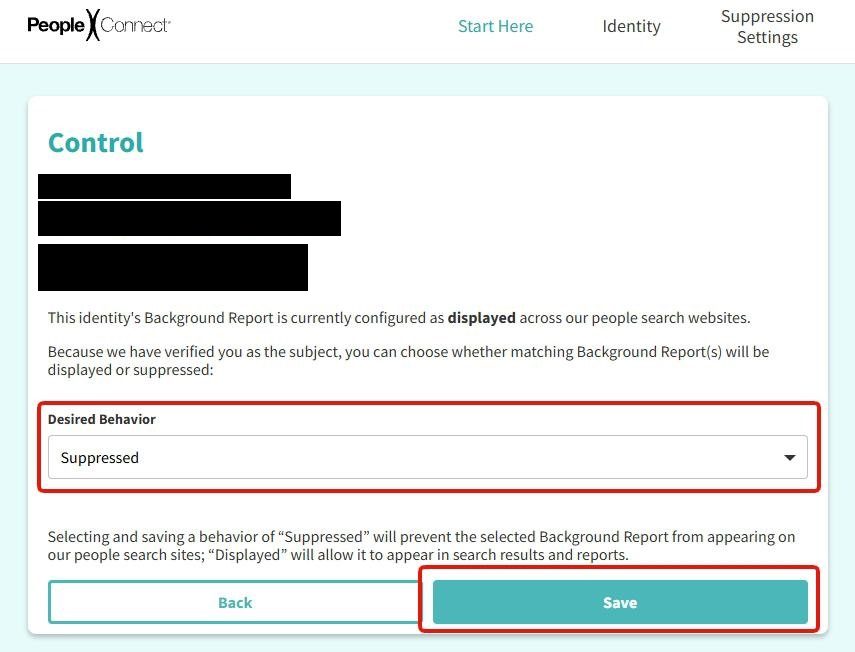
Click Continue, then set Desired Behavior to Suppressed and save
The code proves the record is yours; it does not hide it. The screen that follows says so - "Select 'Continue' to manage suppression rules for this record" - and the Control page behind it opens with your report still displayed. Open the Desired Behavior dropdown, choose Suppressed, and click Save. That one setting covers TruthFinder, Intelius, Instant Checkmate, and US Search.
The record stays displayed until you choose Suppressed and save.
Stopping at the green "Verified" banner leaves you listed. Verifying and suppressing are two different screens, and only the second one changes what the sites show.
Confirm
Confirm it worked
Search your name on truthfinder.com a couple of days after saving. Independent guides consistently report records dropping in about 48 hours, sometimes stretching to several days - PeopleConnect publishes no official processing SLA we could read. Run the same search on intelius.com, instantcheckmate.com, and ussearch.com while you're at it; the suppression covers all four, and confirming each beats assuming. Search ZabaSearch and Addresses.com as well, because PeopleConnect's broader wording covers name listings on those Intelius people-search sites without naming either one. If your record still shows after a week, move to the channels in the troubleshooting section.
One request, four sites. This suppression covers Intelius, Instant Checkmate, and US Search along with TruthFinder. Classmates isn't included - it runs its own flows.
Can't find yourself in the free preview? If you live in Alabama, California, Illinois, Indiana, Nevada, Ohio, or South Dakota, the Fischer settlement's injunctive terms required the four sites to stop displaying settlement-class members' names on subscription-offer pages once the settlement got final approval - a status we couldn't verify this pass. Either way, a blank preview doesn't prove the record is gone, so complete the suppression anyway.
If it fails
Troubleshooting
Verification link expired: the emailed link lapses 15 minutes after it's sent - the email says so itself. Restart the flow and open the email the moment it arrives.
No verification email: check spam, then resubmit with a different address.
None of the verification contact methods are yours anymore: that's the flow's dead-end - email privacy@peopleconnect.us and ask for suppression manually.
Record still up after a week: email help@truthfinder.com or call 855-921-3711 - the contacts TruthFinder, LLC filed with the CPPA registry - or use the PeopleConnect privacy line at (888) 245-1655 from the company's privacy policy.
California residents: route a deletion request through the state's DROP platform - registered brokers have been required to process DROP requests since August 1, 2026.
Nevada residents: the PeopleConnect privacy policy directs opt-outs by email with the subject line "Nevada Do Not Sell Request."
Billing, not privacy: recurring charges after cancellation are TruthFinder's dominant complaint theme. Cancel through support first, then dispute with your card issuer if a refund stalls.
Stay off
Keep your record off
One suppression covers the four sites that PeopleConnect specifically names, but it doesn't affect brokers outside the PeopleConnect family. People-search listings can return when brokers get new data. Recheck TruthFinder and the other named sites each quarter, along with ZabaSearch and Addresses.com, which the broader wording covers without naming, and check Classmates separately. Redact's data broker scan checks for your details and files a new suppression request when needed.
Take yourself off data broker sites
Redact scans data broker sites from your device, finds where your details are listed, and submits the removal requests for you. If a broker relists you, it files again.
August 10, 2026 · Flow confirmed by a real walkthrough of the shared Suppression Center - the same form serves all four PeopleConnect sites, and the step screenshots live on the PeopleConnect removal guide. The verification code only goes out once you pick a masked contact from your record, type it out in full, and click Request Verification Code. The August walk stopped at record selection, so its screenshots end there; the verification screens and the two after them are documented from the Intelius walk of May 21, 2026, which captured all four. This corrects an earlier revision that dropped the 'Desired Behavior → Suppressed' step and described the code as completing the removal - it does not, and the record stays displayed until the setting is saved.