The main request for Lotame is a five-step data-subject-rights submission via the unified Epsilon Consumer Privacy Request Form at legal.epsilon.com/dsr - that addresses the data Lotame holds about you in its own Lotame Data Exchange Marketplace, across browsers and devices. It doesn't reach data Lotame processes on behalf of a business customer, which its privacy notice says you must raise with that company. Lotame and Epsilon have shared a single DSR pipe since Publicis acquired Lotame on April 2, 2025, so one Epsilon form covers both companies. Do the browser opt-out at lotame-optout.com, at the bottom of this page, as well. The DSR form doesn't stop Lotame using a browser's Panorama ID and PID, and the browser opt-out doesn't reach the Data Exchange data, so you need both.
Before you remove your data: See the Lotame data broker profile for ownership (Publicis / Epsilon since April 2, 2025), the Panorama ID product context, the AlmondNet patent case, and the company background.
Quick facts
Removal Overview
Primary opt-out + quick alternative
Data Exchange request
Epsilon Privacy Request Form
Browser opt-out (per browser)
lotame-optout.com
Account required
No
Who can submit
Consumers · employees · business clients
Verification
DSR path: OneTrust email confirmation
Acknowledgment
10 days
Fulfillment SLA
30 days good-faith · 15 business days for an opt-out and 45 days for delete under CCPA
Data Lotame holds for business customers · other Publicis brands outside Epsilon
Why both options exist. Lotame's data sits at two layers. The cookie / device layer is what your browser sends Lotame whenever you visit a publisher site running Lotame's tag - the browser opt-out at lotame-optout.com flags that browser's identifier as opted-out so future tag-fires don't add to the profile. The resolved-identity layer is the Panorama ID profile that ties browser, mobile, CTV, and offline signals together - the route Lotame offers for that is the Epsilon DSR form, which processes a CCPA / CPRA delete-or-restrict request against the data Lotame holds in its own Lotame Data Exchange Marketplace. Its privacy notice is explicit about the limit: requests through the form "will only apply to your personal data held on our platform in our Lotame Data Exchange Marketplace", and for data Lotame processes for a business customer "you must contact that company". Do both. The DSR form is in section 03 below, and the browser opt-out, which the form doesn't replace, is in section 04 after it.
The browser opt-out is per-browser, not per-person. A Lotame browser opt-out at lotame-optout.com lives in a cookie on the specific browser you used. Clear your cookies, switch browsers, change devices, or install a new browser, and you've left the opt-out behind. The Epsilon DSR form covers the Data Exchange data across browsers and devices, while the browser opt-out covers that browser's Panorama ID and PID and needs re-running whenever your local browser state changes, so do both.
Prereqs
What you'll need before you start
3 things
An email address you can access. Deletion and correction requests on the Epsilon DSR form require OneTrust email verification - the form sends a "Confirm email" link you have to click. We recommend using your real address (the one most likely to match Lotame's records) rather than a disposable one - matching helps the request resolve against your actual profile.
~10 minutes for the DSR walkthrough (including a verification wait that can run past two minutes - see step 05).
The browsers and devices you regularly use, for the browser opt-out at lotame-optout.com (section 04, below the DSR walkthrough). It's per-browser and per-device, so you'd repeat it for Chrome on your laptop, Safari on your phone, and so on. Don't skip it, because the DSR form doesn't stop Lotame using a browser's Panorama ID and PID.
The opt-out
Submit the Epsilon DSR (5 steps, tested)
~10 minutes (incl. email wait)
The steps below follow the strongest request type, "Delete my Personal Information", so the screenshots trace that path. The form does support the full menu of CCPA / CPRA / GDPR request types and accepts only one request type per submission; if you need more than one (e.g., delete + opt out of sale), just run these steps again. Multiple submissions are explicitly allowed.
01
Open legal.epsilon.com/dsr and pick your country and request type
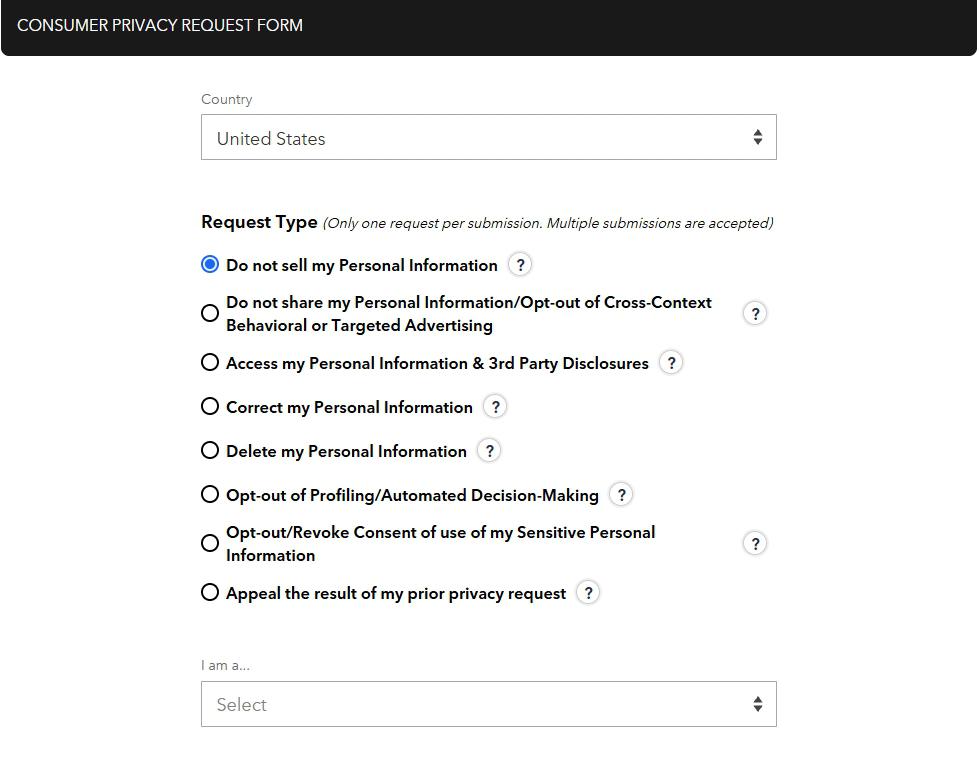
Go to legal.epsilon.com/dsr. The page is titled "CONSUMER PRIVACY REQUEST FORM". Pick your Country from the dropdown first. It starts at Select, and the request types only appear once you've chosen, since the country routes the request to the right privacy-law framework.
Then pick a Request Type. There are eight radio options:
Do not sell my Personal Information
Do not share my Personal Information / Opt-out of Cross-Context Behavioral or Targeted Advertising
Access my Personal Information & 3rd Party Disclosures
Correct my Personal Information
Delete my Personal Information (the request type this guide follows)
Opt-out of Profiling / Automated Decision-Making
Opt-out / Revoke Consent of use of my Sensitive Personal Information
Appeal the result of my prior privacy request
Below the request-type radios, an "I am a..." dropdown asks how you relate to Lotame / Epsilon. Options include consumer, current employee, past employee, current business client, and past business client - so employees and Lotame's B2B customers can use the same form to submit their own data-rights requests. Pick whichever applies.
The screenshot shows the request-type list with Do not sell my Personal Information highlighted; for this walkthrough pick Delete my Personal Information instead. The italic header note confirms that you can run the flow multiple times if you need more than one request type.
02
Scroll down and fill in your identity-verification info
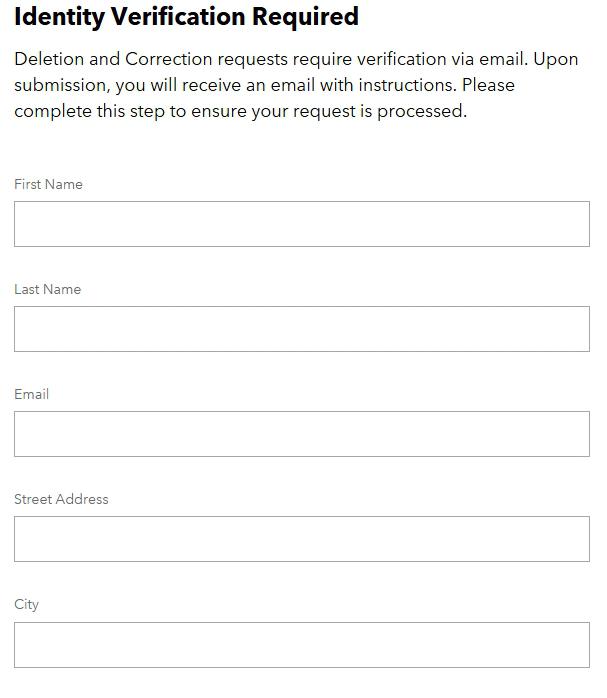
Same page. Scroll down past the request-type section and you'll see an "Identity Verification Required" block with the helper text: "Deletion and Correction requests require verification via email. Upon submission, you will receive an email with instructions. Please complete this step to ensure your request is processed."
Fill in First Name, Last Name, Email, Street Address, City, and any additional identifier fields the form requires for your jurisdiction. Use the email address most likely to match your record in Lotame / Epsilon - that helps the request resolve against an actual profile rather than bouncing as unverifiable.
Scroll to the bottom of the form and click Submit.
The identity-verification fields live on the same page as the request-type radios - you don't navigate to a separate page.
03
Confirm the "One More Step" notice
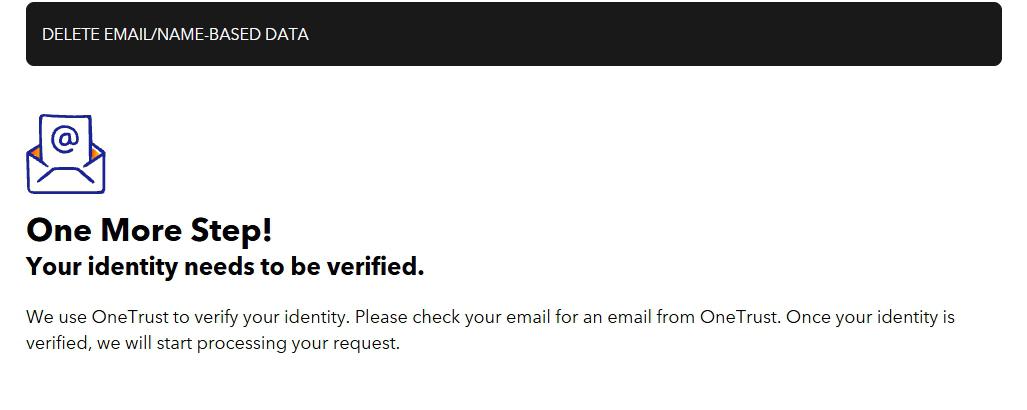
After you submit, the page changes to a full-width black banner reading "DELETE EMAIL/NAME-BASED DATA" followed by a large headline: "One More Step! Your identity needs to be verified."
The page tells you: "We use OneTrust to verify your identity. Please check your email for an email from OneTrust. Once your identity is verified, we will start processing your request." That's your cue to switch to your inbox.
The OneTrust verification step is mandatory for deletion and correction requests. Don't close this tab - you'll come back to it after step 5.
04
Open the email and click "Confirm email"
Check your inbox for an email from "Epsilon - Global Compliance & Privacy" at noreply@m.onetrust.com. The subject line includes your unique Request ID, a ten-character code, as "(Request ID: ...) Your Privacy Request."
The email body recaps the request you submitted (request type, name, email, country, submission timestamp). Save the Request ID for your records - if you need to follow up or appeal, Epsilon will reference it.
Click the blue "Confirm email" button. That opens a browser tab confirming your identity to OneTrust.
The Request ID in the subject line is your case reference - save the email. Click "Confirm email" to verify your identity.
05
Wait for the green check - this can take 2+ minutes
After clicking "Confirm email," a new browser tab opens to a OneTrust-hosted confirmation page. Stay on this tab.
The verification can take over two minutes to finalize. The tab is doing real work in the background while you wait. Don't close it, don't refresh aggressively, just leave it open until the final confirmation appears.
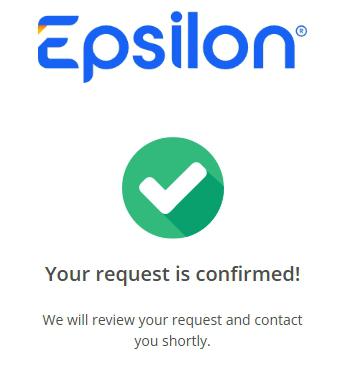
When the verification completes, the page displays the Epsilon logo, a large green check mark, and the headline "Your request is confirmed!" with the supporting text: "We will review your request and contact you shortly." That green check is the signal that your request actually entered Epsilon's processing queue. Without it, you submitted a request that never got verified - and Epsilon's policy is that unverified deletion / correction requests don't process.
The green check is the signal that your verification finished and the request entered Epsilon's processing queue. If you don't see this screen, the request never got verified.
The verification wait can run past two minutes. The gap between clicking "Confirm email" and the green check has run past two minutes on this form, and nothing on the page says how long it should take. Plan to stay on the verification tab until you see the green check - closing early means the request may not have actually been processed.
Need more than one request type? The form's own header note confirms it explicitly: "Only one request per submission. Multiple submissions are accepted." So if you want (for example) both a deletion and a "do not sell" opt-out, just run steps 01-05 again with the second request type selected. Each submission gets its own Request ID and goes through the same OneTrust verification flow.
Prefer the phone? US consumers can call the Epsilon-unified consumer privacy line at +1 (866) 267-3861 to submit a request verbally. Outcome is the same; you'll still be in the 10-day-acknowledgment, 30-day-fulfillment SLA window. Worth choosing if you have multiple requests to submit or need to discuss edge cases with a privacy team member.
Authorized agents can submit on your behalf. The Epsilon form supports submissions by authorized agents (privacy services, family members with power-of-attorney, etc.). Epsilon requires written proof of agent authority - typically a signed letter or notarized agent-authorization document attached to the request. State-law specifics vary; consult the form for the exact attachment requirements based on your country / state selection.
Quick alternative
Browser-level opt-out, once per browser
Needed as well as the DSR above
Do this as well as the request form above, not instead of it. Lotame's Services Privacy Notice says that form only covers data in its Data Exchange Marketplace, while this browser opt-out sets an opt-out cookie that stops Lotame using the browser's Panorama ID and Lotame PID. It takes about 30 seconds per browser.
Visit lotame-optout.com in each browser you use
Open lotame-optout.com in the browser you want to opt out and click Exercise Your Opt-Out. Opening the page alone does nothing. The click sets an opt-out cookie on Lotame's crwdcntrl.net domain, and Lotame stops using that browser's Panorama ID and PID. Repeat per browser, per device (Chrome on your laptop, Safari on your phone, Edge on your work machine, etc.). There's no consolidated cross-browser opt-out at this layer - the DSR submission above is the route Lotame offers for the resolved-identity layer, and it only covers data held in the Lotame Data Exchange Marketplace.
Use Global Privacy Control as well. Enable GPC in Firefox (built-in setting) or via a browser extension in Chrome / Edge to send a standing "do not sell / share" signal under CCPA / CPRA and similar state laws. Lotame's privacy notice explicitly acknowledges GPC, but says Lotame can't capture the signal itself and relies on the sites you visit to pass it on, so GPC protects you only on sites that forward it. Keep the opt-out cookie and the DSR submission as the durable measures.
Verify
Confirming the opt-out worked
10-day ack + 30-day SLA
Browser opt-out (the quick alternative). Verifiable immediately by re-visiting lotame-optout.com - the page should confirm you've already opted out on that browser. If you clear cookies for that browser, you'll need to re-run the opt-out.
DSR request (the primary opt-out). Lotame's Services Privacy Notice promises a 10-day acknowledgment (so expect a confirmation email by day 10) and a good-faith attempt to fulfill the request within 30 days, sooner where the law requires. CCPA / CPRA statutory ceiling is 45 days for delete, access and correction requests (extendable once to 90 with written notice) and 15 business days for an opt-out of sale or sharing. California residents whose request isn't honored within those windows have CPPA enforcement options.
Confirm via subsequent ad-targeting changes. A successful Lotame opt-out may reduce - but won't eliminate - cross-site targeted ads. Lotame is one of many data brokers; suppressing your Lotame profile doesn't suppress data held by independent brokers like LiveRamp, Acxiom, or AtData.
Save the confirmation email Epsilon sends after the DSR form. It includes a case reference that's useful if you need to escalate.
Troubleshooting
If it doesn't work
Common situations
The browser opt-out doesn't seem to persist.Lotame's opt-out page says the opt-out lives in a third-party cookie on its crwdcntrl.net domain, so if your browser deletes cookies, on close or through a privacy extension, you're no longer opted out and need to click Exercise Your Opt-Out again. If you block third-party cookies altogether, the page says Lotame falls back to matching your browser by IP address and browser details to honor the opt-out, though it can't guarantee it will recognize you. The DSR submission still covers the Data Exchange data either way, and Global Privacy Control helps on sites that forward the signal.
You don't receive a confirmation email from Epsilon. Check spam - the email is sent from noreply@m.onetrust.com (not an epsilon.com address), so spam filters routinely misroute it. If nothing arrives after 24 hours, the email address you submitted may have a typo - try resubmitting from a different address, or call +1 (866) 267-3861 to report the missing confirmation.
You clicked "Confirm email" but the green check never appears. Give it at least 5 minutes before doing anything - the verification alone can take over 2 minutes. If the tab still shows the loading state after 5 minutes, don't close it. Open a second tab and check the original email - sometimes a fresh click on "Confirm email" from the email kicks the verification forward. If still no green check after 15 minutes, the verification likely failed; resubmit the original request through the DSR form to start over.
Your request isn't fulfilled in time. California law gives Lotame 15 business days to act on an opt-out of sale or sharing and 45 days, extendable once to 90, for a deletion request. The acknowledgment comes from a no-reply address, so once a deadline passes, email privacy@epsilon.com or call +1 (866) 267-3861 with your case number.
Targeted ads from Lotame customers persist after a successful opt-out. Lotame licenses data to advertisers and other data brokers; downstream customers may have cached audience segments that include you. The Lotame opt-out stops new data from being sent, but it can't recall what's already in customer systems.
You want to opt out across all of Publicis's other brands too. The Epsilon DSR form reaches Epsilon and Lotame, and on Lotame's side only the data in the Lotame Data Exchange Marketplace. Publicis Media (the advertising agencies under Publicis Groupe) operates on a separate privacy framework. Its parent-company privacy contact isn't published at a stable address, so start from publicisgroupe.com and follow the footer if you need broader coverage.
Stay off
Keep your data out of Lotame (and the broader identity-resolution ecosystem)
Source-side prevention
Re-run both paths annually. Lotame continuously refreshes its identity graph from new tag-fires and partner data. A successful opt-out today doesn't prevent a future scrape from re-indexing you. Annual re-submission is the standard maintenance cycle.
Watch the Epsilon side too. Because Lotame and Epsilon share the unified DSR pipe, a single Epsilon DSR form reaches both, so you don't have to file twice, though on Lotame's side it still only covers data in the Lotame Data Exchange Marketplace. See the Epsilon removal guide for the broader Epsilon-specific context (the $150M DOJ deferred-prosecution agreement, the CORE ID consumer-segment product, etc.).
Lotame is one of several identity-resolution brokers. Opting out of Lotame doesn't propagate to LiveRamp, Acxiom, AtData, Foursquare, or other identity-resolution / DMP peers. Each has its own opt-out flow profiled in this directory.
Address the source. Lotame's cookie / device signals come from publisher sites that have integrated Lotame's tag. Browser extensions that block third-party cookies and ad-tech tags (uBlock Origin, Privacy Badger, Ghostery, or built-in tracking protection in Firefox / Brave / Safari) prevent your visits from contributing new signals to the Lotame graph in the first place. The opt-out cleans up existing data; the blockers prevent new data.
Use Global Privacy Control. Enable GPC in Firefox (built-in) or via a browser extension in Chrome / Edge. Lotame acknowledges GPC in its Services Privacy Notice but says it can't capture the signal itself and relies on its business customers and data partners to relay it, so the signal only reaches Lotame from sites that forward it. Treat GPC as a supplement to the opt-out cookie and the DSR submission, not a replacement.
Mobile and CTV. Lotame's Services Privacy Notice says changing your phone's or TV's ad settings alone doesn't send Lotame an opt-out. On a phone, opt out of Lotame in the Digital Advertising Alliance's AppChoices app, or email your phone's advertising ID to privacy@epsilon.com, since Epsilon now runs Lotame. On a smart TV or streaming device, find its advertising ID (the notice calls it the CTV IFA) and email that the same way. Once that's done, delete or disable your mobile advertising ID rather than resetting it, since a reset only hands partner apps a fresh ID to report against. On recent Android versions open Settings, then Google, then Ads, and choose Delete advertising ID; on iOS follow Apple's steps to turn off app tracking.
If you change browsers or buy a new device, rerun the browser opt-out at lotame-optout.com on the new browser. The cookie-level opt-out is per-browser, so a fresh browser starts with no opt-out cookie. The Epsilon DSR opt-out stays in effect against the Panorama ID data Lotame holds in its own Data Exchange Marketplace regardless of which browser you're using, as long as Lotame can match the new browser to your existing profile.
Take yourself off data broker sites
Redact scans data broker sites from your device, finds where your details are listed, and submits the removal requests for you. If a broker relists you, it files again.
![An email from Epsilon - Global Compliance & Privacy at noreply@m.onetrust.com. Subject line reads '(Request ID: [redacted]) Your Privacy Request.' Email body has an Epsilon logo at the top, then 'Dear [name]' and text reading: 'One more step is required before we can start working on your request. Please confirm your email by clicking on the button below. Your Request ID is [ID], please keep this for your records.' Below that the Request ID, Date Submitted (05/28/2026 05:00 PM UTC), selected request types (Delete my Personal Information), First Name, Last Name, Consumer Email, and Country are listed. At the bottom sits a navy 'Confirm email' button.](/broker-images/versions/f78691102d54bd52af305f281d9b4307ea962da5d3764ce06f101347e34a05c0/lotame-com/step-4.jpg)