Gyazo Was Just Hacked, Pretty Badly. You May Want to Delete Your Images.
 Dan Saltman7 min read
On this page
So as you may have already heard, Gyazo was hacked on September 11. The attacker took 23.6 million user records and data on about 490 million images, and the whole service was offline from September 18 until September 27. It's a good idea to start thinking about your stored images and how they relate to your privacy.
How did Gyazo get hacked?

Gyazo is run by Helpfeel, a software company in Kyoto. Its breach notice says an attacker used a flaw in the server that handles Gyazo's image uploads to run their own commands on its systems, and got into the database from there. Helpfeel hasn't said what the flaw was or who was behind it. Outside specialists are still investigating.
| Date | Timeline of what happened |
|---|---|
| Sept. 11 | The attacker gets in. Gyazo spots suspicious activity that evening. |
| Sept. 12 | By early morning, Gyazo has cut the attacker off and fixed the flaw. |
| Sept. 14 | Gyazo confirms data was taken and switches off images. |
| Sept. 15 | New uploads work again. Helpfeel reports the breach to Japan's privacy regulator. |
| Sept. 16 | Helpfeel publishes its breach notice. |
| Sept. 18 | Gyazo takes the whole service offline as a precaution. |
| Sept. 22 | Gyazo says saved images are intact and it's preparing a way for you to review them and make them viewable and shareable again. |
| Sept. 25 | Helpfeel reports the attacker also took metadata for about 174 million deleted images. |
| Sept. 27 | Gyazo comes back online. Old images stay visible only to their owners until they resume delivery. From Sept. 29, Gyazo Teams members can see each other's too. |
What all got leaked?

About 23.62 million account records.
- Your name or nickname and email address
- A hash of your password (a scrambled version, not the password itself)
- User, device and login session IDs
- The token linking Gyazo to your Twitter account, and your Google sign-in email, if you used either
- Your profile, language, sign-up and last login dates, plan, billing status and usage stats
That count includes anonymous accounts with no email, and Helpfeel is still working out how many actual people it covers. No card numbers or other payment details were taken.
About 490 million image records. Most are for images uploaded in or before January 2019, around 14.4% of Gyazo's image data. The attacker also pulled records on another 2.4 million images using what Helpfeel calls "specific filtering criteria", without saying what those were. Helpfeel later found the attacker also took metadata for about 174 million images people had deleted, mostly in or before February 2023, though not the deleted images themselves (Helpfeel, September 25).
- The image ID, which is what a Gyazo link is built from
- The IP address it was uploaded from, and the app or browser that sent it
- GPS location from the image's EXIF data, if it had any
- The text Gyazo's OCR read out of it
- Its title and the web page it was captured from
- A hashed passphrase, for private images
The image ID is the part that really matters most. Helpfeel says the leaked IDs can be used to open the images themselves, the attacker(s) also got a list of which images are private, and Helpfeel can't rule out that some private ones were viewed. The OCR text means nobody even has to open a screenshot to read what's in the image, that's the scary part in all of this.
If you started using Gyazo after January 2019, most of your images probably aren't in the hacked image set. Helpfeel is still asking every user to change their password, and now that the site's back, you can.
What you should do now
Gyazo's back online, so you can work through this whole checklist today.
- Change your passwords. Change your Gyazo password now. If you used the same password, or something close to it, anywhere else, change it there too (Helpfeel, September 27).
- Remove Gyazo from Twitter. If you linked them, revoke Gyazo in Twitter's connected apps. Helpfeel says it has already invalidated or restricted the leaked login data, but I'd remove it anyway.
- Watch for fake Gyazo emails. Whoever has this data knows your email and that you use Gyazo. Don't click links in emails about the breach, go to gyazo.com yourself. Helpfeel says it'll email affected users as its investigation goes on, so real notices will turn up too.
Delete the images behind the leaked links
A new password protects your account, not your images. The attacker has links to about 490 million Gyazo images. Since Gyazo came back on September 27, every image uploaded before the attack is visible only to its owner until they choose Resume delivery (Helpfeel, September 27). On Gyazo Teams, since September 29 other members of your team can see those images too, unless they're set to Only me, and password-protected images still need the password (Helpfeel, September 29 update). A resumed image goes straight back to the sharing setting it had before, so if that was Anyone with the link, everyone can open it again, including the attackers. Don't resume anything you don't need shared. Download what you want to keep and delete the rest as quickly as possible.
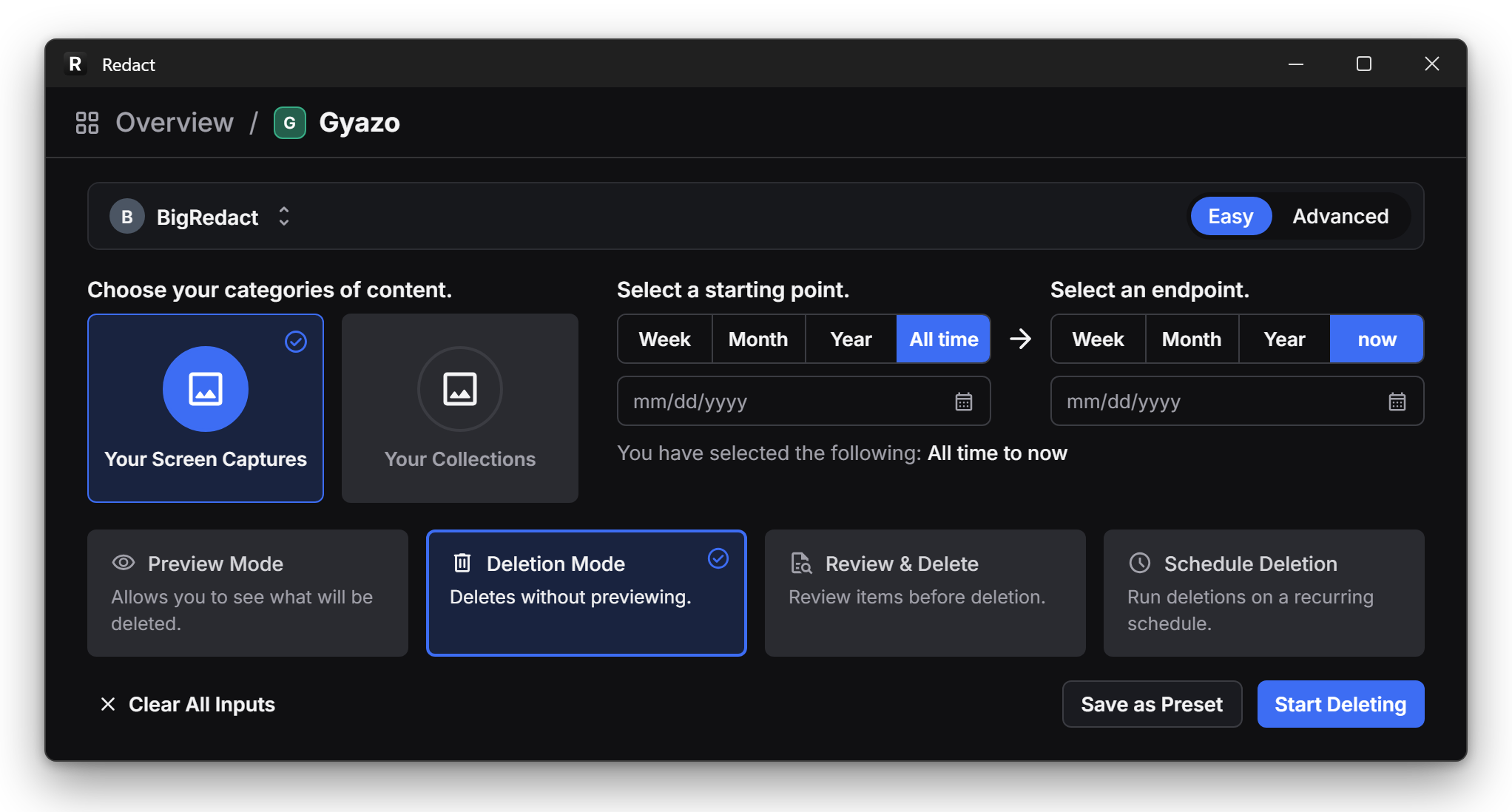
Redact deletes all your Gyazo images in one run, or just the old ones the leak covers. It runs on your computer, and your login goes straight to Gyazo, never through us. You're not handing it to another company right after this one got hacked. Gyazo cleanup is on Redact's paid plans. You can set your Redact filters to just delete all images older than January 2019.
Or, if you're thinking what a lot of people are thinking, it may be time to delete everything you've ever screenshotted and cancel your Gyazo account.
- 1
Set up Redact
Download Redact and sign in. - 2
Connect Gyazo
Pick Gyazo in Redact and sign in with your new Gyazo password. - 3
Target the leaked years
Pick Your Screen Captures, and Your Collections too if you made any. Set the endpoint to the end of January 2019 to clear the years the leak covers, or leave it on now to clear everything.
- 4
Delete them
Pick Deletion Mode, then click Start Deleting. Keep Redact open until it finishes.
Our Gyazo cleanup guide covers the title, description and app filters, with screenshots.
Redact for Gyazo
Delete your images