Gyazo Alternatives Compared, Feature by Feature
 Dan Saltman11 min read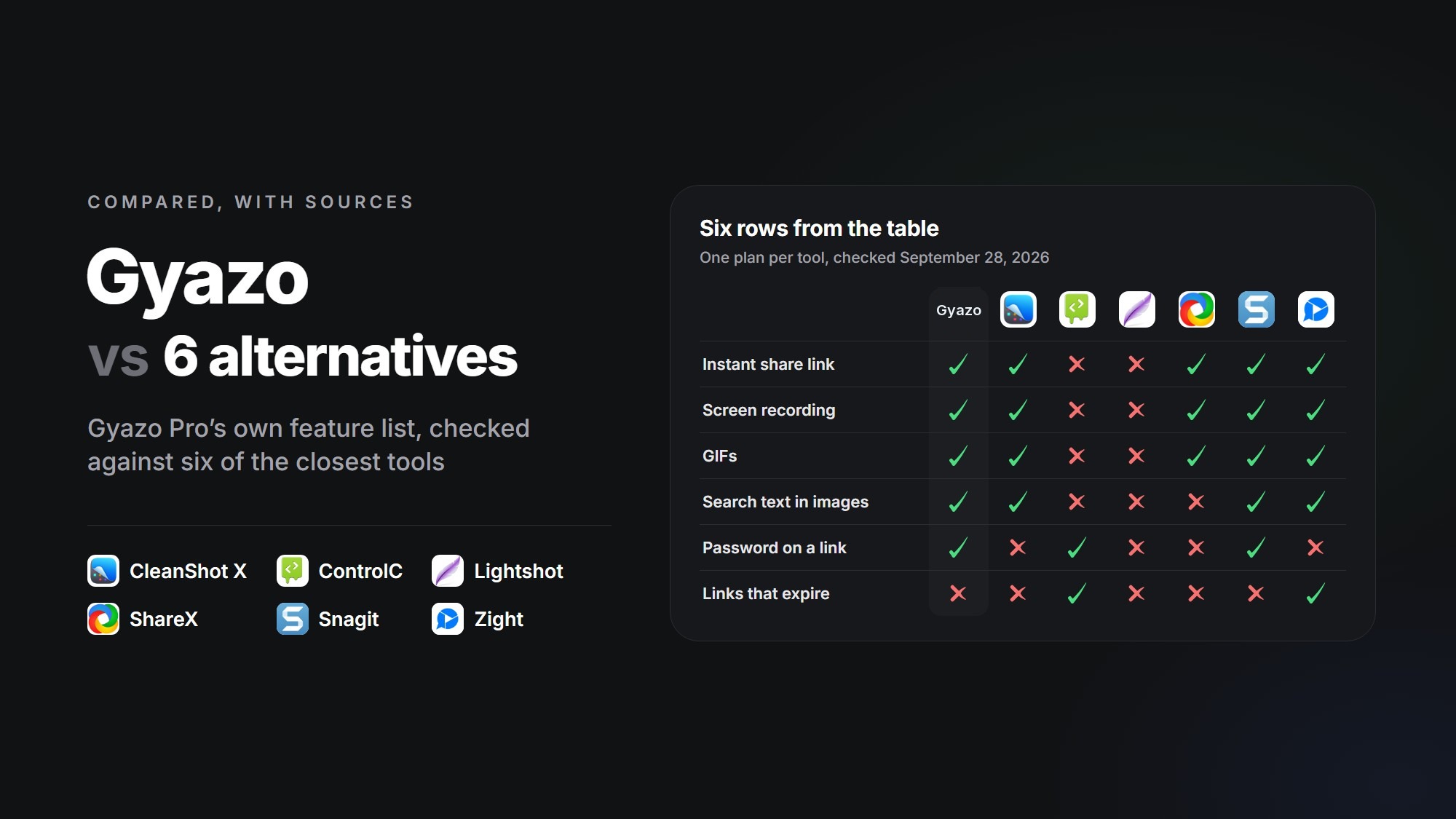
Gyazo came back online on September 27, a little over two weeks after a break-in that took data on roughly 490 million of its images. Everything uploaded before the attack is locked to its owner for now (and, on Gyazo Teams, the owner's teammates), and you'll have to decide what happens to those images whether you stay or leave.
For anyone thinking of leaving, I took the main features Gyazo lists on its pricing page and checked each one against six of the closest tools, CleanShot X, ControlC, Lightshot, ShareX, Snagit and Zight. Each column is one plan, Gyazo Pro for Gyazo since it has everything on that list except the team tools, and every answer comes from that tool's own pages as they read on September 28, 2026.
I know the person who runs ControlC, so weigh what I say about it with that in mind. Below the table there's a short take on each tool, then what to do with the images you've already got on Gyazo.
Gyazo Pro's features, tool by tool
A tick means the plan in the first row has it and an X means it doesn't. Where a mark isn't the whole answer, the cell adds a few words. Near the end I've added three rows Gyazo leaves off its list that matter more after the breach, and the last group is where each tool runs.
Scroll the table sideways to see every tool.
| Plans comparedPrices in US dollars | Gyazo |  CleanShot X CleanShot X |  ControlC ControlC |  Lightshot Lightshot |  ShareX ShareX |  Snagit Snagit |  Zight Zight |
|---|---|---|---|---|---|---|---|
| The plan in each column | |||||||
| Plan and price | Pro, $71.88 a year | Basic, $35 once | Free | Free | Free | Individual, $39 a year | Create, $119.40 a year |
| Capture | |||||||
| Uploads and copies a link as you capture | Off by default | Off by default | Off by default | ||||
| Records the screen | Up to 10 minutes | No time limit | No time limit | No time limit | |||
| Makes GIFs | |||||||
| Records your webcam and voice | Voice only | ||||||
| Edit | |||||||
| Arrows, shapes and text on screenshots | Desktop app | ||||||
| Trims videos | |||||||
| Keep and find | |||||||
| Online library of your uploads | Everything | 1 GB | 48 hours | Everything | Unlimited images, 25 videos | 5 GB | |
| Collections with their own share link | Web albums | ||||||
| Searches the words inside captures | Uploads only | ||||||
| Copies text out of a capture | Mac app | ||||||
| Searches by app, site or date | |||||||
| Sharing and privacy | |||||||
| Who can open a new link | Anyone with the link | Anyone with the link | Anyone with the link | Public | Depends on where you upload | Anyone with the link | Anyone with the link |
| Only-me setting for one capture | |||||||
| Password on a link | Web uploads | Access phrase | |||||
| No third-party ads | |||||||
| Not on Gyazo's listThese matter more after the breach | |||||||
| Links that expire on their own | Within 48 hours | Videos | |||||
| Strips location data when you upload | |||||||
| Saves to your computer without uploading | Desktop app | ||||||
| Where it runs | |||||||
| Windows app | |||||||
| Mac app | |||||||
| Linux app | Unsupported, no video | ||||||
| iPhone and iPad app | |||||||
| Android app | |||||||
| Browser extension | Needs the Windows app | ||||||
| Pricing | Pricing | Free | Free | Free | Pricing | Pricing | |
What each one is like to move to
CleanShot X
CleanShot X is my pick for a Mac, and the one that feels most like a grown-up Gyazo. Basic is a one-time $35. It keeps every capture on your Mac until you decide to upload it, and it reads text out of screenshots on the Mac itself. Recording covers video and GIFs with your camera and voice, and version 5.0, out September 1, added a proper video editor.
Basic's CleanShot Cloud holds 1 GB, and every link opens for anyone who has it. The password, only-me and self-destruct settings on CleanShot's feature pages all belong to its Pro plan, $10 a user a month billed yearly. The cloud search can also find uploads by the words in them. There's nothing for Windows, phones or browsers.
ControlC
ControlC is run by a friend of mine. It started as a paste site for text and code, took on images and GIFs at the start of September, and now has a Windows app, ControlC Desktop. You press a hotkey, drag over part of the screen and mark it up with arrows, boxes, numbered markers, text or pixelation. Enter uploads it, or you can save a PNG without uploading anything. It's free, with no ads and no paid plans.
It keeps very little. It strips location and camera details on your computer before anything's sent, I found nothing in its code that reads the text in your images, and every image deletes itself within 48 hours (you pick anywhere from 5 minutes up). That also makes it a poor home for anything that has to last, like a screenshot embedded in docs. There's no video or GIF recording, you don't get a link until you press Enter, and passwords only work in the website's uploader. The app is Windows only for now, and its installer isn't signed yet, so Windows may warn you the first time you run it. For anything sensitive, cover it with the filled rectangle rather than pixelating it, since pixelated text can sometimes be reversed.
Knowing the owner doesn't change how I read its terms. Section 10 says anything you post gives ControlC an exclusive, worldwide, irrevocable, royalty-free license to use it for any purpose, marketing and advertising included. I've criticized Reddit and TikTok for clauses like that, and theirs aren't even exclusive. The license ends when the content comes down, and images come down within 48 hours, but I wouldn't upload anything personal or from work until that clause is cut back to what running the site needs.
Lightshot
Lightshot is the tool most people compare Gyazo with, and it's still a quick way to grab part of the screen and draw an arrow on it. It's free, it can save or copy a capture without uploading it, and when you do want a link, Ctrl+D sends the capture to prnt.sc.
Lightshot's privacy policy says every upload is public, its share pages carry ads, and its short links have been guessed by strangers for years. When WIRED opened 11,000 random ones in 2021, about a fifth of the live images held details useful for identity theft or getting into someone's account (WIRED, archived). There's no password, only-me setting or expiry, no recording of any kind, and the apps have gone years without an update (the Mac version is from 2019). The site still lists an Android app, but it's been gone from Google Play since early 2024. If you keep using it, I'd stick to copying and saving, and keep anything personal off prnt.sc.
ShareX
ShareX is the replacement I saw people leaving Gyazo name most often, and it's the nearest thing to Gyazo's instant link without a subscription. It's free, open source and has no ads, and since January new installs save captures to your PC instead of uploading them. Turn uploading on and pick a destination, and every capture goes up with its link already copied, whether that's Imgur or storage you run yourself, like an S3 bucket.
It records video with no time limit, makes GIFs, reads text with the OCR built into Windows, and its history can be searched by the app a capture came from and by date. It doesn't host anything itself, though, so who can open your links, and whether they can expire or take a password, comes down to where you send them. Imgur, the default, makes anything you upload viewable by whoever has the link, and it's blocked the UK since September 2025. ShareX is Windows only, with no webcam and no video trimming in the current release, and its Metadata tool strips location data only when you run it by hand.
Snagit
Snagit, now sold as Camtasia Snagit for $39 a year, is the heavyweight editor of the group. Captures stay on your computer until you share one, and the editor goes well past Gyazo's, with step-by-step guides built from your clicks, Smart Redact for hiding emails, card numbers and faces, and text recognition that runs on your computer. Recordings have no time limit, can include your webcam and voice, and can be trimmed or saved as GIFs. Its library sorts captures by the app or website they came from and by date, much like Gyazo's search.
Links go through TechSmith's Screencast on its free allowance, which keeps unlimited images but only 25 videos and may delete anything nobody's viewed in a year. That free tier does have an only-you setting and an access phrase that works like a password, but its share pages carry a Made with Snagit banner with a free trial button. There's no phone app or browser extension, and the Mac version now needs macOS 15 or later. The Mac App Store still sells a one-time Snagit 2024 for $49.99, but it won't get new versions and support for it ends December 31, so I wouldn't buy it now.
Zight
Zight, which used to be CloudApp, is the closest match I found to Gyazo's cloud side. Its Create plan, $119.40 a year or $12.95 month to month, uploads every capture with the link already copied. It records video with no time limit, makes GIFs, adds your webcam and voice, trims recordings, and keeps a library that can now be searched by the text in your screenshots. It runs on Windows, Mac, iPhone and Chrome.
Since Zight repackaged its plans in June, Create has no passwords, no only-me setting and no restricted sharing, so anyone who has a link can see the capture, though videos can be set to expire. Storage stops at 5 GB, nothing stays local, there's no Android app, and the iPhone app was last updated in August 2025. Zight's text search also means the words in your screenshots are read on its servers.
Before you leave, sort out your old Gyazo images
Moving to another app doesn't touch anything already on Gyazo's servers. Since September 27, every image uploaded before the attack is visible only to its owner until they choose Resume delivery, and a resumed image goes straight back to the setting it had before (Helpfeel, September 27). On a Gyazo Teams account, your teammates have been able to open those images as well since September 29, unless an image is set to Only me, and one with a password still asks for it (Helpfeel, September 29 update). The stolen metadata includes the image IDs that Gyazo's links are built from, so I'd sort the library before resuming anything.
- 1
Change your Gyazo password
Helpfeel asks every Gyazo user to change it now, and to change any other password that's the same or similar.
- 2
Save what you want to keep
Gyazo Pro can export everything at once. On the free plan, Gyazo is showing every image uploaded before the attack for now, past the usual limit of your 10 latest, so download the ones you want while they're all there.
- 3
Move anything embedded somewhere else
Search your docs, READMEs, wikis and forum posts for gyazo.com links. Re-host those images somewhere you control and point the links there. Resume delivery only for an image whose old link has to keep working, like one in a post you can't edit.
- 4
Delete the rest
Gyazo lets you select captures and delete them in batches. Our Gyazo bulk delete guide covers clearing a whole library at once with Redact.
Deleting now won't pull back anything that's already been taken. The stolen data even included metadata for about 174 million images people had deleted years ago, mostly before February 2023 (Helpfeel, September 25). I'd still clear out anything you don't need, though, since deleting ends each link permanently and leaves less sitting on Gyazo's servers.
How I checked
Every cell describes one plan per tool, the one named in the table's first row, as that company's own site described it on September 28, 2026. The table covers Gyazo Pro's main features, not every line on its pricing page. Replay, exporting everything at once, background removal, browsing history and AI alt text aren't in it. These are the pages I used for each column.
- Gyazo Pro: pricing, help center and Helpfeel's September 27 notice
- CleanShot X Basic: pricing, features, FAQ and changelog
- ControlC: desktop app, FAQ and terms and privacy policy
- Lightshot: site, privacy policy and Mac App Store listing
- ShareX: site, changelog and source code
- Snagit: store, Library guide, Screencast sharing guide and Screencast free and Pro compared
- Zight Create: pricing, help center and changelog
Redact for Gyazo
Delete your images