Accurate Append runs a single page Data Opt-out form at clients.accurateappend.com/public/optout/capture. Fill in your name, address, phone, and email. Then pass the Cloudflare check and click Submit. The page also offers the toll free number 833-663-1919 for the same request. You'll see a green "Your information has been successfully submitted" banner, and you'll usually receive a confirmation email from optout@accurateappend.com within minutes. The same form handles opt-outs under CCPA, New Jersey Daniel's Law, Virginia CDPA, Colorado CPA, and Connecticut CTDPA. The form has Add another phone and Add another email buttons, but its own instructions say to submit multiple requests for more than one postal address, email address or phone number, so file one request per extra item.
Before you remove your data: See the Accurate Append data broker profile for ownership, the CPPA $55,400 Delete Act fine, and the political-mailing-list product context.
Quick facts
Removal Overview
Data Opt-out form
Method
Web form · toll-free 833-663-1919
Active time
~3 minutes
Processing time
Minutes · 15-business-day CCPA opt-out cap
Statutes supported
CCPA · NJ Daniel's Law · VA CDPA · CO CPA · CT CTDPA
Required fields
Name · address · phone · email
Multiple data points
Add another buttons exist, but the form asks for one request per extra email, phone or address
Fast processing isn't typical for the broker category. Most data brokers in this directory run on the statutory 45-day clock for CCPA / CPRA deletion requests. Accurate Append's "promptly processed" email language and a confirmation that arrives within minutes suggest the opt-out is largely automated rather than queued for human review. The CCPA regulations still give Accurate Append 15 business days to act on an opt-out of sale, and that's the statutory backstop.
Submit one form per address. Per the form's own copy: "Submit multiple requests if you need to suppress more than one postal address, email address or phone number." The form does show Add another phone and Add another email buttons, but that instruction is the one to follow: file a separate request for each extra postal address, email address or phone number. If you have moved recently, plan on at least two submissions.
Multi-state coverage. The form functions as the opt-out channel for CCPA (California), New Jersey Daniel's Law (covered persons - judges, prosecutors, law enforcement), Virginia CDPA, Colorado CPA, and Connecticut CTDPA. You don't pick the statute; the form processes per your address. If you're in a state without an explicit data-broker framework, the opt-out still applies but the regulatory backstop is weaker.
Prereqs
What you'll need before you start
3 things
Your full legal name, street address, phone, and email. All are required fields. The form's First Name placeholder says "Please enter your legal name", so it's looking for the version on official records (voter rolls, property deeds, etc.), not a nickname. If you have previous names or alternate spellings, add them via the "ADD OTHER NAMES" button.
Any additional phones / emails you want included. The form shows Add another phone and Add another email buttons, but its own instructions say to submit multiple requests for more than one email address or phone number, so plan on one submission per extra contact point.
A real email inbox. The confirmation arrives from optout@accurateappend.com; without it you have no record of submission. Use your real inbox rather than a masked address.
The 3 steps
Submit, confirm, receive email
~5 minutes total
01
Open the Accurate Append opt-out form and fill in your contact info
Open clients.accurateappend.com/public/optout/capture. The page is titled "Data Opt-out" with a blue / orange branded header. Above the form, intro text explains the form covers CCPA, NJ Daniel's Law, VA CDPA, CO CPA, and CT CTDPA opt-outs.
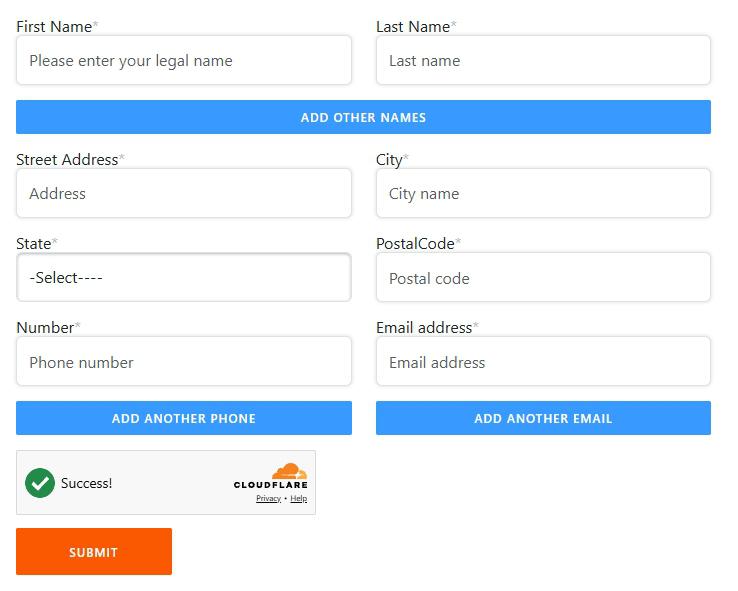
Fill in every required field (marked with red asterisks):
First Name (legal name)
Last Name
(Optional) Click ADD OTHER NAMES to include maiden / previous / alternate spellings
Street Address
City
State (dropdown)
Postal Code
Number (phone)
Email address
Skip the ADD ANOTHER PHONE and ADD ANOTHER EMAIL buttons; the form asks for a separate request per extra email address or phone number
Pass the Cloudflare check (a green checkmark "Success" appears once verified) and click the orange SUBMIT button.
Form fields. The other-name button adds name variants; for extra emails or phones the form asks for a separate request.
02
Submit and watch for the green "successfully submitted" banner
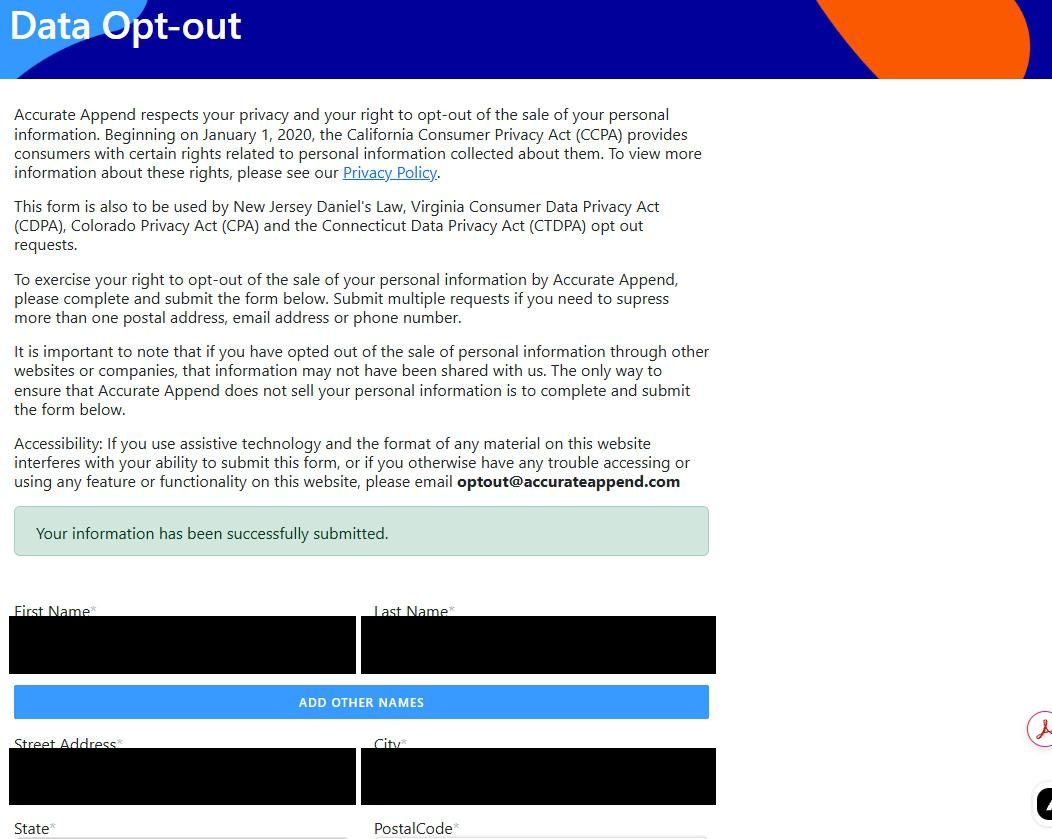
After clicking Submit, the page reloads near the top with a green confirmation banner that reads: "Your information has been successfully submitted." If you don't see the banner, scroll up - the form renders the success state above the fields, not in a modal.
If you see field-validation errors (missing required field, invalid email format, etc.), the page indicates the problem rather than the success banner. Fix the field and re-submit.
The green "successfully submitted" banner is your confirmation that the form went through.
03
Receive the confirmation email (usually within minutes)
Within a few minutes, you should receive a Confirmation of Opt-Out Request email from optout@accurateappend.com. It can land within minutes of submission.
The email body confirms:
Accurate Append has "promptly processed" the request
Your personal data "will no longer be used for any marketing or promotional activities"
Your data "will not be shared with any third parties for such purposes"
A footer reading "Information opted-out:" listing the specific data items that were processed
Save the email - it's your statutory record of the request, useful if you ever need to escalate or prove the timeline.
The confirmation email arrives within minutes and lists the specific data items that were opted out.
Confirm it worked
Did it actually work?
Email is the receipt
The green "successfully submitted" banner confirms the form went through. The confirmation email from optout@accurateappend.com within minutes confirms processing.
The email itself includes an "Information opted-out:" section listing the specific data points that were processed. Cross-check this against what you submitted to make sure everything you wanted suppressed is reflected.
Accurate Append doesn't run a consumer search page, so there's nothing public to re-search yourself on. The verification is the confirmation email and the downstream effect (reduction in unsolicited mail / political solicitations citing Accurate Append-sourced data).
If you don't receive the email within a few hours, check spam. If still nothing, follow up at accurateappend.com/get-in-touch/ referencing your submission and the CCPA / CPRA statutory deadline.
Annual recheck. Accurate Append continuously rebuilds its match index from upstream public-record sources. An annual re-submission is reasonable maintenance even after a successful opt-out.
Troubleshooting
If it doesn't work
Common failures
Cloudflare check won't complete. Disable strict tracker-blocking, ad blockers, or VPN briefly and retry. Cloudflare's anti-bot widget can misread aggressive browser configurations as non-human traffic.
Form rejects a required field. Required fields are marked with red asterisks. The most commonly forgotten ones are State (dropdown defaults to "-Select----" and needs an explicit choice) and Postal Code (which needs the 5-digit ZIP for US addresses).
No confirmation email after submitting. Check spam / promotions for optout@accurateappend.com. The sender domain is recognized but some corporate spam filters may quarantine it. If still nothing after a few hours, re-submit (idempotent for the same data).
You've moved and want to suppress multiple addresses. Per the form's own copy, submit a separate request per postal address, and do the same for each extra email address or phone number despite the Add another buttons.
You need to escalate or follow up. Email the address on the confirmation, optout@accurateappend.com, call the toll-free line at 833-663-1919, or use the contact form at accurateappend.com/get-in-touch/, citing your original submission date. The company has been under active regulatory attention since its July 2025 registration fine, so requests are unlikely to sit ignored.
NJ covered persons (judges, prosecutors, police, family): Daniel's Law gives you a $1,000-per-violation private right of action. Document the submission timestamp carefully if you may need to enforce that right later.
Stay off
Keep your data out of Accurate Append (and the broader append ecosystem)
Annual re-check advised
Check back once a year. Under California law an opt-out doesn't lapse, and Accurate Append can't sell your data again unless you later agree to it. Append brokers keep rebuilding their match indexes from upstream sources (voter registration files, property records, court filings, web scrapes), though, so a yearly check, with a new request if your address, phone or email has changed, keeps the opt-out matched to you.
Accurate Append is one of several append brokers. Submit separately at the larger B2B contact peers: ZoomInfo, RocketReach, Clearbit, plus the larger consumer-marketing append brokers Epsilon and Acxiom. Opt-outs don't propagate; each has its own process.
California residents: use the central DROP platform. As of January 1, 2026, the California Privacy Protection Agency operates the Delete Request and Opt-Out Platform (DROP) at consumer.drop.privacy.ca.gov. A single deletion request through DROP covers every CPPA-registered data broker, including Accurate Append. Use it for ongoing coverage across the broker category.
Address the upstream sources. Accurate Append's data comes from public records (voter rolls in states where they're public, property records, court filings), web scrapes, and data partnerships. Where you can opt out of the upstream source (e.g., voter-list address confidentiality programs for survivors of domestic violence, or NJ Daniel's Law for covered persons), doing so reduces what flows into append brokers in the first place.
Watch for new state laws. The Delete Act framework is expanding. New state regimes (Virginia CDPA, Colorado CPA, Connecticut CTDPA already supported by Accurate Append; Texas, Oregon, and others coming) give you stronger deletion rights over time. Check annually whether your state has added new rights.
Take yourself off data broker sites
Redact scans data broker sites from your device, finds where your details are listed, and submits the removal requests for you. If a broker relists you, it files again.
![Confirmation email from optout@accurateappend.com, timestamped '3:55 PM (7 minutes ago)' with the subject line 'Confirmation of Opt-Out Request' and 'External' inbox tag. Email body opens with 'Dear [recipient name redacted]' and explains Accurate Append has 'promptly processed' the opt-out request, stating the recipient's personal data 'will no longer be used for any marketing or promotional activities, nor will it be shared with any third parties for such purposes.' Body mentions the company takes 'privacy and security of your information seriously' and provides a contact link to https://accurateappend.com/get-in-touch/ for follow-up questions. Email signed 'Best regards, Customer Support, support@accurateappend.com, Accurate Append, Inc.' with a link to www.accurateappend.com. The bottom of the email shows 'Information opted-out:' followed by the specific data items (redacted with colored blocks).](/broker-images/versions/d2cb70e11cc0ade8c254f3682af59a4b59bc3f9322fc296ff517c121f1a5957b/accurate-append-com/step-3.jpg)