How to Delete Your Cash App Account (easy step by step guide)
Cash App calls it closing your account. Here's where the button is, what to move out first, and what stays on file after.
 Dan Saltman9 min read
On this page
To delete your Cash App account, open the app, tap the profile icon on the home screen, then Support > Account & Settings > Close Your Cash App Account. Cash App calls it closing, and there's no separate "delete" button. Without the app, call Cash App support at (800) 969-1940.
You can't close an account with anything in it. Cash App says you need to cash out all funds first, and the app's own Close Account screen adds bitcoin, stock and any balance you owe. Even then, it keeps some of your records: as a financial institution, it's legally required to.
Below are Cash App's steps, what to move out before you close, and what stays on file after. Deleting social media accounts too? We have guides for those.
How do you want to close your account?

5 things to do before you close your Cash App account
A Save your statements. Closing signs you out of every session, so download what you need while you can still log in. In the app, tap the profile icon > Documents & statements > Account Statements. On a computer, log in at cash.app/account and click Documents > Account statements. Cash App says each one shows your balances, fees, transactions and direct deposits for the month. If you invested, your monthly stock statements are under Documents & statements > Stocks, and each trade confirmation is in Activity: tap the trade, then View trade confirmation under What you can do (Cash App's guide).
B Sell or move your stocks and bitcoin. You have to cash out all funds to close, so decide what happens to investments first. You can sell stock from the Money tab, and Cash App says the money can take up to 2 business days to reach your balance. Or ask another broker to move your shares over; Cash App charges $75 for that, and only whole shares move. Bitcoin can be sold or withdrawn to your own wallet, and Cash App warns that withdrawals to outside wallets can't be reversed. Selling may have tax consequences.
C Pay off Borrow. If you have a Borrow loan, repay it under Money > Borrow > Repay Early. Cash App says there's no penalty for paying early. The app won't close an account with an outstanding balance, and Cash App's privacy notice lists collecting fees you owe as one reason it keeps your information after you close.
D Move your direct deposit and bills. A closed account can't receive payments. Give your employer or benefits office a new account for direct deposit, and move any subscription or bill paid with your Cash App Card to another card before you close.
E Withdraw your balance. Do this last, once any sales have landed. Go to the Money tab, tap Withdraw, enter the amount and pick your bank (Cash App's steps). If you have a personal or business account linked, Cash App says it closes too, so withdraw from that one as well.
Just want to stop the ads? Closing isn't the only way. Cash App's privacy notice says you can opt out of its targeted advertising under Account & Settings > Privacy.
How to close your Cash App account
These steps follow Cash App's help article on closing your account as of October 2026. Cash App's help center only describes closing in the app or through support, not on the cash.app website.
Option 1: Close your account in the app (iPhone or Android)
The steps are the same on iPhone and Android, though the screenshots below were taken on an iPhone.
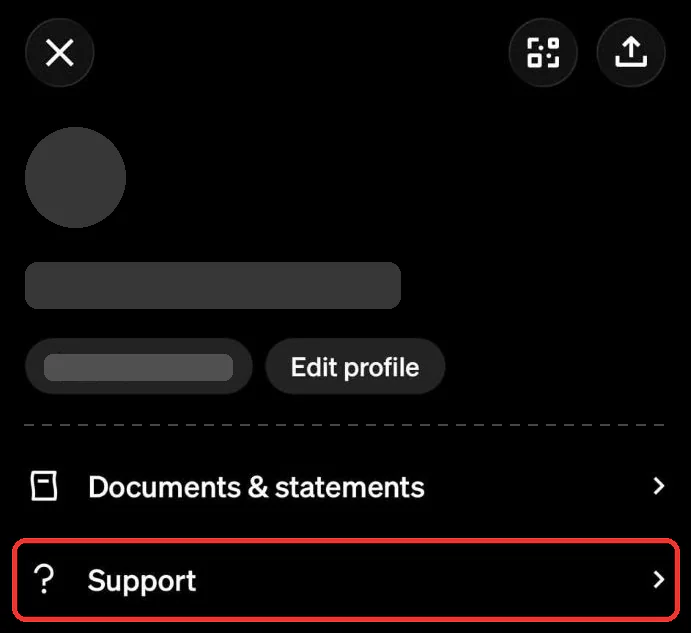
Step 1 Open your profile and tap Support
Tap the profile icon at the top right of your Cash App home screen. Scroll down your profile and tap Support, just below Documents & statements.
Step 2 Tap Account & Settings
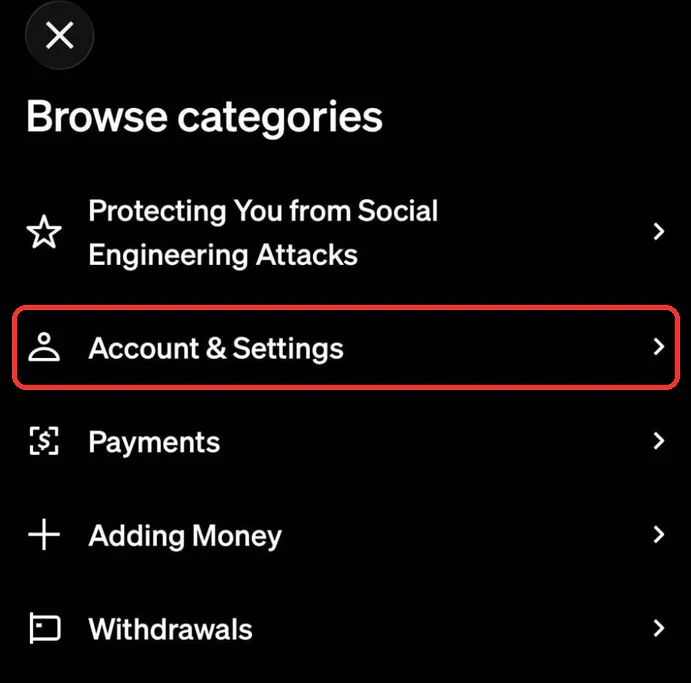
Under Browse categories, tap Account & Settings. You can also type "account and settings" into the search bar at the top of Support.
Step 3 Tap Close Your Cash App Account
Scroll down the Account & Settings list. Close Your Cash App Account is just below Access and Delete Your Personal Information.
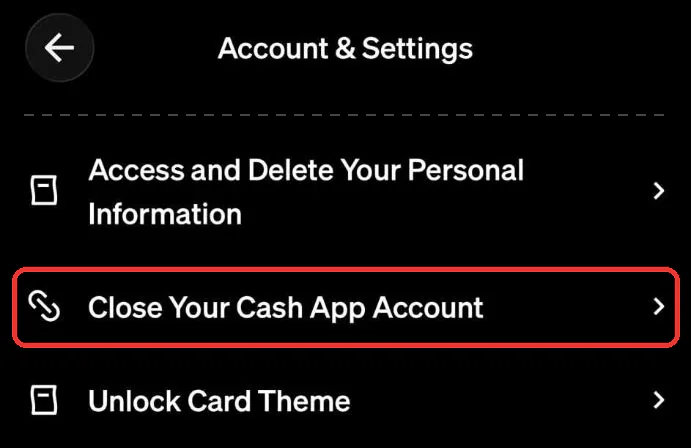
Step 4 Check the Close Account screen, then close
The Close Account screen says you can't close while you have any cash, bitcoin or stock, or a balance you owe. If anything is left, it only offers Done. Work through the list above, then come back to this screen to close the account.
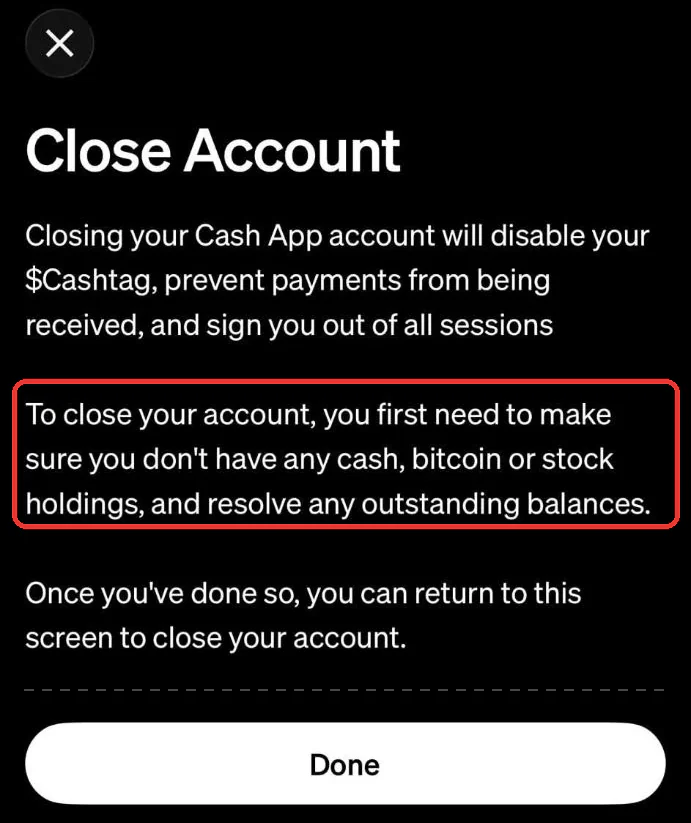
The account in these screenshots still had holdings, so the screen showed Done instead of a way to close.
Option 2: Close your account without the app (phone or chat)
If you've deleted the app or can't get into it, Cash App says to contact support instead.
Step 1 Call Cash App support
Call (800) 969-1940 and ask to close your account. That's the number on Cash App's own help page. Only use numbers from cash.app: scammers post fake "Cash App support" numbers.
Step 2 Or ask in a support chat
Chat still runs through the app. On cash.app/help, select Start a Chat and scan the QR code to install Cash App, then tap your profile > Support > Chat and ask to close the account.
What closing your Cash App account leaves behind
Here's what Cash App says in its article on closing your account and its privacy notice:
- Your $cashtag is disabled. People can't pay you, and you're signed out of all sessions.
- A linked personal or business account closes too.
- Cash App keeps your transaction records. It says it's legally required to keep some transaction records and account information as a financial institution.
- It keeps other data for a while too. The privacy notice says that even after you close your account, it can keep information about you to follow the law, fight fraud, collect fees owed, resolve disputes and enforce its terms. It doesn't give a set number of years.
- A deletion request won't reach your financial data. You can ask Cash App to delete your personal information through cash.app/support or 1-800-969-1940, but the notice says those rights don't apply to information covered by GLBA, the federal law for financial companies. Cash App customer accounts fall under it.
- Other people keep their side. Cash App shares your name and payment details with the people you pay or get paid by, and money you moved to or from a bank shows on that bank's statements.
- What's already been shared stays shared. The privacy notice says Cash App shares data with Block companies such as Square and Afterpay, service providers, and advertising partners. Closing your account doesn't pull back copies already passed on.
Redact doesn't support Cash App
Redact deletes posts, comments, messages and likes in bulk on social and chat platforms. Cash App isn't one of the services Redact supports, so there's nothing for it to delete there. Cash App's own steps above are the way to go.
If Cash App is part of a bigger cleanup, our social media guides cover the accounts where deleting the account and deleting what you posted are two separate jobs.
FAQ
How do I permanently delete my Cash App account?
In the app, tap the profile icon > Support > Account & Settings > Close Your Cash App Account. You'll need to empty the account first: no cash, bitcoin, stock or balance owed. Cash App calls this closing your account, and its help center doesn't describe a way to reopen it afterwards.
Can I delete my Cash App account on the website?
Cash App's help center doesn't describe a close button on cash.app. Close it in the app, or call Cash App support at (800) 969-1940 if you don't have the app.
Does deleting the Cash App app close my account?
No. Uninstalling the app only removes it from your phone. Your account, balance and $cashtag stay until you close the account in the app or through support.
Can I close my Cash App account with money in it?
No. The app's Close Account screen says you can't have any cash, bitcoin or stock holdings, or a balance you owe, and Cash App says that includes any linked personal or business account. Sell or move stocks and bitcoin first, pay off what you owe, then withdraw the balance to your bank.
What happens to my $cashtag when I close Cash App?
Cash App says closing disables your $cashtag, so nobody can send you money with it.
Does Cash App keep my information after I close my account?
Yes. Cash App says it's legally required to keep some transaction records and account information, and its privacy notice says it can keep information after you close to follow the law, prevent fraud, collect fees owed and resolve disputes.
How do I download my Cash App history before closing?
Tap the profile icon > Documents & statements > Account Statements in the app, or log in at cash.app/account and click Documents > Account statements. Investing statements are under Documents & statements > Stocks, and each trade confirmation is on the trade in Activity.