How to Get Your Personal Info Out of Google Search Results
 Dan Saltman7 min read
On this page
Search your own name and there's a fair chance the search results page hands out your home address, a phone number, an email, or worse. Google has a free tool for exactly this, called Results about you. Set it up once and it watches Search for you, emails you when something new turns up, and lets you ask for the result to be taken down.
It launched in September 2022, got alerts in August 2023, was rebuilt in February 2025, and started catching ID numbers in February 2026. It's still one of the least used privacy settings Google ships.
Will Google Take It Down?
Well, that really depends what it is. Find the row that matches what you found in the search results. The pill says whether Google will consider it, and opening the row says where to ask.
My address, phone number or emailEligible for removal
Results about you, or the three-dot menu beside the result
This is the exact case the tool was built for. Set it up once and it keeps looking for new results on its own. For a result it has already listed, expand it and choose Request to remove.
Open Results about youA Social Security, passport or driver's license numberEligible for removal
Results about you in the US, the personal information removal form elsewhere
Government ID numbers were added to the tool in February 2026, US first. Outside the US the removal form takes the same request.
Open Results about youA bank or card number, my signature, a medical record or a loginEligible for removal
The personal information removal form
All four are on Google's published list. The form takes up to 1,000 URLs in one submission and asks which country you live in.
Open the removal formMy personal info next to a threat, or a pile of it with no purposeEligible for removal
The personal information removal form, doxxing category
Google's own wording covers personal info paired with explicit or implicit threats, and a significant amount of aggregated personal info without a legitimate purpose.
Open the removal formAn explicit image of meEligible for removal
Google Images, three dots, Remove result, then It shows a sexual image of me
Google removes explicit images that were shared without your consent, fakes made to look like you, and pages that falsely tie you to sex work. Images you're currently selling don't qualify. Since February 2026 you can send several images in one form and tick Future searches so Google filters similar results before you see them.
Open the removal formA page I already fixed, but Google still shows the old versionGoogle refreshes it
The three-dot menu beside the result, or the Refresh Outdated Content tool
The page has to have actually changed, and this route is for pages you don't control. Google recrawls it and the listing catches up with what is there now. The result stays in Search, with the old snippet gone.
Open Refresh Outdated ContentA news story, a public record or an old post of mineGoogle leaves it up
The site that published it
Google keeps results it decides are in the public interest, which covers news, government and school sites, and things you posted yourself. Outside the EU and UK there's no Google form for these, so the only way to change what Google shows is to change or remove the page itself. EU and UK residents can ask Google to delist name searches under data protection law, weighed against the public interest.
See what Redact can deleteGet "Results About You" Monitoring Setup on Google
You need a Google account, you need to be over 18, and you need to be in a country the tool has reached, which includes the US, UK, Canada and Australia. Under 18s use the removal form instead.
- 1
Open the tool and press Get started
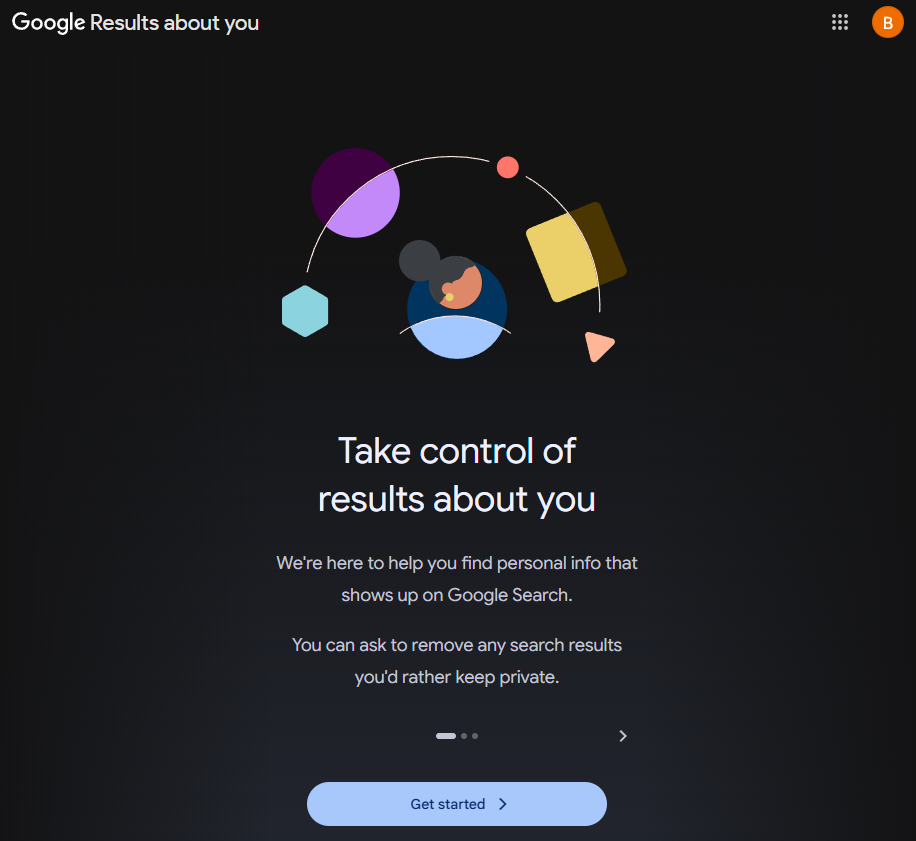
Go to myactivity.google.com/results-about-you and sign in. On a phone it's in the Google app under your profile picture. Skip the three intro slides and press Get started.
- 2
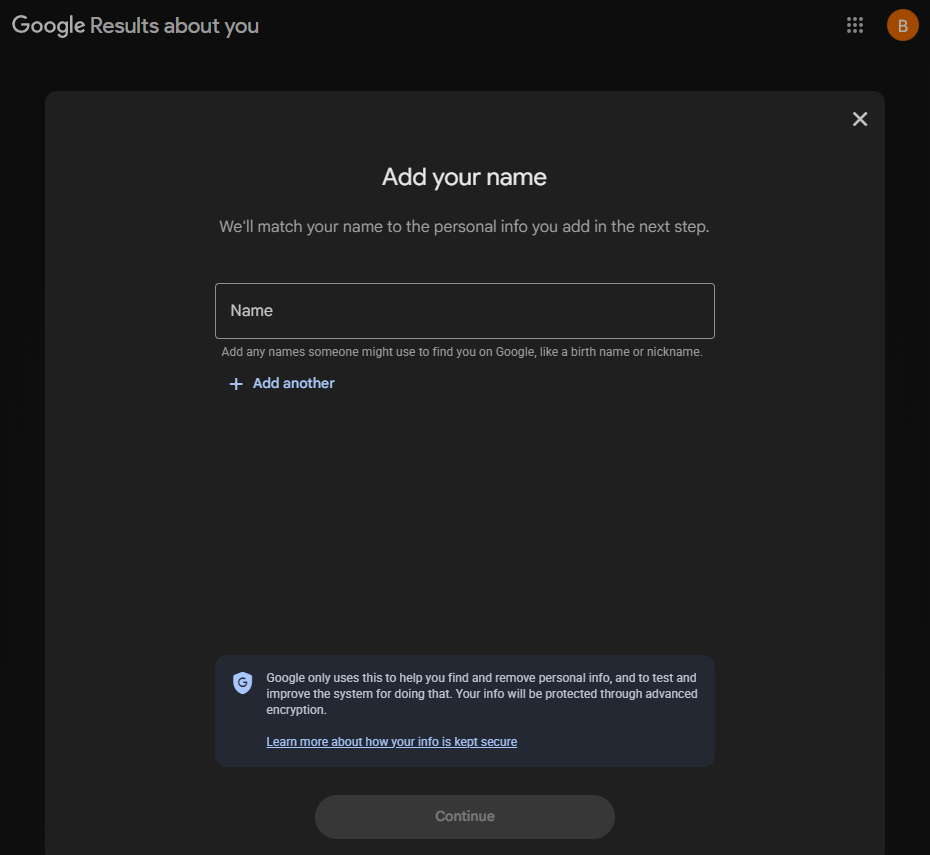
Add every name you go by
Google only shows you results that match a name you entered. Put in your full name, then use Add another for nicknames, a maiden or former name, and common misspellings.
- 3
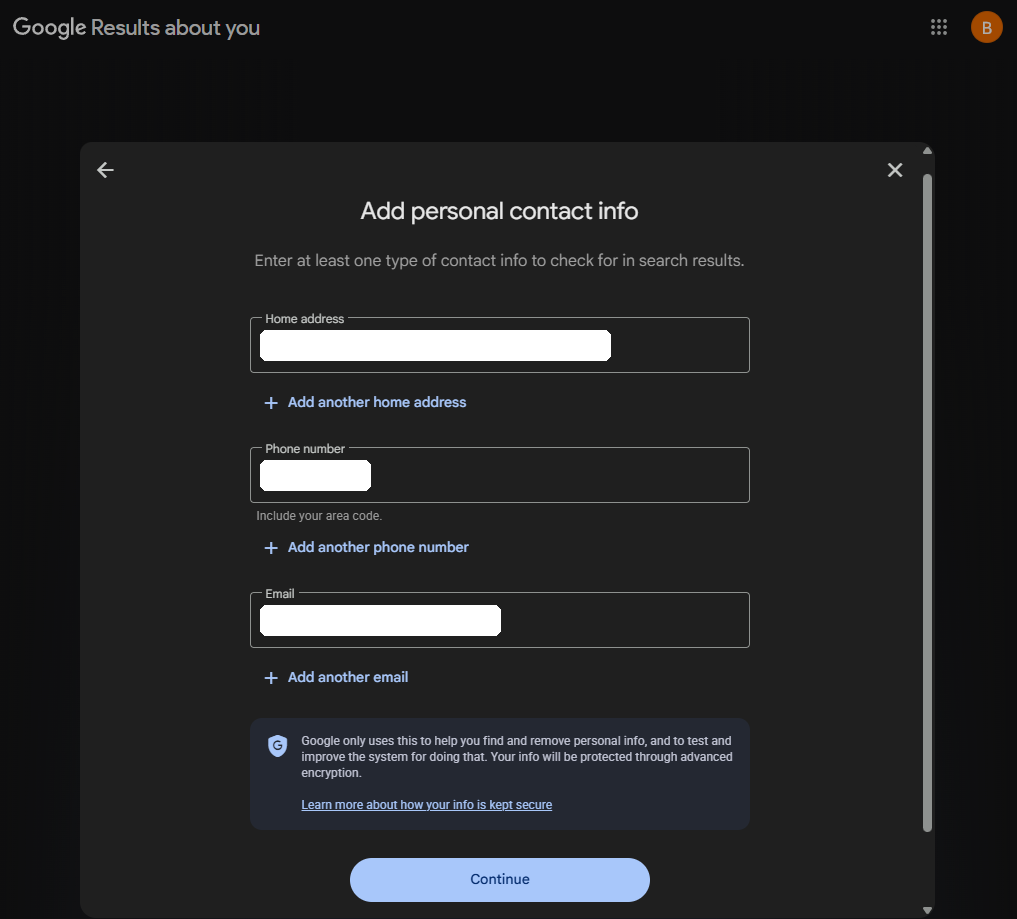
Add the contact details you want watched
Home address, phone number with area code, and email. You only have to fill one, but fill all three and use Add another for old addresses and spare numbers. Google's notice on the screen says the details are used to find and remove your info and to improve that system, and are protected with encryption.
- 4
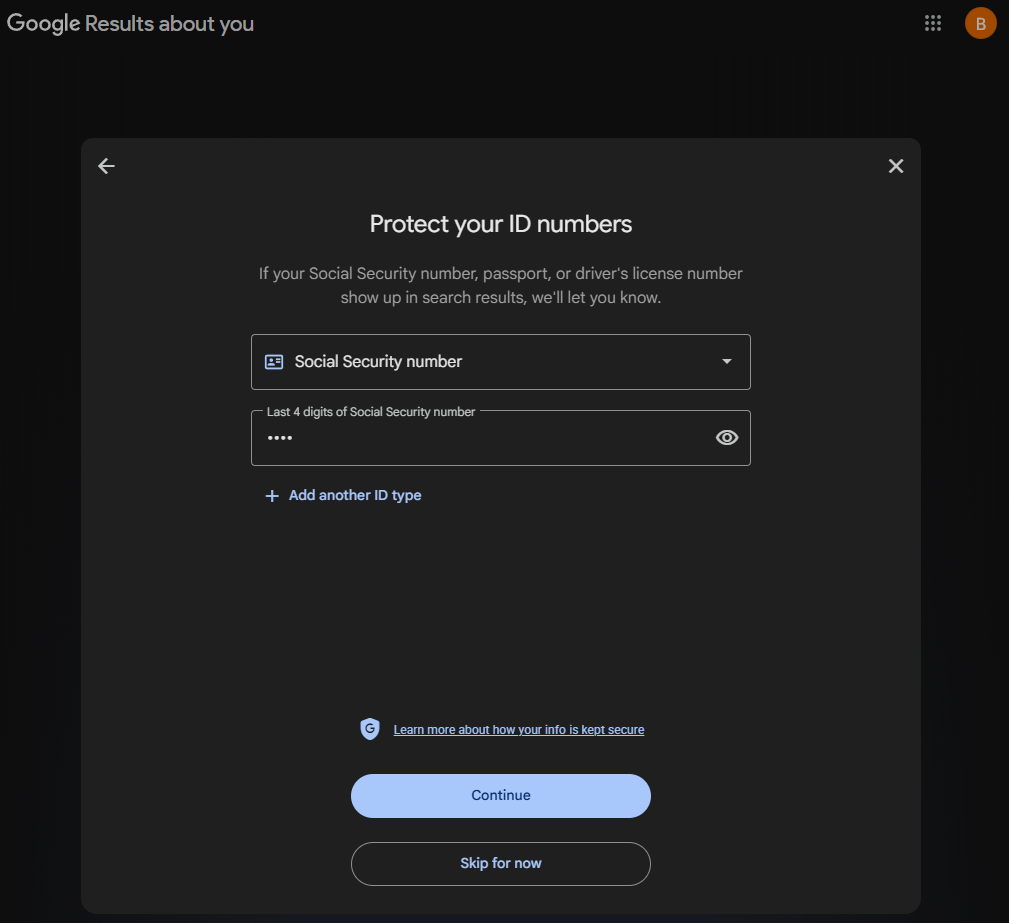
Add your ID numbers, or skip
US only for now. Pick Social Security, passport or driver's license from the drop-down. For a Social Security number Google asks for the last four digits only. Skip for now moves on without it.
- 5
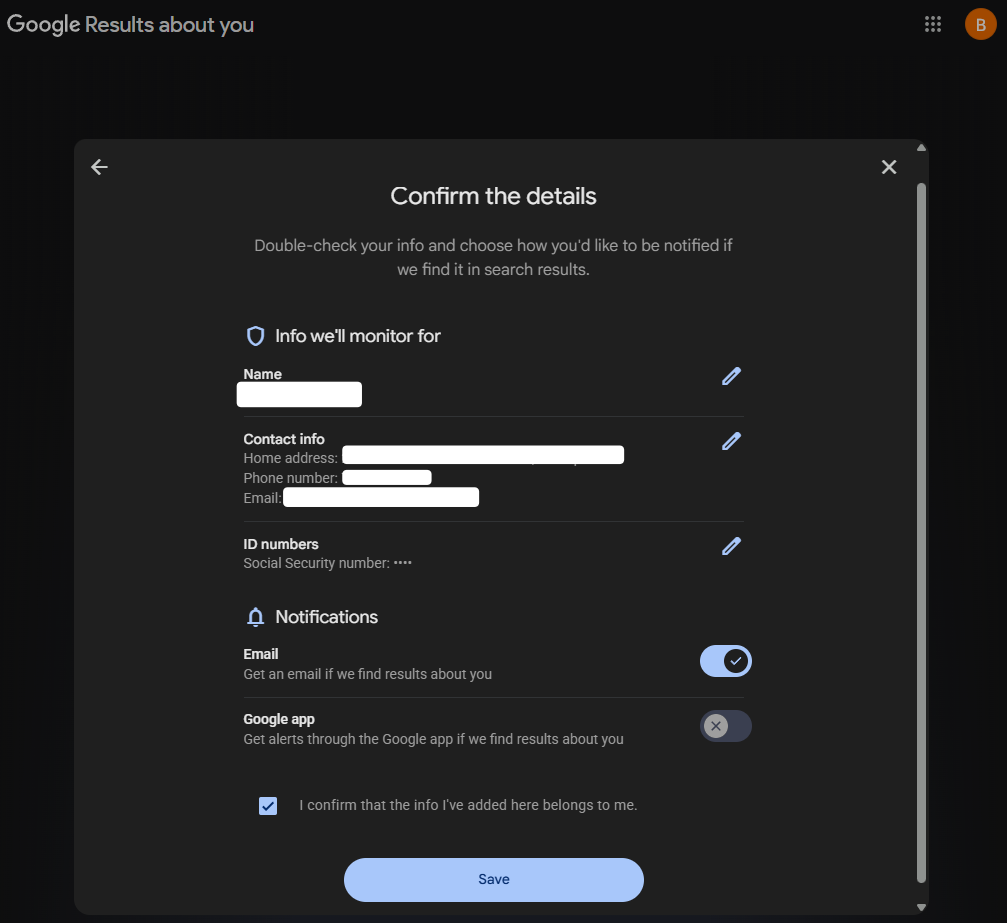
Check the summary and keep the email alert on
The Email switch is on by default and the Google app switch is off. Leave email on. The alert is the whole point, since every result that turns up after today lands in your inbox. Tick the confirmation box and press Save.
- 6
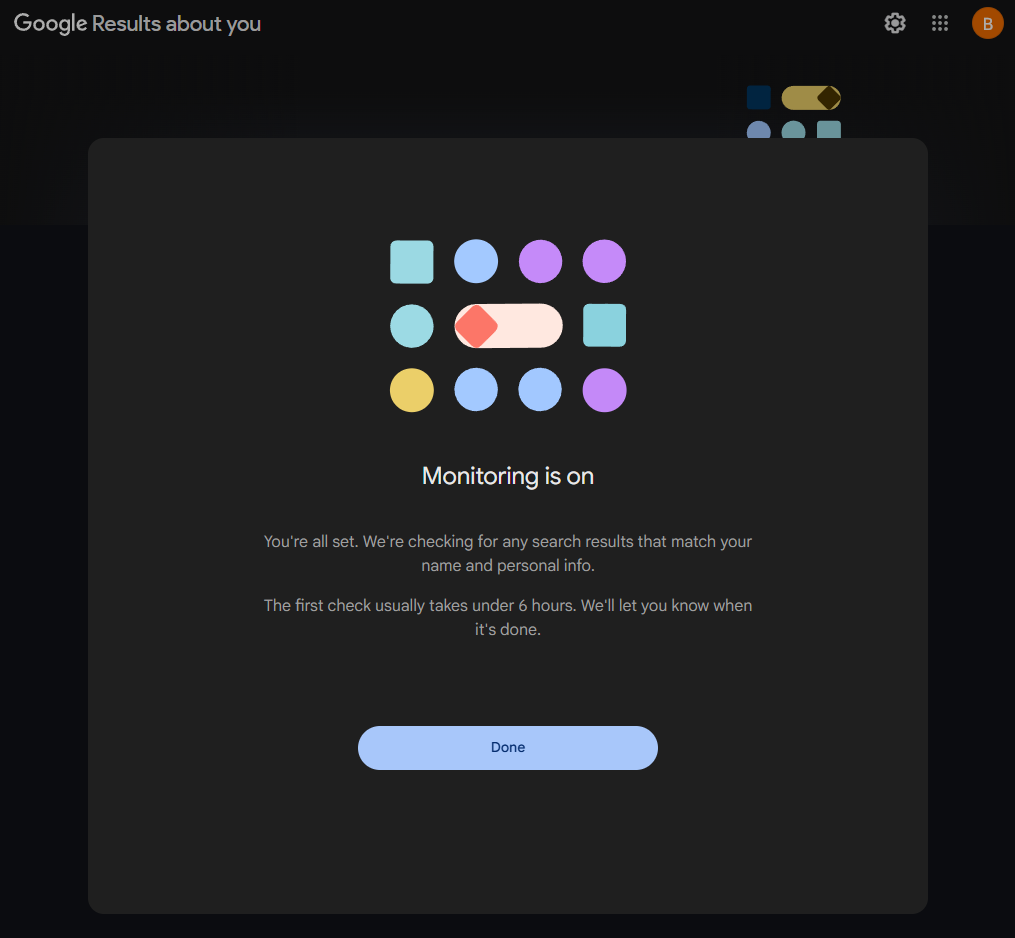
Wait for the first check
The first check takes under six hours. Press Done and come back to the same page to see what it found.
What to Do With What Google Turns Up
Each result on the dashboard is a page that shows one of your details. Read it first. Your business number on your own website isn't a problem. For anything you want gone, expand the result and choose Request to remove. Google reviews it and emails you the decision.
| Label | What it means |
|---|---|
| In progress | Google has your request and hasn't decided yet. Most come back within days. |
| Approved | The page comes out of Search, either for every search or, when Google keeps it for other reasons, for searches that include your name. |
| Denied | Google decided the page is in the public interest, or the detail isn't one it removes. |
| Undone | You cancelled the request, or Google reversed a removal after a review. |
If a denied page shows your details next to a threat, or piles them up for no reason a stranger would need, resubmit it through the removal form as doxxing, which is judged on a different standard.
The Result the Tool Missed
The dashboard only lists pages that match the details you entered. For anything else, every Google result has a three-dot menu with Remove result in it. It tells you on the spot whether the page qualifies and files the request quickly. The same menu has a refresh option for a page you've already had changed, so Google recrawls it.
Where Google Draws the Line
Google accepts removal requests for these, and judges each one.
- Your home address, phone number or email address
- Social Security, passport and driver's license numbers
- Bank account and credit card numbers
- Pictures of your signature or your ID
- Private records, like medical records
- Confidential usernames and passwords
Explicit images of you shared without your consent, fakes made to look like you, and pages that falsely tie you to sex work
Pages that pair your personal info with a threat, or aggregate it with no legitimate purpose
An approved request takes the page out of Search, either for every search or only for searches that include your name, depending on what else is on the page. Either way, in Google's own words, "it might still be on the internet". The site still has it, other search engines still list it, and screenshots and archives keep their copies. Google won't remove your own posts, photos or profiles either, because they're public on purpose. Those are yours to delete at the source, and they're usually most of what a search for your name turns up.
FAQ
Does Results about you delete my information from the internet?
No. It removes the result from Google Search. The page is untouched and other search engines can still list it.
How long does a removal take?
Most requests leave In progress within a few days. Google emails you when it decides.
Is it safe to give Google my address and phone number?
Google's own notice says the details are used to find and remove your info and to test and improve that system, are kept so you can check the status of your requests later, are protected with encryption, and aren't used to personalize anything across its products. You're telling Google things it needs in order to find them elsewhere.
I'm not in the US. Can I still use it?
Yes, in the countries it has reached, including the UK, Ireland, Canada, Australia and South Africa. Anywhere else, the removal form takes the same request.