Removal guide · QuickPublicRecords

How to remove your info from QuickPublicRecords

  • Redact removes listings automatically

Fill in how the listing has you, confirm an email address with the code they send, then press Remove on your own record. Don't close the tab there. On Kids Live Safe, which runs the same form for the same company, Remove is followed by a second email whose link has to be clicked within 60 minutes before the request counts, so expect one here too. The first screen has also been refusing Redact's own test requests since August. If it refuses yours, the email route below is the way through.

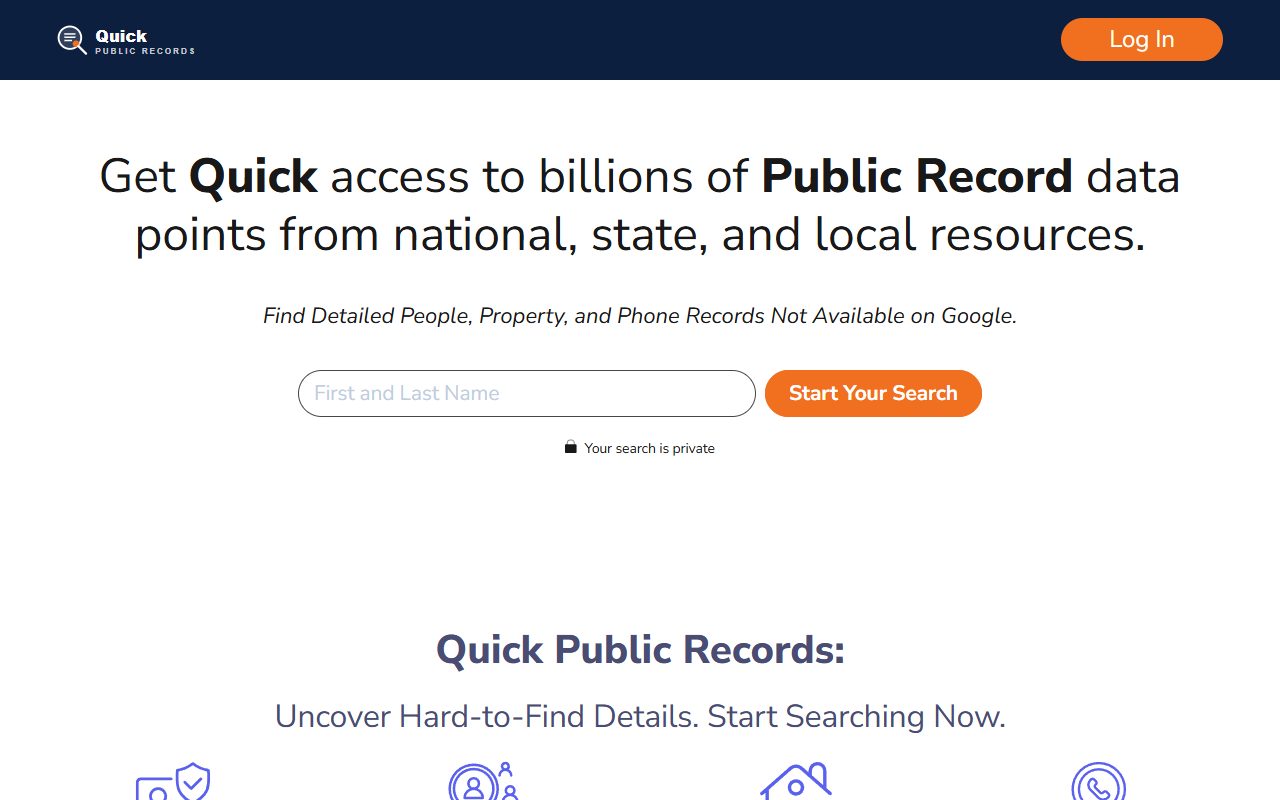
QuickPublicRecords homepage screenshot

Curious who's behind it? The QuickPublicRecords profile covers Scalable Commerce, the Kids Live Safe filing and the 2024 numbers.

Quick facts

At a glance

Method

Help-center form, a code by email, Remove, then a likely confirmation link

Request type

Do Not Sell My Info · not Delete My Info

Details asked for

Name, town, state, ZIP and the age on the listing

Time

About 15 minutes, inbox open

Cost

Free · no account needed

Stated turnaround

Around a day, by its own help-center answer

The steps

From the form to the confirmation link

01

Choose Do Not Sell My Info and describe your listing

Head to quickpublicrecords.com/help-center/privacy-requests. It's titled Privacy Requests, and a Request Type dropdown sits at the top with three options in it.

Leave it where it opens, on Do Not Sell My Info. That's the suppression, and it's what takes a searchable record off the site. Delete My Info is aimed at people with a paid account and clears what sits behind that account rather than the listing. Choosing Request a Copy hands you back what they hold and changes nothing.

Every box below carries an asterisk. Give them the name, the town, the state, the ZIP and the age exactly as a listing would carry them, because the match is literal and where you live now won't find a record filed under somewhere older. Clear the human check, then Continue.
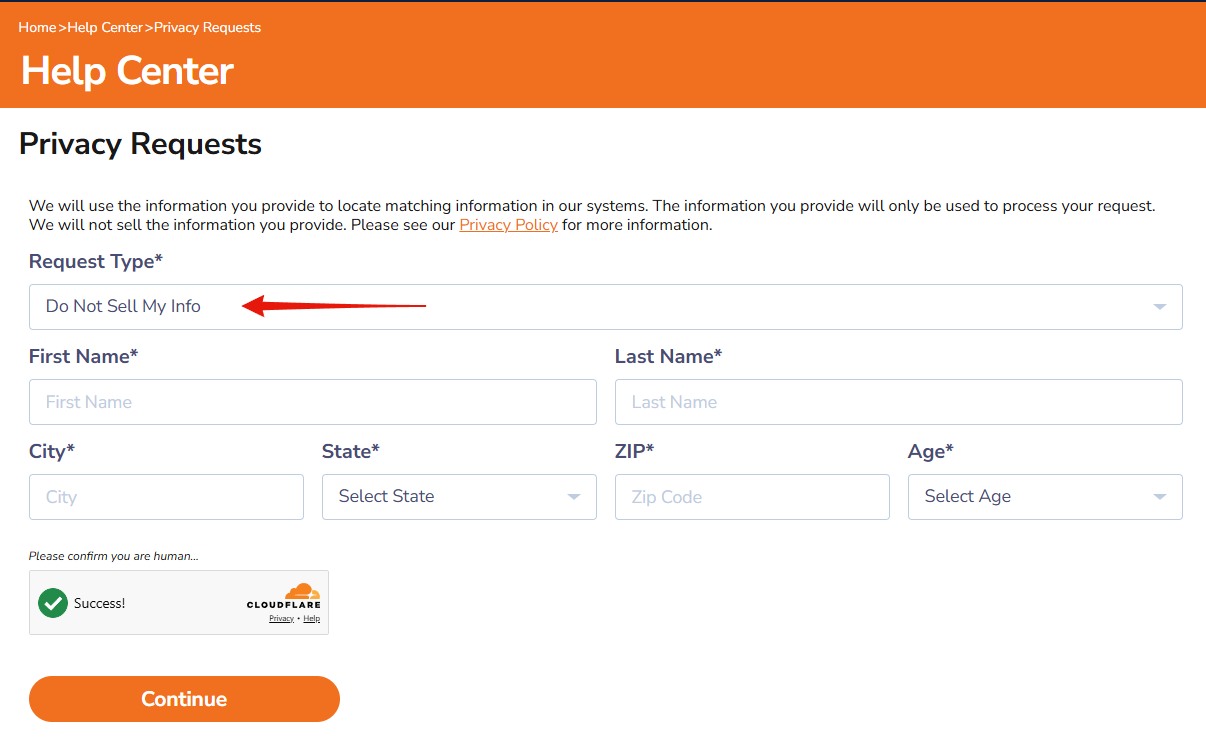
The orange Privacy Requests screen on QuickPublicRecords. A red arrow points at the request-type dropdown, which reads Do Not Sell My Info, and empty starred fields for the person's details sit under it above a cleared human check and an orange Continue button.
Set the dropdown once, then it's just your listing's details.
02

Give them an address for the code

Continue brings up a screen that asks for nothing but an email address. It's the one screen of the walk that wasn't photographed, but the page after it says the code went to your email, and the form above has no box for one.

Pick an address you can open in the same sitting, since two messages may be on the way. A masked or secondary inbox is fine, because nothing here compares the address against the record you're removing. Clear the human check and carry on.

03

Paste in the code they email you

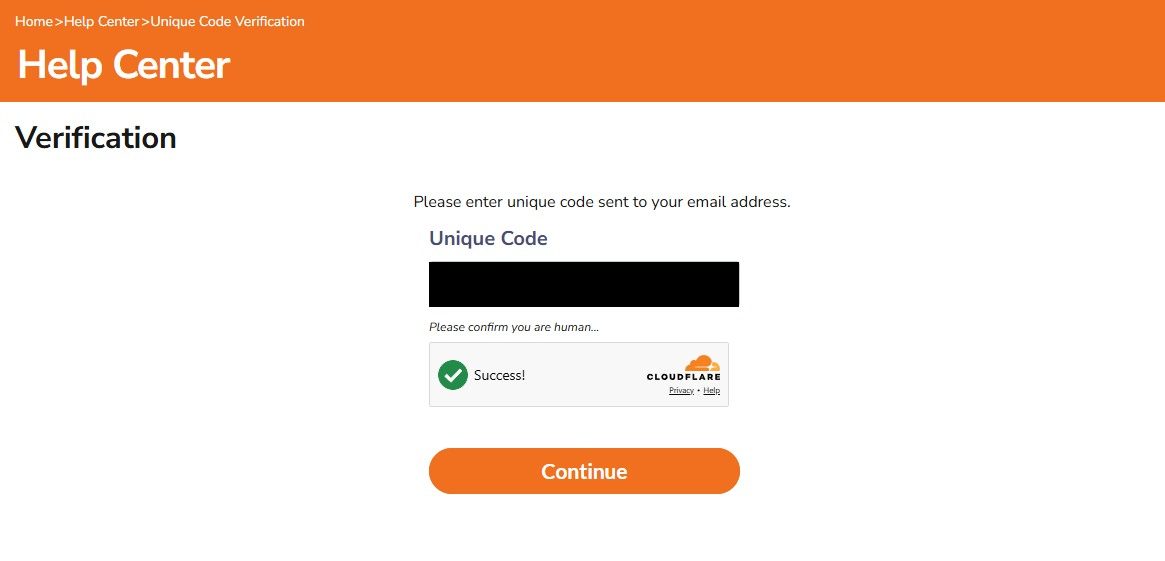
What lands is a unique code, not something to click. Copy it out of the message, return to the Verification page, drop it into the box, get past the human check once more and carry on.

The Verification screen on QuickPublicRecords, headed Unique Code, with the typed code blacked out, a cleared human check underneath and an orange Continue button.
Retyped, not clicked.
04

Find yourself, then press Remove

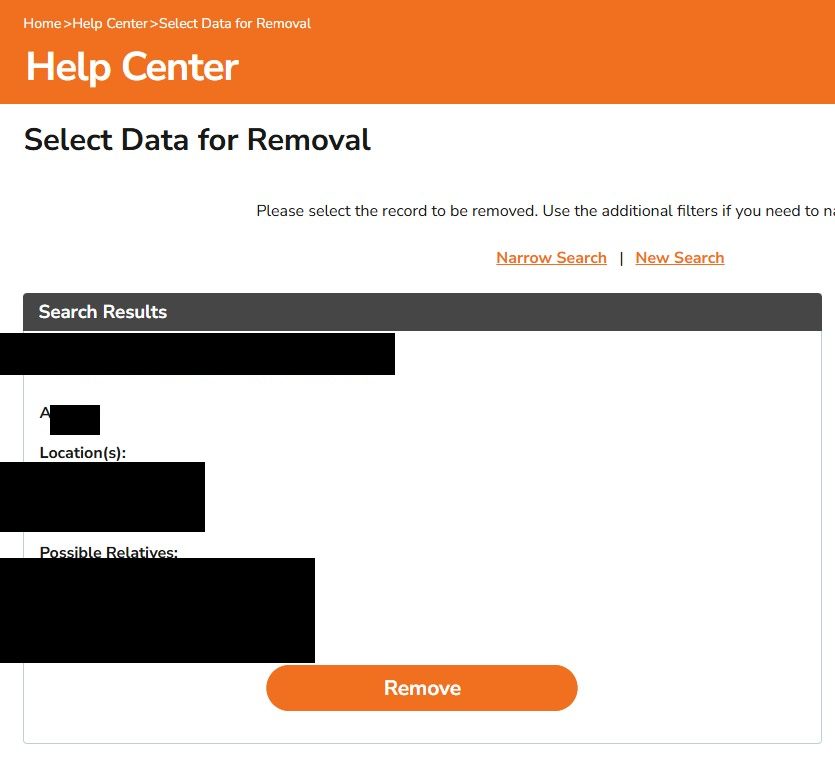
The code drops you on Select Data for Removal, showing what the search matched with an age, a list of places and a set of possible relatives. Read those three before you do anything, because names cluster and the wrong record removed leaves yours where it was. Narrow Search and New Search are there when the match is off.

When the record in front of you is genuinely yours, press Remove, and keep your inbox open for what comes next.

Select Data for Removal on QuickPublicRecords, showing one matched result whose name, age, places and relatives are covered in black, with Narrow Search and New Search above it and an orange Remove button below.
Everything identifying is blacked out here. Match it up, then Remove.
05

Click the link if a second email arrives

The walk here stopped at the Remove button, so what follows it on QuickPublicRecords isn't photographed. On Kids Live Safe, the same company's other site on the same form, Remove opens a Request Submitted page and sends a second email whose link has to be clicked within 60 minutes. The request isn't made until it is.

Expect the same here. When that email lands, open the link straight away. If nothing turns up within several minutes, look in spam and filtered folders before deciding there's nothing to click. If it never comes, treat the request as not made and run the form again from the top.

The first Continue has been refusing requests. Redact's own tests of this form have been turned away at the first screen since August, with the site rejecting the request before its human check runs. A walk through by hand on 10 August got past it to the record screen shown in step 4, so it isn't refused every time. If pressing Continue on the first screen does nothing or shows an error, the problem is the site, not your details. Write to privacyinfo@kidslivesafe.com instead, ask for the listing to be suppressed, and give the name, city and age it shows.

Afterwards

Checking it went through

Their own answer to how long it takes is about 24 hours, and they ask for a day between the confirmation email and looking again. Leave it that long, then run your name through the site. Still there a week later, and it's time to write to privacyinfo@kidslivesafe.com quoting the date you filed, or ring 1 (833) 202-2626. Their California filing puts the median at three days, so a week already sits outside the numbers they reported themselves.

If it fails

When something goes wrong

  • Continue on the first screen does nothing, or shows an error. That's the refusal described above the steps, and trying again rarely changes it. Email privacyinfo@kidslivesafe.com with the listing's name, city and age and ask for it to be suppressed.

  • The code hasn't arrived. Look in spam, give it a few minutes, then run the form again with a different address. Nothing is filed before the record screen, so restarting costs nothing.

  • You found the second email too late. If its link has stopped working, treat the request as never sent and go through the form again from the top.

  • The second email never arrives. Check spam and filtered folders, then go through the form again, since on the Kids Live Safe flow no request exists until that link is clicked. If a second attempt brings nothing either, write to privacyinfo@kidslivesafe.com with the listing's name, city and age.

  • The results aren't you. Use Narrow Search with the listing's city and state, or start again with a different spelling of your name. Removing a stranger's record helps nobody.

  • The request came back denied. It happens a lot here, 80,707 times in 2024 by the company's own count. Reply in writing to the privacy address, name the record and the date, and ask what the refusal was based on.

  • You're filing for someone else. The site takes authorized-agent requests with either a letter signed by the person or a valid power of attorney, sent in after the form.

  • You're a New Jersey judge, prosecutor or police officer. Daniel's Law covered persons, and their households, are pointed at support rather than the automated form.

Stay off

Keeping it off

The site says outright that it keeps refreshing its background-report results from public sources, so a record can come back when a new filing lands under a variant of your name. Search yourself again after a month, and check Kids Live Safe at the same time, since one company runs both and each keeps its own list. Redact's data-broker scan checks both sites and refiles on Kids Live Safe when a record comes back. It can't file QuickPublicRecords' form for you, so a listing that returns there is one to refile yourself.

Take yourself off data broker sites

Redact scans 120+ data broker sites from your device, finds where your details are listed, and submits the removal requests for you. If a broker relists you, it files again.

Last updated:

September 10, 2026 · Step order and the three captures date from 10 August 2026, when the form was run through by hand as far as the Remove button. The email-address screen and what follows Remove weren't photographed, so those two steps follow Kids Live Safe, which runs the same form for the same company. The form page and its help-center answers were rechecked on 9 September, and the warning above the steps comes from Redact's own tests, which have been refused at the first screen since August.