Kids Live Safe removes listings through a free form in its help center, and the company says it processes requests at the next database update, usually within 24 hours, with its published metrics showing a three-day median. Getting there takes five screens and two emails, and the second email carries a link that the site says expires after 60 minutes. The bigger issue is afterwards. Kids Live Safe's own FAQ says partner data with other spellings and addresses comes back in as new records, so plan on checking again.
Before you start, the Kids Live Safe data broker profile explains who Scalable Commerce is, which sister sites it runs, and where the Daniel's Law case stands.
The listing's details. First and last name, city, state, ZIP and age, every one required, and every one as Kids Live Safe has them. A listing at an old address needs that old address, not your current one.
An email address you can read within the next few minutes, twice. A code lands first, and a link lands after you've chosen your record. The link is the one on a timer.
A tolerance for Cloudflare's "confirm you are human" box, which appears on the form, on the email page and on the code page.
Daniel's Law covered persons in New Jersey (judges, prosecutors, police officers and the people in their households) are told by the site to contact support instead of using this form. That route carries the statute behind it, so use it if it applies to you.
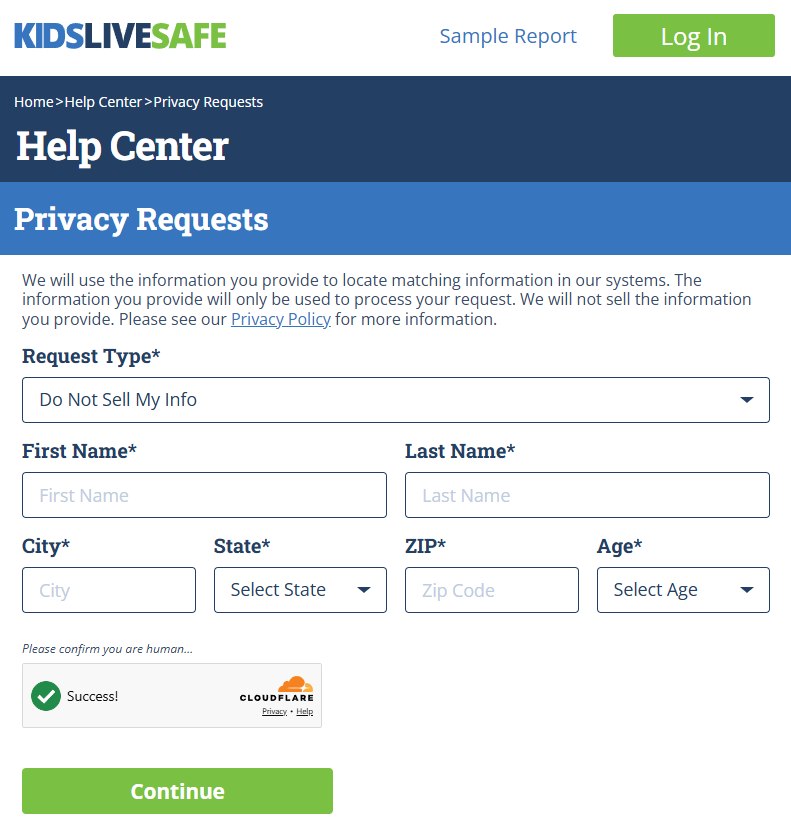
Request Type comes up as Do Not Sell My Info, and that's correct for a listing. The dropdown's other entry, Delete My Info, exists for subscribers who want their account data erased. Picking it for a public record doesn't remove anything.
Enter First Name, Last Name, City and ZIP, select State and Age, clear the Cloudflare check and press Continue. The six fields are all required and the site matches on them, so they have to agree with the listing.
Six required fields, and the request type stays as it is.
02
Hand over an email address
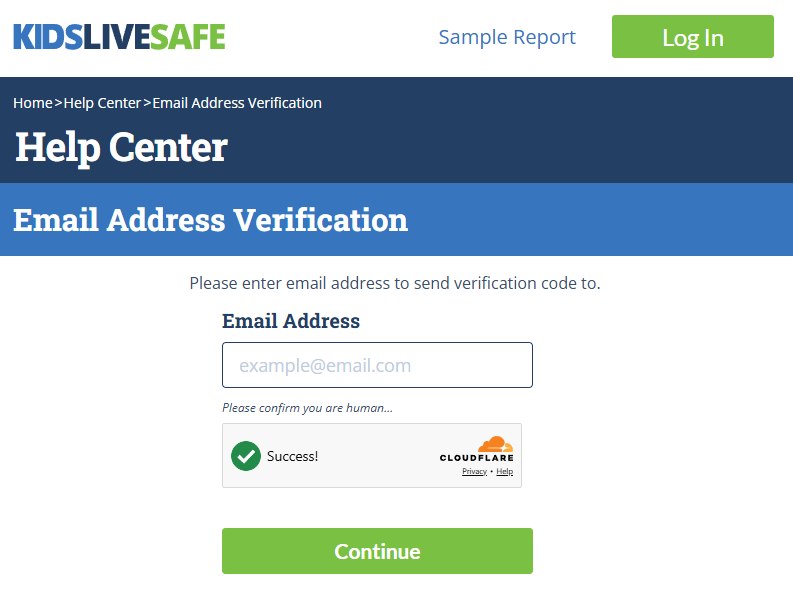
The Email Address Verification page wants one thing, the address to send a code to. Enter it, clear Cloudflare, press Continue. Nothing about your record has been submitted yet.
The code goes to this address.
03
Type the code in
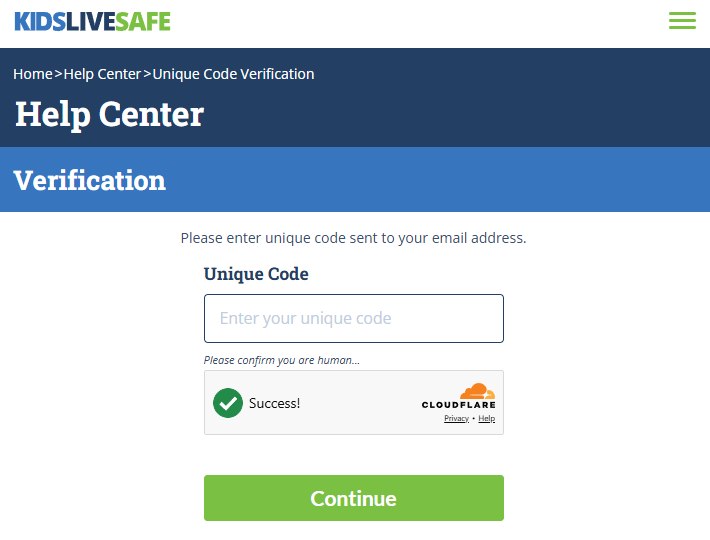
Read the code from the email and put it in the box marked Unique Code on the Verification page, then clear Cloudflare and press Continue. This is a code, not a link. The link is the second email, and it hasn't been sent yet.
Code now, link later.
04
Check the record, then press Remove
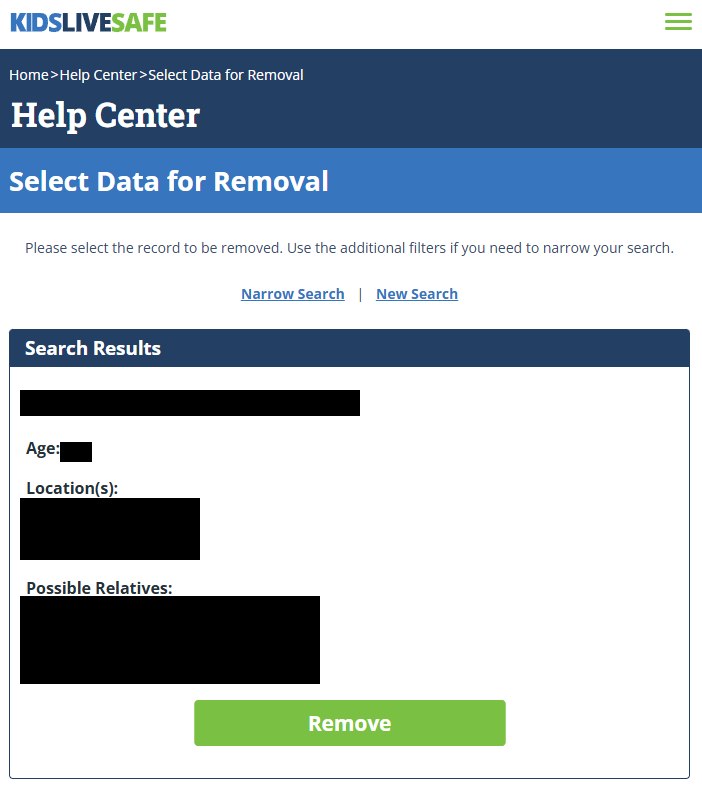
The Select Data for Removal page opens with a Search Results box showing the record the site matched, laid out as name, age, locations and possible relatives. Above the box sit two links, Narrow Search and New Search.
Make sure the record is you and not a namesake. If it isn't, Narrow Search takes you to the extra filters the page mentions, and New Search goes back to the beginning. Removing someone else's record leaves yours where it was. When the record shown is yours, press the green Remove button.
Details blacked out. The labels show a name, an age, locations and possible relatives.
05
Click the link in the second email within the hour
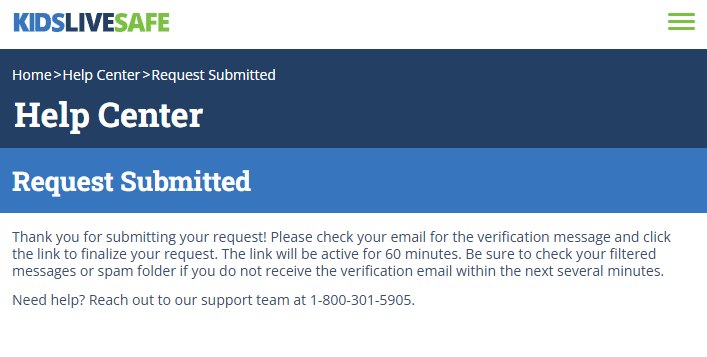
Remove takes you to a Request Submitted page. The page says a verification message is on its way, that the request is finalized by clicking the link inside it, and that the link only works for 60 minutes. It also points you to filtered messages and spam if the email hasn't arrived within several minutes.
Until that link is clicked, the request hasn't been made. Let the hour pass and there's no follow-up, just a listing that stays put. The page shows the support number too, 1-800-301-5905.
The clock on the link starts here.
Confirm
Did it work?
Clicking the link is the last thing the site asks of you, and it doesn't send anything afterwards to say the record has gone. So search for yourself on Kids Live Safe a day or two after the click. The company says requests are processed when its database next updates, usually within a day, and its published privacy metrics show a three-day median. If you're still listed after a week, email privacyinfo@kidslivesafe.com with the date you clicked the link.
If it fails
If something goes wrong
No code, or no link. Check spam. Then start again from the form with a different address, which costs nothing because no request exists until the link is clicked.
The link timed out. The request lapsed. Go back to the form and run it again. Each run sends a new code and a new link.
The site shows a stranger, or no one. Recheck the form entries against the listing, especially city and age. A current address the site never recorded won't find you.
You're in California. Scalable Commerce is on the state's data-broker register, so an ignored request can go to the CPPA's complaint form with a registration to cite.
The problem is a $29.97 charge. That's the trial converting, and it's a support matter rather than a privacy request. Cancel first, then dispute with your card issuer if a refund doesn't come.
Stay off
Why it comes back, and what to do
Kids Live Safe says in its own FAQ that data partners keep sending records with different spellings, initials and addresses, and that those arrive as new listings rather than matching the suppressed one. A successful removal today doesn't cover the variant that turns up next quarter. Check monthly for the first few months, and check Public Data Check and quickpublicrecords.com as well, since each keeps a separate suppression list. Redact's data-broker scan watches all three and refiles when a record returns.
Take yourself off data broker sites
Redact scans data broker sites from your device, finds where your details are listed, and submits the removal requests for you. If a broker relists you, it files again.
August 27, 2026 · Steps and screenshots are from a complete run on a live Kids Live Safe listing on that date. Company research above carries its own earlier date.