LiveRamp routes its privacy requests through a TrustArc-hosted Privacy Choices page at liveramp.com/privacy/my-privacy-choices. The page lists ten request types in an accordion menu; "Opt Out Request" is the general opt-out from RampID and the Data Marketplace. That option sub-divides into three flavors, starting with an "Opt Out as a Consumer, Agent, or Parent" form (the path most people want and the one this guide follows), a device-specific opt-out for your mobile advertising ID, and a browser-specific opt-out for LiveRamp's third-party cookie. You can run all three - they cover different surfaces of the RampID graph.
Before you remove your data: See the LiveRamp data broker profile for its Acxiom history, RampID product details, and the active N.D. Cal. CIPA / Wiretap class action.
Quick facts
Removal Overview
My Privacy Choices · TrustArc
Method
TrustArc Privacy Choices form
Active time
~3-5 minutes per request type
Processing time
15 days for opt-out requests · 45 days for access, correction and deletion
The Opt Out option covers three surfaces. The Privacy Choices menu treats "Opt Out Request" as a single category but it sub-divides into three distinct opt-outs, namely (1) the consumer / agent / parent form (the one this guide follows, covering the general RampID graph), (2) a device-specific opt-out tied to your mobile advertising ID, and (3) a browser-specific opt-out tied to LiveRamp's third-party cookie. Run all three for the fullest coverage; they touch different parts of how LiveRamp resolves your identity.
Beyond opt-out: the same Privacy Choices page is also where you'd file a Deletion Request (purge stored RampID data), an Access Request (find out what LiveRamp has on you), or a Correction Request. Start with the Opt Out flow below and layer on Access / Deletion as separate submissions if you want fuller coverage. Each is its own form.
Prereqs
What you'll need before you start
3 things
Your name, residency, and a working email address. LiveRamp's form requires all three. This form is what LiveRamp's privacy page calls its United States Your Privacy Choices portal. EU and UK residents should use the country portals and addresses listed there instead, such as the UK Your Rights Portal or ukprivacy@liveramp.com. Use the email that LiveRamp's customers are most likely to have on file for you - typically the one you use most for online shopping or account signups.
(Optional) Your mobile advertising ID if you also want to run the device-specific opt-out. On Android it's in Settings then Google then Ads. Apple doesn't show the IDFA in Settings, and you shouldn't install another app or grant it tracking permission only to read the identifier, so on iOS skip the device-specific opt-out and use Apple's app tracking controls instead. Skip this entirely if you only want the general consumer opt-out.
5-10 minutes. The form itself is short, but each request type runs as a separate submission. This guide covers the general consumer opt-out; if you also want to run the device-specific or browser-specific opt-outs (or file a separate Deletion / Access request), plan on doing the flow again for each.
The 3 steps
Pick request type, fill the form, see the success screen
~3-5 minutes
01
Open liveramp.com/privacy/my-privacy-choices and click "Opt Out Request"
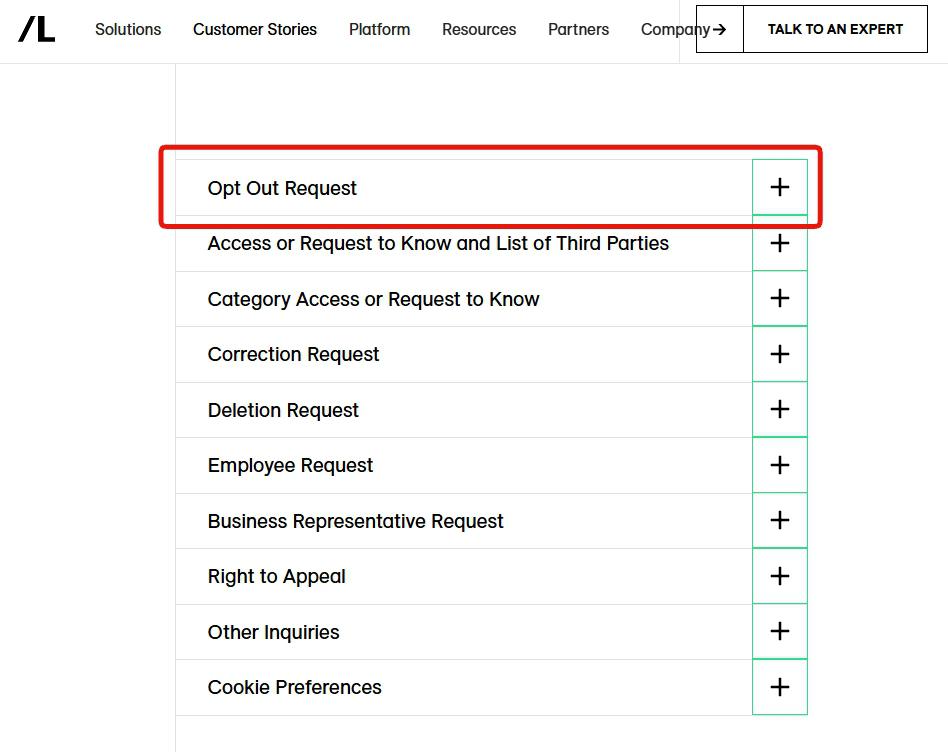
Open liveramp.com/privacy/my-privacy-choices. The page shows the LiveRamp top nav (Solutions, Customer Stories, Platform, etc.) with an accordion menu of 10 request types below. The top option, Opt Out Request, is the one to open - click the + button on its right to expand the section.
When the section expands, you'll see three sub-options:
Opt Out as a Consumer, Agent, or Parent - the general flow this guide uses
Device Specific Opt Out of LiveRamp's Mobile Identifier - runs against your mobile advertising ID (IDFA / GAID)
Browser Specific Opt Out of LiveRamp's Third Party Cookie - sets a browser cookie that suppresses LiveRamp's third-party cookie on participating sites
Click "Opt Out as a Consumer, Agent, or Parent". It covers the general RampID graph, not just one device or browser.
Pick Opt Out Request from the accordion menu. Then choose "Opt Out as a Consumer, Agent, or Parent" from the three sub-options that appear.
02
Fill out the consumer opt-out form and click Submit
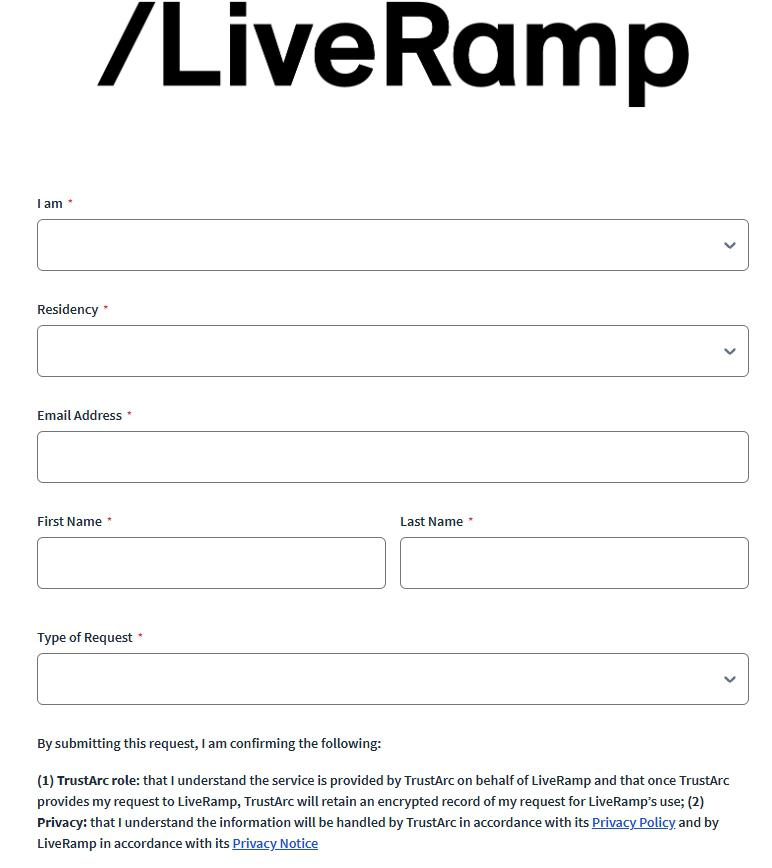
Clicking "Opt Out as a Consumer, Agent, or Parent" opens a TrustArc-hosted form with the LiveRamp logo at the top. Fill in every required field (marked with red asterisks):
I am - dropdown for your capacity (Consumer / Authorized Agent / Parent on behalf of a minor)
Residency - dropdown for your state / country (sets the applicable privacy law)
Email Address - the email LiveRamp most likely has on file for you
First Name and Last Name
Type of Request - dropdown for the specific opt-out variant within this flow
Below the fields, the form notes that the service is provided by TrustArc on LiveRamp's behalf and that TrustArc keeps an encrypted record of your request; the relevant Privacy Policy and Privacy Notice are linked at the bottom.
Click Submit. The form processes server-side and routes the request to LiveRamp's privacy team.
Fill in name, residency, email, and request type. The TrustArc / LiveRamp privacy disclaimer is below the form.
03
See the "Form Submission Success" screen
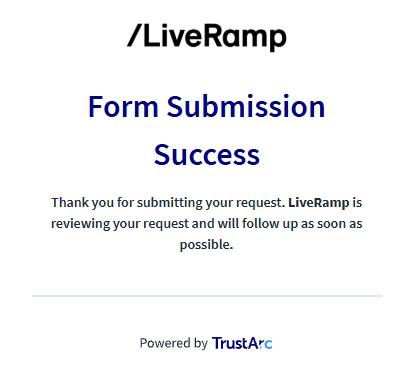
If the submission went through, you'll land on a "Form Submission Success" page with the message: "Thank you for submitting your request. LiveRamp is reviewing your request and will follow up as soon as possible." The page is footed with a "Powered by TrustArc" tag.
That's the on-screen confirmation. Expect a follow-up email from LiveRamp's privacy team within 15 days, the response window its Privacy Choices page gives for opt-out requests, confirming the action taken. Save the success screenshot or any follow-up email as your reference.
Want to run more requests? Repeat the flow with different options - for example, file the device-specific opt-out from the same Privacy Choices menu, or submit a Deletion Request to actually purge stored data rather than just suppressing future use. Each runs as a separate submission.
The TrustArc success page confirms the submission landed with LiveRamp's privacy team.
Confirm it worked
Did it actually work?
On-screen + email confirmation
The "Form Submission Success" screen is the immediate confirmation. If you didn't see it, the submission may not have gone through - check for field-validation errors and re-submit.
Expect a follow-up email from LiveRamp's privacy team within 15 days, the window LiveRamp's Privacy Choices page gives for opt-out requests. Access, correction and deletion requests get 45 days, which LiveRamp can extend by up to 45 more. EU / UK residents get no stated window on this form; LiveRamp's privacy hub routes their requests to country-specific portals and addresses, such as the UK Your Rights Portal or ukprivacy@liveramp.com. The email should confirm the disposition - either the opt-out was applied or LiveRamp couldn't match you against stored records.
LiveRamp doesn't run a consumer-facing search page, so you can't search yourself on liveramp.com to confirm the opt-out. The data lives in enterprise APIs and the Data Marketplace. Downstream signals to watch include a reduction in personalized advertising on publisher sites using LiveRamp's Authenticated Traffic Solution, fewer cross-device retargeting ads, and any LiveRamp customer (advertiser) showing you fewer targeted-segment ads.
For the fullest opt-out, run all three Opt Out sub-flows. The consumer / agent / parent form covers the general RampID graph; the device-specific opt-out covers your mobile advertising ID; the browser-specific opt-out covers the LiveRamp third-party cookie on participating sites. Each is its own submission.
Annual recheck. LiveRamp continuously re-resolves identity signals from customer onboarding and Data Marketplace partners. An annual re-submission is the maintenance pattern.
Troubleshooting
If it doesn't work
Common failures
The form rejects a required field. All five fields (I am, Residency, Email, First Name, Last Name, Type of Request) are required. The most commonly forgotten ones are the dropdowns (Residency and Type of Request) which default to empty.
No follow-up email from LiveRamp. Check spam / promotions. If still nothing within a week, email privacy@liveramp.com directly with your submission date as a follow-up.
LiveRamp says they can't match you. Most common if you used a less-known email address on the form. Re-submit using the email you use most for online accounts. You can also try previous email addresses you've used over the years - LiveRamp's identity graph spans years of resolved signals, so an older address may match where a newer one doesn't.
You want a full Deletion rather than an Opt Out. Go back to the Privacy Choices menu and pick Deletion Request instead. It's a separate submission with the same TrustArc-hosted form pattern.
You're an authorized agent acting on someone else's behalf. Pick "Agent" in the "I am" dropdown. LiveRamp may require written authorization from the data subject before processing; have that ready.
You don't hear back within 15 days. Email privacy@liveramp.com referencing your submission date and the 15-day response window LiveRamp's Privacy Choices page gives for opt-out requests. Deletion, access and correction requests get 45 days. The active N.D. Cal. CIPA class action is relevant background - the court denied most of LiveRamp's motion to dismiss in July 2025.
Stay off
Keep your data out of LiveRamp (and the broader identity-resolution ecosystem)
Annual re-check advised
Re-run the opt-out annually. LiveRamp's identity graph continuously absorbs new signals from customer onboarding (advertisers / publishers uploading their first-party data) and from Data Marketplace partner contributions. A successful opt-out today doesn't prevent your email or device ID from being re-resolved tomorrow if it shows up in a new customer's data file. An annual re-submission is the maintenance pattern.
Run all three Opt Out sub-flows. The general consumer opt-out (this guide) covers the RampID graph; the device-specific opt-out covers mobile advertising IDs; the browser-specific opt-out covers the third-party cookie. Each touches a different surface of how LiveRamp resolves you.
LiveRamp is one of several identity brokers. Submit separately at Acxiom (the marketing business LiveRamp sold in 2018, now Omnicom-owned) and Epsilon (Publicis-owned) - those run parallel identity-graph products. Opt-outs at LiveRamp don't propagate.
Use Global Privacy Control. LiveRamp's ATS (Authenticated Traffic Solution) and third-party cookie operations honor GPC as a valid opt-out signal. Enable GPC in Firefox (built-in) or via a browser extension in Chrome / Edge to set the signal automatically on every site visit.
California residents: use the central DROP platform. As of January 1, 2026, the CPPA Delete Request and Opt-Out Platform (DROP) at consumer.drop.privacy.ca.gov lets a single deletion request cover every CPPA-registered broker. LiveRamp is registered, so DROP covers it - though the LiveRamp-specific opt-out here is more granular and immediate.
Address the upstream sources. LiveRamp's data comes from advertisers and publishers uploading their first-party customer files. Locking down "data sharing with marketing partners" at the retailer / loyalty-program / publisher level reduces what flows into LiveRamp's resolution pipeline in the first place. That's tedious but it's the most durable intervention.
Take yourself off data broker sites
Redact scans data broker sites from your device, finds where your details are listed, and submits the removal requests for you. If a broker relists you, it files again.