Removal guide · Azira

How to remove your info from Azira

Short form, one hard prerequisite. The request lives on TrustArc, not on azira.com, and it can't do anything without your device's Mobile Ad ID, because that's the only name Azira has for you. Get that first. The rest takes about two minutes, and then you change one default and answer the emails that follow.

Azira homepage screenshot

Before you file: the Azira profile covers what its filing discloses, including that it shared consumer data with state governments.

Prerequisite

Get your Mobile Ad ID first

Azira identifies you by your phone, not your name. The form takes your details, but the identifier is the only link between you and the movement records held against you.

On Android it takes about fifteen seconds.

  1. Open Settings
  2. Tap Google, listed on some phones as Google Services
  3. Under the All Services tab, tap Ads
  4. The Advertising ID is the long string at the bottom

Azira's form says only to open the Settings app and click on Ads, which skips the part where Ads sits under Google. That omission is where most people give up.

On iPhone Settings won't show it. Apple hides the IDFA from users, which Azira acknowledges on the form, and it points to Apple's App Store search for IDFA utilities.

Reading it has a cost, so weigh it first. Since iOS 14.5 Apple returns 00000000-0000-0000-0000-000000000000 to any app that hasn't been allowed to track, so the utility only sees your real IDFA once you switch on Allow Apps to Request to Track under Settings > Privacy & Security > Tracking and allow that app when it asks. That hands a third-party app the same identifier and tracking permission this guide exists to take back, and deleting the app afterwards doesn't undo anything it already sent. If you go ahead, use a utility you trust, copy the value, switch Allow Apps to Request to Track back off, tell iOS to have apps you'd already allowed stop tracking, then delete the app. Don't submit an all-zero ID. It isn't your identifier, it can't match your records, and the request will look like it succeeded while doing nothing.

The same rule works in your favour. The apps feeding Azira only receive your IDFA if you allowed them to track, so if tracking has been off on this phone since iOS 14.5, there may be little or nothing keyed to it. The request matters most for apps you did allow, and for records from before 2021.

Copy the string somewhere before opening the form. It's long and case-sensitive, so paste it rather than typing it out.

You're already on the right screen to do the more durable thing, which is to reset or delete the advertising ID. That breaks the link for every location broker keyed to it at once, Cuebiq included, rather than just this one. Do it after you've copied the value and submitted, not before, or you'll have deleted the identifier you needed.

The form

Submitting the request

01

Open the TrustArc form

Go to the Azira Data Subject Request Form. It carries Azira's logo but sits on submit-irm.trustarc.com, because TrustArc handles these requests on Azira's behalf. That's expected, not a phishing page.

The form states up front that it's only for individuals and their authorised agents, and that Azira will reply with instructions to verify you're the device owner. Submitting starts a short exchange rather than ending one.

The page runs Google reCAPTCHA v3 in the background, so there's no puzzle to solve. If it scores you as a bot, the submission comes back with "Are you a bot? If not, please re-enter." Trying again without a VPN or a blocking extension usually clears it, and the page shows its own notice if an extension has blocked the script that draws the form.

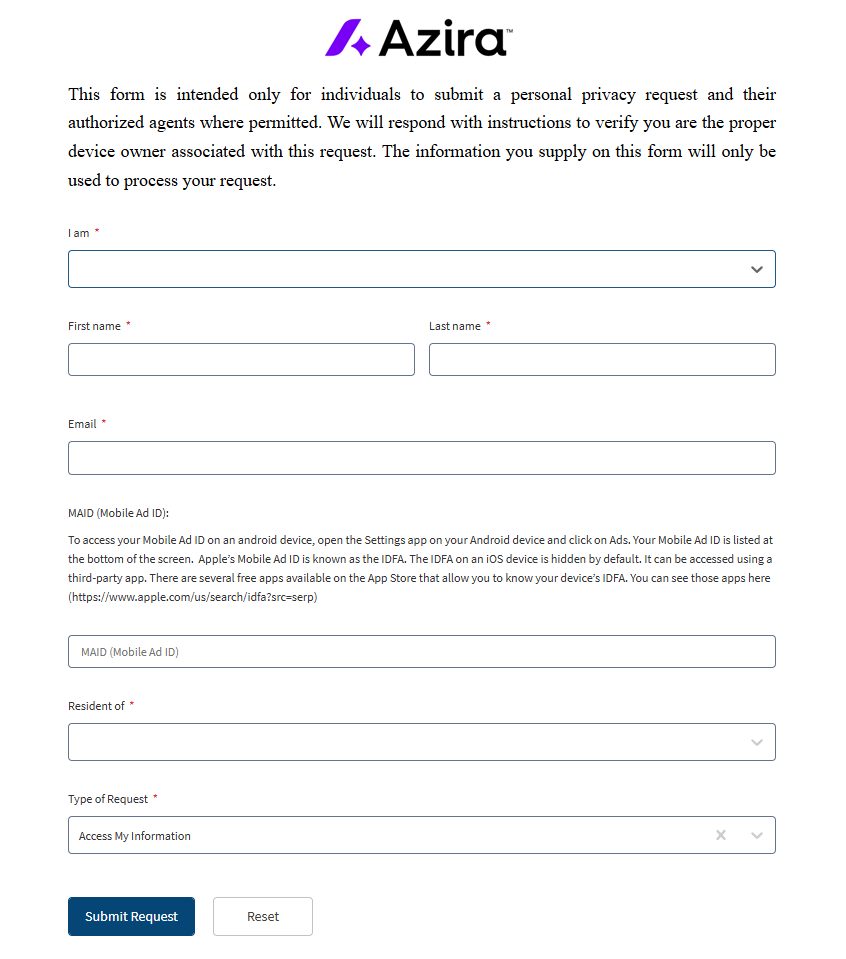
Azira's Data Subject Request Form on TrustArc, showing a required I am dropdown, required First name, Last name and Email fields, a MAID field with retrieval instructions above it, a required Resident of dropdown, and a Type of Request selector set to Access My Information.
The MAID box sits mid-form under Azira's retrieval instructions. It carries no asterisk, but the form's definition marks it required, and without a value a removal has nothing to act on.
02

Identify yourself and where you live

I am is a required dropdown with two choices, Individual or Agent, for someone acting on another person's behalf.

First name, Last name and Email are all required. The email matters more than usual here, because it's where the verification messages will arrive.

Resident of is a required country list, with a state list under United States, and it sets which privacy law applies to your request. Answer it accurately rather than picking the first option.

03

Paste the Mobile Ad ID and choose the request type

Paste your identifier into MAID (Mobile Ad ID). The box takes up to 36 characters, which is exactly the length of a GAID or IDFA.

Then set Type of Request. It defaults to Access My Information, which isn't what you want if your goal is removal, so change it to Delete My Information. The list also offers Opt-out or Unsubscribe, Do Not Sell My Personal Information, Limit the Use of My Sensitive Personal Information, Withdraw My Consent and Correct or Update My Information. Access is worth filing separately if you want to see the movement history first; Azira files a one-day turnaround, so that's a realistic thing to do before deleting.

Press Submit Request. One request covers one device identifier, so a second phone or tablet means a second submission. The confirmation screen says the request is being reviewed and Azira will follow up.

04

Answer the emails

Two messages can follow. TrustArc's form definition marks email verification as required, so expect a message asking you to confirm your address before the request goes through. Azira's own notice on the form says it'll then send instructions to confirm you own the device tied to that identifier. The request isn't finished until you've done what those ask.

Azira files a one-day mean and median response, and its own policy table says two days, so if nothing has arrived after a few days check your spam folder before assuming it failed, then chase privacy@azira.com with the identifier you submitted.

Expectations

What the record suggests

Azira filed 5,042,679 deletion requests for 2024, all complied with, none denied, at a one-day mean and median. Read those numbers with Azira's own explanation in its privacy policy. None of the requests it received included a MAID, so it had nothing it knew to be in scope, told each requester so, and invited them to resubmit with the identifier, which it commits to honour. The record shows fast answers, not five million trails erased, and it's why this guide won't let you near the form without the ID.

There's nothing to re-check afterwards, since Azira never published a page about you. The verification exchange and Azira's confirmation are the only evidence you'll have, so keep both along with the identifier you submitted.

Deletion addresses the history attached to that identifier. It doesn't stop apps on your phone from supplying a fresh trail tomorrow. If you want this to stick, reset the advertising ID and cut location permissions back to While Using for anything that doesn't genuinely need to know where you are.

Problems

Where it goes wrong

  • You can't find Ads in Android settings. It's nested under Google. The full path is Settings > Google > All Services > Ads.

  • No IDFA on iPhone, or the utility shows all zeros. Apple hides it, and returns zeros until tracking is allowed. Turn on Allow Apps to Request to Track, allow the utility, read it, then switch the setting back off and delete the app.

  • You submitted with the default request type. That's Access My Information, not deletion. Submit again with Delete My Information selected.

  • The domain isn't azira.com. Correct. TrustArc runs the form, linked from Azira's own privacy policy and site footer.

  • "Are you a bot?" or a blank form. The page runs reCAPTCHA v3 silently and shows a blocked-resource notice when an extension stops its script. Retry without a VPN or the extension.

  • No verification email. Check spam first, then write to privacy@azira.com. Until verification is done the request stays open.

Take yourself off data broker sites

Redact scans 120+ data broker sites from your device, finds where your details are listed, and submits the removal requests for you. If a broker relists you, it files again.

Last updated:

September 10, 2026 · Walked firsthand on August 18, 2026, and written from the real screens rather than drafted first. The required fields, the unasterisked MAID box, the Type of Request default and the device-owner verification notice come from that walk, and the Android path is given in full because Azira's own instruction omits where Ads sits. On September 10, 2026 the form's definition was read from TrustArc's render endpoint, which confirmed every walked field and added what the walk couldn't see. The MAID box is marked required with a 36-character limit, the request types are listed by name, the page runs Google reCAPTCHA v3, and email verification is required. Azira's own request metrics were read from its privacy policy the same day.