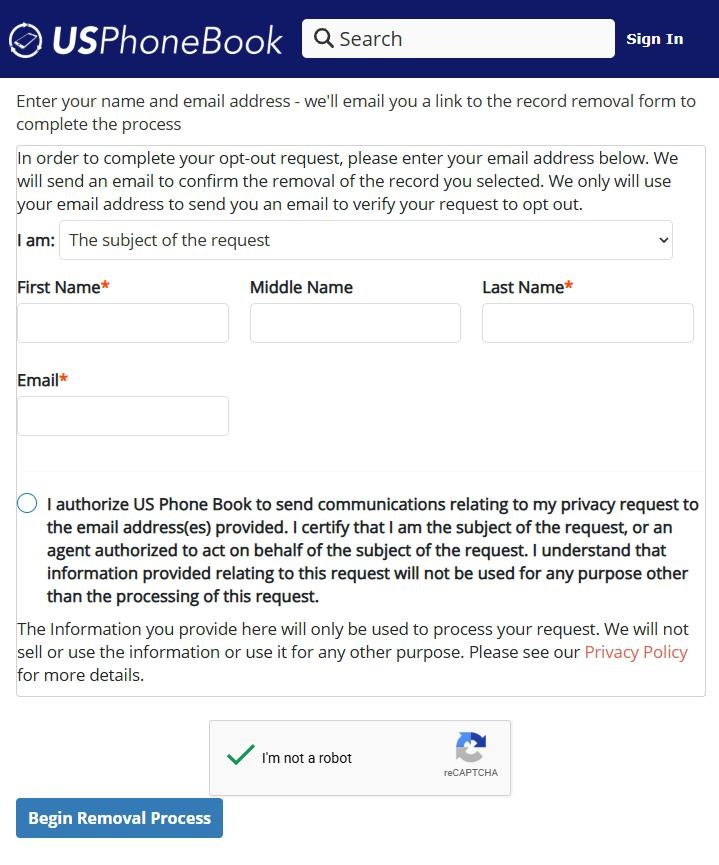
USPhoneBook's opt-out is a five-step email-gated two-form flow at usphonebook.com/removal (note: the URL is /removal, not /opt-out). The shape is identical to the sibling site FastPeopleSearch: submit the short Privacy Request form, see the "You're not done" intermediate page, open the email USPhoneBook sends you (which lands in Gmail's spam folder by default - watch for that), click the black "Click here to fill out the form" button, fill out the detailed second form, then see the confirmation. About 5-10 minutes; USPhoneBook says removal completes in 3 days or less.
Before you remove your data: See the USPhoneBook data broker profile for ownership, contact details, litigation history, and related sites.
Quick facts
Removal Overview
Email-gated two-form flow
Method
Two forms separated by an email link
Active time
~5-10 minutes
Difficulty
Easy
Account required
No
Verification
reCAPTCHA + email link
Processing
3 days or less
One opt-out per record
Yes
Phone fallback
(888) 747-4095
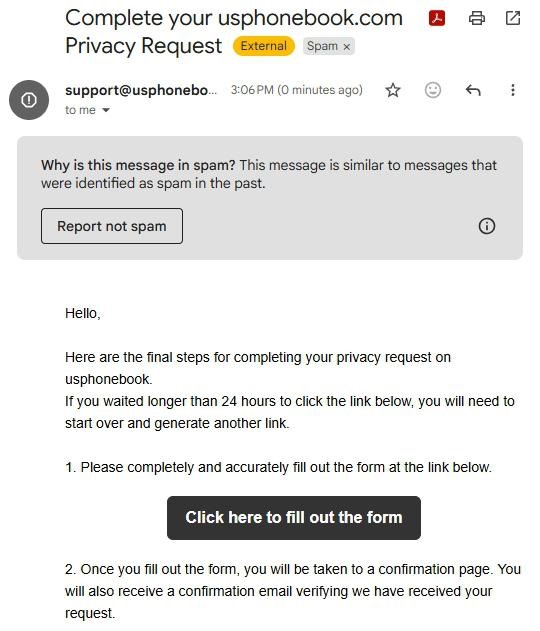
The verification email lands in Gmail's spam folder by default. We walked this opt-out live and the message ("Complete your usphonebook.com Privacy Request" from support@usphonebook.com) went straight to spam. If you don't see it in your inbox after submitting the first form, check spam aggressively before assuming the form failed - it's almost certainly there.
The URL is /removal, not /opt-out. Several third-party guides point you at /opt-out; the actual current opt-out form lives at usphonebook.com/removal. Use the live URL.
Already opted out of FastPeopleSearch or PeopleSearchNow? Do this one too. All three sites are operated by Mississippi Tornado Alley LLC. Its filing says one request covers the sale of personal information across its sites, but we haven't verified that a record clears the others - do each one. See the profile network section for the shared-operator context.
I'd use a forwarding / disposable email. The first form asks for your email and USPhoneBook sends the verification link there. A masked address via Apple Hide My Email, Firefox Relay, or SimpleLogin limits how much new contact data the broker collects from you through the opt-out itself.
Prereqs
What you'll need before you start
3 things
A real email inbox you can check today. USPhoneBook emails the verification link from support@usphonebook.com - and remember it lands in spam by default. We'd recommend a forwarding / disposable address rather than your primary inbox.
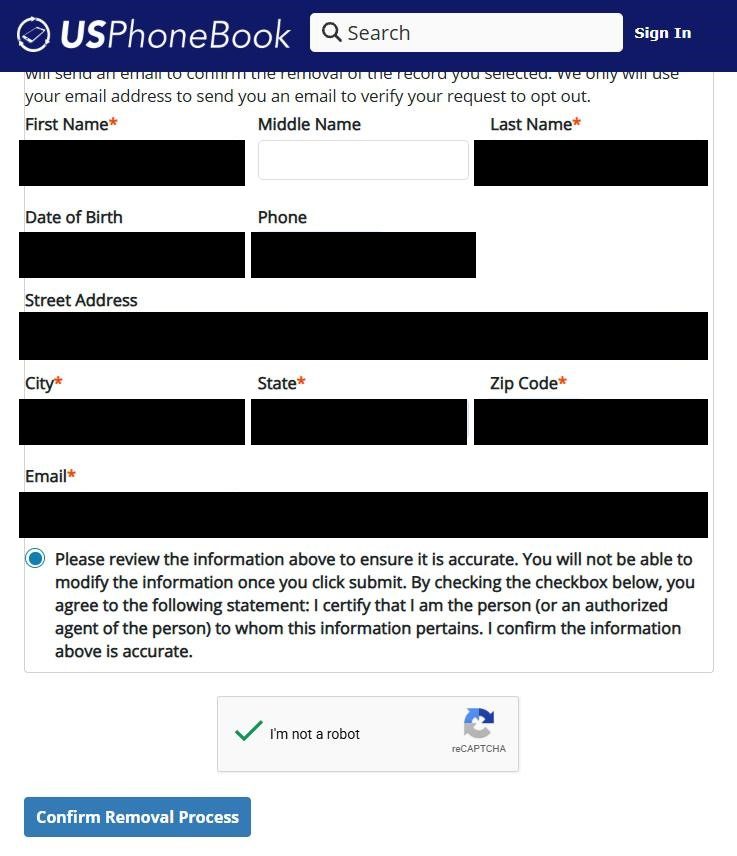
Your full name + DOB + address + phone + zip. The first form just needs your name + email, but the second form (after the email link) asks for First / Middle / Last name, Date of Birth, Phone, Street Address, City, State, Zip Code, and Email - have all of that ready before you start so you can power through.
An uninterrupted 10 minutes. The email link is single-use and time-limited (24 hours per the email's own warning). I'd plan to do both forms in one sitting rather than walking away mid-flow.
The 5 steps
Remove your listing
~5-10 minutes total
01
Go to usphonebook.com/removal, fill the Privacy Request form, click Begin Removal Process
Open usphonebook.com/removal (not /opt-out - that's the older URL some guides reference). Leave the "I am" dropdown set to The subject of the request, fill in First Name, Middle Name (optional), Last Name, and Email, check the authorization box, solve the reCAPTCHA, and click the blue Begin Removal Process button at the bottom.
Name + email + consent + reCAPTCHA, then Begin Removal Process.
02
See the "You're not done" page confirming an email was sent
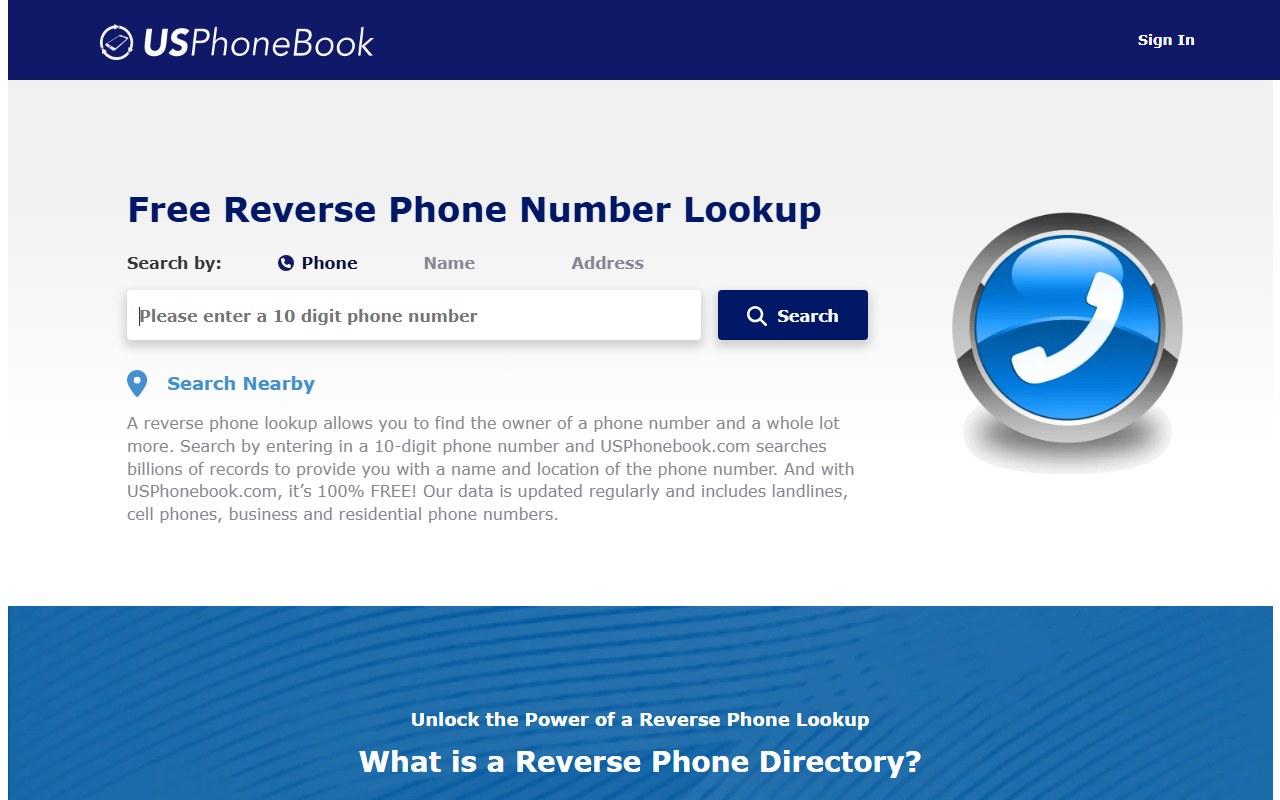
After submitting, you land on a page titled "You're not done" (breadcrumb: Opt Out / Verify Email Sent). The page tells you an email has been sent to the address you provided and that you need to check your inbox to complete the opt-out. Below that, USPhoneBook tries to keep you on-site with a "Free Reverse Phone Number Lookup" widget - ignore it and go check your email.
"You're not done" - email sent, time to go check spam.
03
Find the email in spam (yes, spam) and click the black "Click here to fill out the form" button
Check your inbox for an email titled "Complete your usphonebook.com Privacy Request" from support@usphonebook.com. Check spam first - in Gmail it lands there by default, with a "Why is this message in spam?" banner and a Report Not Spam button at the top. Open the email and click the black "Click here to fill out the form" button in the middle. The email warns the link expires in 24 hours if you wait.
Email lives in Gmail spam. Black button = "Click here to fill out the form".
04
Fill out the detailed second form, check the review box + reCAPTCHA, click Confirm Removal Process
The email link takes you back to USPhoneBook with a detailed form pre-loaded with your name. Fill in Date of Birth, Phone, Street Address, City, State (dropdown), Zip Code, and confirm the Email field is right. Tick the "Please review the information above to ensure it is accurate. You will not be able to modify the information once you click submit" checkbox, solve the second reCAPTCHA, and click the blue Confirm Removal Process button.
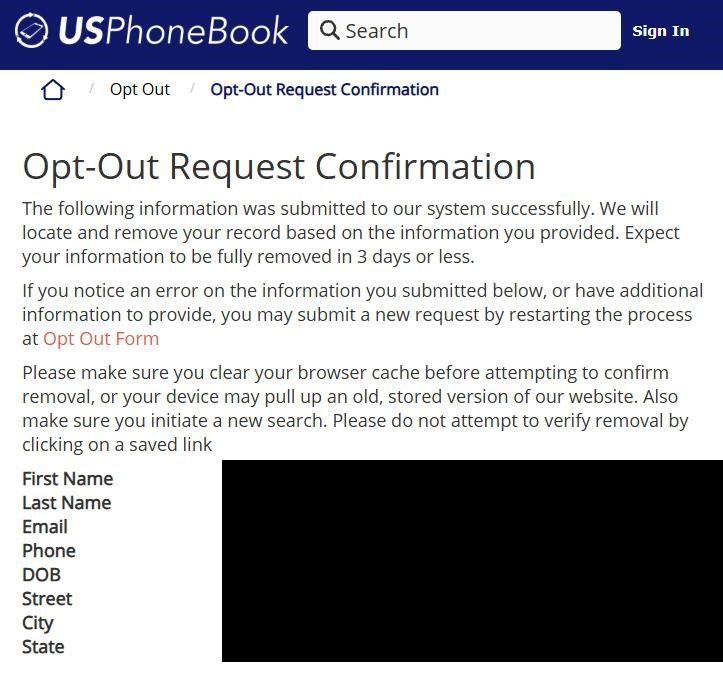
Submitting lands you on the Opt-Out Request Confirmation page (breadcrumb: Opt Out / Opt-Out Request Confirmation). The page reads "The following information was submitted to our system successfully. We will locate and remove your record based on the information you provided. Expect your information to be fully removed in 3 days or less." It echoes the data you submitted - First Name, Last Name, Email, Phone, DOB, Street, City, State - and reminds you to clear your browser cache before checking for removal. Screenshot this page as evidence.
Submitted. 3 days or less. Clear cache before verifying.
Confirm it worked
Did it actually work?
3 days or less
Wait up to 3 days after submitting the detailed second form. That's USPhoneBook's stated processing window from the confirmation page.
Clear your browser cache (or open a private / incognito window) before re-checking. The confirmation page specifically warns about cached copies and tells you not to verify removal by clicking on a saved link.
Go to usphonebook.com and run a fresh search by name + city/state. I'd also spot-check by phone number, since USPhoneBook's reverse-phone-lookup product indexes the same person under multiple keys.
Your record should no longer appear in the results.
If you matched multiple USPhoneBook listings (older addresses, nickname variants, secondary phone numbers), we recommend re-running steps 1-5 once per listing.
Don't forget the sister sites. If you haven't already opted out of FastPeopleSearch or PeopleSearchNow, do those next - same Mississippi Tornado Alley LLC operator, same general flow, and we haven't verified that a removal here reaches them.
Set a 90-day reminder to re-check. USPhoneBook continuously re-indexes public records, so a new listing can appear weeks or months after a successful opt-out.
Troubleshooting
If it doesn't work
Common failures
"The verification email never arrived" - check spam first. This is the number-one failure mode on USPhoneBook. The email from support@usphonebook.com lands in Gmail's spam folder by default. Look there before assuming the form failed. If it's still not there after 30 minutes even in spam, restart from step 1.
You waited and the 24-hour email link expired. The link is single-use and time-limited. Restart from step 1 to generate a new one.
The /opt-out URL gives a 404 or redirects oddly. Several public guides point you at the old /opt-out URL; the live form is at /removal. Use that.
The detailed second form throws an error. Try a different browser, disable ad-blockers / privacy extensions for the session, clear cookies, and avoid VPN / Tor exit nodes. If the error persists, call the BBB-listed phone (888) 747-4095 to file the opt-out by phone instead.
reCAPTCHA won't pass. Same advice as above - browser, extensions, VPN are the usual culprits.
Record still appears after 3 days. Clear cache first - the confirmation page specifically warns about stale cached copies. If it's still there after a fresh search, re-run the entire flow once. If still up after another week, escalate by phone ((888) 747-4095).
Multiple records under your name. USPhoneBook indexes by name, address, and phone - so a single person commonly has multiple records across historical addresses, secondary phones, and old email addresses. Each is a separate opt-out submission.
Stay off
Keep your record off the site
Re-listing is common
We recommend re-checking quarterly. USPhoneBook continuously re-indexes public records, so a new listing can appear weeks or months after a successful opt-out as new property, voter, or directory data surfaces.
Also opt out of the FastPeopleSearch and PeopleSearchNow siblings. Mississippi Tornado Alley LLC operates all three brands, and we haven't verified that opting out of USPhoneBook reaches FastPeopleSearch or PeopleSearchNow. Run those opt-outs separately. The flows are nearly identical - if you remember this one, you'll remember the other two.
Watch for multiple profiles. Address changes and name variants (middle initial, nickname, maiden name) tend to produce separate USPhoneBook records. I'd re-check by all the variants you've used, not just your current legal name.
Watch the reverse-phone-lookup angle. USPhoneBook leans on phone-number lookups; even if your name-search result is clean, your phone number could still surface in a reverse lookup. Search yourself by phone number too during the quarterly re-check.
Whitelist support@usphonebook.com in Gmail so the next round's verification email doesn't disappear into spam. The email goes to spam by default - if you've got Gmail filters set up, this is the sender to allow.
Suppress upstream sources where possible. Voter registration, property assessor data, and published phone directories are the most common re-listing triggers we've seen; some states allow address confidentiality programs (often for victims of stalking or domestic violence) that suppress your record at the source.
I'd suggest a forwarding mailbox or PO Box for non-essential mail and a masked email forwarder for non-essential signups. New property records and new email-list signups are the biggest re-listing triggers across the people-search category.
Take yourself off data broker sites
Redact scans data broker sites from your device, finds where your details are listed, and submits the removal requests for you. If a broker relists you, it files again.
![USPhoneBook intermediate page with breadcrumb 'Opt Out / Verify Email Sent', a large 'You're not done' heading, and the message 'An email has been sent to [name] - [email]. Please check your inbox and follow the instructions in the email to complete the opt out process.' Below the message sits a blue 'Free Reverse Phone Number Lookup' widget with a phone-number search field and a magnifying-glass button - the broker's attempt to keep the user engaged on-site instead of completing the opt-out.](/broker-images/versions/11d1ea9ffd9e2a00af72f50b53413f32585dcd4f306b03ac1e7ca6771733afd0/usphonebook-com/step-2.jpg)