Removal guide · UpLead

How to remove your info from UpLead

One form, one submission, no account to create. The catch is the Request Type dropdown. There's no option called opt-out, and the choice that stops your data being sold is Delete my Information, which UpLead's own page confirms. Give a phone number and you'll also be asked for a six-digit code texted to it.

UpLead homepage screenshot

Worth knowing first: the UpLead profile explains why your work mobile is in a sales database you never signed up for, and what the company means when it says it only holds business identities.

Quick facts

At a glance

Shape

One page, one Submit, plus a six-digit text code if you give a phone number

How long

Two or three minutes

Price

Nothing

Must provide

Full name, a contact email, a jurisdiction, a request type, and at least one of the email or phone number you want removed

Pick this option

Delete my Information, even when opting out

They claim

15 days, per the figure UpLead filed with California for 2024

Filling it in

Working through the form

01

Open the page and find the form on the right

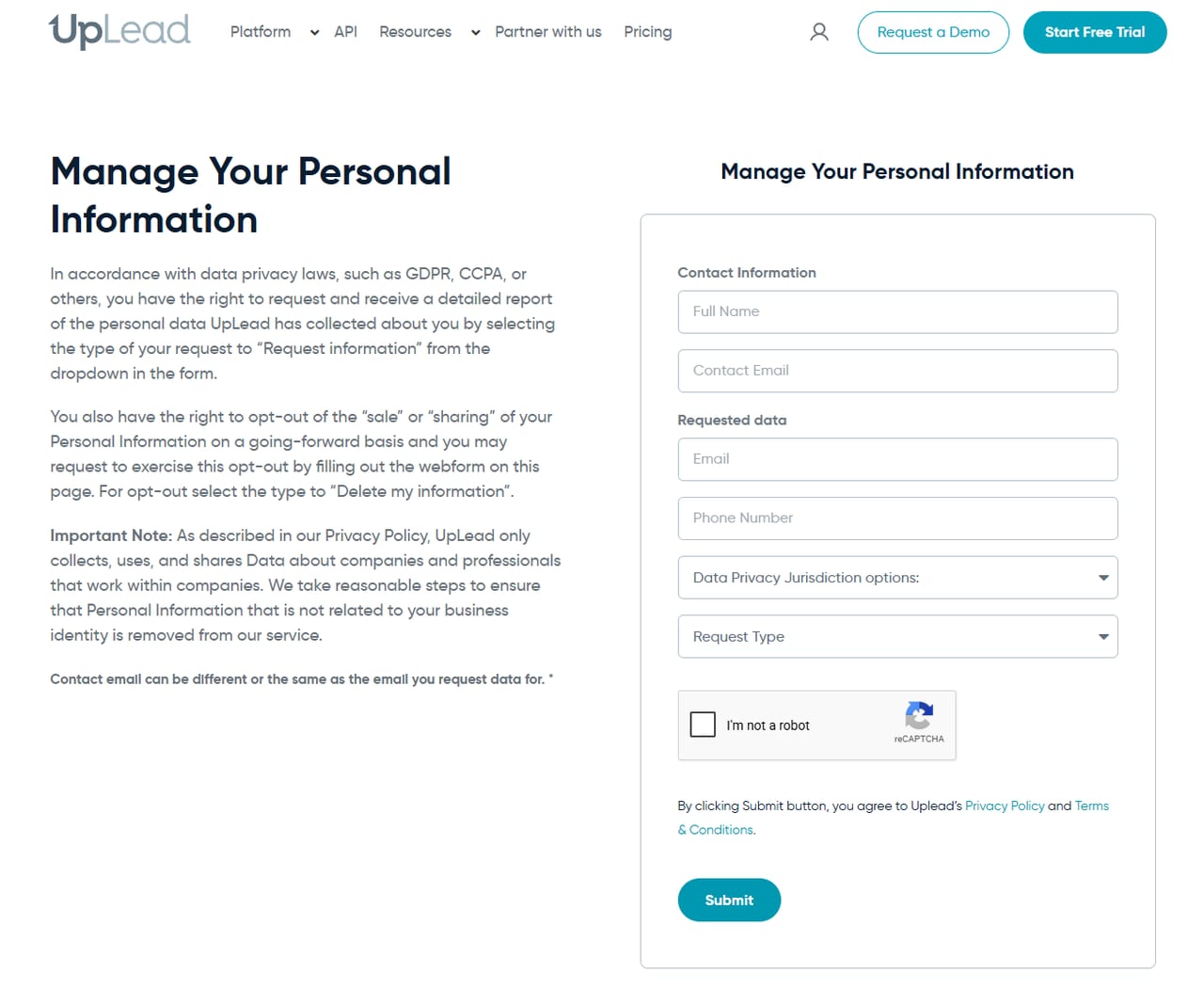
Go to uplead.com/opt-out. The heading Manage Your Personal Information appears twice, once over the explanatory text on the left and once over the boxed form on the right. The left column names GDPR and CCPA as the basis and maps each dropdown option to a right.

UpLead's Manage Your Personal Information page. Explanatory text on the left describes which request type to select, and a boxed form on the right holds Full Name, Contact Email, Email, Phone Number, a Data Privacy Jurisdiction dropdown, a Request Type dropdown, a reCAPTCHA and a Submit button.
Contact Information identifies the person asking. Requested data identifies the record to remove.
02

Separate who's asking from what's being removed

The form splits into two groups and the distinction is deliberate.

Contact Information is you, the requester, meaning Full Name and Contact Email, both required. This is where UpLead replies.

Requested data holds Email and Phone Number, the record you want acted on. Fill in at least one or the form refuses to send, with the message "Please fill in Email or Phone Number for removal." Use the work address and the mobile as they'd appear in a sales database.

UpLead spells out that the two groups can differ, saying the contact email "can be different or the same as the email you request data for". That's the useful bit if the listed address belongs to a job you've already left.

The phone field takes digits only, no spaces, brackets or dashes. Start with the country code (1 for a US number), because the form puts a plus sign in front of whatever you type and reads it as an international number.
03

Set your jurisdiction, then the request type

Data Privacy Jurisdiction options is where you declare the law you're claiming under. The list holds six entries, CCPA, VDPA, OCPA, TDPSA, GDPR and Other. Pick the one matching where you live, since that determines what UpLead is obliged to do rather than what it chooses to do.

Request Type is the field to get right. Choose Delete my Information for either deletion or opt-out, per the instruction on the page. Choose Request my Information only if you want the report first.

Fill the phone field even if your main concern is the email. Leaving it blank risks a partial match that clears the address and leaves the number, the field most likely to outlive your current job.

It does add a step. Typing a number reveals a consent checkbox that must be ticked, giving UpLead permission to send one SMS to prove the number is yours. The checkbox wording says the text carries a confirmation link; the page's own verification box asks for a six-digit code, so expect either.

04

Pass the reCAPTCHA and submit

Tick I'm not a robot, then press Submit. Submitting also accepts UpLead's Privacy Policy and Terms, per the line above the button. A second, invisible Cloudflare check runs as you submit; if it fails you'll see "Human verification failed. Please try again."

With no phone number, a green line at the top of the form reads "Your opt-out request has been received and will be processed." and the form clears. That line is the only receipt the page gives you, so screenshot the completed form before you send it, or note the date, the two email addresses and the request type you picked.

With a phone number, a Verify Your Phone Number box opens instead. Enter the six-digit code from the text and press Verify Code; the form then reports the number verified and the request accepted.

Afterwards

What to expect, and what the numbers suggest

UpLead told California that in 2024 it received 4,063,777 requests to delete and complied in whole with all of them, denying none, with mean and median response both landing on exactly 15 days. The same filing reports zero opt-out requests and zero requests to know, which is what you'd expect from a form whose only routes are deletion and a report.

The generous reading is that a request here is very likely to be honoured, which few brokers in this directory can claim. The sceptical one is that identical mean and median across four million cases is the signature of an automated pipeline, and automation matches on exactly the identifiers you supplied. That's the practical argument for filling in every field you can rather than the minimum.

Because an email-only request gets no on-page verification step, the absence of a reply isn't evidence either way. If you want proof, file a Request my Information afterwards and see what comes back.

If something goes wrong

Common snags

  • The form says "Human verification failed" or "timed out". That's the invisible Cloudflare check behind the Submit button, separate from the reCAPTCHA you ticked. Wait a moment and press Submit again; if it keeps failing, try another browser without extensions.

  • A colleague found you on UpLead after your request. Check whether the record showing is the one you named. A different employer, a variant spelling of your name or a second number is a separate record and needs its own submission.

  • You'd rather have a human. UpLead's California filing gives techteam@uplead.com and (800) 493-4084; its privacy policy gives support@uplead.com. Use them as a follow-up if the webform goes unanswered, quoting your submission date.

Staying out

Why you may need to do this twice

UpLead sells freshness, so its collection pipeline never stops. A deletion removes what's there now. It doesn't register you as a person who declines to be collected, so changing jobs, being added to a new company's team page or updating a professional profile can put you back. If you move roles, assume you're a new record and check again.

This is a category rather than a company. UpLead competes with other B2B contact vendors compiling the same professionals from the same public signals, and this directory covers several, including ZoomInfo, Clearbit and RocketReach. Clearing one doesn't touch the others.

Take yourself off data broker sites

Redact scans 120+ data broker sites from your device, finds where your details are listed, and submits the removal requests for you. If a broker relists you, it files again.

Last updated:

August 18, 2026 · Written from a firsthand walk of the form rather than drafted first. Field names, the two dropdowns, the reCAPTCHA and the Submit wording are from the live form; the instruction to select "Delete my information" for an opt-out, and the note that the contact email may differ from the requested one, are quoted from the same page. September 10, 2026 · Rechecked by reading the served form. The option labels are "Request my Information" and "Delete my Information"; at least one of Email or Phone Number is required; the phone field is digits only and gets a plus sign added; a phone number leads to a six-digit code rather than only a link; a hidden Cloudflare check runs alongside the reCAPTCHA. Volume and response figures are Uplead LLC's 2024 California filing, unchanged in the current registry.