RocketReach gates its opt-out behind an email-verification check. You submit an email address at rocketreach.co/remove-profile, and RocketReach sends the removal form when the address matches its database. RocketReach sells B2B contact info, including names, work email addresses, phone numbers, job titles, and social profile links. Submit each current or former work address that RocketReach may hold. If no email arrives, contact RocketReach when you expect it to have a profile for you.
Before you remove your data: See the RocketReach data broker profile for ownership, the $1.59M Krause IRPA settlement, and the company's claim of roughly 700 million professional profiles.
The verification email is the gate. RocketReach says it will send a verification link if the submitted email exists in its database. A missing email means the submitted address didn't match, or the message wasn't delivered. It doesn't prove that RocketReach has no profile under another address.
Submit every email worth checking. RocketReach matches profiles to email addresses. If you have multiple work or professional addresses (current job, previous jobs, freelance, personal domain), submit each separately. Each may have its own profile.
Prereqs
What you'll need before you start
2 things
The email address you want to check. Start with your current work email (or your most- visible professional email if you don't have a single work address). If you've been listed in any company's employee directory, conference speaker bio, or LinkedIn profile under a given address, that's the one most likely to be in RocketReach's index.
Access to that email inbox. The verification link goes to the address you submit; you need to be able to click it to complete the opt-out. If you no longer have access to an old work email, see the troubleshooting section.
The opt-out
Submit your email to RocketReach
~30 seconds
01
Submit your email at rocketreach.co/remove-profile
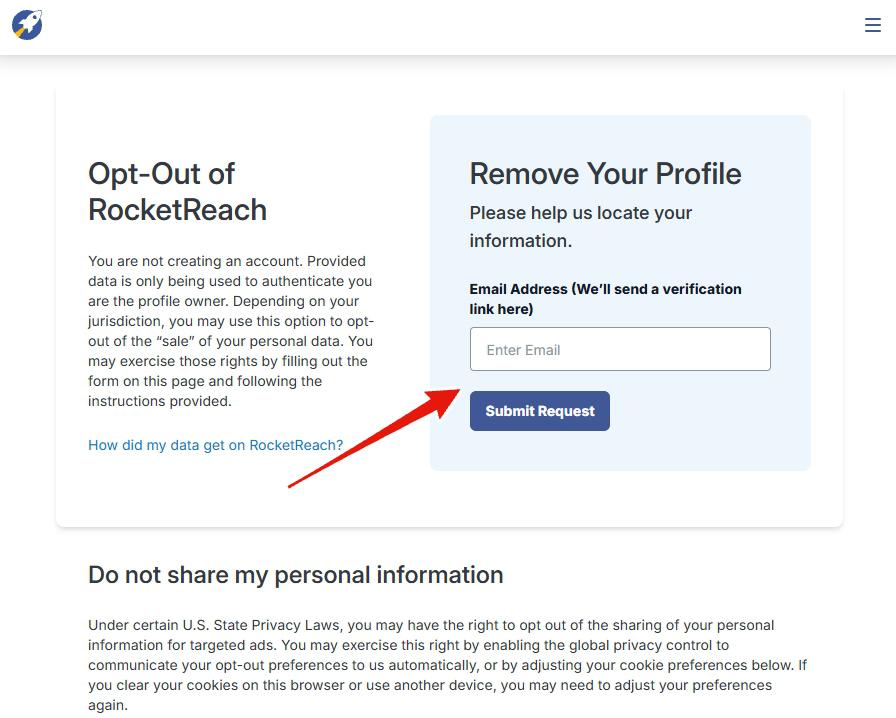
Open rocketreach.co/remove-profile. The page is titled "Opt-Out of RocketReach" with a right-side panel reading "Remove Your Profile - Please help us locate your information."
In the Email Address field (label notes: "We'll send a verification link here"), type the email address you want to check. Click the blue Submit Request button.
You'll see a confirmation reading something like: "Request Received - We will send a verification link to [your email] if it exists in our database. Please be sure to check your spam folder. This email may take a few minutes to arrive."
That language is intentional - it's RocketReach telling you the gate is your email being in their index. See section 04 for what happens next.
Paste your email into the right-side panel and click Submit Request. The form doesn't tell you on-page whether you're in the database - that signal arrives by email (or not).
What happens next
What happens after submission
Check your inbox
RocketReach may send a verification email after you submit an address.
The page doesn't say whether RocketReach matched the submitted address. The verification email provides a positive match, but non-receipt doesn't prove that no profile exists.
Outcome A · You receive a verification email
You're in the database. Open the email from RocketReach (check spam if you don't see it within ~15 minutes), click the verification link, and complete whatever form RocketReach presents on the next page. That's the actual opt-out submission. Save any confirmation page or follow-up email for your records. RocketReach doesn't say how long removal takes, but California law gives it 15 business days to act on an opt-out of sale under CCPA / CPRA.
Outcome B. No email arrives.
Wait at least 30 minutes and check your spam folder. A missing email means the submitted address wasn't matched, or the message wasn't delivered. Submit any other current or former work addresses that RocketReach may hold. If you expect RocketReach to have a profile for you, email privacy@rocketreach.co and list the known work addresses that may identify it.
A missing email doesn't prove that no profile exists. RocketReach may have matched a profile to an old, inferred, or different work address. Delivery can also fail. Contact RocketReach if you have checked every known address and still expect a profile.
Troubleshooting
If it doesn't work
Common situations
You're confident you should be in there but no email arrives. Try previous work addresses (jobs you've left, contractor / freelance domains, personal-brand addresses you've used professionally). RocketReach indexes by published email; the address you currently use day-to-day may not be the one they have. Also check the address shown on your public LinkedIn profile or company "About" page - those are common sources.
The verification email lands but the link doesn't work. Copy the link, paste it into an incognito / private browser window, and submit the form there. Browser extensions and corporate email rewriting (Microsoft Safe Links, Proofpoint, etc.) can break clickable URLs.
You no longer have access to the email address. Email privacy@rocketreach.co from a different address. Explain that you can't access the email tied to the profile, and ask what other verification methods RocketReach accepts. Don't email a government ID or other sensitive document unless RocketReach provides an authenticated upload page and explains why it needs the document.
You submitted and got the verification email, but then never followed up. The opt-out doesn't process until you click the link and complete the next form. Re-submit your email to get a fresh verification link if the original one expires.
Profile reappears after you successfully opted out. Common complaint. RocketReach refreshes its database; a future scrape of the same sources can re-index your profile. Annual re-submission is the standard maintenance pattern. See section 06.
You don't hear back within 15 business days of completing the full opt-out. Email privacy@rocketreach.co referencing your submission date and the CCPA / CPRA statutory deadline.
Stay off
Keep your data out of RocketReach (and the broader B2B-contact ecosystem)
Source-side prevention
Expect to do this again next year. The scrapers that built your profile keep running after it's suppressed, and a later crawl of the same sources can index you afresh. Resubmitting your email once a year catches that.
One opt-out reaches one broker. ZoomInfo, Apollo.io, Lusha, Clearbit, Seamless.AI and Cognism scrape the same public web and keep their own databases. A removal at RocketReach tells none of them anything, so each needs its own request.
Cut off what feeds the scrapers. RocketReach's profiles are assembled from LinkedIn, employer team pages, conference bios, GitHub commit history and professional directories. The less of that carries your work email, the less there is to harvest - hide the email on LinkedIn, come off the team page where you can, and give event organisers a forwarding address.
Turn on Global Privacy Control. RocketReach's opt-out page says it honours the GPC signal for the "do not share" right under state privacy laws. Firefox ships it as a setting, and Chrome or Edge can send it through an extension, so the instruction goes out with every visit.
Watch for the profile returning after a job move. Your current employer's email address is the one RocketReach most wants to sell, so a new role usually means a new record within weeks. File the opt-out again with the new address.
Take yourself off data broker sites
Redact scans data broker sites from your device, finds where your details are listed, and submits the removal requests for you. If a broker relists you, it files again.