How to remove your court filing from Open Public Records
Redact finds listings · manual opt-out
Open Public Records has no single opt-out page. Each court filing has its own page, and the removal form sits at the bottom of it, closed until you click it. You find your filing by name, open the form, add your name and email, upload one file holding a photo ID and your supporting documents, and submit. The site says a person reviews every request and that approved ones are handled within 24 hours.
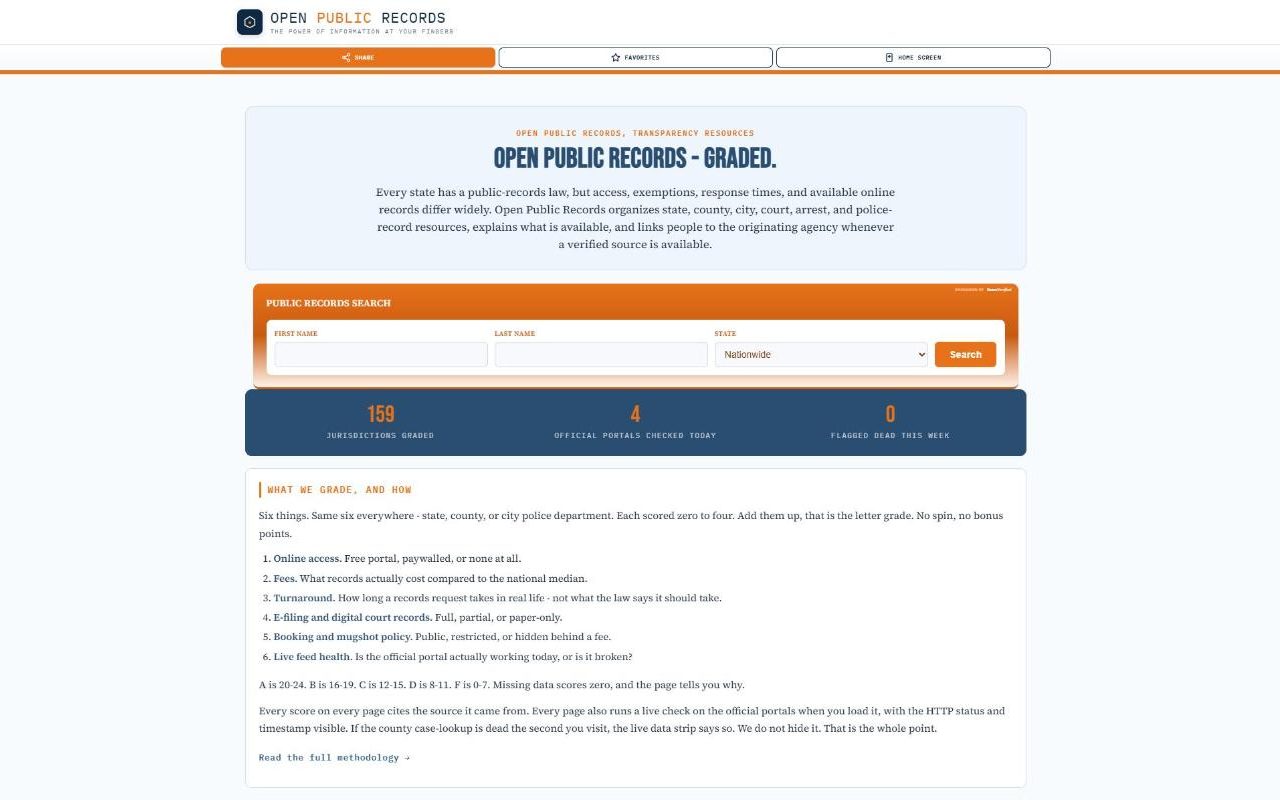
Read the profile first. The Open Public Records profile covers what a filing page shows, the BeenVerified search box and what's known about who runs the site.
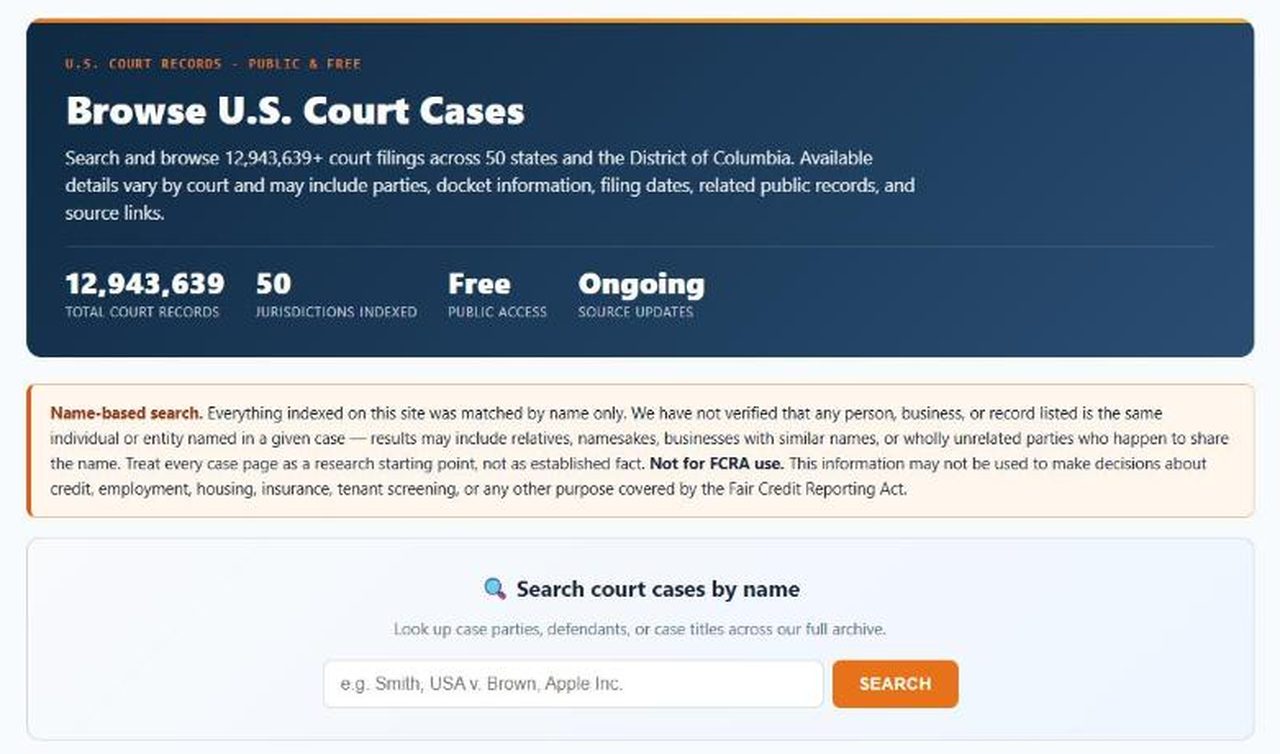
Open the court search. Under Search court cases by name, type your last name, or your name the way a case would be titled, and press Search.
Don't use the orange Public Records Search box on the homepage for this. That one is the sponsored search, and it takes you to BeenVerified.
The court search. This is the box that finds filing pages.
02
Find your case in the results
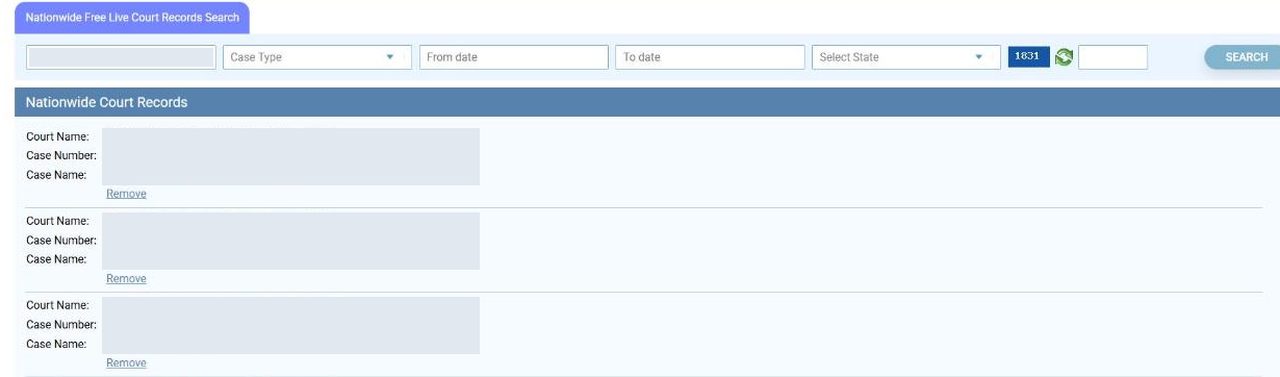
The results open on an older-looking page headed Nationwide Court Records. Each match lists a Court Name, a Case Number and a Case Name, with a Remove link underneath.
A common name brings back a lot of cases. The bar above the results lets you narrow by case type, dates and state, and there's a short number beside it to type into the box next to the Search button. Check the court and case number against your own paperwork before going further.
Each result has a Remove link. Case details are covered here.
03
Click Remove, then go to the removal box
Click Remove under your case. It opens the filing's own page, but it leaves you at the top instead of at the form. Press the red Request Record Removal button in the right-hand column, or scroll to the bottom of the page.
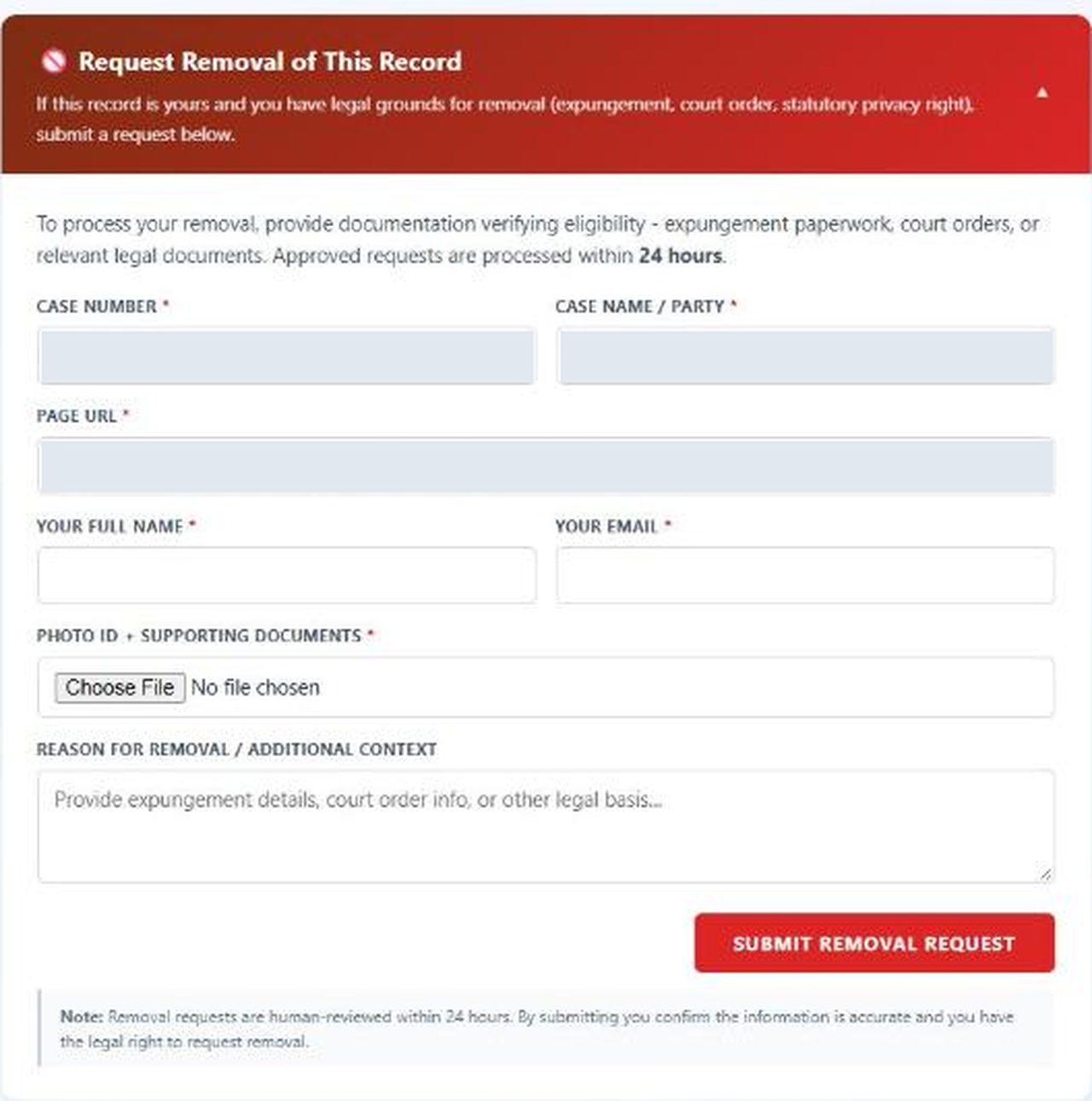
You'll land on a red box headed Request Removal of This Record. It's closed. Click the box to open the form.
The removal box starts closed. Click it to open the form.
04
Fill in your name and email
Three fields come filled in for you. Case Number, Case Name / Party and Page URL are taken from the page you're on, so leave them as they are.
Add Your Full Name and Your Email. Both are required. Reason for removal / additional context is the only optional field, and it's where the site asks for expungement details, court order information or another legal basis.
The open form. The three case fields arrive filled in.
05
Upload your ID and documents as one file
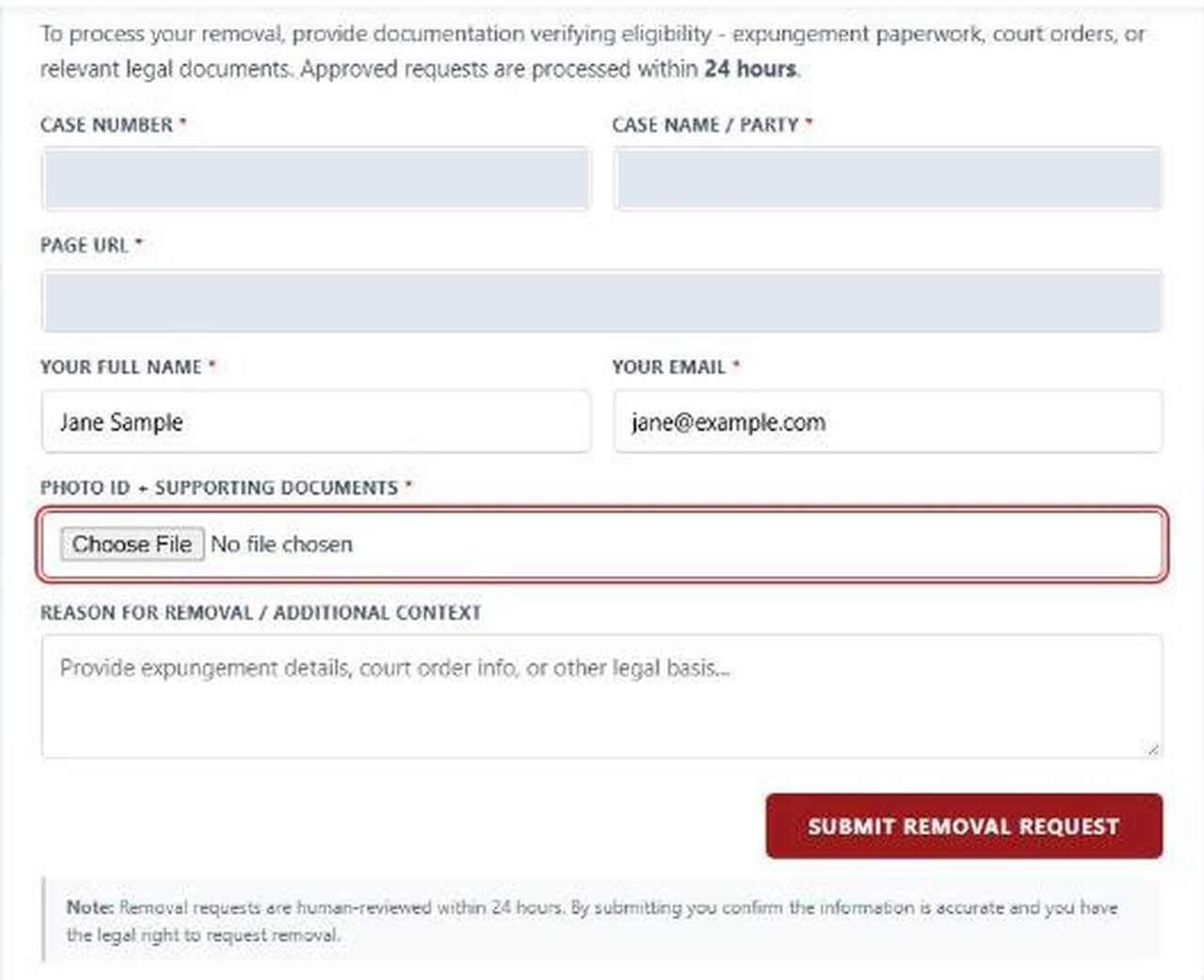
Under Photo ID + Supporting Documents, press Choose File. The field takes a single file, either an image or a PDF, so put your photo ID and your paperwork into one PDF before you get here.
The form asks for "expungement paperwork, court orders, or relevant legal documents". It doesn't say which kinds of ID it accepts.
Submitting without a file outlines the upload in red. The name and email shown are samples.
You're sending an ID to a site that doesn't name its operator. The form doesn't say how the file is stored or for how long. If the filing isn't worth that to you, the contact-page route under Troubleshooting asks for less.
06
Press Submit Removal Request
Press the red Submit Removal Request button. If something's missing, a pink bar above the form reads Please fill in followed by the name of the field, and that field is outlined in red.
The note under the button says requests are "human-reviewed within 24 hours" and that by submitting you confirm you have the legal right to ask.
Where our walk stopped. We went through this form on a live filing page on October 5, 2026 and stopped at the Submit button, because the filing wasn't ours to remove. The page's code shows a green line after sending that reads "Thank you. Your request has been received and will be processed within 24 hours." We haven't seen it appear ourselves.
Confirm
Confirm it worked
The thank-you line isn't a receipt. The form shows it whenever the site's server answers, and nothing on the form promises a confirmation email, so keep the page address and the date you sent the request.
Open the filing's address again after a day or two. The site says approved requests are processed within 24 hours, and it also says it reviews each one and may turn it down, so a page that's still up may mean a refusal and not a delay. Once the page is gone, a copy can linger in search results. Google's outdated content tool clears that.
If it fails
Troubleshooting
The form says "Submission failed". That message tells you to email openpublicrecords@gmail.com directly. Send the page address, the case number and the same documents.
You don't have an expungement or a court order. The site's terms describe a wider route. Write through the contact page with the exact address of the page, enough information to show it's about you, and a short statement of why it should come down. The terms say every request is weighed against the public nature of the record and can be declined.
You're named in more than one case. Each filing has its own page and its own form, so each one needs its own request.
The page is still up after a few days. Email openpublicrecords@gmail.com with the page address and the date of your first request. Neither the form nor the terms describe an appeal.
You found yourself through the orange search box. That report is BeenVerified's, and this form doesn't reach it. Use our BeenVerified removal guide.
An old page called records_removal.htm. It still loads if you have the address, but nothing on the site links to it anymore. Use the form on the filing page.
Stay off
Keep your record off
Removal here takes one page out of this site's index. The site is plain that "the underlying government record remains at its source", so the same case can still be read at the court and picked up by other sites. A sealing or expungement order from the court gives you the paperwork this form asks for. What it does to the court's own file depends on the state and on the order. Sealing usually limits who can read the file, while some expungements leave it open to the public, so don't count on an order to keep the case from being collected again.
Filing pages say new filings are added as the court publishes them, so a new case would get a new page. Search your name on the court search every few months.
Take yourself off data broker sites
Redact scans data broker sites from your device, finds where your details are listed, and submits the removal requests for you. If a broker relists you, it files again.
October 5, 2026 · Walked on October 5, 2026 on a live court filing page, from the name search to the Submit Removal Request button. The search results, the Remove link, the closed removal box, the form's fields and both missing-field messages were all seen on screen. We stopped before sending, because the filing wasn't ours, so the thank-you line, the failure message and the single-file limit on the upload are read from the page's code, and the 24-hour turnaround is the site's claim. The contact-page route comes from section 12 of the site's terms, read the same day.