BeenVerified runs a self-service opt-out. Fill in your identity profile, pick your record from the results, optionally add phones / addresses / emails / social profiles to suppress, tick the acknowledgement + CAPTCHA, submit, then click the green "VERIFY OPT-OUT" link in the email they send. Plan on 5-7 minutes total including the email round-trip; in our experience the listing usually disappears within 24-72 hours after verification, with full propagation in up to 7 business days.
Before you remove your data: See the BeenVerified data broker profile for ownership, contact details, litigation history, and related sites.
Quick facts
Removal Overview
Email-verified
Method
Identity form + accordion add-ons
Active time
~5 minutes
Difficulty
Easy
Account required
No
Verification
hCaptcha + email link
Result appears
24-72 hours
Full propagation
Up to 7 business days
Re-listing risk
Medium · Re-check quarterly
Sister-site propagation is ambiguous. Some guides report that opting out of BeenVerified also suppresses your record on PeopleLooker, NeighborWho, and Ownerly. Others report the opposite - each LTVCO brand maintains its own suppression list. I haven't been able to confirm one way or the other from BeenVerified directly. Our safe assumption: opt out separately on each LTVCO sister site. See the sister-sites list on the profile.
Prereqs
What you'll need before you start
5 things
BeenVerified's opt-out form now asks for a complete identity profile up front (not just a name search). I'd recommend having these on hand before you start so you don't have to pause mid-flow.
Your first name and last name.
Your age.
Your full mailing address - street, city, state, and ZIP. If you've moved recently, use the address most likely on the listing (which may be an older one).
A real email inbox you can check. After you submit the form, BeenVerified sends a verification email with a "VERIFY OPT-OUT" link. The opt-out doesn't take effect until you click that link, so you need ongoing access to whichever inbox you use. A disposable address only works if you can still receive mail at it for the next few minutes.
Watch the billing. The BeenVerified BBB profile carries a "Pattern of Complaints" alert specifically about unexpected recurring subscription charges. The opt-out flow itself is free - if you're ever asked for a credit card during the opt-out, back out. Removal doesn't require payment.
Multiple records: common names produce multiple matching results. Each listing requires its own opt-out submission - plan to run steps 1-6 once per record. If you want to attempt a bulk removal, I'd suggest emailing ccpa@beenverified.com directly with the list of profile URLs; we've seen support respond within 72 hours.
The 6 steps
Remove your listing
~5 minutes total
01
Open the opt-out search page and run an initial search
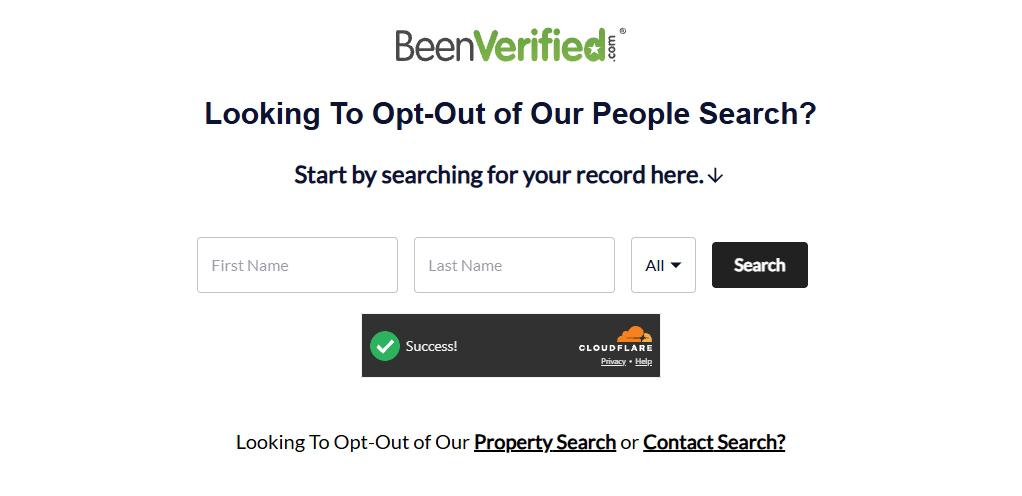
Go directly to beenverified.com/app/optout/search. You can also reach the same page by scrolling to the footer of the homepage and clicking the "Do Not Sell or Share My Personal Information" link.
The page is titled "Looking To Opt-Out of Our People Search?" with a simple form below: First Name, Last Name, and a State dropdown (defaults to "All"). The page is gated by Cloudflare's bot check - look for the "Success!" indicator before submitting. Fill in the form, click Search to proceed to the identity form in step 2.
The opt-out search gate. Cloudflare verifies you're human before showing the identity form.
02
Fill in the identity form (and pick the right Request Type)
The opt-out flow no longer starts with a simple name + state search. Instead, BeenVerified asks for a complete identity profile up front. Fill in every field below.
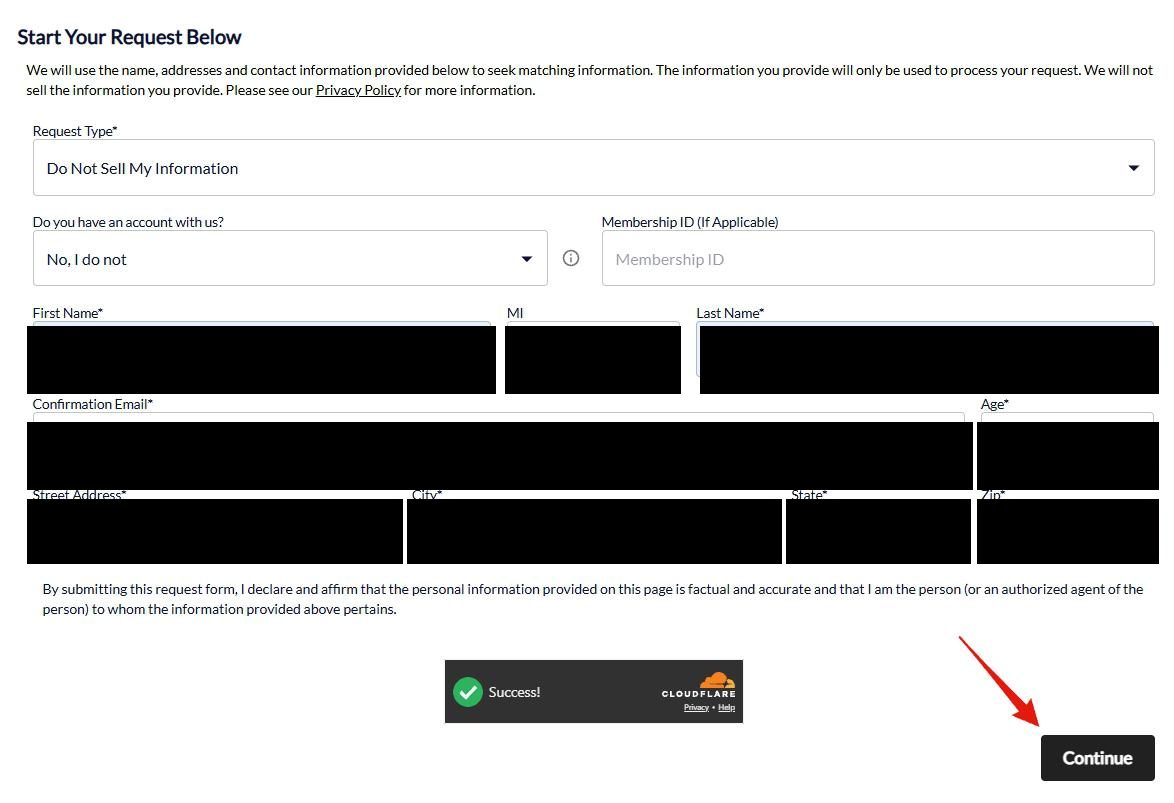
The form is titled "Start Your Request Below." Fill in:
Request Type* dropdown - pick "Do Not Sell My Information"
Do you have an account with us? dropdown - pick "No, I do not" (most users)
First Name*
MI (middle initial) - optional, no asterisk
Last Name*
Confirmation Email*
Age*
Street Address*
City*
State*
Zip*
Leave blank: the "Membership ID (If Applicable)" field. You don't need an account to opt out; that field is only for existing paid BeenVerified subscribers.
Wait for the Cloudflare "Success!" indicator near the bottom of the form, then click Continue.
BeenVerified now collects a full identity profile up front - more PII than the older search-first flow.
Pick "Do Not Sell My Information," NOT "Delete My Information." The Request Type dropdown offers both, but the "Delete My Information" path doesn't actually complete the opt-out correctly. Use "Do Not Sell My Information" - the CCPA-style suppression flow - to get your record removed. This is a non-obvious trap; the wrong selection silently breaks the flow.
No account, no membership ID needed. The "Membership ID" field is only relevant if you already have a paid BeenVerified subscription. Leave it blank. You don't need to create an account to opt out.
This is much more PII than the old flow. The earlier BeenVerified opt-out only asked for first name + last name + state. The current form collects your age, full street address, ZIP, and email in addition. You need an inbox you can actually check - the email you enter here gets the "VERIFY OPT-OUT" link in step 5, and the opt-out doesn't take effect until you click it.
03
Choose the profile that matches who you are
After clicking Continue, BeenVerified shows a list of matching profiles. The page typically says "No exact match for [your name]" at the top even when listings appear - that's normal. Look through each candidate and pick the entry that's actually you. Match on age, city/address, and any known relatives or aliases shown.
A left-side "Filter results" panel lets you narrow by Full Name, Location (past or present), and Age - useful for common names.
When you find your record, click the "Proceed to Opt Out" button on its row.
Multiple matches? Expect several entries if your name is common. Either repeat steps 3-5 for each, or follow the bulk-removal note below.
"No exact match" is the standard header - listings still show below. Match on age, city, and relatives.
Sealed records, screenshot anything visible: if your listing displays criminal data you believe was expunged or sealed under state law, screenshot it before opting out - it's your dated record of what was published.
04
Add additional info to suppress (optional), then check + hCaptcha
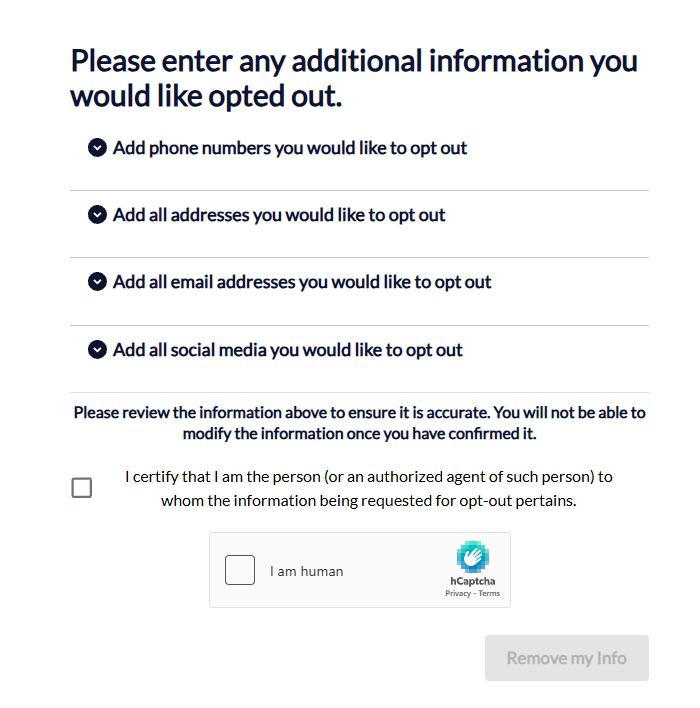
After you pick your profile, BeenVerified shows a page headed "Please enter any additional information you would like opted out." There are four accordion dropdowns where you can add data points to suppress along with your main record. Each section is optional - expand only the ones you want to use.
Add phone numbers you would like to opt out
Add all addresses you would like to opt out
Add all email addresses you would like to opt out
Add all social media you would like to opt out
Below the accordions, BeenVerified warns: "Please review the information above to ensure it is accurate. You will not be able to modify the information once you have confirmed it."
To submit:
Tick the attestation checkbox: "I certify that I am the person (or an authorized agent of such person) to whom the information being requested for opt-out pertains."
Solve the hCaptcha ("I am human" checkbox)
Click "Remove my Info" (the button stays grayed-out until both the checkbox and the CAPTCHA are completed)
Four optional accordions, an attestation checkbox, hCaptcha (not Google reCAPTCHA), and a "Remove my Info" button that activates once both gates are complete.
Trade-off: more suppression vs. more PII. Adding phones, prior addresses, alternate emails, and social media links increases the chance that all your scattered records get suppressed. But it also hands BeenVerified additional identity correlations they can use. Pick the level that matches your risk model - the form works either way.
Social media handles are a sharp tool here. Pasting your Twitter, Facebook, LinkedIn, or Instagram URL is the most reliable way to suppress the "Linked social profiles" section of BeenVerified's report - the cross-walk between your real name and your social accounts is often what makes a people-search result actually identifying. If you only care about one category of removal, that's the one with the highest privacy ROI.
05
Check your email and click "VERIFY OPT-OUT"
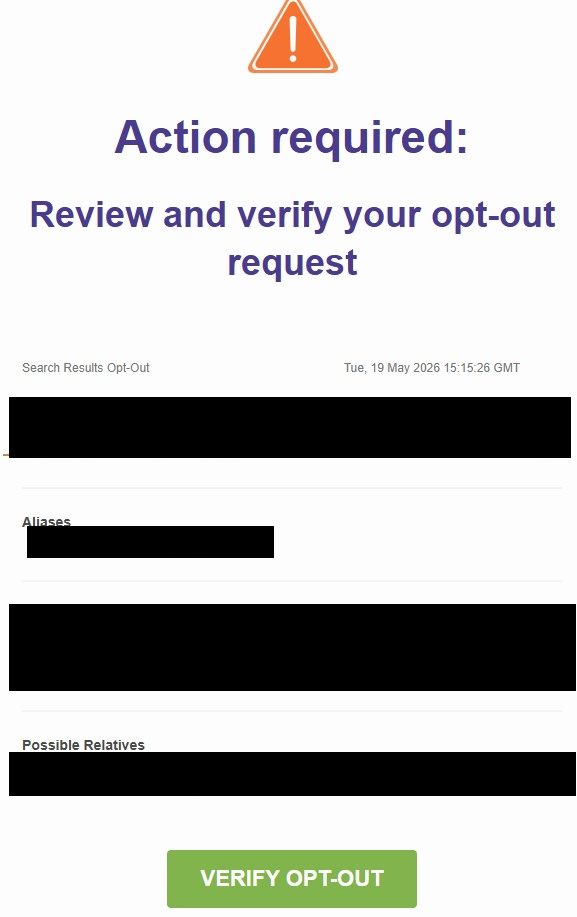
Shortly after you click "Remove my Info" in step 4, BeenVerified sends a verification email to the address you provided. The email is headed "Action required: Review and verify your opt-out request" with a large orange caution icon at the top. Below that is a summary of the listing they're about to suppress (name, aliases, recent cities, possible relatives).
Your opt-out isn't active until you click the green "VERIFY OPT-OUT" button at the bottom of the email. The request sits unverified on their end until you do.
Open the inbox of the email address you used in step 2 (check spam / promotions if you don't see it within a few minutes)
Find the email from BeenVerified - subject begins with "Action required"
Review the summary to confirm the listing is yours, then click the green "VERIFY OPT-OUT" button
The link takes you to a BeenVerified confirmation page (covered in step 6)
The email confirms which listing is being suppressed - click "VERIFY OPT-OUT" to activate the request.
If you never click the link, the opt-out doesn't take effect. The web-form submission in step 4 only queues the request; verification is the gate. People who skip this step often think they've opted out and then notice their record is still live weeks later.
Verification link can expire. If you wait too long (a few days) the button may stop working. If that happens, re-do the form from step 1 - you don't lose anything, the new request will just supersede the unverified one.
06
Confirmation - "Your optout request was submitted"
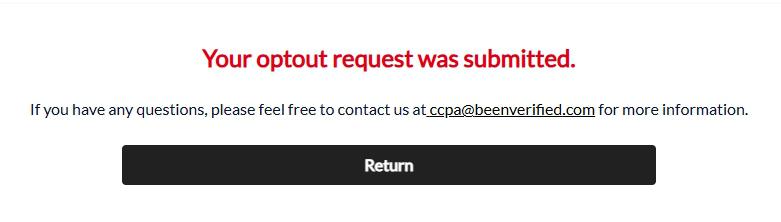
After you click "VERIFY OPT-OUT" in the email, BeenVerified shows a final confirmation page with the message "Your optout request was submitted." in red. The page offers a contact email (ccpa@beenverified.com) for follow-up questions and a "Return" button to leave.
Your record should disappear from BeenVerified search results within 24-72 hours, with full propagation taking up to 7 business days.
The contact for follow-up is ccpa@beenverified.com, not the generic privacy@ address.
Screenshot this confirmation. The on-page message and the original verification email together are your evidence trail. Save both - if you ever need to file a CCPA / state-AG / CFPB complaint claiming you requested removal, the timestamped screenshots are what proves you did your part.
Confirm
Confirm it worked
Wait 24-72h
Wait at least 24-72 hours after submitting your request in step 5, then go back to beenverified.com and search for yourself using the same name + state from step 2.
I'd recommend checking in an incognito / private browser window, or clear your cache first. We've found cached search results can show the old listing even after the suppression has actually happened.
Full propagation can take up to 7 business days. If you're inside that window, give it more time before assuming the opt-out didn't work.
Success looks like: the record you removed no longer appears in BeenVerified search results when you re-search in a fresh browser session, and clicking any old direct profile URL leads to a "Profile not found" or "no longer available" page.
If it fails
Troubleshooting
5 fallbacks
Picked the wrong Request Type. If you accidentally selected "Delete My Information" instead of "Do Not Sell My Information" in step 2, the opt-out won't process correctly. Restart from step 1 and pick "Do Not Sell My Information" - that's the only Request Type that reliably completes the flow.
Form rejected your submission. Check that all required fields (name, age, email, street, city, state, ZIP) are filled in, the acknowledgement checkbox is ticked, and the CAPTCHA is solved.
Couldn't find your record in step 3. Go back to step 2 and try variations of your name (middle initial vs full middle name, maiden name, hyphenated last name). If you've lived in multiple states, you may need to run the flow separately for each state's records.
Listing still appears after 7 business days. I'd recommend emailing ccpa@beenverified.com with the listing URL, your original removal-request email, and the date you submitted the opt-out. Cite a CCPA (California) or state privacy-law deletion right if applicable.
Sealed / expunged records still showing. If your record displays criminal data you believe was expunged or sealed under state law, this is a potential FCRA violation - email privacy@ above with the specific records, and keep dated screenshots of the listing.
Stay off
Keep your record off the site
Quarterly check
BeenVerified refreshes its dataset from public records, partner feeds, aggregators, resellers, and new web crawls on an ongoing basis. A new address, phone number, court filing, or social-media profile linkage can put you back on the site - even if you successfully removed an older record.
We recommend re-checking every 3-4 months. Search the site for your name across any state you've lived in. If a new record appears, repeat steps 1-5 to suppress it.
And remember - BeenVerified is one of 9 brands in the LTVCO portfolio. Since we can't confirm whether the opt-out propagates across sister sites, I'd suggest checking PeopleLooker, PeopleSmart, NeighborWho, Ownerly, NumberGuru, ReversePhone, Bumper, and MoneyBot5000 for your listing as well. The sister-sites list on the profile has direct links to each.
Doing this across every broker? BeenVerified is one of ~120 active US people-search and background-check sites we track. In our experience, manual removal across all of them takes 20-40 hours per pass. Redact's data broker removal product runs and re-checks all the requests for you.
Take yourself off data broker sites
Redact scans data broker sites from your device, finds where your details are listed, and submits the removal requests for you. If a broker relists you, it files again.
![BeenVerified profile-selection page with a 'No exact match for [name]' header, a left-side Filter results sidebar (Full Name, Location past or present, Age slider, Refine Results button), and two matching profile cards. Each card has a 'Proceed to Opt Out' button on the right; a green arrow indicates the button on the first match.](/broker-images/versions/2d47b7829f6194a7ab051c7e81e88e9467480a0023dc8d85bbf8ddd122a76a72/beenverified-com/step-3.jpg)