Removal guide · FamFinder

How to remove your info from FamFinder

FamFinder runs an opt-out on its own domain, at an address that isn't linked anywhere on the site. We walked it in August 2026 and it works - but the verification email that completes the request can take hours to arrive, long enough to look like it never will. Emailing privacy@famfinder.com is the alternative if you'd rather not wait.

FamFinder homepage screenshot

The full picture: See the FamFinder data broker profile for ownership and what its site publishes.

Status

The verification email is slow - don't give up on it

We walked FamFinder's opt-out on August 7, 2026, and the one thing worth knowing before you start is that the verification email takes a long time to arrive.

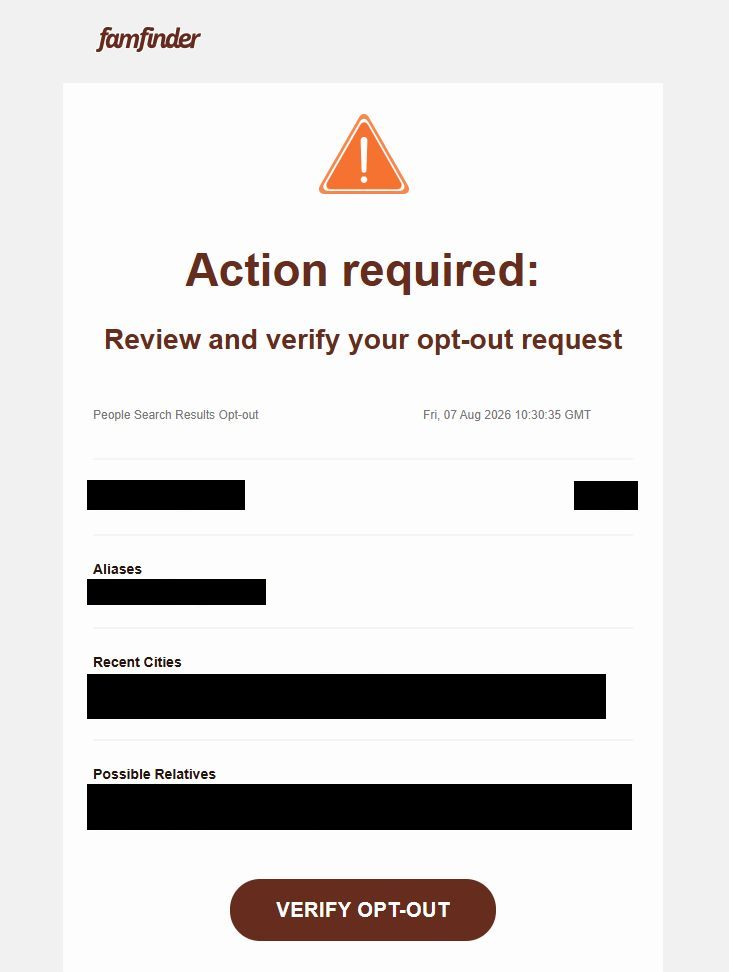
The form itself works. It finds your record, takes your email address, accepts the captcha, and tells you to check your inbox. Then nothing happens for long enough that our first pass through this flow concluded the email was never coming at all. It does come. Ours landed hours later, subject line "Action required: Review and verify your opt-out request", with your record's name, aliases, recent cities and possible relatives laid out above a VERIFY OPT-OUT button.

Don't resubmit, and don't assume it failed. FamFinder doesn't record the request until you click the link, so an unclicked email means an unfinished opt-out - but the delay is the process working slowly, not a broken form. Check back over the following hours, and look in spam.

Quick facts

At a glance

Status

Working as of Aug 7, 2026 · the verification email is slow, allow hours

Method

On-site form + email verification, or an email request

Entry point

famfinder.com/optout · unlisted, not in the nav

Cost

Free

The steps

Remove your listing

01

Go to famfinder.com/optout and search for your record

Type famfinder.com/optout into the address bar. It redirects to FamFinder's own opt-out page, headed Looking To Opt-Out of Our People Search?

You won't find this by browsing. It isn't in the site's navigation, and the FAQ's reference to "our Opt-Out Instructions" is plain text with nothing to click, so the address is the only way in.

Enter your first name, last name and state, then click Search. Cloudflare checks the browser first and shows a green Success! before the form works, so give it a second.
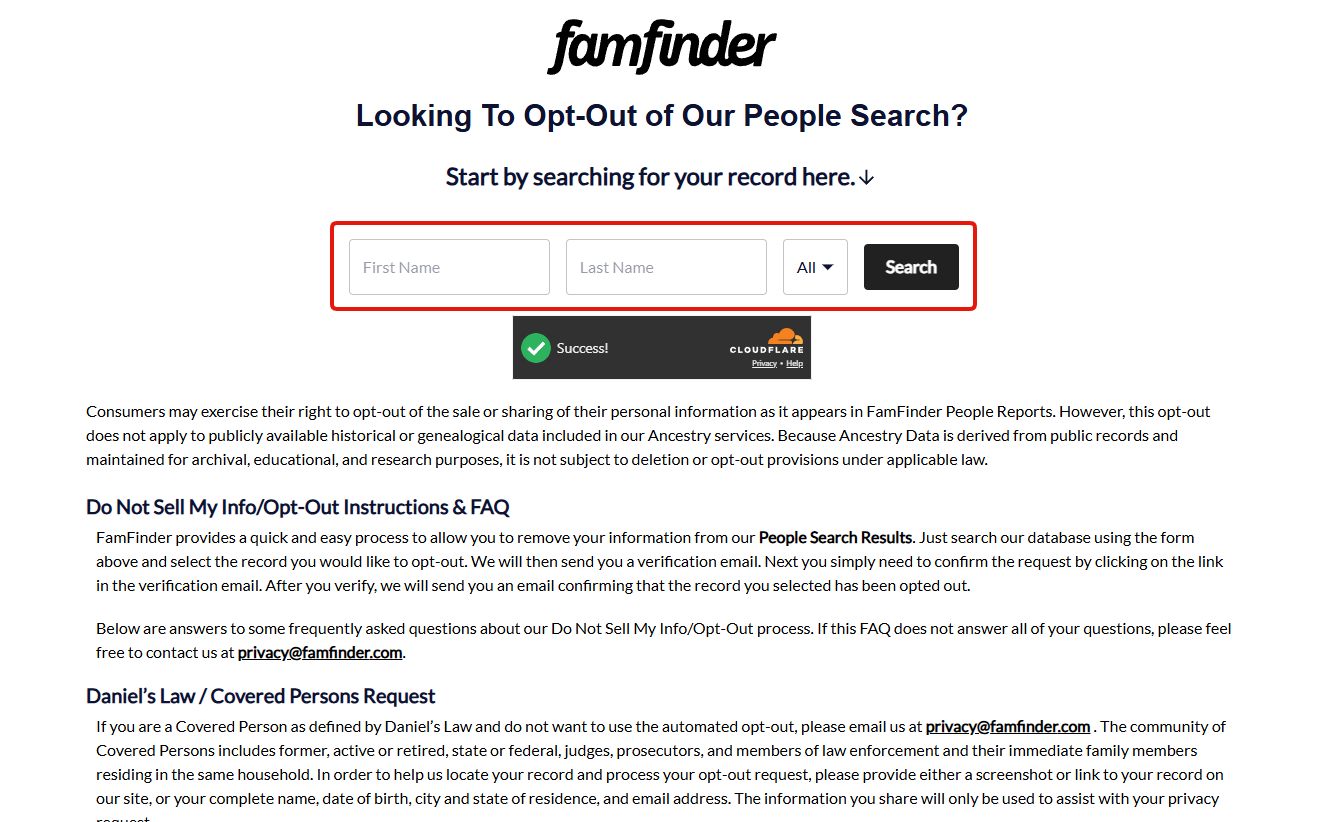
FamFinder's opt-out page headed 'Looking To Opt-Out of Our People Search?' with a First Name, Last Name and state search form outlined in red, a Cloudflare 'Success!' indicator below it, and the Do Not Sell My Info / Opt-Out Instructions FAQ underneath.
The opt-out page. Search your record here - the form only works once Cloudflare shows Success.

This opt-out doesn't cover everything FamFinder holds on you. The page states that it applies to personal information in FamFinder People Reports but not to "publicly available historical or genealogical data included in our Ancestry services," which it says isn't subject to deletion because it's archival. So a successful opt-out can leave genealogical records about you in place.
02

Find your record and click Proceed to Opt Out

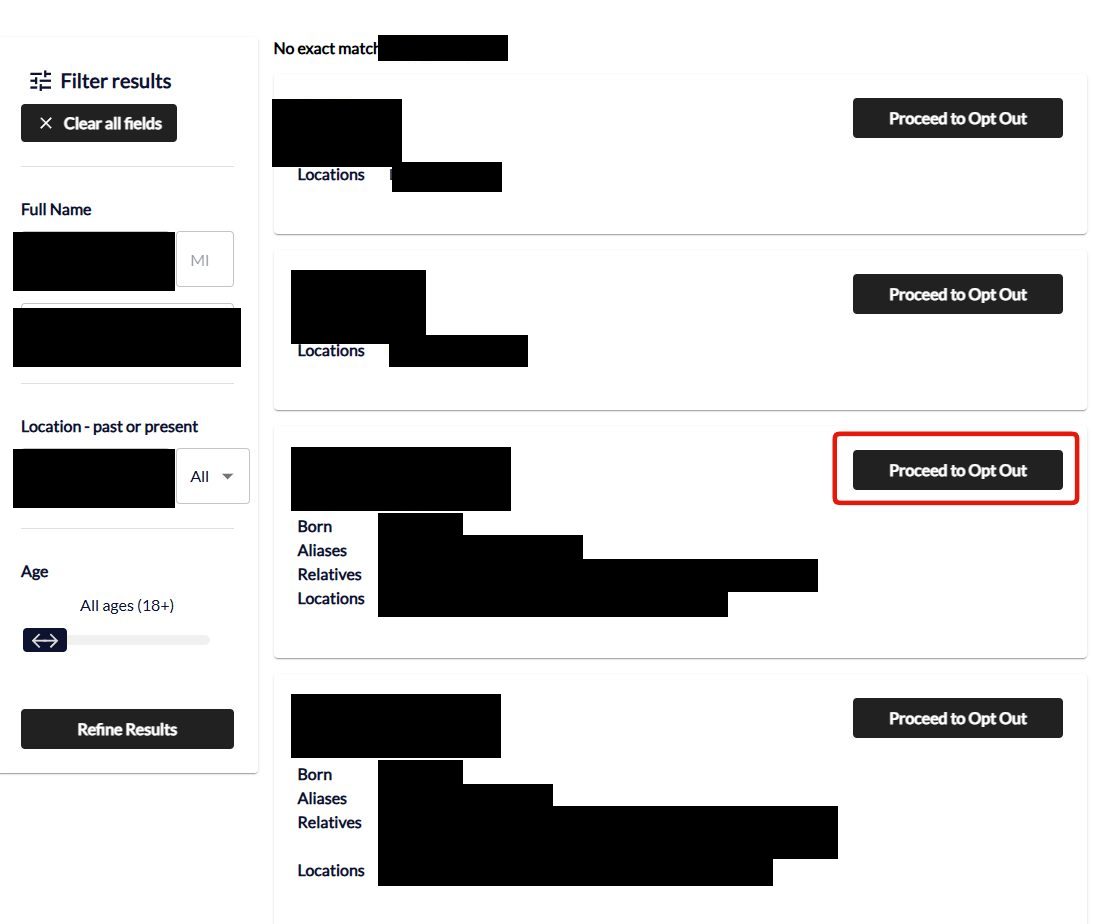
The results list every record matching the name, each with its own Proceed to Opt Out button. Pick the one that's actually you - the born date, aliases, relatives and locations under each entry are what tell near-identical names apart.

If there's too much to sort through, the left-hand panel filters by middle initial, location and age. Each record is a separate opt-out, so if more than one is yours you'll be doing this more than once.

FamFinder opt-out search results showing several matching records, each listing born date, aliases, relatives and locations, with a 'Proceed to Opt Out' button on every row and the chosen row's button outlined in red. A filter panel on the left offers full name, location and age.
Every match gets its own Proceed to Opt Out button. One record, one request.
03

Enter your email, clear the captcha, and send

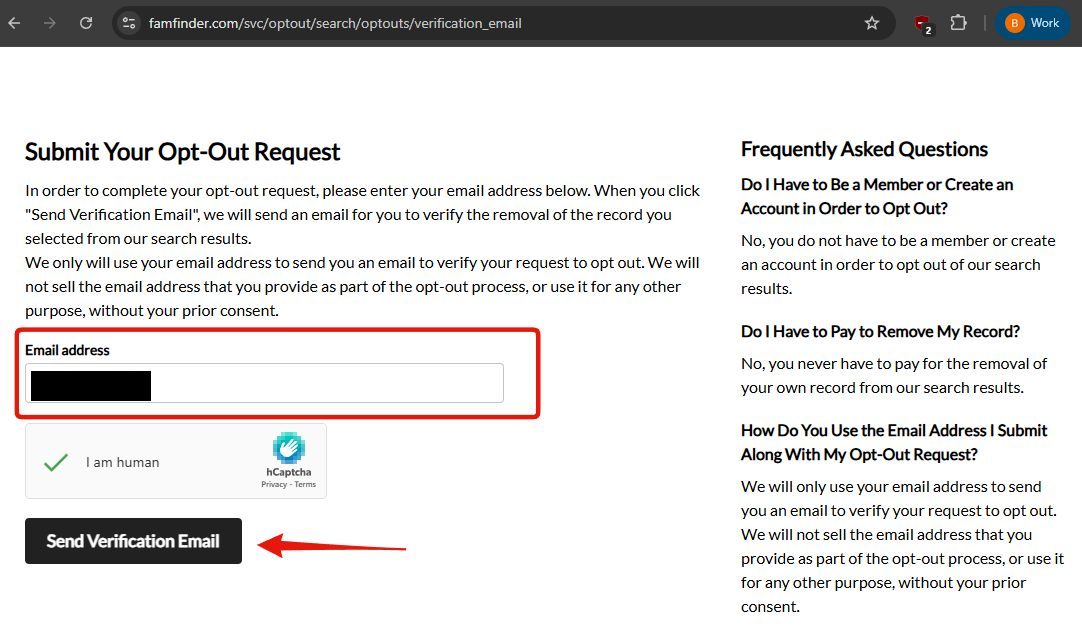
You land on Submit Your Opt-Out Request at famfinder.com/svc/optout/search/optouts/verification_email. Enter an email address, tick the I am human hCaptcha, and click Send Verification Email.

FamFinder states it only uses this address to verify the request, and that no account and no payment are needed to opt out.

FamFinder's 'Submit Your Opt-Out Request' page with an email address field outlined in red, an hCaptcha 'I am human' checkbox showing a green tick, and a red arrow pointing at the black 'Send Verification Email' button.
Enter an email, clear the captcha, send. Then wait - the email is slow.

Expect a long wait here. You click Send Verification Email and, as of August 7, 2026, nothing arrives for hours. Our first walkthrough sat here long enough to write the flow off as broken before the email finally landed.

FamFinder doesn't record the request until you click the link, so the opt-out isn't finished until it turns up. Don't resubmit and don't assume failure - just leave it and check back.

04

Click VERIFY OPT-OUT in the email when it lands

The email comes from FamFinder headed "Action required: Review and verify your opt-out request", tagged People Search Results Opt-out, and it echoes the record you picked back at you - name, age, aliases, recent cities and possible relatives - above a VERIFY OPT-OUT button.

Read those details before you click. This is the last point where you can catch having selected the wrong person, and the aliases and recent cities are what give it away. If they aren't yours, go back and start again from the search rather than verifying someone else's removal.

Click the button. FamFinder's own instructions say a second email follows confirming the record has been opted out.

FamFinder verification email headed 'Action required: Review and verify your opt-out request', dated Fri 07 Aug 2026 10:30:35 GMT, listing the selected record's name, age, aliases, recent cities and possible relatives above a large 'VERIFY OPT-OUT' button.
The verification email. Check the aliases and cities are yours, then click VERIFY OPT-OUT.

Give this hours, not minutes. Ours was timestamped 10:30:35 GMT, long after the form was submitted - late enough that we first recorded the opt-out as broken. Check spam, and don't resubmit while you're waiting.

05

Or email privacy@famfinder.com instead

If you'd rather not wait on the email round-trip, privacy@famfinder.com is published on FamFinder's own FAQ as an alternative route.

Include a link to your record or a screenshot of it, plus your full name, date of birth, city and state, so they can find the right entry.

FamFinder warns that one request may not be enough. Its FAQ says records "may appear from multiple sources, so you may need to complete additional steps to fully remove your details." Treat a single submission as the start rather than the finish, and search yourself again afterwards.

Judges, prosecutors, law enforcement and their households have a separate route. FamFinder's opt-out page carries a Daniel's Law / Covered Persons notice telling Covered Persons to skip the automated flow and email privacy@famfinder.com instead, with either a link or screenshot of the record, or a full name, date of birth, city and state of residence, and email address.

Confirm

Confirm it worked

Nothing is submitted until you click VERIFY OPT-OUT in the email, so the first thing to confirm is that you got that far. If the email hasn't come yet, the request is still sitting unrecorded.

No FamFinder-specific turnaround is published. The registered operator's 2024 metrics report a 10-day mean and 3-day median response to deletion requests across its brands, so give it about a week after verifying and then search again.

Search for the specific record you opened rather than just your name, and keep FamFinder's own warning in mind that a listing built from several sources can take more than one request. If nothing has happened, escalate to privacy@ltvco.com or 347-931-2725 at the parent company.

If it fails

Troubleshooting

  • The verification email hasn't arrived: wait longer before doing anything else. On August 7, 2026 ours took hours, long enough that we initially recorded the flow as broken. Check spam, don't resubmit, and give it a day before treating it as a failure. If you'd rather not wait, privacy@famfinder.com is the alternative.

  • Portal won't load: it depends on JavaScript and a Cloudflare check - try a different browser or turn off content blockers for the page. If it still won't open, use the email route.

  • Listing persists after a week: email privacy@famfinder.com with the record's URL and the date you submitted. Escalate to privacy@ltvco.com or 347-931-2725 at the parent if that gets no reply.

  • Only part of your record cleared: that's the case FamFinder's FAQ warns about, where a listing is assembled from several sources. Submit again for what's left rather than assuming the first request failed.

Take yourself off data broker sites

Redact scans 120+ data broker sites from your device, finds where your details are listed, and submits the removal requests for you. If a broker relists you, it files again.

Last updated:

August 7, 2026 · Walked through by Hang-low, and it works - slowly. Steps 1 to 3 are documented from that run with his screenshots of each screen, and step 4 from the verification email itself. ⚠️ An earlier version of this guide said the flow was broken because the email never arrived. It does arrive; ours took hours, and the email is timestamped 10:30:35 GMT. That correction is the reason the guide now leads with the delay rather than a failure. The guide also previously sent readers to BeenVerified's family-wide portal, which was wrong - famfinder.com/optout is FamFinder's own page.