Removal guide · Cuebiq

How to remove your info from Cuebiq

The form is short. The obstacle is your mobile advertising ID, the only name Cuebiq knows you by. The field isn't marked required, so the form takes a submission without it that matches nothing. Find the ID first and the rest takes two minutes. Cuebiq's own directions for finding it are wrong on Android and awkward on iPhone, so both routes are below.

Cuebiq homepage screenshot

Worth reading first: the Cuebiq profile explains how a company you've never used ended up with a record of where your phone has been.

Do this first

Find your advertising ID before you open the form

Cuebiq holds no account, email or name for you, only your phone's mobile advertising identifier, so a request without it goes through and quietly matches nothing.

On Android open Settings, tap Google (listed on some phones as Google Services), open the All Services tab and tap Ads. Your Advertising ID is the long string at the bottom. Cuebiq's form tells Android users to go to Settings > Privacy > Advanced > Ads, a route from an older version of Android that current handsets don't have. The NAI's own device instructions, written against Android 16, give the same Google > All Services > Ads route.

On iPhone there's no route in Settings, and that's Apple's doing rather than Cuebiq's. Apple removed user-facing access to the IDFA, so the only way to read it is a third-party utility from the App Store, such as My Device ID by AppsFlyer or IDFA ATT, which report the value on screen. A utility only sees the real value once you switch on Allow Apps to Request to Track under Settings > Privacy & Security > Tracking and allow it when it asks. Otherwise Apple hands it zeros, which match nothing. That permission gives a third-party app the identifier and tracking access you're trying to take back, so as soon as you've copied the value, switch it off again, tell iOS to have apps you'd already allowed stop tracking, and delete the utility.

Copy the string somewhere before you continue. It's long, case-sensitive and worth pasting rather than retyping.

Yes, on iPhone you have to install an app to opt out of tracking, and it's reasonable to resent that. Cuebiq says it isn't responsible for third-party apps, so choose carefully. Check what permissions the utility asks for, treat anything wanting more than the identifier as suspect, and delete it once you've copied the string.

While you're on that Android screen, this is the moment to delete or reset the advertising ID. That breaks the link for every location broker at once, not just this one.

On iPhone you can't reset the IDFA yourself, so switch off Allow Apps to Request to Track under Settings > Privacy & Security > Tracking instead. Apple says every app that then asks is treated as if you'd declined. iOS also asks whether apps you've already allowed should stop tracking, so choose that, or they keep reading the real value.

The request

Filling in the privacy request

01

Open the request page, not the privacy centre

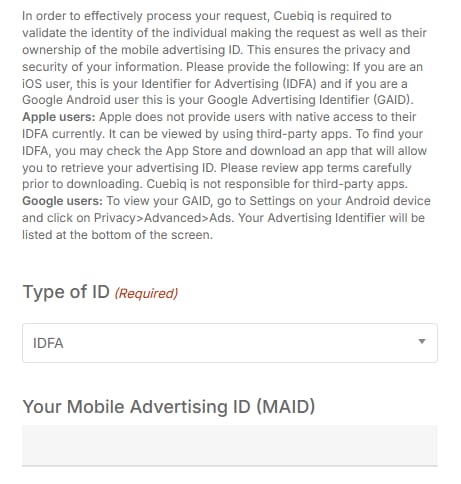
Go to cuebiq.com/privacy-request/. The heading reads Privacy Request, with Exercise Your Privacy Choice over the explanation on the left and the form on the right.

If you landed on the privacy centre instead, that page explains policy and holds no form.

Cuebiq's Privacy Request page. On the right, a form headed I wish to with three radio options for opt-out, access, and erase, followed by a required email field, an instruction block about the mobile advertising ID, and a Type of ID dropdown set to IDFA.
Three choices at the top. Everything below them is identification, meaning an email to reply to and the identifier the records are keyed to.
02

Choose what you're asking for

I wish to is required and offers three choices.

  • opt-out / do not sell or share my personal information
  • get access to or a copy of my personal information
  • erase/delete my personal information

Pick opt-out if you're filing once. Cuebiq's filing comment says it treats every opt-out as a deletion, and its privacy policy says an opt-out also stops collection and adds the device to an opt-out list it shares with partners. The same policy says an erase request on its own doesn't stop collection, so erase/delete is the weaker single choice despite the name. With Cuebiq's stated four-day turnaround, filing opt-out and then erase is a realistic pair if you want both on record.

An access request is worth more here than on a people-search site, since very few people have seen their own movement history as a broker records it.

03

Add an email address for the reply

Your Email Address is required, and the form says it's used solely to process the request.

This isn't what Cuebiq matches you on, since it holds no email for you. It's purely the reply channel, so use whichever address you actually monitor rather than hunting for one connected to the apps involved.

04

Set the ID type, paste the identifier, answer the agent question

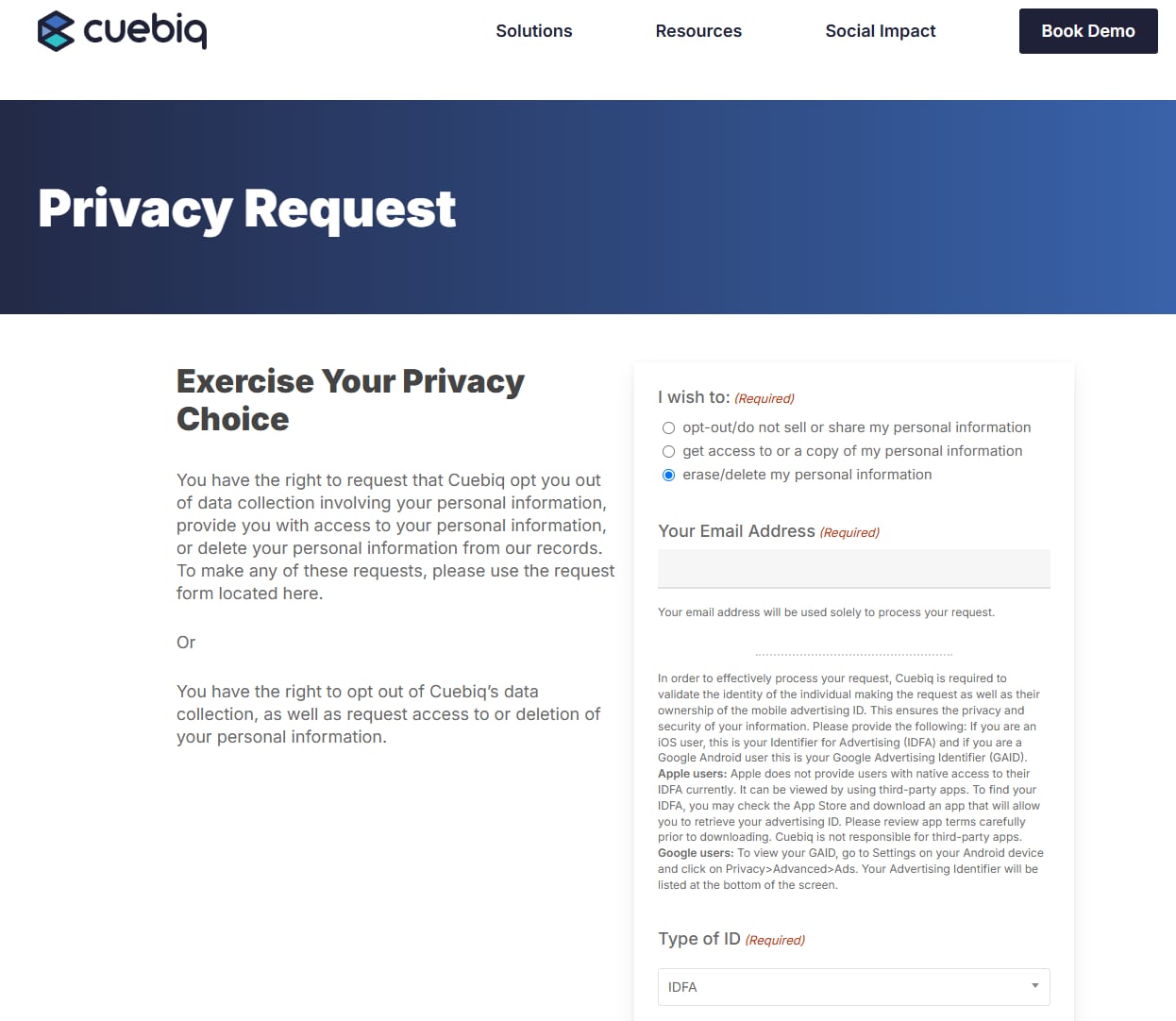
Type of ID is a required dropdown that defaults to IDFA. Switch it to GAID on Android.

Paste your string into Your Mobile Advertising ID (MAID). It carries no required marker, so a successful submission isn't proof of a complete one.

Are You an Authorized Agent Submitting a Request on Behalf of a California Resident? is required. Tick No if you're acting for yourself. The file-upload slot beneath it is for an agent's signed designation form and stays empty otherwise. Click Submit My Request. An invisible reCAPTCHA v3 runs behind the button, so there's no puzzle to solve.

One request covers one identifier.

The middle of Cuebiq's form, with an instruction block explaining IDFA and GAID retrieval, a required Type of ID dropdown set to IDFA, and the Your Mobile Advertising ID (MAID) text field beneath it.
The blue instruction block is where Cuebiq's Android directions are out of date. Type of ID is required; the MAID field itself isn't.

Afterwards

What a result looks like

Cuebiq's filed numbers set the expectation. For 2024 it reported 26,285,436 deletion requests received, 26,211,064 granted in whole, none in part and 74,372 denied, a grant rate above 99%. It reports four days to respond, and its filing comment says it tracked a mean but not a median for 2024 and entered the same value in both columns.

There's nothing to re-search afterwards because there was never a public listing. Keep Cuebiq's reply, the identifier you submitted and the date. If you want something firmer than a confirmation, file an access request afterwards; a response showing nothing held is the closest thing to proof this category offers.

Without a request, Cuebiq's policy says it retires an advertising ID from ad targeting within 120 days but keeps using it for analytics for up to 24 months, so a request does shorten the tail.

Snags

Where people get stuck

  • The Android path on the form doesn't exist. Cuebiq prints Settings > Privacy > Advanced > Ads. Its privacy policy, updated August 21, 2026, gives Settings > Privacy > Ads or Settings > Google > Ads instead, and neither matches the form. Use Settings > Google > All Services > Ads.

  • No way to see the IDFA on iPhone. Correct, Apple removed it. A third-party utility is the only route, and it can be deleted straight after.

  • You found a page with no form. That's the privacy centre. The form is at /privacy-request/.

  • You reset your advertising ID recently. The old value is a separate record this request won't reach and you can no longer retrieve. File for the current one.

  • You have more than one device. A phone and a tablet are two identifiers and two requests.

  • Some partner apps carry their own switch. Cuebiq's privacy centre says certain app partners offer a separate Cuebiq Opt-Out option in their settings, and its policy describes in-app Request access to my data and Delete my data options. Check the app's settings if you know which app carried the SDK.

  • You want it to stop, not just be deleted. Erasure alone doesn't end collection, by Cuebiq's own policy. File the opt-out, then act on the phone as below.

The real fix

Cutting it off at the phone

This is the one category in the directory where the device, not the broker, is the effective place to act. Cuebiq is one buyer in a large market and the same SDK arrangement feeds many location companies, so deleting from one leaves the pipeline intact.

Cut the advertising ID off, as in the tip above. That severs the key tying past location to future location across every broker at once.

Audit location permissions. Set apps to While Using rather than Always, and revoke it from anything with no business knowing where you are. A weather app needs a rough area, not a continuous trail.

Use the industry pages for the rest. The NAI's one-click opt-out tool, which Cuebiq's privacy centre still links, has been retired. Its old address now lands on the NAI's How to Opt Out page, which points to the DAA's AdChoices tools for browser-based opt-outs and to per-device instructions for advertising IDs. Those cover interest-based advertising rather than location collection, so treat them as a supplement to the device settings.

Cuebiq's four-day turnaround is genuinely good and worth using. Do it alongside the device settings rather than instead of them.

Take yourself off data broker sites

Redact scans 120+ data broker sites from your device, finds where your details are listed, and submits the removal requests for you. If a broker relists you, it files again.

Last updated:

August 18, 2026 · Walked firsthand before a word was drafted. The three request types, the required email, the Type of ID dropdown defaulting to IDFA, the unmarked MAID field and the required authorised-agent question all come from the live form, and the Android retrieval path printed on it was corrected against a current handset. September 10, 2026 · Rechecked against the served form, which is unchanged and also carries an invisible reCAPTCHA v3 and an upload slot for agents. Cuebiq's filing comment and its privacy policy, updated August 21, 2026, moved opt-out ahead of erase as the request to pick, because Cuebiq says it deletes on opt-out and that erasure alone doesn't stop collection. The NAI tool link was retired upstream and now points at the NAI's resources page.