Clearbit routes privacy requests through the Privacy Request Center at preferences.clearbit.com. The flow is a 2-step process. Pick your country and state, choose one of 4 request types (Access, Deletion, Transfer, or Update Inaccuracies); then fill out the request-specific form and submit. California residents can also email a sale opt-out as clearbit.com/ccpa-opt-out describes, but that email route only covers the sale of their data, and the page sends every other request, deletion included, back to this form. You can repeat the process for each request type you want exercised.
Before you remove your data: See the Clearbit data broker profile for ownership (HubSpot, since December 2023), the Reveal IP-to-company product, and the full data-product breakdown.
The opt-out stops future use, not past use. Clearbit's own docs note: an opt-out "stops your data from being served through their API going forward but does not recall data that has already been delivered to their customers." Once a HubSpot or Clearbit customer has pulled your record into their CRM, that downstream copy is no longer under Clearbit's control. Still file the Deletion request, because it stops ongoing distribution - but it isn't a magic eraser.
Options vary by state. The available request types on the form depend on the country and state you pick. The US baseline is the 4 types listed above; some states add specific rights (e.g., the California-specific path at clearbit.com/ccpa-opt-out). The EU / UK path follows GDPR Article 17 and is available through the same form by picking your country in step 1.
Prereqs
What you'll need before you start
3 things
Your name and email address. Clearbit uses these to match against stored records. Use the work email most likely to appear in their enrichment data; if you have multiple professional addresses, plan on a separate submission per address.
Somewhere to receive Clearbit's reply. The privacy team confirms by email and sometimes asks a follow-up question before it acts, so the address on the form has to be one you'll read.
A decision on which request type you want. Pick one per submission. Most people want Deletion; some want Access first to see what Clearbit holds before deleting. You can run both - just file two separate submissions.
The 2 steps
Pick request type, fill the form, submit
~5 minutes per request
01
Open preferences.clearbit.com, pick country and state, select Deletion Request
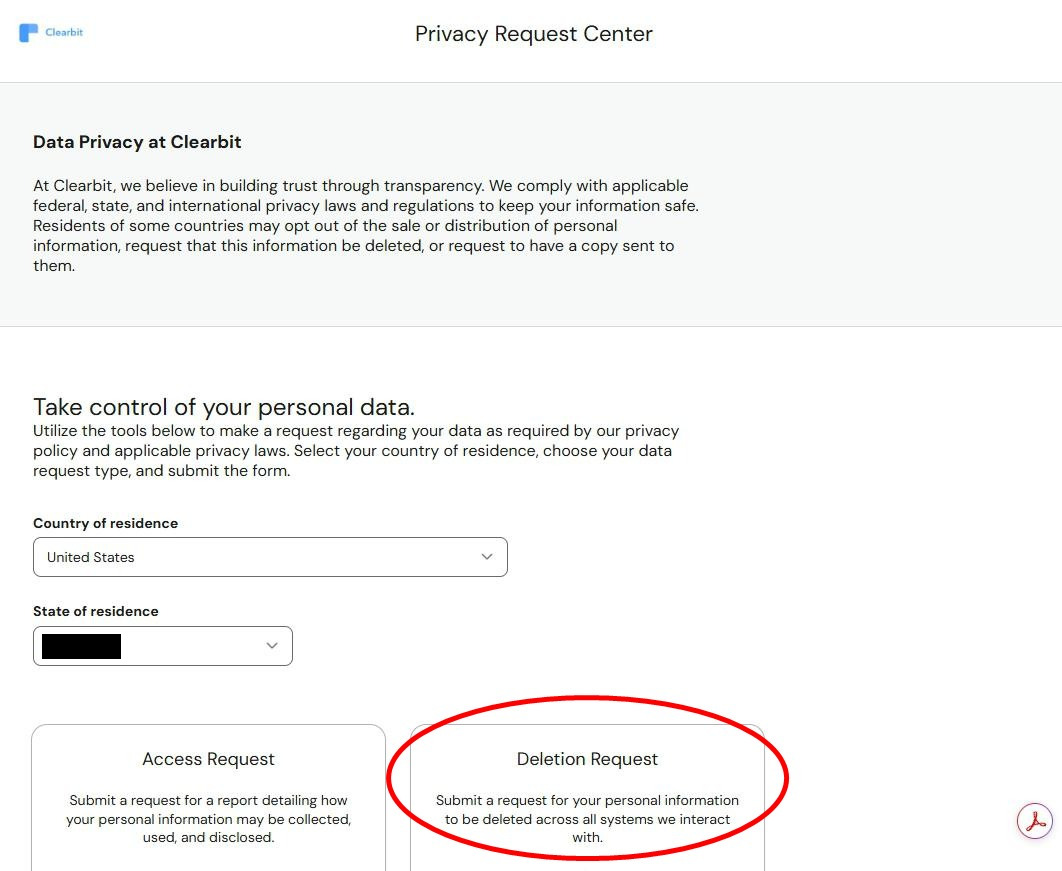
Open the Clearbit Privacy Request Center. The page is titled "Privacy Request Center" with a "Take control of your personal data" heading. Pick your Country of residence from the first dropdown, then your State of residence from the second.
The page then reveals the request-type cards. For US residents you'll typically see four:
Access Request - get a report of what Clearbit has collected, used, and disclosed about you
Deletion Request - delete your personal information across all systems Clearbit interacts with (this is what most people want)
Transfer Request - collect all your data and email it to a recipient you specify
Update Inaccuracies Request - fix any inaccuracies in Clearbit's records (good if your work email or job title is wrong and being misrepresented downstream)
Select the Deletion Request card (circled in red in the screenshot below) and click Start Deletion Request. The other cards route to slightly different forms if you need a different right - to exercise more than one, repeat the flow per request type. Available types may vary by your state - the screenshot below shows a United States view, with the state blacked out.
Step 1: pick country and state, then click "Start [Type] Request" on the card matching what you want.
02
Fill out the request form and submit
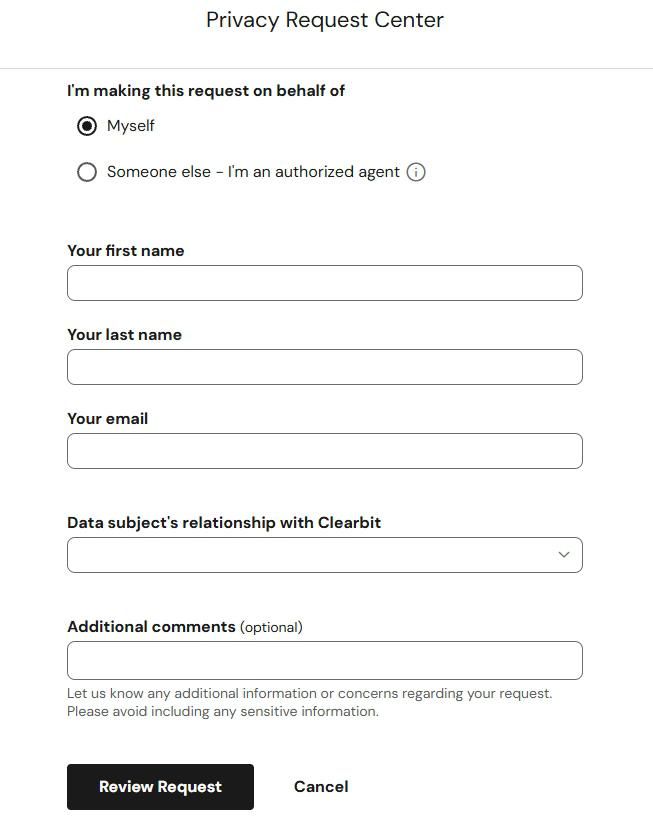
The form fields vary slightly depending on which request type you picked in step 1, but the core fields are consistent. For a typical Deletion Request (the example shown in the screenshot):
I'm making this request on behalf of - pick Myself (or Someone else - I'm an authorized agent if you're acting for another person and have written authorization)
Your first name
Your last name
Your email - use the work email most likely to be in Clearbit's index
Data subject's relationship with Clearbit - dropdown identifying you (e.g., visitor, prospect, customer)
Additional comments (optional) - any context, request reason, or specifics that will help the privacy team process the request. The helper says to avoid including sensitive information.
Click Review Request (the black button at the bottom). Clearbit takes you to a summary confirmation screen; review and submit. You should receive an email confirmation shortly after.
To exercise multiple rights (e.g., Access plus Deletion), repeat this entire two-step process for each request type. Clearbit only accepts one request type per submission.
Step 2: fill the form (Deletion Request shown). Click "Review Request" to reach the confirmation screen before final submission.
California users: The email route at clearbit.com/ccpa-opt-out only opts you out of the sale of your data. To have it deleted, use the Privacy Request form in the steps below, which that page also points to.
Confirm it worked
Did it actually work?
Indirect verification
Expect a confirmation email shortly after the "Review Request" submission. Save it; it's your reference for the processing window.
Under the CCPA / CPRA Clearbit has 45 days to answer, and may take one extension to 90 if it tells you so. Clearbit doesn't publish a timescale of its own, and the answer arrives as an email saying what was done.
Verification: if you submitted an Access request you'll receive a copy of the data Clearbit held - that's the most concrete way to see what was on file. If you submitted a Deletion request, the confirmation email is your reference but you won't see a "before" version of the data unless you also filed an Access request first.
Clearbit holds nothing accessible to the public. Unlike a people-search broker, you can't search yourself on Clearbit's site to see your profile. The data lives in the API and customer dashboards. So the verification has to be indirect (confirmation email + reduction in inbound sales outreach citing your Clearbit-shaped data).
Come back once a year. Clearbit's crawlers never stop, and a new job title or a fresh conference bio is exactly what they pick up. A yearly Deletion request keeps the record from rebuilding.
Troubleshooting
If it doesn't work
Common failures
No confirmation email after Review Request. Check spam / promotions. If not there after a few hours, the submission may not have completed; re-do the flow. Email privacy@clearbit.com directly if the form keeps failing; phone (866) 241-4820 is the third channel.
Your state doesn't show the request type you want. The form gates options by state. If you're in a state without strong state-level privacy rights, you may only see Deletion and a limited set. CCPA / CPRA in California is the most expansive; CO / VA / CT / UT have meaningful rights. EU / UK get GDPR-aligned options.
The privacy team can't find a record for you. Enrichment data is keyed to work addresses, and yours may have changed since Clearbit last crawled. Reply with older work addresses, former employers' domains, or the URL of your LinkedIn profile, and next time put those details in the Additional comments field before you submit.
You wanted Access but only got a Deletion option. If Access is offered for your state, file it as its own request, since the form treats each request type as a fresh submission, and note that some states limit how often you can ask (twice a year under the CCPA). If your state doesn't get an Access option at all, ask for a copy of your data by emailing privacy@clearbit.com or calling (866) 241-4820.
You see your data on a HubSpot product after opting out at Clearbit. Since HubSpot completed the acquisition in December 2023, the same dataset can surface through HubSpot CRM, Breeze Intelligence, and other HubSpot product surfaces. The Clearbit opt-out should cover the underlying data backend, but for full certainty file a parallel request through HubSpot's privacy portal.
A month on and nothing has come back. Write to privacy@clearbit.com, quote the day you submitted, and point out that the CCPA / CPRA clock has been running since then.
Stay off
Keep your data out of Clearbit (and the broader B2B-enrichment ecosystem)
Annual re-check advised
Treat the deletion as a yearly chore. Suppression stops Clearbit serving what it already holds; it doesn't stop the next crawl from collecting you again. Put a reminder in the calendar and file the Deletion request every twelve months.
The other enrichment vendors hold their own copies. ZoomInfo, RocketReach, Apollo.io, Lusha, Seamless.AI and Cognism each run a separate index and a separate opt-out, and none of them hears about a request you made to Clearbit.
Starve the crawl. Most of what Clearbit knows about a person started on a public page - a LinkedIn profile, a company team page, a GitHub account, a speaker bio. Set LinkedIn to hide your email and limit profile visibility, ask your employer to take you off the team page if you'd rather not be listed, and give conference organisers a forwarding address rather than your real one. This only shrinks the public-source feed. Records that arrive through Clearbit's data partnerships or its customers' contributed enrichment results are untouched, which is another reason the annual re-submission matters.
Send the do-not-share signal from the browser. Clearbit treats Global Privacy Control as a valid "do not share" instruction. Firefox has it as a setting; in Chrome or Edge an extension such as Privacy Badger sends it on every page you load.
A new employer means a new record. The address Clearbit values most is the one at your current company, so the first weeks in a new role are when a clean profile comes back. File again under the new work email as soon as it exists.
HubSpot holds the same data one layer up. Since the 2023 acquisition Clearbit's dataset feeds HubSpot's own customer-data products, and a Clearbit suppression may not reach every surface there. A second request through HubSpot's privacy page closes that gap.
Take yourself off data broker sites
Redact scans data broker sites from your device, finds where your details are listed, and submits the removal requests for you. If a broker relists you, it files again.