Acxiom isn't a consumer-facing search site like the rest of this directory. It's a B2B data broker that sells consumer data to advertisers and risk-management firms. The marketing opt-out at acxiom.com/optout is a three-step flow that stops Acxiom from selling your data for marketing. It takes about 10 minutes, and processing takes about 14 days. The stronger Delete request via Acxiom's OneTrust portal asks Acxiom to delete your data and requires identity verification, and Acxiom accepts it from consumers in every US state. Use both paths.
Before you remove your data: See the Acxiom data broker profile for ownership, contact details, litigation history, and related sites.
Quick facts
Removal Overview
Marketing opt-out · Delete request
Marketing opt-out method
Web form + email verify
Marketing opt-out time
~10 min active · ~14 days processing
Delete request method
OneTrust portal + identity verify
Account required
No
CAPTCHA
Yes
Email link
Required
Phone fallback (US)
(877) 774-2094
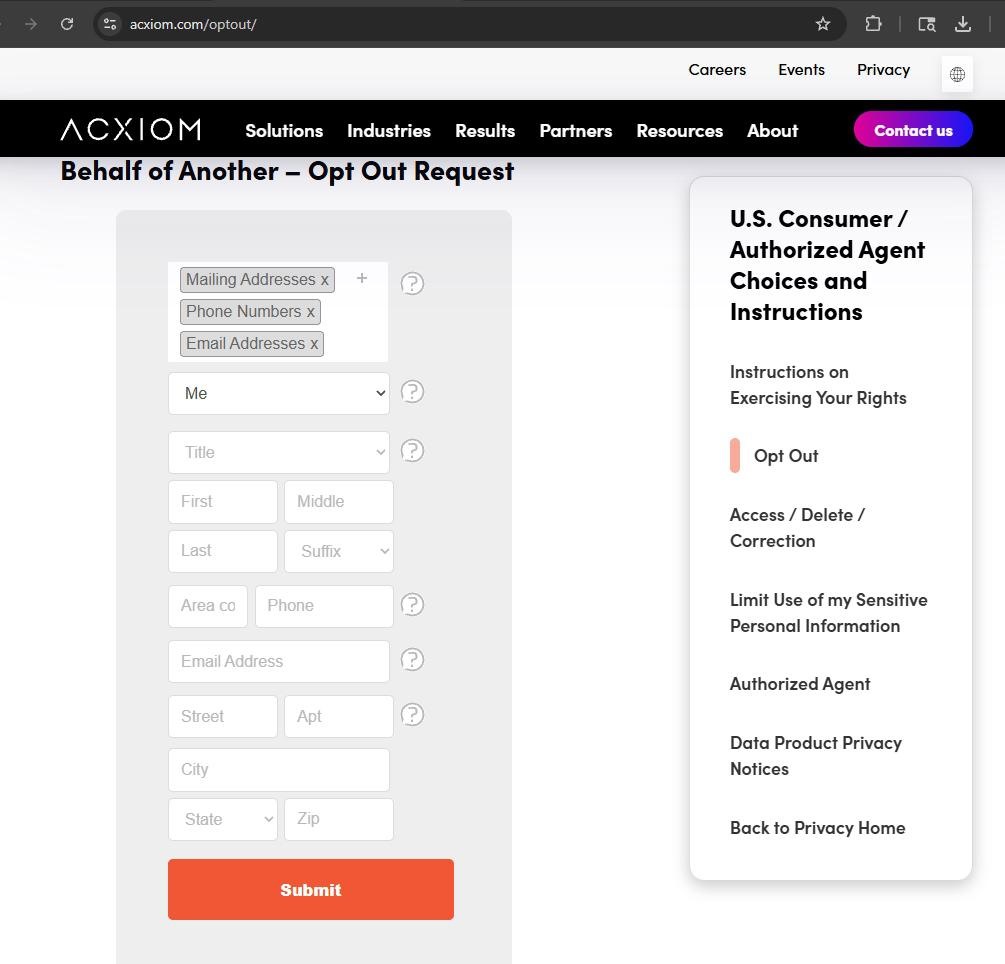
The form is busier than it needs to be. It pre-loads three segment chips (Mailing Addresses, Phone Numbers, Email Addresses) with x buttons to remove them and a + button to add more, plus ? tooltips beside half the rows. Leave all three segments in place (that's the maximum opt-out), pick Me as the requestor, and fill the form straight through. Nothing else on the page needs a click.
Marketing opt-out vs Delete request - know what you're getting. The marketing opt-out tells Acxiom to stop selling your name / address / phone / email for marketing. It doesn't purge anything. If you want your data actually deleted, file a Delete request via the OneTrust portal (section 04). Acxiom's US privacy notice offers it to consumers nationwide, whatever state they live in.
Use the email address Acxiom may actually hold. The Email Address field is both where the confirmation link goes and the address the Email Addresses segment suppresses, so a fresh masked or relay address would opt out an address Acxiom never had. Enter your real address and watch that inbox for the link. If you have used several addresses, submit the form once per address; the Thank You page links to another request.
Outside the US? Acxiom routes consumer rights requests through region-specific channels - see section 05 for Germany, Austria/Switzerland, Europe-wide, Asia Pacific, and rest-of-world contact paths.
Prereqs
What you'll need before you start
3 things
A real email inbox you can check. Acxiom sends a verification link from noreply-optout@acxiom.com, and the marketing opt-out doesn't take effect until you click it. Use your real address, the one Acxiom is most likely to hold, because the same field is the address the Email Addresses segment suppresses - and consider whitelisting that sender so the email doesn't end up in spam.
Your name, current address, phone, and email. The form takes Title (optional), First, Middle, Last, Suffix, an area code + phone number, an email, and a full street address. The form takes one address, so if you've moved, submit a separate request for each address you've lived at.
For the Delete request in section 04, you need your date of birth. Acxiom's OneTrust portal verifies your identity with your name, address, date of birth, and email address.
The 3 steps
Marketing opt-out
~10 minutes total
01
Go to acxiom.com/optout and fill the form in full
Open acxiom.com/optout. The page title is "US Individual / Individual Acting on Behalf of Another - Opt Out Request." Leave the three pre-loaded segment chips (Mailing Addresses, Phone Numbers, Email Addresses) in place, keep the dropdown set to Me, then fill in the rest, which is Title (optional), First / Middle / Last / Suffix, Area code + Phone, Email Address, Street / Apt, City, State, Zip. Click the orange Submit button at the bottom.
Fill the form in full. Leave all three segment chips, pick Me, click Submit.
02
Confirm your email + solve the CAPTCHA, see the "Thank You for Submitting" page
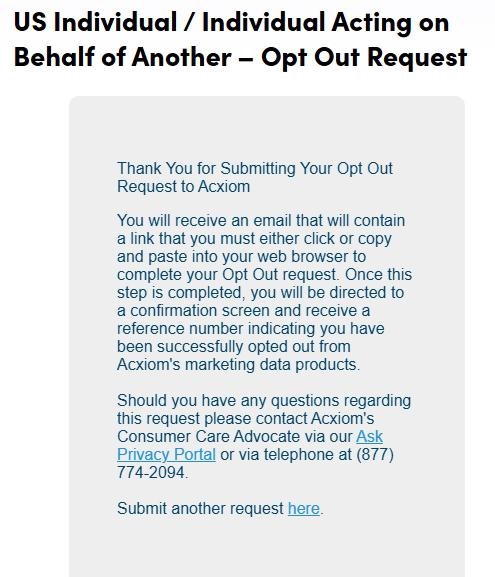
Acxiom asks you to re-confirm your email address and solve a CAPTCHA on the next screen. Once you submit that, you'll land on a "Thank You for Submitting Your Opt Out Request to Acxiom" page explaining that you'll receive an email with a link to complete the request. The page also lists Acxiom's Ask Privacy support form and the toll-free (877) 774-2094 as fallback channels.
Email + CAPTCHA, then the Thank You page tells you an email is on its way.
03
Open the email from noreply-optout@acxiom.com and click the verification link
Check your inbox for "Consumer Opt-Out Verification" from noreply-optout@acxiom.com. The body has a long isapps.acxiom.com/optout/OptOut.aspx?confirmFor=... link - click it (or copy-paste it into your browser). Clicking finalizes the opt-out and lands you on a confirmation screen with a reference number. Save the reference number in case you need to escalate. The email reiterates: "This request will be processed within two weeks."
Click the verification link. Save the reference number on the confirmation screen.
State-law Delete
The stronger Delete request (CCPA + state privacy laws)
OneTrust portal
Acxiom lets consumers anywhere in the US ask it to actually delete their data, not just stop selling it for marketing, whatever state they live in. This is a separate flow from the marketing opt-out above, and Acxiom routes it through a third-party OneTrust privacy portal that verifies your identity before processing.
Open the Acxiom OneTrust Consumer Privacy Portal. The same portal handles Right-to-Know (Access) and Right-to-Delete requests, California's right to limit use of sensitive personal information, and the Iowa and Utah right to opt out of processing of sensitive personal data, both of which Acxiom's consumer instructions say it treats as a request to delete.
Pick the request type - for full removal, choose Right to Delete. (If you also want to see what Acxiom has on you first, run a Right to Know request - they're capped at two per 12 months, so plan accordingly.)
Provide identity-verification info, meaning full name, address, date of birth (MM/DD/YYYY), and email. A third-party identity service runs the verification at no cost to you.
Acxiom will send multiple verification emails with time limits. Watch your inbox closely and respond quickly so the verification doesn't lapse.
Once verified you'll get a request ID for tracking. Save it. If Acxiom denies your request, its appeal instructions send you to the Acxiom Consumer Privacy Support Center, the same form as the Ask Privacy support form, with the original request and its request ID.
Acting on behalf of someone else? Acxiom has separate portals for Authorized Agent requests (with power-of-attorney documentation) and for parents / guardians of minors. The minors flow requires the child's birth certificate or similar plus a parent's custody documentation or utility bill.
Non-US contacts
International privacy channels
Region-specific routing
Acxiom operates internationally and routes consumer rights requests through region-specific channels rather than the single US opt-out form. Pick the channel that matches your jurisdiction.
Wait two weeks after clicking the email confirmation link for the marketing opt-out. For the Delete request, expect a multi-week timeline because of the identity-verification step.
Confirming the marketing opt-out is hard by design. Acxiom doesn't run a consumer-facing profile page where you can re-search yourself like the people-search brokers - so you can't just check a website to see if your record is gone. The signals you'll see are indirect, like fewer mailed advertising catalogs, fewer cold marketing emails, fewer telemarketing calls.
For the Delete request, the OneTrust portal lets you track your request ID for status updates. If you don't hear back within the state-law timeframe (CCPA: 45 days, often extended once to 90), file an Appeal through the OneTrust portal.
You can also file a Right-to-Know request first (also via OneTrust) to receive Acxiom's Consumer Access Report, which describes what data they have on you. Re-running the Right-to-Know after your Delete should show a shorter report.
We recommend re-running the marketing opt-out annually. Acxiom's segments and ad-targeting relationships refresh continuously. A California opt-out doesn't lapse, but a yearly run with any new address, phone or email picks up records the first one didn't match.
Troubleshooting
If it doesn't work
Common failures
Verification email never arrives. Check spam / promotions for noreply-optout@acxiom.com. If it's not there after a couple of hours, re-submit the form rather than waiting longer.
The verification link in the email doesn't open. The email body itself tells you to copy-paste it instead. If that also fails, the email lists Acxiom's Ask Privacy support form, a free-text form to the privacy team that needs no request ID, and the toll-free (877) 774-2094 as fallbacks.
The OneTrust verification emails are confusing or expire. Acxiom's own consumer-instructions page warns that verification "involves multiple emails with time limits." Don't start the Delete request unless you can respond to those quickly. If verification lapses you'll need to restart the request. Only Right to Know requests are capped at two per 12 months, so a lapsed Delete verification can simply be restarted.
You're not sure which path you want. Start with the marketing opt-out (section 03) - it's universally available, free, and quick. Then follow up with the Delete request (section 04), which Acxiom accepts from any US resident, to have the data deleted.
You prefer not to use the web at all. US marketing opt-out can be done by phone - (877) 774-2094 - or by mail to Acxiom LLC, Consumer Care Advocate CWY0301-026, Attention: Consumer Rights Requests, P.O. Box 2000, Conway, AR 72033. Phone calls use an "identity authentication test" before the request is accepted. Mail submissions require "reasonable documentation."
Stay off
Keep your data out of Acxiom (and the broader ad ecosystem)
Annual re-check advised
We recommend re-running the marketing opt-out annually. Acxiom's segments refresh constantly as new data flows in from partners, so a yearly run, with any new address, phone or email, catches records the first one didn't match.
Acxiom is just one of many - and it's now an Omnicom property. Opting out of Acxiom doesn't opt you out of the broader IPG / Omnicom data stack. Other related properties worth knowing about: KINESSO (IPG's marketing-intelligence platform, also Omnicom- owned post-Nov 2025) and LiveRamp (the renamed Acxiom Corp from the 2018 split, now a separate public company with its own data-onboarding business and its own opt-out).
Suppress upstream data sources. Acxiom buys from public-records aggregators, marketing list providers, and loyalty-program data brokers. Reducing those upstream feeds - opting out of store loyalty programs, using a forwarding mailbox for non-essential mail, masking emails for non-essential signups - is what actually reduces re-listing risk over time.
Industry-wide opt-outs help. The DAA WebChoices tool and DMA Choice cover marketing-association members generally - Acxiom participates in both. They're a complement to the Acxiom-specific opt-out, not a replacement.
Take yourself off data broker sites
Redact scans data broker sites from your device, finds where your details are listed, and submits the removal requests for you. If a broker relists you, it files again.
![Acxiom verification email titled 'Consumer Opt-Out Verification' from noreply-optout@acxiom.com. Body reads 'To complete your Opt-Out request, please either click the following link: [long isapps.acxiom.com/optout/OptOut.aspx URL with confirmFor + confirmCode parameters] or copy and paste the link into your web browser. Once this step is completed, you will be directed to a confirmation screen and receive a reference number indicating you have been successfully opted out from Acxiom's marketing data products. This request will be processed within two weeks.' Fallback: 'If for any reason you are not able to access the link above, please contact us at the Ask Privacy Portal or via telephone at (877) 774-2094.' Footer notes the email is from an automated service and includes a standard confidentiality boilerplate.](/broker-images/versions/074136f6f717ad568cdec52395a0f5af3c422614436b118f952e37cadec2c2a1/acxiom-com/step-3.jpg)