What Will Happen to Your Skype Data After Its Shutdown?
 Dan Saltman7 min read
On this page
Microsoft shut Skype down on May 5, 2025, and users were left with questions about the fate of their data. Those questions were well grounded, given Microsoft-owned LinkedIn had faced a lawsuit after allegations they used customer data to train AI models, without proper consent.
Microsoft provided options for data migration and export, which are covered below. Regardless, the shutdown raised real concerns about data privacy and accessibility.
Here is what happened to Skype data, and what the options were while there was still time to act.
Skype Data Post-Shutdown
When the retirement was announced, Microsoft said users who took no action by May 5, 2025 would have their Skype data retained until the end of December 2025 (Vocal.Media), and that all remaining data (chats, contacts, call logs, and files) would then be permanently deleted from its servers (TechCrunch)
That schedule moved. Under Microsoft's final timeline, deletion of Skype chat and call history began on April 1, 2026, and the export portal stayed open until June 15, 2026, after which anything left was deleted (Microsoft Support). Anyone active on Skype between December 2024 and February 2025 who then moved to and used Teams Free before December 1, 2025 was carved out and kept their Skype chat and call history inside Teams Free. Only history that originated in Skype was affected, so chats started in Teams were never in scope.
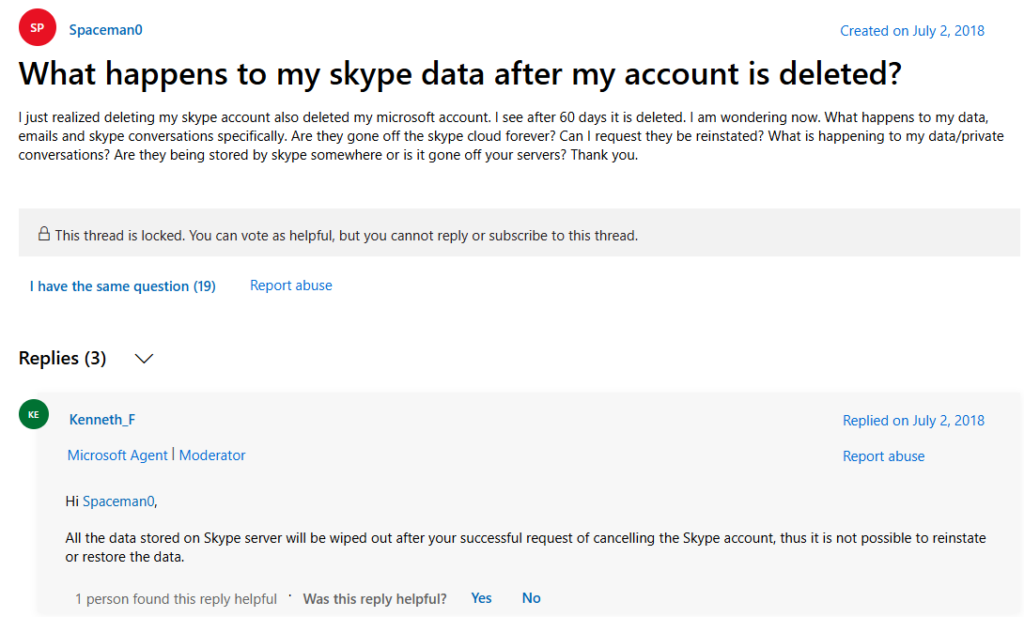
For users who deleted their Skype accounts before the shutdown, Microsoft stated that all associated data would be wiped out within 60 days of the deletion request (Microsoft Agent, Microsoft Forums);
Where Should Skype Users Go?
- Microsoft Teams: the lowest friction route at the time. Users could sign into Teams with their Skype credentials, which transferred chats and contacts where possible.
- Alternative video and voice platforms: there are countless non-Microsoft alternatives to Skype: check out this list from TechRadar.
Deleting or Archiving Your Skype Data
Microsoft always intended to purge the Skype data it held, whatever the final date turned out to be. Leaving data in their hands was not a good idea either way: taking control of it meant one less potential breach. At the time the options were simple.
- Export your data: anyone not moving to Teams could export their Skype data, which covered chats, contacts, and call history. The export portal stayed open until June 15, 2026, though an export stopped reflecting a full history once deletion began on April 1, 2026.
- Manually delete old Skype content: hours spent clearing messages from each DM and group chat one by one.
- Archive what you wanted to keep: whichever route you took, keeping your own copy beat relying on Microsoft to hold it.
All of those dates have now passed. Anything not exported, migrated or deleted in time is gone, and there is no route back to it.
Why You Should Delete or Archive Your Skype Data
While exporting or migrating your data ensures continuity, many users overlook the importance of managing their digital footprint. Understand why you should take control over your Skype data, rather than leaving it in Microsoft’s hands.
Data Privacy Risks
Microsoft said it would delete user data once the purge window closed, but there is always a risk of residual metadata being retained, or a breach. That could expose sensitive information if it is not managed correctly. Deleting data ahead of the shutdown minimised the risk.
Prevent Unauthorized Access
Inactive accounts are often prime targets for cyberattacks. Deleting your Skype account and its associated data helps prevent any unauthorized party from accessing your old conversations or files.
Avoid Losing Important Data
If you rely on manual exports or migrations but forget to complete them before the deadlines, you risk losing valuable information forever. Tools like Redact.dev allow you to automate archiving essential conversations and files while securely deleting unnecessary ones.
Simplify Digital Footprint Management
Most people have years of accumulated messages and files on Skype that they no longer need. Redact.dev handles that backlog in bulk on the platforms it covers, keeping only what matters most.
How Redact.dev Can Help You Take Control
Redact.dev is a digital footprint management tool covering platforms across your online presence. It supported Skype until the shutdown, and this is what that offered at the time.
- Mass Deletion: Quickly delete years’ worth of messages and files in bulk.
- Customizable Filters: Target specific date ranges or types of content for deletion.
- Automated Archiving: Save important conversations and files before deleting them.
- Cross-Platform Support: the same tooling across the other platforms Redact covers, which is where it still works.
- User-Friendly Interface: No technical expertise required; Redact.dev simplifies the entire process.
Skype closed on May 5, 2025, so that route is no longer available. Redact still covers the other platforms in your footprint.
How Securing Skype Data Worked
This is how the process worked while the integration was live:
Log in to Your Account:
- Review your chats, contacts, and files.
- Identify what needs to be archived or deleted.
Export Important Data:
- Use Microsoft’s export tool to download chats and files.
Enable the Archive Feature: toggling it on stored everything a run deleted in a local archive on your own device.
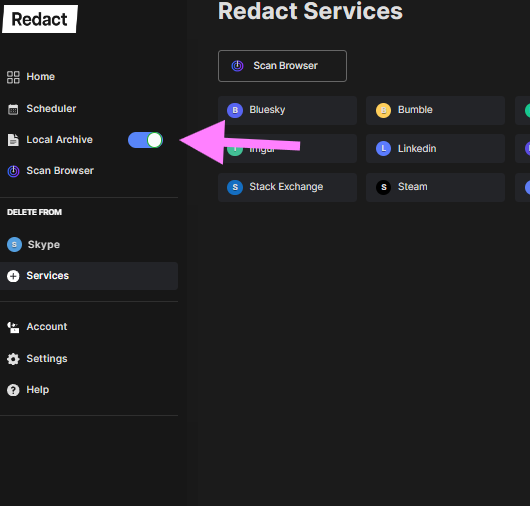
Select the Skype Service: Skype appeared on the services page while the integration was live.
Log in to Skype: selecting the service prompted a login. Redact stored nothing about the login, the account, or what was deleted.
Mass delete unwanted Skype content: the deletion form took the relevant chats, a date range, and keywords, and covered everything when left blank.
Select your deletion mode: a run could start deleting straight away, or preview first for a more precise pass. Review & Delete stepped through the history before anything was chosen for deletion.

A scheduled run could also keep deleting automatically for anyone still using Skype up to the shutdown.
Summary
Skype shut down on May 5, 2025, and Microsoft finished deleting the history it held after June 15, 2026. Microsoft made transitioning to Teams straightforward and provided a data export option, but both routes have since closed. The episode stands as a reminder to take control of a digital footprint before a platform decides its fate for you.
Skype is gone, and so is the history Microsoft held for anyone who did not migrate to Teams Free in time. Redact.dev no longer reaches Skype, but it still wipes the rest of your footprint and archives it privately on the way through.